
How to download Scratch projects?
What is an .sb3 file, and how do you open it?
An .sb3 file is Scratch's own project format. It holds everything in the project: every sprite, costume, sound, backdrop and code block, as a complete snapshot in a single file. If you're not sure what a sprite is, it's any character or object in the project that can be moved and programmed.
To open one, go to File → Load from your computer in the Scratch editor and pick the file. That works in the online editor and in Scratch Desktop, and loading a project replaces whatever is currently open, so save your current work first.
Nothing else opens an .sb3 file properly. Double-clicking it won't launch anything useful, and no other software reads the format, which makes more sense once you know what programming language Scratch uses to store projects.
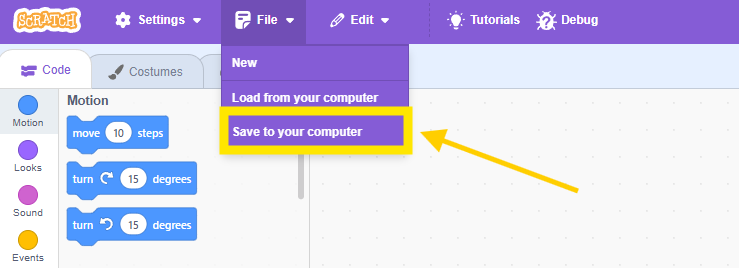
Downloading someone else's project
If your kid wants to download a shared community project to remix offline, open it, click See inside, then File → Save to your computer. Not all projects allow this, creators can turn off remixing, but most public projects are open by default.
Can you save a Scratch project without an account?
Yes. Saving to your computer doesn't require a Scratch account at all. Open the editor, build something, then use File → Save to your computer and the .sb3 file lands in your downloads folder.
Without an account you lose cloud saving and sharing, so the file on your computer is the whole backup.
If the download isn't working
No File menu visible? You're probably looking at the project page rather than the editor. Click See inside first, and the menu bar appears at the top left.
Downloaded the file but nothing opens it? That's expected. Go back to Scratch and use File → Load from your computer instead of double-clicking the file.
Nothing happens when you click Save to your computer? Check whether your browser blocked the download. Most browsers show a small icon in the address bar when they stop one.
Downloaded a file called project.sb3 and can't find it? It's in your browser's default downloads folder, and the generic name means the project was never given a title before saving.


