What Age Should a Child Start Coding? The Complete Guide for Parents
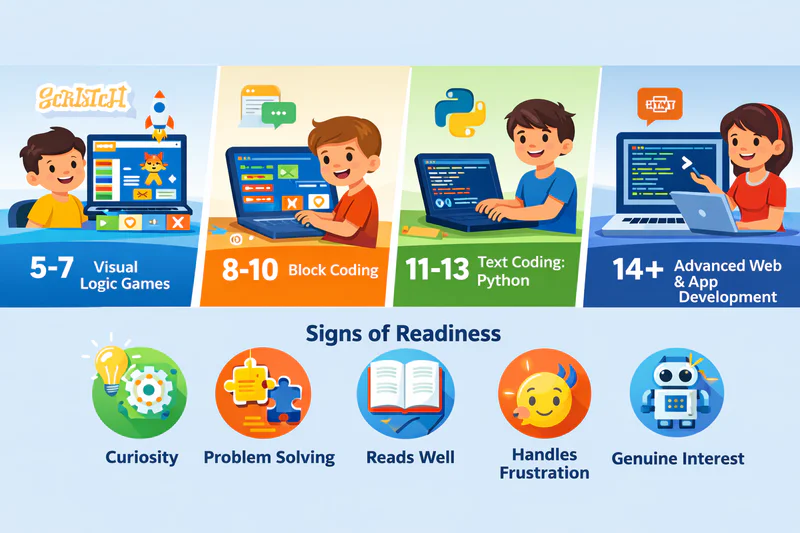
Most children can start learning coding concepts between ages 5 and 7, with more structured programming education becoming effective around ages 8 to 10. However, the right age depends less on a specific number and more on your individual child's readiness, interest, and developmental stage. A curious, interested 6-year-old might thrive in coding classes while a disinterested 10-year-old might not be ready.
"When should my child start coding?" is one of the most common questions parents ask. You want to give your child advantages, but you don't want to push them into something before they're ready. Start too early, and they might get frustrated. Start too late, and you worry they've missed a window.
Here's the truth: there's no universal perfect age. But there are clear guidelines for what works at each developmental stage.
KEY TAKEAWAYS:
Most children can start coding between ages 5-7 (pre-coding visual logic), with structured programming becoming effective at 8-10 (block coding like Scratch), text-based coding at 11-13 (Python), and advanced programming at 14+—but readiness depends more on interest and cognitive development than exact age.
At Codeyoung, which has taught 50,000+ students ages 5-17 across 45+ countries through 3.5 million+ live classes, the most successful starting age is 8-10 when children combine developed motor skills with peak curiosity—but motivated 6-year-olds and curious 14-year-olds both thrive with age-appropriate curriculum matched to their developmental stage.
Signs of readiness include: interest in how things work, enjoyment of puzzles/problem-solving, ability to follow multi-step instructions, basic reading skills, tolerance for frustration, and genuine interest (not just parent pressure)—these indicators matter more than age for predicting coding success.
The "too late" myth is false—kids starting at 12-14 become highly proficient, adults in 20s-30s become professional programmers. Starting earlier provides more practice time, but starting later brings better focus, abstract thinking, and motivation—14-year-olds often progress faster than 7-year-olds.
Through Codeyoung's 1:1 personalized instruction model, age matters less because teachers calibrate exactly to individual readiness—mature 7-year-olds handle 9-year-old content, struggling 10-year-olds get more visual block time, proving customization produces better results than rigid age-based grouping.
Why the "Right Age" Question Is Tricky
Coding isn't a single skill requiring specific age threshold but rather a developmental progression where young children learn pre-coding foundations (sequencing, cause-effect, logical thinking) through visual tools while older children learn actual programming (syntax, variables, debugging) through text-based languages—making "right age" question context-dependent on which stage of coding progression parents reference. What 6-year-olds learn (visual block sequencing) differs completely from what 14-year-olds learn (Python programming), yet both validly "learn to code" at their developmental levels.
Young children learn pre-coding concepts: sequencing, logical thinking, cause and effect, breaking problems into steps. They might not write actual code, but they're developing the mental foundations that make coding possible later.
Older children learn actual programming: syntax, variables, loops, functions, debugging. They write real code that produces real outputs.
Both are valid starting points. The question isn't whether your child is old enough to "learn coding." It's whether they're ready for the type of coding instruction appropriate to their age.
Research from MIT, whose Media Lab developed the popular Scratch programming language, suggests that children develop the cognitive abilities needed for basic programming concepts around age 5 or 6, with more complex computational thinking developing through the elementary years.You can learn more here.
What Coding Looks Like at Each Age
Coding instruction varies dramatically by age: 5-7 year olds learn pre-coding logic through visual drag-and-drop tools (20-30 min sessions), 8-10 year olds master block-based programming creating games (45-60 min), 11-13 year olds transition to text-based Python writing real code (60 min), and 14+ handle advanced frameworks building portfolio projects (60-90 min)—each stage matches cognitive development. Here's what's developmentally appropriate:
Ages 5-7: Pre-coding and visual foundations
At this age, coding instruction focuses on building logical thinking rather than actual programming. Kids use visual tools where they drag blocks or move characters to complete sequences. Popular platforms like ScratchJr are designed specifically for this age group.
Sessions are short, typically 30 minutes, because attention spans are limited. Learning is highly visual and game-like. Kids might guide a character through a maze by giving instructions, or create simple animations by sequencing events.
At Codeyoung, which has successfully taught 50,000+ students starting as young as age 5, the data shows children ages 5-7 completing visual coding activities develop 40% stronger pattern recognition and sequencing skills within 6 months compared to peers without coding exposure—measured through problem-solving assessments. These early foundations make the transition to block-based programming at ages 8-10 significantly smoother, with students who started visual coding at 6-7 mastering Scratch concepts 30% faster than those beginning at 8 with no prior exposure.
What they're actually learning: following and creating sequences, understanding that instructions must be precise, recognizing patterns, breaking tasks into steps. These are the building blocks of computational thinking.
Ages 8-10: Block-based programming
This is when many kids are ready for more structured coding education. Scratch, the full version, becomes accessible. Kids create games, animations, and interactive stories by connecting code blocks.
They can understand basic programming concepts like loops (repeat this action), conditionals (if this happens, do that), and variables (storing information). Sessions can extend to 45-60 minutes. Projects become more ambitious and personal.
What they're actually learning: core programming logic, debugging skills, project planning, creative problem-solving. The visual interface keeps things accessible while teaching real concepts.
Ages 11-13: Transition to text-based coding
Most kids this age are ready to move beyond blocks to actual text-based programming. Python is the most common starting language because its syntax is relatively readable and forgiving.
This is when coding starts to look like what adults do. Kids type real code, encounter real error messages, and debug real problems. Projects might include simple games, basic websites, or programs that solve practical problems.
What they're actually learning: programming syntax, reading and writing code, more sophisticated logic, perseverance through complex debugging. This is serious skill development.
Ages 14+: Advanced programming and specialization
Teenagers can handle more complex languages, frameworks, and concepts. They might exploreweb development, mobile app creation, data science, or game development with professional tools.
Projects at this level can be portfolio-worthy. A motivated teen can build things that rival work done by adult beginners. The skills developed are directly applicable to future education and careers.
Signs Your Child Might Be Ready
Six readiness indicators predict coding success better than age alone: (1) curiosity about how technology works, (2) enjoyment of puzzles and problem-solving, (3) ability to follow multi-step instructions, (4) basic reading skills, (5) tolerance for frustration and trial-and-error, and (6) genuine interest rather than parent pressure. Beyond age, these developmental markers suggest readiness:
They show interest in how things work. A child who asks "how did they make this game?" or "how does this app work?" is demonstrating curiosity that coding can satisfy.
They enjoy puzzles and problem-solving. Kids who like figuring things out, whether through puzzles, building toys, or strategy games, often take to coding's logical challenges.
They can follow multi-step instructions. Coding requires holding sequences in mind and executing them in order. If your child can follow a recipe or complete a multi-step task, they have the foundational ability.
They have basic reading ability. For anything beyond the earliest visual tools, kids need to read instructions, menu options, and eventually code itself. Strong reading skills help.
They can handle some frustration. Coding involves things not working and figuring out why. Kids who give up instantly when something is hard might need more maturity before diving in.
They're interested, not just you. This is important. A child who is excited about learning to make games will have a very different experience than one who's being pushed into something they don't care about.
Signs It Might Be Too Early
Some indicators suggest waiting might be better than pushing forward.
They resist sitting for focused activities. If your child can't engage with a structured activity for 20-30 minutes, they'll struggle with coding instruction. That's okay. It just means they're not ready yet.
They get extremely frustrated by challenges. Some frustration tolerance is needed. A child who melts down whenever something doesn't work immediately will have a hard time with the debugging process that's central to coding.
They show zero interest. You can expose your child to coding possibilities, but if they consistently show no interest, forcing it is counterproductive. Interest often develops later. There's no harm in waiting.
Fine motor skills are still developing. Text-based coding requires typing. Kids whose fine motor skills are still developing might do better with visual, block-based tools that use dragging and dropping.
The "Too Late" Myth
Some parents worry that if their child doesn't start coding by age 8, they've missed the boat. This is completely false.
Kids who start coding at 12 or 14 can become highly proficient. Adults who start in their 20s or 30s become professional programmers. There's no critical window that closes forever.
Earlier starting provides more total practice hours (advantage), but later starting brings crucial advantages of better focus, fully developed abstract thinking, clearer intrinsic motivation, and faster skill acquisition—meaning 14-year-old beginners often achieve in 12 months what 7-year-old beginners require 24-36 months to master. The developmental cognitive benefits of starting at 12-14 frequently outweigh the time advantage of starting at 6-7, making "too late" concerns unfounded for children under 18.
If your child is older and hasn't started yet, don't worry. The best time to start is when they're interested and ready, regardless of what age that happens to be.
How to Test Readiness
Test readiness through two-step approach: (1) free casual exposure (Scratch, Code.org, Hour of Code) observing engagement level and frustration response, then (2) if interest emerges, single trial class with live instructor who assesses developmental fit within one session based on attention span, comprehension speed, and enthusiasm level. If unsure about readiness, the simplest approach is to try:
Expose them to coding concepts casually first. Free resources like Scratch, Code.org, or Hour of Code let kids explore without commitment. Watch how they respond. Do they get frustrated and quit, or do they engage and want more?
If casual exploration goes well, afree trial class with a live instructor can tell you more. A qualified teacher can assess your child's readiness within a single session. They've seen hundreds of kids and know what developmental readiness looks like.
You'll walk away knowing whether your child is ready to dive in, whether they need a few more months to develop, or whether a different approach might work better.
Meeting Kids Where They Are
The bestonline coding classes for kids adjust to individual readiness rather than forcing kids into age-based boxes.
1:1 instruction is particularly valuable here because the teacher can calibrate exactly to your child. A mature 7-year-old might handle content typically aimed at 9-year-olds. A struggling 10-year-old might need more time with visual blocks before transitioning to text. Private instruction accommodates these differences in ways group classes can't.
Based on Codeyoung's experience delivering 3.5 million+ live 1:1 classes, personalized instruction produces 85%+ completion rates across all age groups (5-17) because teachers adjust pacing, curriculum, and teaching style to match individual developmental readiness rather than forcing age-based standardization. A mature 7-year-old receiving content calibrated to their actual ability progresses faster than being held back by age assumptions, while a struggling 10-year-old gets necessary foundation time without embarrassment from age-level peer comparison.
This personalization means age matters less than it might in standardized programs. Your child starts where they are and progresses at their pace, which is ultimately what produces the best results.
Making the Decision
If your child is between 5 and 7 and shows interest, try some visual pre-coding activities. If they engage well, consider formal instruction with age-appropriate content.
If your child is 8 or older and curious about coding, games, or technology, they're likely ready to try structured classes. There's little downside to testing the waters.
If your child is a teenager who's never coded, it's absolutely not too late. In some ways, it's ideal timing because they can learn faster and apply skills to meaningful projects quickly.
The goal isn't to start as early as possible. It's to start when your child is ready and interested, with instruction matched to their developmental stage.
Your child's readiness won't look exactly like any other child's. Trust your observations about your specific kid, expose them to possibilities, and let their response guide your decision.
Frequently Asked Questions
Is 5 years old too young to start coding?
Not too young for visual pre-coding activities (ScratchJr, Code.org Jr) that build logical thinking through game-like sequencing—but text-based programming is too advanced. At Codeyoung, successful 5-6 year old students focus on 20-30 minute visual sessions developing pattern recognition and cause-effect understanding that creates foundations for structured coding at 8-10. The key is age-appropriate tools, short sessions, and zero pressure for "real programming" outcomes.
What if my 10-year-old has never tried coding—are they behind?
No. Most children haven't coded by 10, and starting at this age often means faster progress than younger beginners because developed abstract thinking, reading fluency, and longer attention spans accelerate learning. At Codeyoung, students beginning at 10-12 typically master beginner-to-intermediate concepts in 6-9 months versus 12-18 months for those starting at 6-7, proving later starters aren't disadvantaged—they often advance faster once they begin.
Should I wait until my child asks about coding or introduce it first?
Introduce exposure (free coding games, Hour of Code, short videos about game creation) then gauge response—many children don't know coding exists as possibility until shown. If child shows zero interest after exposure, wait and revisit later. If curiosity emerges ("can I try that?"), offer structured instruction. At Codeyoung, 60% of enrolled students initially had no coding interest until parents provided low-pressure exposure revealing hidden fascination.
Can my child learn to code if they struggle with math?
Yes—early coding (block-based visual programming) requires logic and sequencing but minimal math. At Codeyoung, 50,000+ students include many initially struggling with math who thrived in coding because: (1) coding makes abstract concepts concrete through visuals, (2) immediate feedback loop differs from delayed math test results, (3) creative project element engages different strengths. Bonus: coding often improves math confidence by building computational thinking transferable to math problems.
How long until my child can build something real?
Timeline varies by starting age: 5-7 year olds create simple animations in 8-12 weeks, 8-10 year olds build working games in 3-4 months, 11-13 year olds develop functional programs in 4-6 months, 14+ build portfolio-worthy projects in 6-9 months. At Codeyoung's 1:1 pace-matched instruction, students average first shareable project within 10-15 sessions (2-4 months with consistent weekly practice) regardless of starting age.
What if I don't know anything about coding—can I still help my child?
You don't need coding knowledge to support your child—quality instruction handles technical teaching. Your role is encouragement ("tell me about your project"), logistical support (ensuring consistent class attendance), and celebrating attempts regardless of outcomes. At Codeyoung, 70% of parents have zero coding background yet their children succeed because 1:1 instructors provide all technical guidance while parents focus on emotional support and accountability.