Frontend vs Backend: Which Should Your Child Learn First?
Parents often ask a simple question, my child wants to learn coding, where should they start. The answer usually comes down to frontend vs backend. These are the two main sides of computer programming. Frontend is what users see and interact with. Backend is what works behind the scenes.
Should child learn frontend or backend first. The right starting point depends on the child’s age, interests, and learning ability. Children can start learning coding concepts through age-appropriate activities that introduce sequencing, loops, and problem-solving in a fun and engaging way. Younger kids usually enjoy visual results. This guide explains both sides in simple terms.
Coding is part of the digital world kids already live in. Games, apps, and websites shape how they play and learn. Learning to code at an early stage helps children build confidence and digital literacy.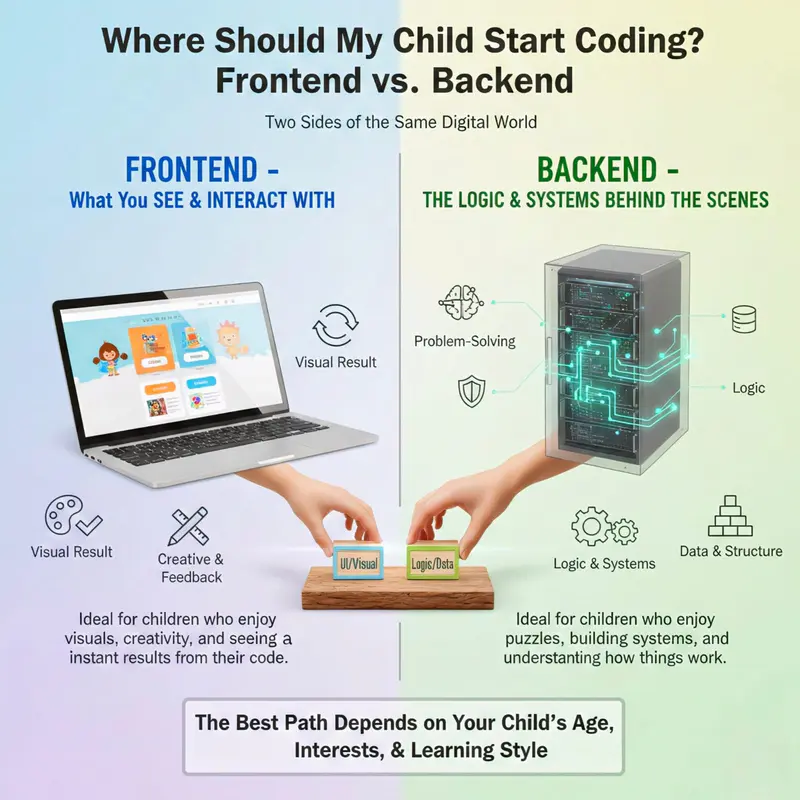
Understanding the Layers: Frontend Development for Kids
Frontend development for kids focuses on what appears on the screen. Buttons, colors, text, animations, and layouts all belong to the frontend. When kids click a button and see something change, they feel in control. That instant feedback is powerful.
Think of frontend as decorating a room. Kids choose colors, arrange furniture, and decide how things look. Just like using building blocks to create different shapes and structures, HTML acts as the building blocks of web pages, letting kids stack and arrange elements to form the layout they want. This creative process keeps them engaged.
This is why frontend is often the best place to start when comparing frontend vs backend. It supports creativity, builds confidence, and helps kids understand how web pages work. For absolute beginners, visual results matter more than complex logic.
Frontend projects also support problem solving skills. If something does not look right, kids inspect their code and fix it.
The Visual Side: HTML, CSS, and JavaScript Basics
Frontend development uses three main tools. Each one has a clear role, which helps kids understand the structure.
HTML gives shape to web pages. It defines headings, text, images, and links. CSS controls style. It adds colors, fonts, spacing, and layout. JavaScript adds action. It responds to clicks, moves objects, and powers simple games.
Together, these tools turn ideas into real projects. Kids can build websites, design user interfaces, and create interactive stories.
JavaScript gives life to many activities. It supports animations, simple games, and interactive lessons. When kids see how JavaScript powers movement and response, coding stops feeling abstract.
These tools also introduce real coding gently. Kids learn syntax without fear. When syntax errors appear, they fix them and move on. That process builds confidence and prepares them for more advanced programming concepts later.
The Logic Behind the Screen: Backend Development for Kids
Backend development focuses on logic, rules and data. It controls how information is stored, processed and returned to users. Backend code decides what happens after a button is clicked.
This side of programming is less visible. Kids do not see colors change or objects move right away. Instead, they work with systems and structure. That is why backend often works better as a second step.
Parents often ask again here, should my child learn frontend or backend first. For most children, frontend comes first. Backend becomes easier once kids understand basic logic and computational thinking.
Backend development builds strong problem solving and critical thinking skills. It supports future learning in data science, artificial intelligence, and back end development careers. But starting too early can feel confusing if results are not visible.
Databases and Servers Simplified for Young Minds
Backend systems rely on servers and databases. These ideas sound complex, but they can be explained simply.
A server is like a helpful librarian. It listens to requests and brings back information. A database is like a cupboard where data is stored in an organized way.
Kids do not need to manage real databases at first. They just need to understand that data lives somewhere and code helps retrieve it. This concept prepares them for web applications and more advanced systems later.
Because backend work does not show instant results, kids may feel less excited at first. That is normal. This is why backend development works best after frontend confidence is built.
Which Coding Language Should Kids Learn First?
Parents often search for which coding language should kids learn first. The answer depends on what the child wants to create.
If a child wants to build websites or interactive games, JavaScript works well. If they enjoy logic and puzzles, Python is a great choice. Swift is the best choice for app development on Apple devices. Learning Swift helps kids create apps for iPhones and iPads. This gives them hands-on experience in designing and developing real applications.
Each language helps kids gain skills that match their interests. This includes web design, game creation, or app building. These skills boost creativity and digital literacy.
The focus should be to learn coding for children in a way that feels age appropriate and engaging. No child should feel rushed into complex systems too early.
Comparing Python, JavaScript, and Swift
This table provides a clear comparison to help you decide which coding language is most suitable for your child's age and interests.
How to Choose Based on Your Child's Interests
The best coding language for your child depends on what they want to create.
Choose Python if your child enjoys puzzles, basic logic, and problem solving. It’s commonly used in computer science classes. It’s a great choice for learning core programming concepts. Python is popular in data science and artificial intelligence.
Choose JavaScript if child is interested in web development. JavaScript powers web pages and is used in front end development to make buttons, menus, and games react on screen. It is a good option for kids who want to build websites or simple web applications.
Choose Swift if your child wants to focus on app development for iPhone or iPad. Swift works well for kids who like visual feedback and want to build real mobile apps. It helps connect code to user interfaces quickly.
Start with block-based coding (such as Scratch or ScratchJr) if child is young or an absolute beginner. Visual programming languages teach basic logic, sequencing, and problem-solving. You don’t have to worry about syntax errors. Kids can create games and interactive stories while learning essential coding skills.
Frontend vs Backend Learning Path for Absolute Beginners
For absolute beginners, frontend offers quick wins. Kids see results and stay motivated. Backend builds deeper logic later.
A simple learning path works best.
Start with block based coding for young age learners
Move to frontend tools to build websites and games. As kids progress, they can explore tools with more features, such as advanced design options and interactive elements.
Introduce backend logic after confidence grows.
Game Development and Creative Coding for Kids
Game development is one of the strongest ways to teach coding. They enjoy building their own games even more. Kids can also enjoy creating interactive stories, which combines coding with storytelling and creativity.
Frontend skills help with visuals and interaction. Backend logic supports scoring and rules. Together, they teach essential coding skills without pressure.
Simple game projects support computational thinking and creativity. Kids test ideas, fix bugs, and improve features.
Best Coding Program and Platforms for Kids
The best coding program depends on the child’s age and interests. Some kids enjoy video tutorials. Others prefer interactive lessons or structured courses.
Good platforms offer engaging activities, clear lesson plans, and support for parents and teachers. They focus on real coding, not just watching videos.
Roblox games, Scratch projects, and simple web challenges all help kids learn while having fun.
App Development and the Future of Coding Skills
App development attracts many older kids. They want to build tools that solve problems. Frontend skills support design. Backend skills support data and logic.
Learning to code gives kids a significant advantage. It builds digital literacy and prepares them for the job market of the next generation.
Artificial Intelligence and Coding: The Next Frontier for Kids
Artificial intelligence is becoming common in our daily lives. Kids are starting to learn about AI. For younger kids, a good starting point is Scratch Jr. This visual programming language lets them create interactive stories and simple games. They can enjoy coding without worrying about complex syntax.
They build their own projects through drag and drop feature. Early exposure helps kids build computational thinking and problem-solving skills. This sets the stage for more advanced programming concepts later on.
As kids gain confidence, they move on to programming in more advanced languages, like JavaScript. This allows them to build their own games, web applications, and even experiment with AI-powered features.
AI tools create personalized learning paths. They adjust to each child's skill level and offer instant feedback. Parents and educators can support kids with structured courses, videos and lesson plans. Groups like the MIT Media Lab offer great resources for this.
Kids who start early in data science, web development, or game development will have a solid foundation to build on. Teaching kids AI and coding early helps them become future innovators and leaders.
The Verdict: Start with What They Can See
Frontend vs backend, which one should child learn first. For most kids, frontend comes first. It is visual, creative, and motivating.
Backend development follows naturally once curiosity grows. Learning order matters less than keeping kids engaged and confident.
Conclusion
Frontend and backend both matter in computer programming. Frontend offers creativity and instant feedback. Backend offers logic and structure. Together, they build a complete skill set.
To learn coding for children, start where your child feels successful. Build confidence first. Skills grow over time. A strong start opens doors to websites, apps, artificial intelligence, and beyond.
Coding is not just a technical skill. It is a way for kids to create, solve problems, and understand the digital world around them.