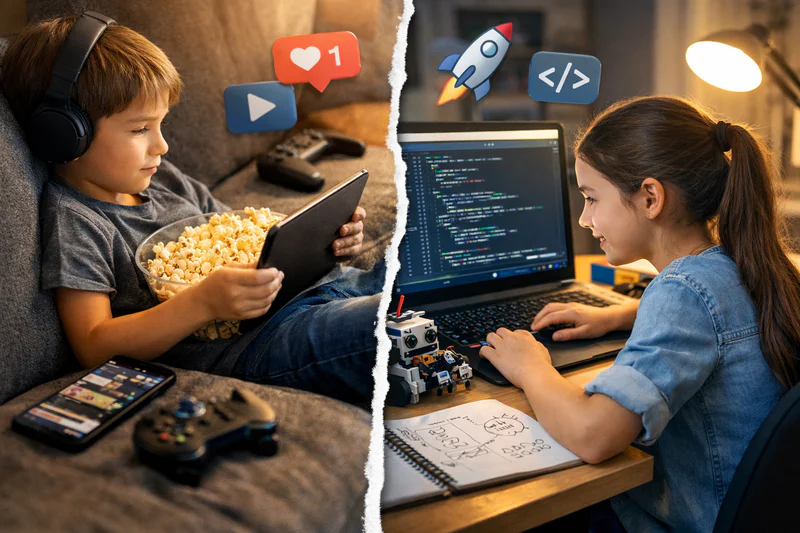
Screen Time vs Learning Time: When Coding Counts as Quality Screen Time
Most parents operate with a single mental model for screens: less is better. It's an understandable default. The research on passive screen consumption in children, watching videos, scrolling social media, playing passive games, does associate high exposure with poorer attention, disrupted sleep, and reduced reading time. The concern is real and the instinct to limit screens is sound.
But that model breaks down the moment you try to apply it to coding screen time for kids. A child writing a Python programme, debugging a Scratch game, or building a personal website is doing something categorically different from a child watching YouTube. Same screen. Completely different cognitive activity. The research treats them as the same. The reality is they aren't.
This guide covers what the science actually says about different types of screen use in children, why coding occupies a distinct category, what parents should actually be measuring instead of raw screen time, and how to use this understanding to make better decisions about your child's digital life.
Key Takeaways
Research consistently distinguishes between passive screen consumption (harmful at high doses) and active, creative screen use (associated with positive developmental outcomes).
Coding is active, creative, and cognitively demanding: the opposite of passive consumption. The same screen time limits that apply to video-watching do not apply to coding.
The right question is not "how much screen time?" but "what is my child producing while on the screen?" Creation is the key distinguishing factor.
Children who code regularly develop attention, persistence, and problem-solving skills that partially offset the cognitive costs of passive screen exposure elsewhere.
A structured coding session of 45 minutes produces measurably different neurological and cognitive outcomes than 45 minutes of passive video consumption.
What Does the Research Actually Say About Screen Time and Children?
The research on children's screen time is more nuanced than the "less is better" headline suggests, and the nuance matters specifically for parents thinking about coding.
The strongest evidence for harm from screen exposure involves passive consumption at high volumes, particularly in children under 3. For this age group, screen exposure displaces interaction with caregivers, which is the primary driver of language and social development. The American Academy of Pediatrics guidelines for children under 2 reflect this evidence clearly.
For children over 5, the picture becomes significantly more complicated. A 2019 meta-analysis published in JAMA Pediatrics, reviewing 68 studies covering over 200,000 children, found that the negative associations between screen time and developmental outcomes were largely concentrated in passive, entertainment-focused use and were much weaker for educational and creative screen use. Several studies found positive associations between creative technology use and outcomes including spatial reasoning, problem-solving, and vocabulary development.
The researchers specifically noted that treating all screen time as equivalent produced misleading conclusions. A child who spends an hour coding and a child who spends an hour watching cartoon compilations are not having similar experiences. Measuring them with the same metric is like measuring the effects of reading and watching TV with the same instrument because both involve sitting still and using your eyes.
What specific harms are associated with passive screen consumption?
The most consistently replicated negative effects of high passive screen consumption in children aged 5 to 12 are reduced sleep duration and quality (particularly when screens are used within an hour of bedtime), reduced time spent in physical activity, displacement of reading and other cognitively rich activities, and impaired sustained attention in academic settings. These effects are real and meaningful at high exposure levels. They do not apply in the same way to active, structured screen activities like coding, which involve sustained attention, sequential problem-solving, and creative production.
Active vs Passive Screen Use: Why the Distinction Changes Everything
The most useful framework for thinking about children's screen use isn't time. It's activity type. There are essentially two categories of screen engagement, and they have fundamentally different effects on a developing child's brain.
Passive vs Active Screen Use in Children: Key Differences
The cognitive profile of a coding session is closer to reading a challenging book or solving a maths puzzle than it is to watching videos. Both reading and coding require sustained attention, build domain-specific knowledge, produce a sense of accomplishment, and leave the child with something they didn't have before they started. Passive video consumption does none of these things.
For a deeper look at how coding transforms device use from consumption to creation, see Productive Screen Time for Kids: How Coding Classes Turn Devices Into Learning Tools.
Should Coding Count Against a Child's Daily Screen Time Limit?
This is the question parents most often ask once they've accepted the active/passive distinction. The honest answer is: not in the same way.
If your concern with screen time is about passive consumption: the rapid-fire stimulus of algorithmically curated video content, the social comparison dynamics of social media, the displacement of reading and outdoor play, then coding doesn't contribute to that concern. A 45-minute coding session is not 45 more minutes of the activity you're trying to limit.
If your concern is about posture, eye strain, or sleep hygiene, then yes: coding involves a screen and shares those physical considerations with any other screen use. The practical guidance is the same: appropriate seating, adequate lighting, regular short breaks, and no coding within an hour of bedtime.
Many Codeyoung parents find it useful to maintain two separate mental categories. One for recreational screen use (where limits are appropriate and worth enforcing). One for creative and educational screen use (where the question isn't the time limit but whether the child is engaged, producing something, and enjoying it). Coding sits firmly in the second category.
How much coding screen time is appropriate per day?
For structured coding sessions, 30 to 60 minutes per session is appropriate for most children aged 7 and above, with shorter sessions (20 to 30 minutes) for younger children. The limiting factor is concentration rather than screen time per se. A child who is still engaged and productive at 45 minutes is fine. A child who is tired, making careless errors, or clearly disengaged after 30 minutes is done for the day regardless of how much time remains. Quality of engagement matters more than duration.
Want your child's screen time to produce something real? Codeyoung's live 1:1 coding classes turn device time into genuine skill-building. Book a free trial class and see what 45 minutes of active screen use looks like.
What Children Are Actually Building When They Code
Abstract arguments about "active vs passive" can feel theoretical. What makes coding concretely different from screen consumption is the output. At the end of a 45-minute coding session, the child has produced something. That fact changes the nature of the experience.
A 7-year-old finishes a Scratch session with an animated story they made from scratch. A 10-year-old closes their laptop with a working Python quiz that asks their family members questions about their interests. A 13-year-old has updated a website that now includes a feature they figured out how to build. These aren't hypothetical. They're the typical output of a well-run coding session at each age level.
The psychological effect of producing something versus consuming something is significant. Children who create report higher satisfaction, stronger sense of competence, and greater intrinsic motivation to continue than children who consume. This isn't a coding-specific effect, it's a general principle of human motivation. But coding is one of the most accessible creative activities available on the same device children already own and want to use.
For a parent whose child spends hours gaming, this is a particularly useful reframe. The gaming instinct, wanting to build something, achieve something, solve something, is exactly the instinct that coding rewards. The difference is that what they build in coding is genuinely theirs. For more on this transition, see My Child Spends Too Much Time Gaming: How Coding Channels That Interest Into Skills.
How to Balance Screen Time Practically at Home in 2026
Theory is useful. Practical frameworks are more useful. Here is how parents in 2026 can think about screen time in a way that distinguishes between types of use rather than treating all screen time identically.
Categorise, don't just count. Track what your child does on screens, not just how long. Keep a mental (or physical) note of how time is split between passive entertainment, social apps, educational content, and creative tools like coding. The split matters more than the total.
Apply limits to the right category. Time limits make most sense for passive entertainment and social media. Educational screen use generally warrants lighter-touch management. Creative screen use (coding, digital art, video production) should be evaluated by engagement quality and output, not duration.
Use physical signals rather than timers for coding. A timer that cuts off a coding session mid-project is frustrating and counterproductive. A better signal is completion: finish the feature you're working on, then stop. This also builds the good habit of reaching natural stopping points rather than abandoning work mid-task.
Screen-free time still matters. Even if coding is cognitively valuable, children need time away from screens for physical activity, face-to-face social interaction, imaginative play, and reading. Coding shouldn't displace these. It should displace passive entertainment.
Watch for quality signals during coding sessions. A child who is engaged, making decisions, asking questions, and wanting to show you what they built is having a good coding session. A child who is zoning out, mindlessly copying without understanding, or checking their phone between steps is not. The quality signal matters as much as the activity type.
For a broader framework on building healthy digital habits at home, see Building Screen Time Balance and Healthy Habits for Digital Learners.
How Do You Know If Your Child's Screen Time Is Actually Productive?
Three questions cut through the noise on this.
Question 1: What did they make? If the answer is "nothing: they were watching/playing/scrolling," that's passive use. If the answer is "a game about dinosaurs" or "a website for their football team" or "a programme that tells jokes," that's creative use. The presence or absence of output is the clearest single indicator.
Question 2: Can they explain what they did? A child who spent 45 minutes coding can usually describe the specific problem they solved, the concept they learned, or the part they're most proud of. A child who spent 45 minutes watching can usually describe what happened in the content but not what they did or produced. The difference in ownership and active engagement is obvious in conversation.
Question 3: Do they want to come back to it? Passive entertainment typically produces the "just one more" cycle: the child wants more of the same stimulus. Creative coding typically produces the "I want to add this next" impulse: the child wants to continue their own project, not consume more content. That distinction in motivation reflects a fundamentally different relationship with the activity.
What Coding Does to a Child's Brain That Passive Screens Don't
The neurological case for treating coding differently from passive screen use is straightforward. Coding activates and exercises a specific cluster of cognitive capacities that passive entertainment does not engage.
Working memory load. Writing code requires holding multiple pieces of information in mind simultaneously: the current state of the programme, the goal of the function being written, the syntax of the language, the logic of the conditional being constructed. This consistent demand on working memory is associated with working memory development over time. Passive video consumption makes minimal working memory demands.
Error detection and correction. Every coding session involves reading error messages, identifying their source, and testing hypotheses about how to fix them. This systematic error-correction process exercises exactly the cognitive capacity that reading comprehension and mathematical reasoning also require. Passive entertainment provides no equivalent exercise.
Deferred gratification. Coding projects take time to complete. A game that works doesn't emerge in five minutes. The child must work through intermediate stages, each of which is satisfying but none of which is the final product. This experience of deferred, self-generated reward is associated with better attention regulation and academic persistence. It is the opposite of the rapid, externally provided reward cycle of algorithmically curated video.
Creative agency. Coding gives children causal power over their digital environment: they can make the computer do what they want rather than accepting what it offers them. This sense of agency is psychologically significant, particularly for children who otherwise experience themselves primarily as consumers of digital content created by others.
For more on the cognitive and emotional benefits of coding specifically, see Why Coding Teaches Emotional Regulation, Not Just Logic and the complete guide to coding for kids.
Frequently Asked Questions: Coding and Screen Time for Kids
Should coding count towards my child's daily screen time limit?
Not in the same way as passive entertainment. Screen time limits are most justified by the effects of passive consumption: rapid-stimulus video content, social media, and unstructured entertainment browsing. Coding shares the physical considerations of screen use (posture, eye strain, sleep hygiene near bedtime) but does not share the cognitive and psychological profile that makes passive screen consumption problematic at high doses. Most parents find it useful to maintain separate categories rather than applying one blanket limit across all screen activities.
How much time should kids spend coding per day?
For structured coding sessions, 30 to 60 minutes per session is appropriate for most children aged 7 and above. Younger children (ages 5 to 7) do better with 20 to 30-minute sessions. The practical limit is sustained concentration rather than screen time per se. Regular short breaks (5 minutes every 25 to 30 minutes) improve both comfort and productivity. Most children naturally reach a stopping point when their concentration flags; following that signal rather than a fixed timer produces better outcomes.
Is gaming the same as coding in terms of screen time quality?
No, though the line can blur. Passive gaming (following a linear story, consuming pre-made content) is closer to passive screen use. Active gaming with creative elements (building in Minecraft, designing in Roblox, strategy games with real decision-making) is more cognitively engaged. Coding goes further still: the child is creating the experience rather than operating within an experience someone else created. The key distinction is who has the creative agency. Coding puts it entirely with the child.
My child wants to code all day. Should I let them?
Extended coding sessions should be balanced with physical activity, outdoor time, face-to-face social interaction, and screen-free creative activities, just as any cognitively demanding single activity should be. Even excellent activities benefit from variety. That said, a child who wants to spend 2 to 3 hours on a coding project over a weekend is demonstrating healthy intrinsic motivation, not problematic screen addiction. The quality signal is whether the engagement is purposeful and productive rather than compulsive and anxious.
Can too much coding be harmful for kids?
At extreme levels, any single activity displaces the variety of experiences children need for healthy development. A child who only codes and never engages in physical play, social interaction, or non-screen creativity is missing important developmental experiences. At the levels typical of coding education, however (45 to 90 minutes per day of structured sessions), there is no evidence of harm and substantial evidence of benefit. The concern about "too much coding" is almost always really a concern about too much total screen time, which can be addressed by ensuring coding doesn't displace physical and social activities rather than by limiting coding specifically.
How do I convince my child's school that coding screen time is different?
Frame it around output and curriculum relevance rather than screen time classification. Most schools distinguish between recreational and educational screen use already. Coding falls clearly in the educational category, particularly for children working on projects that connect to computing curriculum goals or STEM enrichment. If the school has a blanket screen time policy that doesn't distinguish by activity type, sharing the JAMA Pediatrics meta-analysis on active vs passive screen use can provide the research basis for a more nuanced approach.
What is the best time of day for children to code?
For most children, mid-morning or early afternoon produces the best concentration and creative engagement, as these windows align with peak cognitive alertness for school-age children. Evening coding sessions are fine as long as they end at least an hour before bedtime. Coding immediately before bed can delay sleep onset for some children, not because of screen light specifically but because the cognitive engagement can make it harder to wind down. Morning coding on weekends and after-school sessions on weekdays are the most common and most effective scheduling patterns.
Does coding help with the negative effects of other screen time?
Partially. Children who code regularly develop sustained attention, deferred gratification, and systematic problem-solving habits that partially counteract the attention-fragmenting effects of heavy passive screen use. This isn't a recommendation to let passive screen consumption run unchecked on the basis that coding compensates for it. But it does mean that a child with a regular coding practice is likely to be more cognitively resilient in their screen-heavy environment than one without. Coding builds the cognitive muscles that passive screens erode.
My child prefers watching coding tutorials to actually coding. Is that okay?
Watching tutorials is passive, not active. It has real value as a supplement to coding practice but is not a substitute for it. A child who only watches tutorials develops "spectator knowledge", they can follow along and understand what they see, but cannot independently start and complete a project. The essential element is hands-on coding time, where the child's fingers are on the keyboard and the programme is running (or failing and being debugged) in real time. Tutorials work best as preparation for a coding session, not as a replacement for one.
How does Codeyoung's approach differ from screen time that isn't beneficial?
Every Codeyoung session produces real output: a working project the child built themselves. Sessions are live and 1:1, meaning the child is actively coding throughout, not watching. The instructor adapts in real time to keep the child challenged and engaged, preventing the zone-out that characterises less productive screen use. Parents consistently report that children leave Codeyoung sessions energised and wanting to continue their project rather than looking for the next stimulus. That self-directed motivation to continue is the clearest behavioural signal that the screen time was genuinely productive.
The Screen Isn't the Problem. What's on It Is.
Screen time as a single metric was always a blunt instrument. It made sense as a starting point when the primary concern was passive television consumption displacing physical and social development in young children. Applied to the full complexity of how children use screens in 2026, it produces misleading conclusions.
A child who spends 45 minutes building a game they designed is not doing the same thing as a child who spends 45 minutes watching video compilations. The screen is the same. The cognitive activity, the emotional experience, the developmental outcome, and the legacy of the session are entirely different. Managing screen time well in 2026 means distinguishing between these categories rather than treating them as identical.
Coding is the most productive thing most children can do on a screen. It builds skills that compound over years, produces tangible creative output, and develops the cognitive habits that make children more capable learners across every domain. Explore Codeyoung's coding programmes for children aged 6 to 17, or book a free trial class and see what 45 minutes of genuinely productive screen time looks like in practice.
Turn screen time into skill-building time.
Codeyoung's live 1:1 coding classes give children aged 6 to 17 something to show for their screen time: a real project they built themselves. Free first session, no commitment, flexible scheduling.