Coding Projects for Kids: 10 Ideas That Build Real Skills
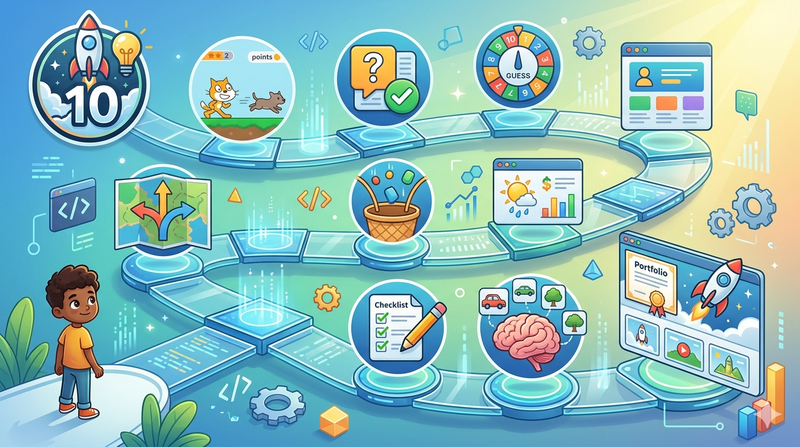
Coding Projects for Kids: 10 Ideas That Build Real Skills
Every child who learns to code hits the same wall eventually. The tutorials are done. The guided exercises are complete. Now what?
The answer is projects, real, self-directed, completable things that put concepts to use rather than just practising them in isolation. But not all projects are equally useful. A project that's too easy produces nothing but a file the child forgets about. A project that's too hard produces frustration and a belief that they aren't good enough. A well-chosen coding project for kids sits in the middle: challenging enough to require the child to think, accessible enough that they can finish it, and connected enough to what they care about that they want to.
This guide presents 10 project ideas organised by age, language, and skill level. For each one: what the child builds, what skills it develops, how long it takes, and what to try next once it's done.
Key Takeaways
Project-based learning produces more durable coding skills than exercises because it requires applying multiple concepts together rather than practising each in isolation.
The best first project for any child is the simplest complete thing they can build in their current language, not the most impressive thing they can imagine.
Projects connected to a child's existing interests (sport, animals, music, games) produce significantly more persistence than generic tutorial projects.
Finishing a project matters more than the project's complexity: a completed simple game builds more confidence than an abandoned complex one.
Each project in this guide is chosen to teach one or two specific transferable skills, not just to produce a result.
Before You Start: How to Pick the Right Project
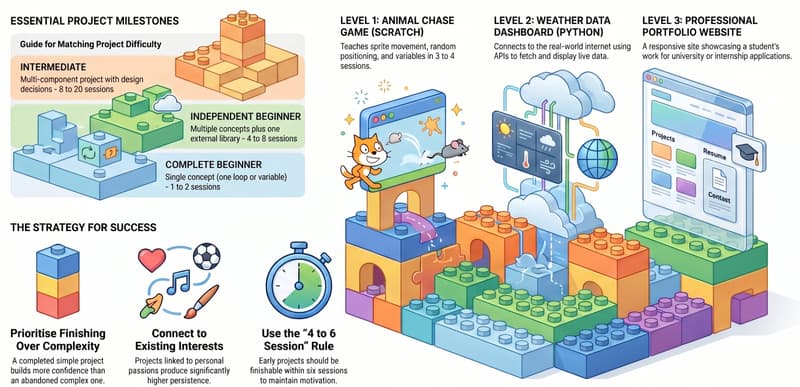
The most common mistake is choosing a project based on ambition rather than current ability. A child who has spent three sessions learning Python basics should not start by building a multiplayer game. The gap between where they are and what the project requires will produce days of confusion before they produce a single line of working code.
A better rule: the first project should be something a child can finish in 4 to 6 sessions. Not because ambition is bad, but because completing something is the most powerful motivational event in a child's early coding life. The confidence from a finished project carries them through the harder projects ahead. The demoralisation from an abandoned one does the opposite.
How to Match Project Difficulty to Skill Level
The 10 Best Coding Projects for Kids in 2026
These projects are organised from simplest to most advanced, covering Scratch, Python, and web development. Each one is realistic to complete at the stated level and teaches skills that transfer directly to every project that follows it.
Project 1: Animal Chase Game (Scratch, Ages 7 to 9, Beginner)
What the child builds: A Scratch game where the player controls a character chasing an animal that moves randomly around the screen. When the player touches the animal, the score goes up by one. The game runs for 30 seconds and shows a final score.
Key skills taught: Sprite movement with keyboard controls, random positioning, score variable, timer, conditional win/lose check. Covers five foundational Scratch concepts in one project.
Why it's effective: The randomness makes every playthrough different, which means the child genuinely wants to keep playing and testing. This natural playtesting loop means they spot bugs themselves rather than needing an instructor to point them out.
Completion time: 3 to 4 sessions. Try next: Add multiple animals with different point values, or add a lives system.
Project 2: Interactive Quiz (Scratch, Ages 8 to 11, Early Beginner)
What the child builds: A quiz about a topic they choose, their favourite sport, an animal they love, a book they've read. 5 to 10 questions, a running score, and a personalised result message at the end ("You're a football expert!" / "Keep studying!").
Key skills taught: Variables for score tracking, conditionals for right/wrong answers, lists for question storage, broadcasting between sprites for scene changes. Also teaches real-world content curation: the child has to write questions and answers, which requires them to think carefully about what they know.
Why it's effective: Personal topic investment drives quality. A child who cares about the subject will spend extra time making sure the questions are interesting and the answers are correct. The result is better code and a project they'll share with family.
Completion time: 4 to 6 sessions. Try next: Add a timer per question, randomise question order, or build the same quiz in Python.
Project 3: Number Guessing Game (Python, Ages 10 to 12, Beginner)
What the child builds: A Python programme that picks a random number between 1 and 100. The player guesses. The programme says "too high" or "too low" until the player guesses correctly. It counts guesses and tells the player how many attempts it took. Optionally: a difficulty setting that changes the range.
Key skills taught: Variables, while loops, conditionals, user input, the random module, and basic game loop logic. This is typically one of the first Python projects for good reason, it uses almost every core concept in about 20 lines.
Why it's effective: Short enough to complete in one or two sessions, satisfying enough to want to play and improve. The "too high / too low" mechanic makes the conditional logic immediately intuitive: the child understands exactly what the if/else is doing because they've played the same game before.
Completion time: 1 to 2 sessions. Try next: A word guessing game (Hangman variant), or a maths quiz generator.
Project 4: Personal Website (HTML and CSS, Ages 10 to 13, Beginner)
What the child builds: A multi-page personal website. A homepage with an introduction and photo. An "About Me" page. A page about their favourite topic (sport, games, animals, music). Styled with CSS colours, fonts, and a consistent layout.
Key skills taught: HTML document structure, semantic elements (header, main, footer, nav), CSS selectors, colour and typography styling, multi-page navigation with links. The first exposure to the separation of content (HTML) and presentation (CSS).
Why it's effective: The output is immediately visible in a browser and looks like a real website. Children share it with family and friends, which creates genuine social validation for the work. The personal content means the child is invested in making it look good.
Completion time: 4 to 6 sessions. Try next: Add a JavaScript feature (a button that changes the page's background colour), or deploy the site using GitHub Pages so it has a real URL.
Project 5: Text Adventure Game (Python, Ages 11 to 13, Early Intermediate)
What the child builds: A text-based adventure where the player makes choices at each decision point. "You are in a forest. You see a path to the left and a cave to the right. Which do you choose?" The story branches based on choices, with multiple possible endings.
Key skills taught: Functions (each scene is a function), return values, nested conditionals, string formatting, basic game state management. For the first time, the child is writing code that has a deliberate structure rather than being linear.
Why it's effective: Creative ownership is very high: the child writes the story, names the characters, designs the choices. The game is unmistakably theirs. This project also reveals whether the child's function understanding is solid, because a text adventure that works requires functions to call each other correctly.
Completion time: 4 to 7 sessions. Try next: Add an inventory system using a Python list, or save/load the player's progress using file handling.
Project 6: Pygame Catch Game (Python + Pygame, Ages 11 to 13, Early Intermediate)
What the child builds: A Pygame game where objects fall from the top of the screen and the player moves a basket left and right to catch them. Different coloured objects give different points. A life system ends the game if too many are missed.
Key skills taught: The Pygame game loop, event handling, object movement, collision detection using rectangles, score and lives display. First project to involve real-time graphics and genuine game feel.
Why it's effective: The physical movement of falling objects and the player's direct control over the basket makes abstract programming concepts viscerally real. When the collision detection works, the satisfaction is immediate and unmistakable. This is the project that convinces many children they can build the kinds of games they've always played.
Completion time: 6 to 10 sessions. Try next: Add multiple object types, speed up over time, or add a high-score file that persists between sessions.
Project 7: Weather or Sports Data Dashboard (Python, Ages 12 to 14, Intermediate)
What the child builds: A Python programme that fetches real data from a public API (weather for their city, or football results for their team) and displays it in a formatted, readable output. Could extend to a basic matplotlib chart of temperatures over a week or goals per game.
Key skills taught: HTTP requests using the requests library, JSON parsing, working with real-world data, basic data visualisation with matplotlib. First project to connect to the actual internet and retrieve live information.
Why it's effective: The data is real, which makes the project feel genuinely useful rather than educational. A child who can see today's actual weather displayed by their own programme has taken a visible step from "learning to code" to "building something that works in the real world."
Completion time: 5 to 8 sessions. Try next: Build a web interface for the same data using Flask, or add email alerts for specific conditions.
Project 8: JavaScript To-Do List App (HTML/CSS/JavaScript, Ages 12 to 14, Intermediate)
What the child builds: A fully functional browser-based to-do list. Add tasks, mark them complete (with a strikethrough), delete tasks. Optional: save tasks to localStorage so they persist when the page is closed and reopened.
Key skills taught: DOM manipulation, event listeners, dynamic element creation, array methods, localStorage. Combines all three web languages in a single project for the first time.
Why it's effective: It's a tool the child will actually use. Many children use their own to-do list app daily after building it, which creates ongoing personal investment in improving it. The localhost storage feature introduces data persistence, a concept that's fundamental to almost every real application.
Completion time: 6 to 10 sessions. Try next: Add due dates and colour-coded priority levels, or rebuild it as a React component.
Project 9: Python Image Classifier (Python AI/ML, Ages 14 to 16, Intermediate–Advanced)
What the child builds: A Python programme using scikit-learn or TensorFlow Lite that is trained on a small image dataset and can classify new images into categories. A common first version: distinguishing between two types of animals, or between handwritten digits from the MNIST dataset.
Key skills taught: Machine learning fundamentals (training data, model training, prediction), NumPy for numerical data, basic neural network concepts, evaluating model accuracy. First real introduction to AI as something a child builds rather than uses.
Why it's effective: The child trains something, tests it on new data, and sees whether it works. The process of improving accuracy by changing the training data or model parameters gives direct, tangible feedback on the machine learning concepts, making ideas like "overfitting" and "validation data" feel real rather than abstract.
Completion time: 8 to 15 sessions. Try next: Build a sentiment analyser for text input, or create a simple recommendation system.
Project 10: Full Personal Portfolio Website (HTML/CSS/JS or Flask, Ages 13 to 17, Advanced)
What the child builds: A professional personal website that showcases their coding projects. A landing page with their name and tagline. A projects section that links to their Scratch page, GitHub, or deployed applications. A contact form or social links. Fully responsive (works well on mobile and desktop). Optionally deployed to a live URL via GitHub Pages, Netlify, or Heroku.
Key skills taught: Responsive design with CSS flexbox and grid, accessibility basics, deployment workflow, portfolio curation. Also professional meta-skills: writing about their own work clearly, choosing what to highlight, and presenting technical projects to a non-technical audience.
Why it's effective: This is the project that turns a collection of coding work into a demonstrable asset. For a child approaching university applications or early internships, a live personal portfolio with 3 to 5 real projects is one of the most impactful things they can produce. It also functions as the container for every future project, there is always a reason to improve it.
Completion time: 10 to 20 sessions. Try next: Add a blog section, a dark mode toggle, or rebuild as a React application.
What Makes a Coding Project Actually Teach Something?
Not all projects are equally educational. A project that the child assembles by following a tutorial step-by-step produces output but limited genuine understanding. A project the child designs: where they make the decisions about how to structure the code, what features to include, and how to solve specific problems, produces understanding that transfers to the next project.
The clearest signal that a project is producing genuine learning is whether the child can modify it. A child who understands their number guessing game can change the range to 1 to 1000, or add a lives system, or change the difficulty based on the number of wrong guesses, without being told how. A child who only followed the tutorial cannot. Asking the child to add one small new feature at the end of a project is the most reliable test of whether the concepts are genuinely internalised.
For more on how to evaluate real learning versus surface familiarity, see How Long Does It Take Kids to Learn Coding? and How to Teach Kids to Code at Home.
Want your child to work through projects like these with a qualified instructor who adapts every session to their pace and interests? Book a free trial class at Codeyoung and start building something real.
How to Help Your Child Through a Coding Project at Home
Parents who want to support their child's project work at home don't need technical knowledge. They need three things.
A clear starting goal. Before the session begins, agree on one specific feature the child wants to finish today. Not "work on the game", "make it so the score goes up when the player catches the ball." Specific, completable goals within a single session produce more satisfaction than open-ended work time.
The question habit. When the child gets stuck, the most useful response is "what do you think is happening?" rather than "let me help you." Asking questions keeps the child's problem-solving active. Answering questions shifts the ownership to the parent. The child learns faster from working through confusion than from watching someone else resolve it.
Genuine interest in the result. "Show me how it works" at the end of a session, asked with real curiosity rather than obligation, is worth more than any reward or incentive. Children who feel their work is genuinely interesting to someone they care about code more between sessions, finish more projects, and develop a stronger coding identity than those who feel their work is noticed only in the abstract.
For the full guide to supporting coding at home, see How to Teach Kids to Code at Home: A Parent Guide.
How Do Projects Connect to a Child's Longer Coding Journey?
Each project in this guide builds specific skills that compound into the next one. The number guessing game teaches loops and conditionals that the text adventure builds on. The text adventure teaches functions that the Pygame game uses for its game loop. The Pygame game teaches object management that the API data project uses for data structures. The path isn't always linear, but it is deliberate.
A child who works through projects with increasing complexity over 12 to 18 months doesn't just know more code. They have developed something more important: a mental model of what programming is for and how to use it to build things. That mental model is the foundation of genuine coding competence, and no amount of tutorial completion produces it as effectively as finishing real projects.
For the complete picture of where the project journey leads across different tracks, see the complete guide to coding for kids, the Python for Kids complete guide, and Building a Coding Portfolio: Tips for Young Developers.
Frequently Asked Questions About Coding Projects for Kids
What is the best first coding project for a child?
The best first project is the simplest complete thing your child can build in their current language, connected to something they genuinely care about. For a 7 to 9-year-old on Scratch, that's typically a simple game with a character they chose and a score counter. For a 10 to 12-year-old starting Python, it's a text-based game: a number guessing game or a quiz on a topic they picked. The topic matters as much as the technical level: a child who is excited about the subject will push through difficulty that would stop them cold on a generic project.
How long should a child spend on one coding project?
For beginners, a project should be completable in 3 to 6 sessions. Longer than this without finishing risks the child losing momentum and abandoning the project before they experience the motivational payoff of completion. For intermediate students, 8 to 15 sessions per project is appropriate. Advanced portfolio projects can span 20 or more sessions. The rule throughout is that the child should reach natural milestones within each session, something new that works by the end of every sitting, even on longer projects.
My child keeps starting new projects but never finishes them. What should I do?
This is one of the most common patterns in children's coding education. The most effective solution is to reduce the scope of the current project until it's genuinely completable, then insist (gently) on finishing before starting something new. "Let's add one more feature and then call this version done" is often enough. A child who has finished 5 simple projects is in a much better position, technically and motivationally, than one who has started 15 complex ones. Completion is a skill, and like any skill, it develops through practice.
What coding projects are good for 8-year-olds?
For an 8-year-old on Scratch, the animal chase game and interactive quiz in this guide are both well-matched. Other strong options include: an animated birthday card for a family member (teaches sequences and sprite animation), a virtual pet that responds to clicks (teaches events and variables), or a simple platformer where a character jumps between platforms (introduces gravity simulation and collision detection). All of these can be completed in 3 to 6 sessions and produce output the child is genuinely proud of.
What Python project should a 12-year-old try first?
The number guessing game is ideal as a first Python project for a 12-year-old, it's completable in 1 to 2 sessions and uses all the core beginner concepts. After that, a text adventure is the strongest next step because the creative writing component keeps motivation high while the function structure provides the main technical challenge. From there, a Pygame project is typically the most compelling path forward for children interested in games, while a personal website (HTML/CSS) suits those interested in design and the visible web.
Can kids create coding projects without an adult's help?
Yes, and they should, with the right starting point and some initial structure. Children who have reached the independent beginner stage (typically after 3 to 6 months of instruction) can work on appropriately-scoped projects with minimal adult involvement. The adult's role at this stage is to agree on the project scope, be available for questions, and show genuine interest in the result. Step-by-step guidance should be reserved for genuine blocks rather than offered preemptively.
Are coding projects better than coding exercises for learning?
For developing genuine capability, yes. Exercises practise individual concepts in isolation. Projects require applying multiple concepts together to produce something that works. The cognitive demand of integration, figuring out which concept applies where, how they interact, and what to do when they conflict, is what produces transferable programming ability. Exercises are valuable for introducing concepts and building initial fluency. Projects are what consolidate that fluency into genuine competence.
What coding projects help kids learn maths at the same time?
Several projects in this guide have strong maths connections. The number guessing game involves probability and range. The quiz can be written on maths topics. The sports data dashboard involves averages, percentages, and data analysis. A Pygame game involves coordinate geometry (sprite positions), rates (speed), and basic physics (gravity, bounce). Children who build these projects often find that the maths concepts they've been learning abstractly in school become much more intuitive when they've applied them purposefully in a programme. For more on this connection, see Coding and Maths for Kids: How Learning Both Gives Children a STEM Edge.
How do I help my child share their coding project with others?
Scratch projects can be published directly to the Scratch community at scratch.mit.edu with a shareable link, no account required to view. Python projects can be shared by zipping the code folder and emailing it, or by uploading to GitHub (appropriate for children aged 12 and above with some instruction). Web projects can be deployed for free using GitHub Pages or Netlify, giving the child a real URL that works on any device. The act of sharing meaningfully increases motivation for the next project: a child who has shown their work to people who found it interesting wants to make the next one even better.
How does Codeyoung use projects in its coding curriculum?
Every Codeyoung session is project-focused. Rather than working through exercises in isolation, children build a series of progressively complex projects that introduce new concepts in the context of something they're actually making. Instructors help children choose project topics connected to their interests and set achievable goals for each session. The projects in this guide are representative of what Codeyoung students build at each stage of their learning journey. Book a free trial class to see the project-based approach in action.
Build Something. Finish It. Build Something Harder.
The 10 projects in this guide are not a curriculum. They are a menu. No child needs to work through all of them, and most will skip some entirely in favour of something that connects more directly to what they care about. That's exactly right.
The principle behind all of them is the same: choose something completable, make it yours, finish it, and then look at what you built and ask what it would take to make it better. That cycle, build, complete, reflect, improve, is how coding skill develops at every level, from a 7-year-old's first Scratch game to a professional engineer's production system. Starting it early, with the right project and the right support, is one of the best investments a child can make in their own capability.
Explore Codeyoung's coding programmes for children aged 6 to 17 to find the right track and starting project for your child, or book a free trial class and let our instructors recommend where to begin.
Start your child's first real coding project today.
Codeyoung's live 1:1 coding classes guide children aged 6 to 17 through projects matched to their level and interests. First class is completely free, no commitment required.
Comments
Your comment has been submitted