Free Coding Class for Kids: What to Expect at Your First Codeyoung Session
A lot of parents arrive at a Codeyoung free trial with the same quiet worry: what if my child isn't ready? What if they find it boring, or too hard, or too easy? What if I've oversold it to them and they're disappointed? These are fair concerns, and this post exists to answer all of them before the session starts.
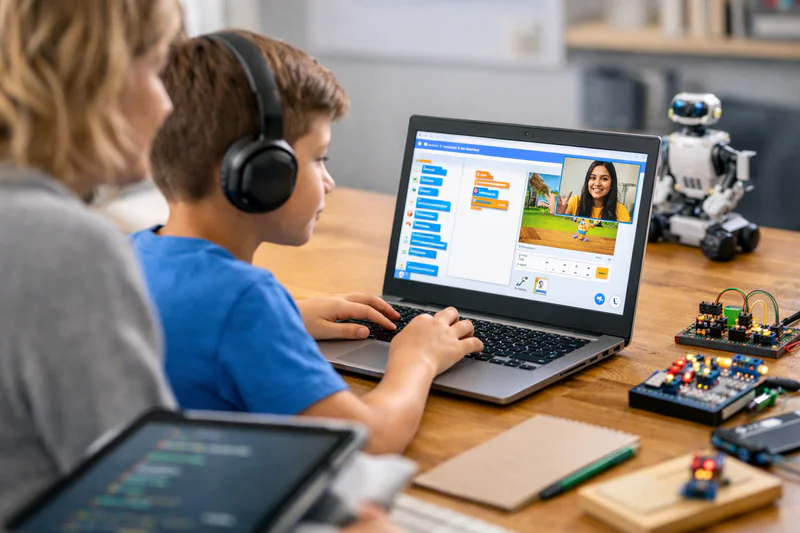
Codeyoung's free trial coding class for kids is not a sales pitch dressed up as a lesson. It is a genuine 45-minute instructional session, taught by a qualified instructor who has worked with hundreds of children at exactly the age and experience level of your child. The session is designed around one goal: making sure your child builds something real, has a positive experience, and leaves with a clear sense of what learning to code with Codeyoung will look like over time.
Here is exactly what happens, start to finish.
Key Takeaways
The free trial session is 45 minutes, live 1:1 with a qualified instructor, and completely free with no commitment to continue.
The instructor assesses your child's current level and interests in the first 10 minutes and adapts the entire session to them specifically.
By the end of the session, your child will have built or meaningfully contributed to a real, working project they can show you.
Parents are welcome to observe the session and will receive a recommendation on the right starting track and pace for their child.
Codeyoung serves 45,000+ students aged 6 to 17 across the USA, UK, Canada, and Australia through this same live 1:1 format.
What Happens in the First 10 Minutes: The Instructor Assessment
The first part of every trial session is an informal conversation. Not a test. Not a formal evaluation. A skilled instructor asking a child a handful of questions in a way that feels like chatting, not being assessed.
The instructor is finding out:
Has your child done any coding before? What tools, how recently, and how much did they enjoy it?
What does your child like to make, build, or create in general? Games, stories, art, tools?
Are there specific things they've seen that made them think "I'd like to make something like that"?
What grade are they in, and how do they find maths and science at school?
How comfortable are they with typing and reading on a screen?
This takes about 10 minutes. The information gathered completely determines what happens for the next 35 minutes. A 7-year-old who loves Minecraft gets a different session than a 13-year-old who wants to build an app. A child who tried Python once and found it overwhelming gets a different approach than one who has never touched code at all.
This is what 1:1 instruction means in practice: the session adapts to the child, not the child to the session. No group class can do this.
The Next 35 Minutes: Building Something Real
After the initial assessment, your child starts coding. Not watching. Not listening to a lecture. Actually writing code or building blocks, with the instructor guiding from the side rather than leading from the front.
What they build depends on age and experience level:
What Children Typically Build in Their First Codeyoung Session
The consistent principle across every age: by the end of the 45 minutes, something exists that didn't exist before. Your child made it. The instructor helped, but the child did the work.
This matters because the experience of building something in the first session is the strongest predictor of whether a child wants to continue. A child who ends a session with a working programme or project feels capable. That feeling is what coding education is ultimately trying to create.
Ready to book your child's free trial session? It takes two minutes, there's no commitment, and the first class is completely free.
What Does the Instructor Assess During the Session?
While the lesson is happening, the instructor is making several observations that inform the recommendation they give at the end. Parents are often surprised by how much an experienced instructor can identify in a single session.
Pace: How quickly does the child grasp new concepts? Do they need more time on one idea before moving to the next, or are they comfortable accelerating?
Learning style: Do they prefer to try first and ask questions after, or do they want to understand fully before attempting? Do they respond better to visual demonstrations or verbal explanations?
Motivation triggers: Which project type produces the most visible engagement? Creative control, competitive scoring, technical challenge, or practical utility?
Attention span: How does the child's focus hold across 45 minutes? Where does it drift, and what brings it back?
Foundational readiness: Is the current tool the right fit, or would the child benefit from a different starting point?
This isn't an exam result or a score. It's a human assessment that informs a practical recommendation: which track, which pace, and which project type will produce the best ongoing experience for this specific child.
What Parents Receive at the End of the Session
The trial doesn't end when the 45 minutes do. After the session, parents receive a clear, specific recommendation covering:
The right starting track: Scratch, Python, web development, MIT App Inventor, Java, or AI/ML, with a plain-English explanation of why that track fits this child right now
Recommended session frequency: once or twice per week depending on the child's goals and how quickly the instructor thinks they'll progress
What the first month looks like: specific milestones and project types so parents know what to expect and what to look for
Any concerns or considerations: if the instructor notices something worth knowing (a gap in foundational skills, an unexpected strength, a particular way the child learns best) they will say so directly
The recommendation is honest. If the trial reveals that your child isn't quite ready for the track you expected, the instructor will say so and explain what to do first. If your child is more advanced than anticipated, the recommendation reflects that too.
What Should You and Your Child Do Before the Trial Session?
Very little preparation is needed. The session is designed to work for children who have never touched code before and for those who have been learning for a year. Here is what actually helps.
Before the session
Make sure the device is ready. A laptop or desktop with a stable internet connection and a modern browser (Chrome works best). No downloads or installations needed for most tracks.
Book a time when your child is alert. A tired child after a long school day will have a very different experience from one who is rested and unhurried. If possible, schedule the trial for a time when your child is typically engaged and energetic.
Tell your child what to expect in simple terms. "You're going to have a coding class and you'll make something with your instructor. It's like trying something new; you don't need to be good at it yet." Take the pressure off. The session is for exploring, not performing.
Don't oversell it. Let the session speak for itself. A child with no expectations who builds something surprising will have a better first experience than one who has been told it will be amazing and then feels the pressure to feel that way.
During the session
Stay available but don't hover. Younger children (ages 6 to 9) often benefit from a parent being nearby and visible. Older children generally do better with more independence. Follow your child's lead.
Let the child answer the instructor's questions themselves. The assessment phase works because the instructor is reading the child's responses directly. A parent answering on behalf of the child disrupts this and leads to a less accurate recommendation.
Watch if you want to. Parents are welcome to observe. Many find it informative to see what 1:1 coding instruction actually looks like in practice.

What Happens After the Trial: Your Options
After the session, there is no pressure and no sales pitch. You have three straightforward options.
Option 1: Enrol in ongoing sessions. If the trial was a good experience and the recommendation makes sense for your child, you book regular weekly sessions in the recommended track. The next session picks up directly from where the trial ended. The instructor who taught the trial continues with your child unless you prefer otherwise.
Option 2: Ask questions first. If you want to understand the recommendation better, ask about the curriculum structure, the expected pace of progress, or what the intermediate milestones look like before committing. These are reasonable questions and a good programme should answer them specifically.
Option 3: Take time to decide. There's no deadline. The session was free and the recommendation is yours to keep regardless of whether you enrol. Many parents book a trial, take a week to discuss it with their child, and come back when they're ready.
The only thing the trial costs is 45 minutes of your child's time. What it produces is a clear picture of where they are, where they could go, and what the right first step looks like.
For more on how to evaluate whether a coding programme is genuinely right for your child before or after the trial, see How to Choose the Right Coding Course for Your Child and 1:1 vs Group Coding Classes for Kids: Which Actually Works Better?
Frequently Asked Questions About the Codeyoung Free Trial Class
Is the free trial class really free with no hidden charges?
Yes. The trial session is completely free and there are no hidden charges, subscription activations, or payment details required to book it. You book a session, your child attends, and nothing is charged. If you decide to enrol in ongoing sessions afterward, that involves a separate, transparent payment discussion. The trial itself has no cost.
What does my child need to have ready for the first session?
A laptop or desktop computer with a stable internet connection and an up-to-date browser, preferably Chrome. A working camera and microphone for the video call. No software installations are needed for Scratch or web-based tracks. For Python, the instructor will guide your child through setting up a free browser-based environment (like Replit) at the start of the first session if needed. No preparation or prior knowledge is required.
What age group is the free trial suitable for?
Codeyoung's free trial is available for children aged 6 to 17. The session format, tool, and project type adapt entirely to the child's age and experience level. A 6-year-old gets a Scratch-based visual session; a 15-year-old with some Python experience gets a session matched to where they currently are. There is no single "standard" trial format: it is personalised from the first minute.
How is the Codeyoung trial different from a free account on a coding app?
A free account on a coding app is self-paced content your child navigates alone. The Codeyoung trial is a live 1:1 session with a qualified human instructor who is actively responding to your child in real time, adapting what happens next based on what they observe. The quality of instruction and the depth of assessment are fundamentally different. The app gives access to content; the trial gives access to a teacher.
Can I sit in and watch my child's trial session?
Yes. Parents are welcome to observe. For younger children (ages 6 to 9), parental presence is often helpful and reassuring. For older children, the instructor may suggest parents give the child space to engage independently, since children sometimes perform differently when a parent is visibly watching. Either way, the choice is yours and the instructor will accommodate whichever arrangement works best for your family.
What happens if my child is very shy or nervous about the session?
This is one of the most common parent concerns, and it is well-handled by experienced instructors. Codeyoung's instructors work with shy and anxious children regularly. The first 10 minutes of warm-up conversation are specifically designed to make the child feel comfortable before any coding begins. Most children who arrive nervous are visibly more relaxed within the first 5 minutes. The 1:1 format helps significantly; there are no peers to feel self-conscious in front of.
What if the instructor recommends a different track than I expected?
Trust the recommendation. Instructors base their suggestions on what they observe directly during the session, not on what sounds impressive or what parents hoped to hear. A recommendation to start with Scratch rather than Python isn't a statement about your child's capability. It's a statement about the optimal starting point for durable, enjoyable learning. Starting at the right level produces faster long-term progress than starting at a level that sounds more advanced but produces frustration.
How quickly after the trial can ongoing sessions begin?
Ongoing sessions can begin as soon as you decide to enrol, typically within a day or two of the trial. Scheduling is flexible and sessions can be arranged around school hours, extracurricular activities, and family commitments. The instructor who taught the trial continues with your child in ongoing sessions wherever possible, since the relationship and contextual knowledge built in the trial are genuinely valuable for the sessions that follow.
What if my child doesn't enjoy the trial session?
If the session genuinely doesn't land well, the honest next question is why. Was the tool wrong for the age? Was the pacing off? Was the project type a mismatch for the child's interests? A single underwhelming session with one instructor in one format is not evidence that coding isn't right for a child. It's evidence that something about the specific session wasn't the right fit. A conversation with the Codeyoung team after the session can diagnose what happened and whether a different approach would produce a different result.
How is the Codeyoung trial different from a coding bootcamp or summer camp?
A coding bootcamp or summer camp is typically a group experience, intensive and time-limited. The Codeyoung trial is a single live 1:1 session that functions as the entry point to ongoing weekly instruction. The two serve different purposes. Camps are good for initial exposure and social coding experience. The Codeyoung trial is designed to assess, personalise, and begin building a learning relationship that continues week-to-week. For children who have attended a camp and want to develop real skills over time, the trial is the natural next step.
One Session Tells You Everything You Need to Know
The most common thing parents say after a Codeyoung trial session is some version of "I didn't expect that much to happen in 45 minutes." That reaction is the product of a format built around one principle: the child should leave with something real, feel genuinely capable, and have a clear picture of what continuing would look like.
There is no risk in booking the trial. The session is free, your child builds something real, and you receive an honest recommendation you can use regardless of whether you enrol. The only outcome that doesn't cost anything is knowing, with confidence, whether coding with Codeyoung is the right next step for your child right now.
Not sure which track is right? See Is My Child Ready to Learn Coding? or explore the Complete Guide to Coding for Kids to understand the full learning path first.
Book your child's free trial class today.
One live 1:1 session. A qualified instructor. A real project your child builds themselves. Completely free, no commitment required. For children aged 6 to 17 across Scratch, Python, Web Development, Java, App Development, and AI/ML.