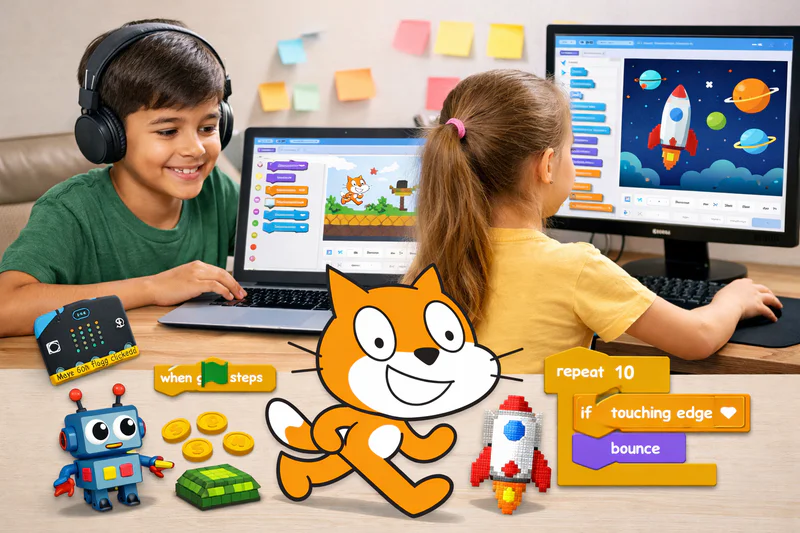
More than 100 million children have created projects on Scratch since MIT released it to the public. In any given month in 2026, tens of thousands of new projects are shared on the Scratch platform by children who built something, wanted to show it to someone, and hit publish. That number tells you something important: Scratch doesn't just teach coding concepts. It produces children who want to share what they made.
Scratch programming for kids is the starting point for the majority of children's coding journeys worldwide, and not by accident. Scratch was designed from the ground up at MIT's Media Lab to be expressive, accessible, and genuinely creative — not to be a simplified introduction to adult tools. What children build in Scratch are real projects: games other people play, animations other people watch, stories other people read. That tangibility is what makes Scratch work as a first coding environment when so many alternatives don't.
This guide covers everything a parent needs to know: what Scratch is and how it works, what the interface looks like, how it compares to Scratch Jr, what children actually learn, what they build at different stages, when to start, when to move on, and how to choose the right programme for your child.
Key Takeaways
Scratch is a free, browser-based visual programming environment developed at MIT, used by over 100 million children globally.
Children aged 6 to 12 are the primary audience, with 7 to 9 being the most productive starting window for structured Scratch instruction.
Scratch teaches real programming concepts — sequences, loops, conditionals, variables, and event handling — through a visual interface that removes the syntax barrier.
Children who develop a strong Scratch foundation before moving to Python progress through Python fundamentals 30 to 40% faster than those who start text-based coding cold.
Codeyoung's Scratch program classes is great for children aged 6 to 12 through live 1:1 sessions, with projects tailored to each child's age and interests.
What Is Scratch and Why Do Children Learn to Code With It?
Scratch is a free, browser-based programming environment where children build projects by snapping together colored instruction blocks rather than typing code. It was created by the Lifelong Kindergarten Group at MIT's Media Lab, led by Professor Mitchel Resnick, and released publicly in 2007. In 2026, it remains the most widely used first coding tool for children globally — with over 135 million registered users and more than 164 million projects shared across 150+ countries.
The block-based interface is not a simplified version of real programming. It teaches the same foundational concepts as any professional language: sequences, loops, conditionals, variables, events, and functions. The difference is that these concepts are expressed visually. A "Repeat 10 times" block does exactly what it says. An "If touching edge, bounce" block reads like an instruction a human would give. Children can focus entirely on the logic of what they want their programme to do, rather than spending cognitive effort on syntax.
Scratch also received the MIT Media Lab's Innovative Learning Award in 2025, recognised for its profound impact on creative learning and accessibility worldwide. This isn't a niche educational tool. It is the world's largest free coding community for kids.
Is Scratch real coding or just a toy?
Scratch is real coding. It teaches sequences, loops, conditionals, variables, event-driven logic, and parallelism — the same foundational concepts present in Python, Java, and every professional language. The block interface removes syntax as a barrier, which is pedagogically deliberate. A child who builds a complex multi-stage game in Scratch and then moves to Python is not starting over. They're translating familiar ideas into new syntax.
What Is Scratch Programming for Kids Actually Used For?
Scratch programming for kids produces a surprisingly wide range of projects. Beginners typically start with simple animations — a character that reacts when clicked, or a sprite that moves across the screen. Within weeks, that same child might be building a quiz game with scoring, a story with multiple scenes, or a platformer with basic physics.
Here's what kids commonly create with Scratch:
Interactive stories and animations with characters, dialogue, and scene transitions
Games ranging from simple catch-and-collect to multi-level adventures
Educational simulations like solar system models or multiplication quizzes
Music and art projects that respond to keyboard input or mouse movement
Greeting cards and school presentations
The beauty of Scratch programming for kids is that complexity scales naturally with age and experience. A 7-year-old might build a blinking animation in 20 minutes. A 12-year-old might spend weeks perfecting a fully playable Scratch version of Flappy Bird — and yes, that's entirely achievable.
How to Use Scratch: Interface Walkthrough for Parents and Kids
You don't need to be a programmer to support your child's Scratch journey. Understanding the basic layout of the Scratch editor helps you follow along, ask the right questions, and spot when your child is stuck.
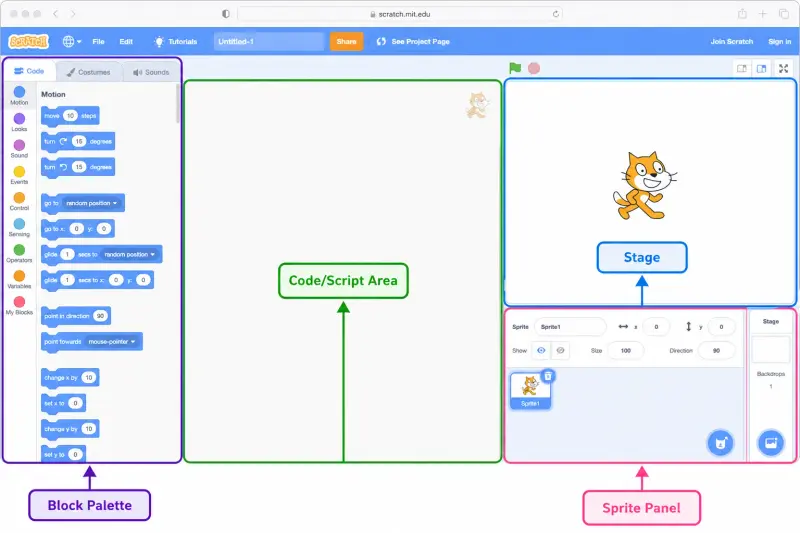
When you open Scratch at scratch.mit.edu, the screen is divided into four main areas:
The Stage is the visual canvas on the right — a 480×360 pixel area where everything your child codes comes to life. When a character moves or an animation plays, it happens here. The Stage also uses an X-Y coordinate system (the same Cartesian plane from middle school geometry), so children are doing real spatial maths without realising it.
The Sprite Panel sits below the Stage and lists all the programmable characters and objects in the project. Your child can use Scratch's built-in sprite library, draw their own, or upload images. Each sprite can have its own independent set of instructions running simultaneously — which is actually an introduction to parallel processing, a genuine computer science concept.
The Block Palette is on the left side and organises coding commands into colour-coded categories:
The Code Area is the workspace in the middle where your child drags blocks from the palette and snaps them together to build scripts. This drag-and-drop interaction eliminates the syntax frustration that stops most beginners and keeps the focus entirely on logic and problem-solving.
Getting started tip: Have your child open Scratch and spend the first 10 minutes clicking through community projects on the homepage before building anything. Asking "what do you think made this work?" is one of the most effective ways to activate curiosity before a first session.
Scratch Jr vs Scratch: Which One Is Right for Your Child?
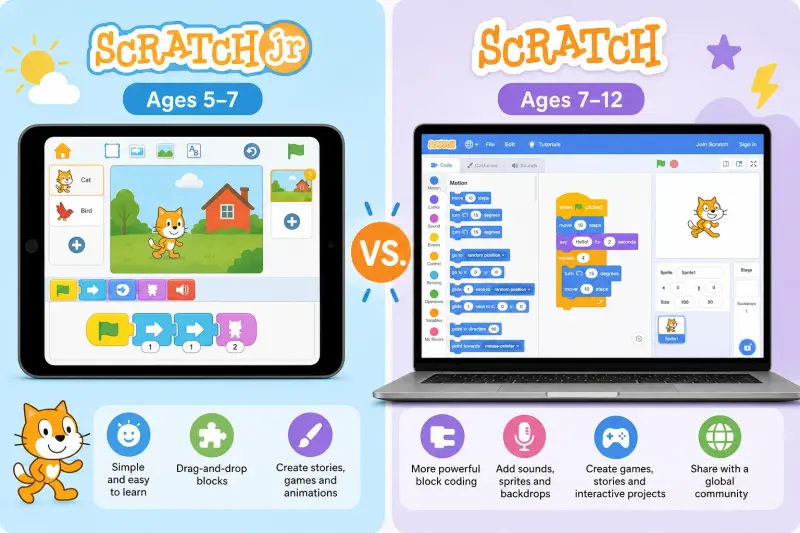
Parents often ask whether to start with Scratch Jr or browser-based Scratch. They serve different age groups and have meaningfully different capabilities.
The short version: Scratch Jr is for pre-readers and early primary school children who are just discovering that tapping blocks makes things happen. Scratch (browser) is for children who can read basic instructions, follow multi-step directions, and sustain focus on a goal-oriented task for 25+ minutes.
Many children use both in sequence: Scratch Jr at age 5–6 on a parent's iPad, then transition to browser Scratch at 7–8 when they start school and develop more reading fluency.
The Core Programming Concepts Scratch Teaches Children
Parents sometimes wonder whether time spent on Scratch could be better used learning Python directly. For children under 10, Scratch is not a detour to Python — it is the most efficient path to Python. Here is what children genuinely learn from Scratch, mapped to where those concepts reappear in text-based coding.
Every concept in this table transfers directly. A child who has written a Scratch game with a score variable, a conditional lives system, and keyboard event handling has already understood the most important ideas in programming. Python gives them new syntax for the same understanding.
What Children Build in Scratch at Each Stage
Scratch is not a single level. Children who stay with it for two or three years build increasingly complex projects. Here's what typical output looks like at each stage.
Stage 1: First Projects (Sessions 1–8)
A child in their first month of Scratch builds projects that are simple but complete: a character that moves when keys are pressed, an animation where something happens in sequence, a basic game where touching an object changes the score. For ready-made inspiration, see our list of easy Scratch games for beginners to play and remake. The outcome is already shareable — the child can show it to a parent, sibling, or friend.
This shareability matters more than it sounds. The moment a child's code does something another person finds interesting is the moment coding stops being a school subject and starts being a creative medium. That transition is what sustains engagement through the harder concepts ahead.
Stage 2: Growing Complexity (Sessions 8–25)
At this stage, children's projects start to feel like real games. Multiple sprites with independent behaviors. A score that tracks correctly across rounds. Multiple levels with increasing difficulty. Sound effects. Custom artwork drawn in Scratch's built-in editor. Children at this stage are using variables, nested conditionals, and custom blocks without consciously thinking of them as programming concepts — they're thinking about them as ways to make the game do what they want.
This is also when children start hitting the creative edge of Scratch's capabilities. They want something and discover it's possible but complicated. That productive tension is the healthiest possible motivation for eventually moving to Python.
Stage 3: Advanced Scratch (Sessions 25+)
Advanced Scratch work looks genuinely impressive: multi-screen games with persistent scores, physics simulations, quiz systems with randomized question banks, platformers with gravity and collision detection. Children at this level are solving real engineering problems within Scratch's block environment and thinking about program architecture, not just individual concepts.
For a fuller breakdown of what's appropriate at each level, see our guide to Scratch projects for different age groups
What Age Should Children Start Scratch Programming?
Most children are ready for Scratch programming for kids between 7 and 8 years old — when they can read basic instructions, follow multi-step directions, and sustain focus on a goal-oriented task. Some confident readers start at 6. Gifted or highly motivated children may be ready earlier.
The most important factor isn't age — it's readiness. A short trial session is the most reliable way to check.
The STEM Power of Scratch: Coding, Maths, and Mental Agility
Scratch programming for kids and mathematics are more deeply connected than most parents realize. The Stage in Scratch uses an X-Y coordinate system — the same Cartesian plane taught in middle school geometry. When a child codes a sprite to move to "X: 100, Y: 50," they are building spatial reasoning and coordinate fluency that directly reinforces what structured maths programs teach.
Variables and operators in Scratch mirror algebraic thinking. Logic gates and conditionals connect to mathematical reasoning. Children who learn to programme develop stronger logical reasoning, better pattern recognition, and improved problem-solving skills — all of which translate directly into maths performance.
The intersection is well-documented: combining Scratch with structured maths creates a powerful reinforcement loop. The geometry children visualize in Scratch reinforces what they study in maths. The logical sequencing in coding sharpens the structured thinking that online maths programs aim to build. These disciplines genuinely make each other stronger.
When Is a Child Ready to Move From Scratch to Python?
There's no single correct answer, but there are clear signals the transition is ready to happen.
The child is hitting creative limits. They want their game to handle complex data, interact with files, connect to the internet, or produce more sophisticated graphics. This is the healthiest motivation — the child is being pulled forward by their own ambitions, not pushed by an external schedule.
The child understands all core concepts fluently. Variables, loops, conditionals, and event handling should feel natural, not effortful. A child still finding basic loops confusing isn't ready for Python, where those concepts appear in a less visually forgiving form.
The child is 10 or older with 6–12 months of Scratch behind them. This combination generally produces the smoothest transition. Children who started Scratch at 10 may transition earlier if their abstract reasoning is strong.
The child is comfortable with text on screen. Python requires reading and writing code as text. A child who finds screen text tiring will struggle with Python syntax in ways that have nothing to do with their programming ability.
For a full breakdown, read Scratch vs Python for kids
What to Look for in a Scratch Course for Kids
Scratch is free at scratch.mit.edu, which means the tool itself isn't the differentiator between good and poor learning experiences. Instruction quality is. Here's what separates a Scratch programme that produces genuine progress from one that produces attendance records:
The child builds something in every session. No session should end without working output. Even a 20-minute session for a 7-year-old should produce a sprite that does something it didn't do before the session started.
Projects connect to what the child cares about. A child who loves animals builds an animal game. One who loves sport builds a sport quiz. Generic "follow the template" projects produce compliance; interest-connected projects produce engagement. The difference in retention and motivation is significant.
The instructor explains why, not just what. "Put this block here" produces a child who follows instructions. "Put this block here because we want the loop to run ten times before the game ends" produces a child who understands loops — and can modify, experiment, and debug independently.
Concepts are introduced progressively. A child in their first three sessions shouldn't be using variables. A child in their fifteenth session should be using them fluently. Good instruction follows a structured Scratch coding curriculum that paces concept introduction to each age group.
The format is 1:1 live instruction. Group Scratch classes produce children who watch an instructor build something and copy it step by step. They rarely produce children who can start a new project independently and build it from scratch. The 1:1 format is what produces genuine autonomous capability.
Frequently Asked Questions About Scratch Programming for Kids
What is Scratch programming and how does it work?
Scratch is a free visual programming environment developed by MIT where children build projects by snapping together colored instruction blocks. Each block represents a programming concept: movement, sound, logic, repetition, or user interaction. Children drag and connect blocks to create sequences of instructions that produce animations, games, and interactive stories. No typing or syntax knowledge is required, making it accessible from around age 6 onwards.
What age is scratch for?
Scratch is most widely used with children aged 7 to 12 for structured coding instruction. Scratch Jr, a simpler tablet-based version, is designed for ages 5 to 7. Children aged 12 and above can use Scratch but often benefit more from starting Python directly. The sweet spot for Scratch instruction is ages 7 to 10 — when the concepts are challenging enough to be interesting but the visual interface removes the syntax friction that would slow a child of this age in Python.
Is Scratch programming free to use?
Yes. Scratch is completely free at scratch.mit.edu, requires no download, and runs in any modern browser. Children can create an account to save and share their projects on the Scratch community platform. The platform is run by MIT as a non-profit educational resource and will always be free. Structured Scratch classes through platforms like Codeyoung involve a fee but provide guided curriculum, live instructors, and personalized feedback that self-directed use cannot replicate.
What can kids make with Scratch programming?
Children create an impressive range of projects: interactive games, animated stories, music visualizers, quiz apps, art projects, and simulations. Beginners animate a character in their first session. Intermediate students build multi-level games with scoring and lives. Advanced students create complex platformers, physics engines, and data-driven interactive experiences. The range of what Scratch can produce is wider than most parents expect.
What is the scratch interface?
The Scratch interface is divided into four key areas: the Stage (the visual canvas where projects play), the Sprite Panel (where characters and objects are managed), the Block Palette (color-coded categories of coding commands), and the Code Area (the drag-and-drop workspace where scripts are built). See the full interface walkthrough section above for a detailed breakdown of each area.
How does Scratch help kids prepare for Python?
Scratch programming for kids teaches the core concepts of all programming — loops, conditionals, variables, events, and logic flow — through visual blocks. When children transition to Python, they're not learning new concepts; they're learning new syntax for what they already know. This makes the shift to Python dramatically smoother. Children who complete a strong Scratch curriculum and move to Python progress through Python fundamentals 30–40% faster than those who start text-based coding cold.
How long does it take to learn Scratch well?
With weekly 1:1 live instruction, most children can build a basic complete game within 6 to 8 sessions, and reach confident intermediate ability within 4 to 6 months. Reaching the advanced stage — building complex projects independently with minimal guidance — typically takes 9 to 15 months of consistent weekly sessions. The timeline depends on session frequency, age, and whether the child experiments between sessions on their own.
Does my child need a specific device to use Scratch?
Scratch runs in any modern browser (Chrome, Firefox, Edge) on a laptop or desktop computer. It doesn't run optimally on tablets — the browser version requires a mouse or trackpad for precise block placement. A laptop or desktop with a stable internet connection is the standard setup. No software installation is needed. Scratch Jr, for younger children, runs as a free app on iOS and Android tablets.
Can children share their Scratch projects online?
Yes. The Scratch platform includes a community where children can publish their projects, play projects made by other children, and leave comments. Projects can also be shared via a direct link without requiring an account to view. MIT moderates the community actively. Children under 13 creating accounts should do so with parental awareness, as an email address is required for account creation.
How does Codeyoung's Scratch program work?
Codeyoung's Scratch Coding classes is delivered through live 1:1 sessions with a qualified instructor experienced in teaching children aged 6 to 12. Each student's first session assesses their current level and interests before recommending a starting project. Sessions run 25 to 45 minutes depending on age, and every session produces real output. The curriculum progresses from basic animations through to complex interactive games, with pace adapted to each child individually. A free first session is available with no commitment required.
Scratch Is Where Confident Coders Begin
The most important thing a parent can understand about Scratch is not that it's a stepping stone. It's that it's a destination in its own right for children aged 7 to 10. The skills a child builds in a well-taught Scratch programme are not beginner skills they'll leave behind — they're foundational concepts, expressed in a visual medium, that carry into every subsequent language they learn.
A child who finishes a strong Scratch curriculum is not just ready for Python. They're curious about it. They've hit the edges of what Scratch makes easy and they want more. That curiosity is the most valuable outcome of good Scratch instruction — more valuable than any individual project they built, and more valuable than any concept they demonstrated they understood.