Python Turtle Programming for Kids: The Ultimate Coding Adventure
Python Turtle Programming for Kids: The Ultimate Coding Adventure
Imagine this, your child opens a blank screen with a white background. They type a few simple commands. Suddenly, colorful shapes appear. Lines move, a circle forms and a star spins. All because of a few lines of code. That is the magic of python turtle programming for kids. Python Turtle is a great avenue for children to begin learning programming in a fun and engaging way.
Python Turtle turns coding into art. It allows children to see instant results. When they write code, the turtle draws. When they change a number, the shape changes. The instant visual feedback inside the turtle environment makes learning Python Turtle simple and engaging.
In this guide, you will learn how Python Turtle works, why early coding matters, and how children can grow from drawing simple shapes to building real-world programming skills.
Key Takeaways
Python Turtle programming for kids teaches real Python syntax from the beginning, giving children early exposure to an actual programming language instead of block-based coding tools.
Instant visual feedback in the turtle environment accelerates understanding of programming concepts, because every turtle command immediately produces visible results in the drawing window.
Core basic programming concepts like loops, variables, functions, and sequencing are learned naturally through drawing shapes and geometric patterns, making abstract logic easier to grasp.
Starting early with the turtle module builds a solid foundation for advanced Python programming and future-ready tech skills, creating a smooth transition into game development, web development, AI and automation.
Children learn faster with structured guidance through personalized instruction that adapts to individual learning pace and style.
Now that the core benefits are clear, let's take a look at how Python turtle works in practice.
Introduction: The Magic of Python Turtle
Python turtle works inside a simple drawing window. Think of it as a virtual canvas. On this screen, a small arrow shaped turtle object moves around. Every time it moves, it draws a line with its onscreen pen.
When kids write:
turtle forward 100
turn turtle left 90
turtle backward 50
They immediately see lines forming. The turtle draws in real time. The immediate visual feedback from the turtle drawing window keeps children engaged. They do not just see text. They see movement, shapes, and color.
The turtle environment feels playful. The screen opens with a white background. The turtle sits at the home position, usually at the center. From there, kids can move the turtle in any direction. They can change pen color, adjust pen size, etc.
The straightforward turtle command structure removes fear. Instead of worrying about complex graphics or advanced syntax, children focus on simple commands. They experiment, change values and test ideas. If something goes wrong, they fix it and try again.
Python turtle graphics is great for beginners. It mixes creativity with logic. Kids are not just coding. They are creating pictures, shapes, and even simple games. Coding becomes fun, not stressful.
Why Coding Matters for Kids
Coding builds logical thinking and problem-solving skills. Python programming teaches children to break large tasks into smaller steps and complete them in order. This way of thinking supports better performance in school and everyday decision-making.
A peer-reviewed study in Frontiers in Psychology found that one month of coding activities in primary school improved children’s planning and self-control skills. The improvement was equal to or greater than seven months of regular classroom instruction. Even short coding practice can support cognitive growth in young learners.
Python is one of the most popular programming languages in the world. It is simple, readable, and powerful. That makes it perfect for kids. Python programming teaches:
Logical thinking
Step by step problem solving
Creativity through building projects
Confidence through achievement
Children who learn coding early develop confidence in technology instead of just consuming it. Research shows that structured coding practice improves math and logical reasoning skills in young learners through hands-on problem-solving.
After learning how coding boosts cognitive skills, we should look at the tool that helps beginners learn.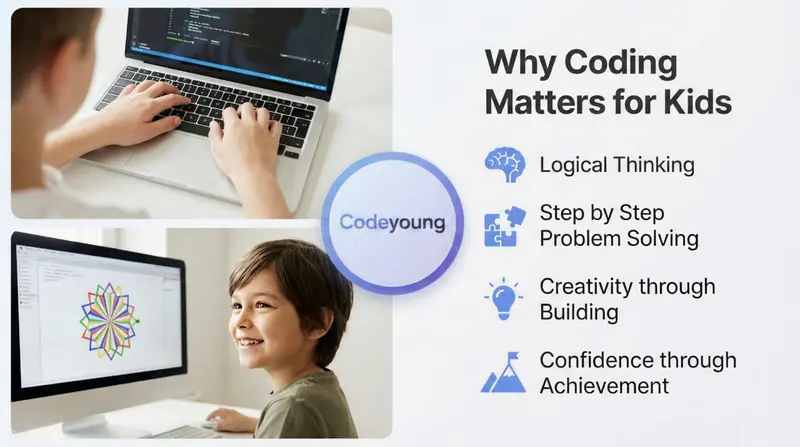
What is Python Turtle?
Python Turtle is a built-in Python library used to create drawings and graphics through code. A Python library is a collection of prewritten tools that perform tasks without requiring users to write everything from scratch.
To start, type:
import turtleThe import turtle command loads the turtle module into the program. After importing, a turtle object is created, which moves around the screen and draws lines.
Key components of the turtle module:
Common turtle commands include:
turtle forward(distance)
turtle backward(distance)
turn turtle left(angle)
right(angle)
circle(given radius)
These simple commands allow children to start drawing shapes immediately. The turtle module removes complexity and keeps the focus on logic and creativity.
Python Turtle vs Scratch: Which Is Better for Kids?
Python Turtle is text-based coding, while Scratch is block-based coding. Both are beginner-friendly, but they develop different skills.
Python Turtle builds familiarity with real programming syntax early. Scratch builds logic visually but delays exposure to typed coding. For long-term growth in Python programming, Turtle provides a stronger foundation.
How to Set Up Python Turtle Correctly
Setting up Python Turtle requires installing Python and importing the turtle module. The process is simple and takes only a few minutes.
First, install Python from the official website. Then open IDLE or a simple code editor and type:
import turtle
t = turtle.Turtle()
Step 1: Install python from the official website.
Step 2: Open IDLE or a simple code editor.
Step 3: Type import turtle.
Step 4: Create a turtle object.
Once the program runs, the drawing window appears. The turtle sits at the same position in the center. From here, kids can move the turtle in any direction.
Inside the turtle environment, they can:
Change turtle mode
Adjust line thickness
Modify pen color
Change fill color
Return to home position
This setup teaches how a python module works in real projects. Children understand that python turtle is just one part of a bigger python ecosystem.
Understanding Commands and How to Move the Turtle
Python Turtle movement commands control how the turtle draws shapes. Mastering these commands allows children to create any geometric design.
Core movement commands:
forward(distance)
backward(distance)
left(angle)
right(angle)
circle(radius)
If a child moves the turtle forward 100 units and turns 90 degrees four times, they create a square. If they turn 120 degrees three times, they create a triangle. When drawing a circle, the command uses a given radius. This connects coding with geometry.
Children also learn about coordinates when they move the turtle to a specific point on the screen. This introduces x and y values in a natural way.
Understanding these simple commands builds confidence. From here, they can create complex designs using loops and angles.
Drawing Shapes and Geometric Patterns Using Python Turtle
Turtle allows children to draw basic shapes and expand them into complex geometric patterns. Students begin with squares, triangles, rectangles, and circles.
Children start with simple shapes:
Square
Rectangle
Triangle
Circle
Once children understand angles, they use loops to repeat patterns. Slight adjustments in angle or distance create stars, spirals, and flower-like designs.
Geometric pattern creation connects math with creativity. Children see how numerical values directly affect visual output on the screen. After learning shape construction, children can personalize their drawings by modifying color and line thickness.
Customizing the Turtle: Colors and Line Thickness
The python turtle library allows kids to control how their turtle draws on the screen. By changing the pen color and pen size, children can turn simple shapes into creative designs. These small changes make turtle graphics more exciting and give instant visual feedback inside the turtle environment.
Step 1: Import turtle and create a turtle object
import turtle
t = turtle.Turtle()
Explanation
import turtle loads the turtle module from the python library.
t = turtle.Turtle() creates a turtle object that can move and draw inside the drawing window.
This is the starting point for most turtle programs.
Step 2: Change the pen color
t.pencolor("red")Explanation
pencolor() changes the color of the onscreen pen.
You can use color names like "blue", "green", or custom hex codes like "#FF5733".
Every time the turtle moves forward or backward, it draws using that selected pen color.
This helps kids highlight different shapes or create colorful geometric patterns.
Step 3: Change the pen size
t.pensize(5) # sets the pen size to 5 pixelsCombining these two commands lets you create bold, colorful designs. Here’s an example that draws a thick red line:
t.pencolor("red")
t.pensize(5)
t.forward(100)  # The turtle forward command moves the turtle ahead by 100 pixels.
Small changes in turtle commands produce big visual differences. Kids quickly see how code controls drawing. That direct cause and effect makes python turtle programming a fun way to learn basic programming concepts while creating personalized designs.
Key Learning Outcomes for Young Programmers
A structured Turtle programming course goes far beyond drawing shapes. It builds real basic programming concepts through hands on experience inside the turtle environment. Children do not just write code. They see how the turtle draws on the screen inside a drawing window with a white background. The strong link between action and result gives quick visual feedback. This is very effective for young learners.
Below is what children actually gain.
1. Understanding coordinates inside the turtle environment
When students import turtle, the window opens. The turtle shape shows up at the home position.
As they move the turtle, they see how x and y coordinates control movement.
When the turtle changes direction, it shows new coordinates on the screen.
This makes abstract math real. Instead of memorizing axes, they watch the turtle object shift on a virtual canvas.
When they place two turtles in the same position and move them differently, they understand spatial logic clearly.
This hands on experience connects geometry with real movement inside python turtle.
2. Mastering turtle commands and code efficiency
Kids start with easy commands like "turtle forward," "turtle backward," and "turn turtle left."
They learn to use loops in Python programming. This way, they don’t have to repeat "turtle forward" four times to draw a square.
They see how repeating commands manually wastes time.
Loops help them create geometric patterns in a structured way.
They understand how a specific angle closes shapes correctly.
This teaches efficiency in a real programming language. It introduces structured thinking without complexity.
3. Using variables with specified distance and given radius
Students store a specified distance in a variable to control how far the turtle forward command moves.
They store a given radius to control a circle.
Changing one variable updates the entire design.
They understand that values control behavior in turtle programs.
Using variables to control distance and radius builds flexibility in Python programming and strengthens logical reasoning.
4. Creating geometric patterns and recursive designs
Children start drawing simple shapes like square and triangle.
Then they combine shapes to create geometric patterns.
By adjusting angles slightly, they produce recursive designs and complex designs.
They experiment with pen color, fill color, pen size, and thickness of the line to create pictures.
The turtle module lets users combine art and logic easily and flexibly.
5. Debugging through visual feedback
If a square does not close, they check the angle after each turn turtle command.
If a circle looks uneven, they adjust the given radius.
If extra lines appear, they control the onscreen pen using turtle mode.
They test small corrections instead of rewriting everything.
Because the turtle draws instantly, children see errors clearly. That direct visual feedback helps them improve faster.
6. Exploring interactive projects and simple games
Python turtle graphics supports interactive projects using mouse clicks.
Kids build simple games like maze runners or reaction timers.
You can create pictures, animate the turtle, or control other turtles on the screen.
When two turtles move differently, they create complex graphics.
This makes learning python a fun way to introduce children to programming. It keeps motivation high.
7. Building a solid foundation for advanced python programming
Children learn how the turtle import loads a python module from a larger python library.
They understand that the python turtle library is one small part of the ecosystem.
Learn how the following code produces results on the screen.
They gain confidence in writing structured code.
Simple Projects Kids Can Create
Python turtle supports interactive projects. Children can use mouse clicks to trigger actions.
For example:
Click to change pen color
Click to move the turtle
Create a simple bouncing ball
These projects introduce event based programming. Kids learn that programs can respond to user actions. They can build a maze game, reaction timer, basic racing game. Many students begin with turtle programs before moving into advanced applications like web development and AI, building progressively complex projects.
Using Two Turtles and Other Turtles for Complex Graphics
Most beginners start with one turtle. But python turtle allows multiple turtle objects. Children can create two turtles with different pen color settings. Each turtle can move independently.
When two turtles draw from the same position but rotate at different angles, they produce complex graphics. This introduces object based thinking. Each turtle object has its own properties. This concept prepares children for advanced programming concepts later in python programming.
By controlling multiple turtles, kids learn structure and organization inside their code.
Making Your Code Powerful Using Functions and Modules in Turtle
As kids improve in turtle programming, they should learn how to organize their code. Writing many repeated turtle forward and turn turtle left commands makes turtle programs long and hard to manage. Functions and modules solve this problem and introduce deeper programming concepts.
1. Using Functions in Python Turtle
A function is a named block of code that runs when you call it. It helps avoid repeating the same turtle commands again and again.
Code Example:
import turtle
def draw_square(t, size):
    for i in range(4):
        t.forward(size)
        t.right(90)
import turtle
This loads the turtle module from the larger python library. Without this line, turtle graphics will not work.def draw_square(t, size):
def means define a function.
draw_square is the function name.
t represents the turtle object.
size is a value that controls the specified distance of each side.for i in range(4):
This is a loop. It repeats the block of code 4 times. A square has 4 sides, so we repeat the steps 4 times.t.forward(size)
This works like turtle forward. It moves the turtle ahead by the given distance.t.right(90)
This turns the turtle 90 degrees to form the square corner.
Why this helps:
Instead of rewriting turtle forward four times in every place, kids define the function once. They can now:
Draw different shapes by changing size
Use two turtles in the same drawing window
Keep code clean and readable
This builds a solid foundation in python programming.
2. Understanding modules in python turtle
A module is a file that contains useful code written by others. The turtle module is one example. When students write:
import turtle: They perform a turtle import. This loads all turtle commands into the program so the turtle draws on the screen. You can also import other python modules like math.
Using math with turtle graphics
code example:
import turtle
import math             # Loads the math module from the python library
t = turtle.Turtle()     # Creates a turtle object inside the turtle environment
for i in range(360):
t.forward(math.sin(math.radians(i)) * 100)
t.left(1)
for i in range(360): – Repeats the steps 360 times.
math.radians(i) – Converts degrees to radians.
math.sin(...) – Generates a changing value for movement.
t.forward(...) – Moves the turtle forward using that value.
t.left(1) – Turns the turtle slightly each time.
Why functions and modules matter
When kids learn functions and modules in python turtle, they:
Organize turtle programs better
Reduce repeated code
Understand how python modules work
Prepare for advanced python programming
They move from basic drawing to structured programming. The shift from consumer to creator builds confidence and prepares them for real world applications beyond turtle graphics.
How Python Turtle Builds Problem-Solving Skills
Python Turtle builds problem-solving skills by making programming errors visible on the screen. When a square does not close properly, children immediately see the gap in the drawing window. The drawing window acts as a feedback system that highlights incorrect angles or distances.
Python turtle teaches logical sequencing, breaking big tasks into small steps, testing and improving code. Even drawing a circle requires understanding radius and angles. When students experiment with a given radius, they connect math with programming.
From Turtle Graphics to Real-World Programming
Python Turtle prepares children for advanced programming because the turtle module uses real Python syntax. When students write import turtle, they learn how a Python module loads functionality into a program. The same structure applies when developers import libraries in professional projects.
After mastering turtle commands, children naturally transition to variables, loops, functions, and conditions. Core programming concepts are key for game development, web development, automation, and AI.
The learning path progresses from Turtle → Core Python → Interactive Projects → Real-World Applications. With consistent practice and structured guidance, students often move from beginner to advanced level within 12 to 18 months, building confidence through progressive skill development.
Step 1: Turtle → Basic python programming
Once kids learn to move the turtle and control angles, they grasp key programming concepts:
Variables store a specified distance or given radius for a circle.
Loops reduce repetition in turtle commands.
Functions organize code.
Conditions control logic.
They move beyond drawing shapes and begin writing structured code. They understand how a python module works and how the following code controls output.
The growth becomes natural.
Step 2: Basic python → Python game development
Many projects using Python Turtle Graphics are great for early game design practice. Kids create small games using mouse clicks, movement logic, and multiple objects.
For example:
A maze game using turtle move logic.
A racing game with two turtles starting at the same position.
A reaction game with timed clicks.
These projects introduce animation, scoring systems, and player interaction. That is the basis of Python game development with libraries beyond the turtle library.
The same logic used to create geometric patterns now builds real gameplay mechanics.
Step 3: From turtle programs to data science basics
At first, children control angles and shapes. Later, they control numbers and data.
When students see how changing a distance alters a drawing, they grasp how values influence results. This thinking applies directly to data science basics. Instead of controlling a turtle shape, they control data sets.
They already know:
How to use variables
How loops process repeated actions
How structured programming works
This makes learning data analysis tools inside the broader python library much easier.
Step 4: Moving into web development
Web development seems different from turtle graphics, but they share the same logic.
When children:
Break a drawing into simple shapes
Control line thickness and fill color
Manage multiple turtle objects
They learn structure and organization. In web development, instead of drawing shapes, they design layouts. Instead of controlling pen color, they control style elements. The thinking stays consistent.
Why python turtle is the right starting point
Python Turtle is beautiful because it teaches programming in a simple and flexible way. It enables users to see results instantly. It introduces children to a real programming language without overwhelming them.
Cynthia Solomon co-created Logo in 1967 with Seymour Papert and Wally Feurzeig. Logo was one of the first programming languages designed for children. Papert, influenced by psychologist Jean Piaget, believed children learn best by building and creating things, including computer programs.
The MIT Logo Foundation explains that Turtle Geometry was created to help children learn math in a natural way. Python Turtle follows the same idea, making it a strong starting point for beginners who want to learn programming.
Children:
Start drawing simple shapes
Create geometric patterns
Build exciting projects
Experiment with other turtles
Design complex designs
Then they move forward. The turtle may look simple, but it opens the door to serious programming. The turtle programming environment gives children hands on experience. It makes coding fun, builds structure, discipline, and creativity at the same time.
Turtle programming is not the end goal. It is the launchpad for everything that comes next.
From Python Turtle to Advanced Python Programming
Python turtle is just the start. Once kids feel confident, they explore the broader python module ecosystem. The growth path often looks like this:
Python turtle → Basic python programming → Simple games → Web development → AI and automation.
Because python is a widely used programming language, skills transfer easily. Children who learn python turtle already understand: Variables, loops, functions, objects, classes, etc. This makes the shift to advanced coding smooth.
Early coding exposure creates a strong foundation. At Codeyoung, students progress from beginner to advanced level in about 12 to 18 months on average. With over 1,000 certified mentors and a 1:1 learning model, students get personalized support at every stage.
Getting Started: Tips for Parents and Kids
Getting started with Python Turtle requires installing Python and writing the import turtle command. Once the turtle module loads, the drawing window opens and the turtle object appears at the home position.
Step 1: Install python from the official website.
Step 2: Open IDLE or a simple code editor.
Step 3: Type import turtle to activate the turtle module.
Step 4: Make a turtle object. Then, start drawing. Use simple commands like "turtle.forward()" and "turtle.left()".
When the window open, children see the turtle shape inside the drawing window. The onscreen pen begins drawing on the virtual canvas as soon as they move the turtle.
Keep sessions short. Start with 20 to 30 minutes. Focus on fun and creative designs rather than perfection. Encourage your child to experiment with pen color, fill color, pen size, and line thickness. Let them create pictures and explore different shapes.
A structured python turtle course for kids can provide guidance and consistent progress. Structured 1:1 instruction helps children learn Python step by step, focusing on consistency rather than speed to build solid foundations.
Common Mistakes in Turtle Programs and How Kids Fix Them
Mistakes are part of coding.
Common problems include:
Shape does not close properly
Wrong angle used
Using turtle backward instead of turtle forward
Incorrect loop count
When children debug, they test small changes. They check specified distance values and angles. Debugging teaches logical investigation. Instead of giving up, they adjust and try again. Debugging is one of the most valuable programming concepts. Turtle makes errors visible and easy to correct.
Why Python Turtle Is a Fun Way to Introduce Children to Programming
Python Turtle is a fun way to introduce children to programming because it combines art and logic in one interactive environment. Every command produces immediate visual feedback on the screen.
Instead of reading abstract code, children see the turtle draw shapes in real time. Adjusting the pen color or turning the turtle left creates visible changes instantly. Unlike passive learning, turtle programs demand action. Kids test ideas. They change pen color, adjust line thickness. They experiment with two turtles drawing at the same position.
This active, creative process makes python turtle programming for kids highly engaging. It blends art, math, and logic in one place. Learning python does not have to feel complex. With turtle graphics, children see that coding is simply giving instructions. Clear instructions lead to clear results.
Conclusion
Turtle programming offers the perfect starting point for coding. It combines creativity with logic. It uses simple commands but leads to complex graphics and interactive projects. Children move the turtle, draw shapes, and build geometric patterns while learning core programming concepts.
More importantly, they gain confidence. They learn to think step by step. They learn to solve problems. With the right guidance and consistent practice, python turtle becomes more than a drawing tool. Python Turtle programming becomes the first step toward real world Python programming.
If you want a fun way to introduce children to coding, python turtle is the place to begin.
Frequently Asked Questions
What age is best for python turtle programming for kids?
Children aged 8 and above can comfortably start Python Turtle programming. At this age, they understand simple instructions like moving forward or turning angles. Younger children may begin with block coding before transitioning to text-based Python.
Do kids need math skills before learning python turtle?
No advanced math is required. Children learn angles, coordinates, and geometric patterns while drawing shapes inside the turtle environment. As the turtle draws and moves a specified distance, math concepts become practical and easy to understand.
Is python turtle only for drawing?
No. Python turtle graphics supports interactive projects and simple games. Kids can use mouse clicks, control the turtle move logic, change pen color, and create animations. The python turtle library allows much more than basic drawing.
How long does it take to learn python turtle?
Most kids understand basic commands within a few weeks of practice. They quickly learn how to import turtle, move the turtle, and create simple shapes. Building complex designs and interactive turtle programs may take a few months.
What comes after python turtle?
After learning python turtle, children move into core python programming and deeper programming concepts. They explore advanced python modules, game development, web apps, and even AI projects. Python turtle builds the solid foundation for long term growth in python programming.