MIT App Inventor for Kids: Build Real Android Apps Without Writing Code
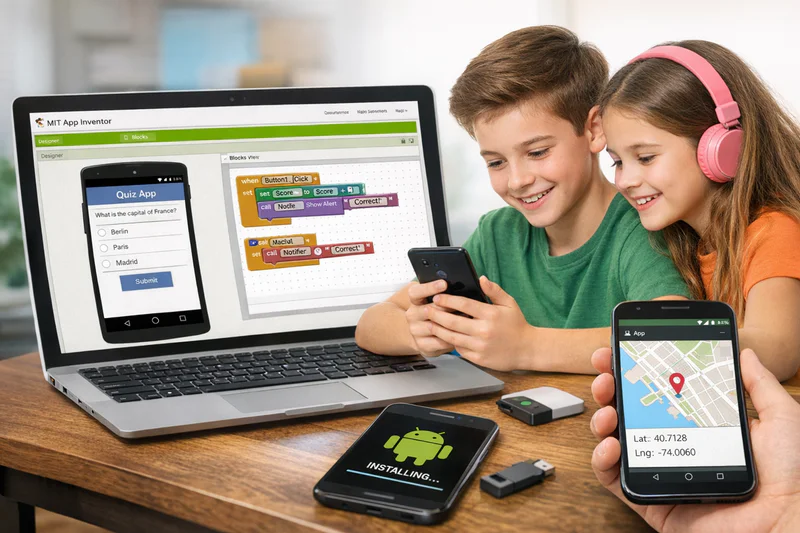
Most tools that promise children can "build apps without coding" produce simulations. Buttons that look like apps but don't actually run anywhere. Demos that work inside a proprietary browser environment and nowhere else. MIT App Inventor is different. It produces real Android applications that install and run on actual phones, shared via a link, tested on any compatible device, and built by children aged 10 and above using a block-based interface that requires no prior coding experience.
Developed at the Massachusetts Institute of Technology, MIT App Inventor for kids is not a simplified toy version of app development. It is a fully functional development environment that uses the same logical structures as professional programming, expressed through visual blocks rather than typed syntax. Children who build apps in App Inventor are learning genuine programming concepts. The blocks are just a more accessible way to express them.
This guide explains what MIT App Inventor is, how it works, what children build with it, the right age to start, and how it fits into a broader coding education.
Key Takeaways
MIT App Inventor is a free, browser-based tool from MIT that lets children build real Android apps using block-based programming, no typing required.
Children aged 10 to 14 are the primary target group, with some motivated 9-year-olds succeeding with good instructor support.
Apps built in App Inventor run on real Android devices and can be shared with family and friends immediately.
The platform teaches genuine programming logic: events, conditionals, loops, variables, data storage, and device sensors.
Codeyoung's MIT App Inventor programme guides children through building real apps in live 1:1 sessions, from a blank screen to a working, shareable application.
What Is MIT App Inventor and How Does It Work?
MIT App Inventor is a web-based development environment. Children access it through any browser, no installation required. The interface has two views that children switch between: the Designer view and the Blocks view.
In the Designer view, children drag and drop components onto a phone-shaped canvas. A button here. A text label there. An image, a text input field, a sound player. These are the visual elements that users will see and interact with when they use the app. This part feels a little like building with LEGO, which is exactly the experience MIT intended.
In the Blocks view, children define what those components actually do. When the button is tapped, what happens? When the text is typed, where does it go? When the phone is shaken, what sound plays? The logic is expressed through interlocking blocks that snap together like puzzle pieces. No semicolons, no bracket matching, no type declarations. If the logic is wrong, the blocks won't fit together or the app won't behave as intended. Both are useful forms of feedback.
Is MIT App Inventor really free to use?
Yes, completely. MIT App Inventor is free for anyone to use, with no registration required to start exploring. Creating projects requires a Google account for saving, which most children aged 10 and above already have. There are no paid tiers, no premium features behind a paywall, and no limits on the number of projects a child can create. MIT maintains the platform as an educational public resource, and it has been used by tens of millions of learners across more than 195 countries.
What Programming Concepts Do Kids Learn Through MIT App Inventor?
One of the most common parent questions is whether App Inventor teaches real programming or just surface-level interaction design. The answer is that the concepts it teaches are genuinely foundational, the same concepts that appear in Python, Java, and every other professional language.
Programming Concepts Taught Through MIT App Inventor
Children who build projects in App Inventor are not just moving blocks around. They are practising genuine computational thinking: breaking a task into events, deciding what data needs to be stored, working out what conditions should trigger what responses. These habits transfer directly when they later move to text-based languages.
What Apps Do Kids Actually Build With MIT App Inventor?
This is the question that matters most to children evaluating the platform. Here is a realistic picture of what is achievable at different stages, based on a structured learning path.
MIT App Inventor Projects for Kids by Skill Level
The quiz app deserves particular mention because it consistently produces one of the most powerful early experiences in children's coding education. A child who builds a quiz about their own favourite topic, with real questions, a scoring system, and a results screen, has made something that other people in their life can actually use and enjoy. That moment of sharing a working app is one of the most motivating experiences in the whole learning journey.
Want your child to build their first real Android app with a qualified 1:1 instructor guiding every session? Book a free trial class at Codeyoung and see the first session in action.
What Age Is Right for Kids to Start MIT App Inventor?
Most children are ready to begin MIT App Inventor from around age 10 to 11. The platform requires comfortable reading, basic maths understanding (enough to work with numbers in conditions and calculations), and the ability to follow a multi-step logical process. Children who have spent time with Scratch have a significant advantage because the block-based interface is conceptually similar, though App Inventor's blocks operate at a higher level of complexity.
MIT App Inventor Readiness by Age and Prior Experience
Children aged 14 and above who are comfortable with logical thinking often find App Inventor accessible enough to progress quickly but then want to move toward text-based development sooner than younger students. That progression is natural and desirable: App Inventor works best as a bridge into professional development, not as the final destination.
How MIT App Inventor Fits Into a Child's Broader Coding Journey
MIT App Inventor sits in a specific and valuable position within the children's coding education sequence. It is more powerful than Scratch (which produces browser-based projects), but more accessible than text-based languages like Python or Java (which require reading and writing syntax). That middle position makes it the ideal bridge for children who are ready to go beyond Scratch but not yet ready for the cognitive demands of typed code.
Children who complete a structured App Inventor course and then move to Python typically find the transition smoother than those who jump directly from Scratch to Python. App Inventor has taught them to think about events, conditions, data storage, and multi-screen logic. They arrive at Python with that conceptual toolkit already in place and just need to learn the new syntax for expressing familiar ideas.
The Codeyoung MIT App Inventor programme is designed with this progression explicitly in mind. Across more than 45,000 students in the USA, UK, Canada, and Australia, Codeyoung has found that children who follow the Scratch to App Inventor to Python path develop the strongest and most durable programming foundations. Explore the full app development track to see how the programmes connect.
How Does Testing and Sharing Apps Work in MIT App Inventor?
One of the platform's most motivating features is how quickly children can see and share their work on a real device. There are three ways to test an App Inventor project.
The first is the built-in emulator, which simulates an Android phone directly in the browser. This requires no physical device and works on any computer. It is slightly slower than a real phone but perfectly functional for development and testing.
The second is live testing via the MIT AI2 Companion app (free on Google Play). The child downloads this app on any Android phone, connects to the same network as their computer, and the app mirrors in real time as they build. Every change in the Designer or Blocks view immediately appears on the phone. This live connection produces a very satisfying development experience, particularly for younger children who want to see their work running on a real device as fast as possible.
The third is generating an APK file, which is a standard Android installation package. The child downloads this file and installs it on any Android device. They can then share it with family and friends via a simple download link. This is what produces the "real app" experience: an icon on the home screen, opening and running like any other Android application.
Frequently Asked Questions About MIT App Inventor for Kids
What is MIT App Inventor and who made it?
MIT App Inventor is a free, web-based development environment created by researchers at the Massachusetts Institute of Technology. It allows children and beginners to build real Android applications using a block-based visual interface, without needing to write any typed code. Originally developed in a collaboration between MIT and Google, it has been maintained by MIT since 2012 and is used by tens of millions of learners in more than 195 countries worldwide.
Can kids really build a real app with MIT App Inventor, or is it just a simulation?
Children build real, functional Android apps. Projects created in App Inventor can be exported as APK files (the standard Android app format) and installed on any Android phone or tablet. They appear as icons on the home screen and run like any other installed application. They are not simulations, demos, or browser-only experiences. A child who builds a quiz app in App Inventor can share the download link with family members who install and play it on their own devices.
Does MIT App Inventor teach real coding skills?
Yes. While App Inventor uses blocks rather than typed syntax, the underlying programming concepts are genuine: event handling, conditionals, loops, variables, lists, data persistence, and API access. Children who build projects in App Inventor are practising computational thinking in a format that transfers directly to text-based languages. The transition from App Inventor to Python or Java is significantly smoother for children who have built a conceptual foundation through App Inventor than for those who jump straight into typed syntax from a block-based tool like Scratch.
What Android devices are compatible with MIT App Inventor apps?
MIT App Inventor apps can run on any Android device running Android 2.3 or higher, which covers virtually all Android phones and tablets manufactured in the past ten years. Testing during development uses the free MIT AI2 Companion app (available on Google Play) or the built-in browser emulator. Final apps are exported as APK files that install on any compatible Android device. iOS and Apple devices are not supported; App Inventor is Android-only.
Is MIT App Inventor better than Scratch for learning to code?
They serve different purposes and different age groups rather than one being straightforwardly better. Scratch is ideal for children aged 6 to 10 as a first introduction to programming logic through creative, visual projects. MIT App Inventor is better suited to children aged 10 and above who are ready to build functional applications that run on real devices. Many children use both in sequence: Scratch builds the conceptual foundation that App Inventor then extends into genuine mobile app development.
How long does it take a child to build their first MIT App Inventor app?
In a structured 1:1 session, most children aged 10 to 12 complete their first functional single-screen app within 3 to 5 sessions. A multi-screen app with score tracking or basic data storage typically takes 8 to 12 sessions. The timeline depends on the child's prior experience with logic-based tools, the complexity of the app they want to build, and whether they have an instructor guiding the process or are working independently from tutorials.
What is the difference between MIT App Inventor and Thunkable?
Both platforms let children build apps using visual interfaces without writing typed code. MIT App Inventor is free, Android-only, and maintained by MIT as an educational resource. Thunkable is a commercial platform with free and paid tiers that supports building for both Android and iOS. App Inventor is generally considered more educational in its design, with a cleaner block structure that maps more directly to programming concepts. Thunkable offers a slightly more polished output for cross-platform deployment. For educational purposes and pure Android development, App Inventor is typically the recommended starting point.
Can children use MIT App Inventor to access phone features like the camera or GPS?
Yes, and this is one of App Inventor's most exciting features for children. The platform provides built-in components for GPS location, the accelerometer (motion sensing), the camera (taking photos within an app), text-to-speech, barcode scanning, and Bluetooth. These are real hardware APIs, not simulated features. A child can build a simple navigation app that displays their GPS coordinates, or a sound-reactive app that responds to phone movement. Accessing real device sensors is a significant step beyond what most beginner coding platforms offer.
Is MIT App Inventor suitable for children who have never coded before?
For children aged 12 and above, yes. The block-based interface removes syntax pressure, and the visual feedback of seeing a component appear on the phone-shaped preview makes the learning feel immediately tangible. For children aged 10 to 11 with no prior coding experience, a few sessions with Scratch or Code.org first is recommended to build basic event-and-response logic before starting App Inventor. The platform is accessible, but some foundational thinking habits make the first sessions more productive.
How does Codeyoung teach MIT App Inventor to children?
Codeyoung's MIT App Inventor programme is delivered through live 1:1 sessions with a qualified instructor. The curriculum starts from the Designer view basics and progressively introduces more complex logic and device features as the child's confidence grows. Each session ends with a working addition to the child's app. Instructors adapt pacing, project type, and difficulty to each individual student rather than following a fixed schedule. The programme is designed for children aged 10 to 15 and connects naturally into Codeyoung's broader app development and Python tracks for students who want to continue.
From Blank Screen to Real App: MIT App Inventor Makes It Happen
MIT App Inventor delivers something rare in children's education: a tool that is genuinely accessible to beginners and genuinely powerful enough to produce something real. A child's first App Inventor project is not a simulation of making an app. It is making an app, which runs on a real phone, which other people can install and use.
That tangibility changes how children see themselves in relation to technology. They stop being users of what others built and start being builders of things others use. That shift in identity, from consumer to creator, is one of the most valuable outcomes coding education can produce, and App Inventor is one of the most reliable ways to produce it.
Explore Codeyoung's MIT App Inventor programme for children aged 10 to 15, or book a free trial session to see what the first class looks like.
Ready for your child to build their first real Android app?
Codeyoung offers personalised 1:1 live MIT App Inventor classes for children aged 10 to 15. Real apps, real devices, expert instructors, and a completely free first session with no commitment required.