How Codeyoung Works: Live 1:1 Coding and Maths for Kids
Parents who are thinking about enrolling their child at Codeyoung usually have the same set of questions. What exactly happens in a session? Who are the instructors? How does the curriculum work? What should a child know before starting? What does the first class look like? And, always, how much does it cost and is there a free trial?
This guide answers all of those questions directly. No promotional language, no obscured detail. Just a clear, honest explanation of what Codeyoung is, how it works, who it's for, and what parents can realistically expect from it.
Key Takeaways
Codeyoung delivers live, 1:1 online coding and maths instruction for children aged 6 to 17 in the USA, UK, Canada, and Australia.
Every session is a dedicated 1:1 interaction between one child and one instructor, no group sharing of instructor attention, ever.
The curriculum is personalised from the first session, starting with an assessment that identifies the child's current level and goals rather than placing them by year group alone.
Coding tracks include Scratch, Python, AI/ML, web development, app development, Java, and game development. The maths programme covers school curriculum support, mental arithmetic, and Vedic techniques.
The first session is completely free, no payment, no commitment, no credit card required to book.
What Is Codeyoung?
Codeyoung is a live 1:1 online education platform that delivers coding and maths instruction to children aged 6 to 17. Founded with the belief that every child deserves the kind of personalised instruction that a dedicated expert tutor provides, Codeyoung connects children with qualified instructors for sessions delivered entirely online via video call, with real-time screen sharing and collaborative coding.
The company serves families primarily in the USA, UK, Canada, and Australia, with a global community of 45,000+ students who have taken classes through the platform. Instruction is in English. Sessions are scheduled flexibly across time zones to accommodate family schedules in all four primary markets.
Codeyoung's two core programmes are:
Coding: Scratch, Python, AI/ML, web development, app development (MIT App Inventor), Java, and game development. For children aged 6 to 17 at every experience level from complete beginner to advanced.
Maths: School curriculum support, mental arithmetic, Vedic maths techniques, and foundational gap-filling. For children aged 6 to 17 from basic numeracy through to pre-university mathematics.
The Format: What "Live 1:1" Actually Means
"Live 1:1" is the most important phrase in how Codeyoung describes its approach, and it's worth being specific about what it means in practice because it distinguishes Codeyoung's model from the majority of online education alternatives.
Codeyoung's Format vs Common Alternatives
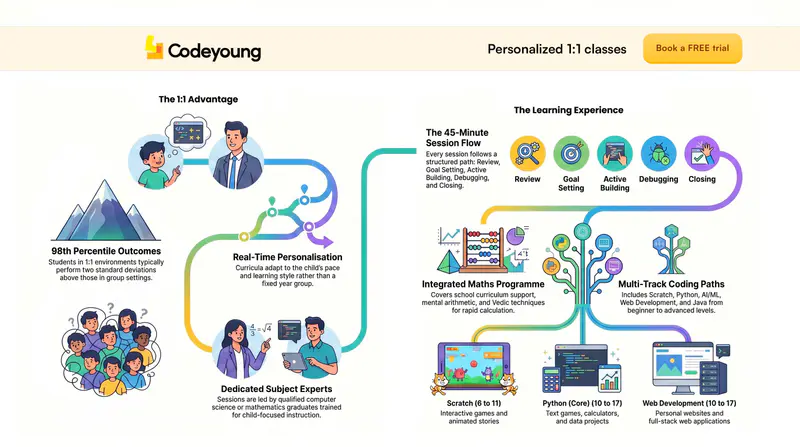
The research case for 1:1 instruction is well-established. Benjamin Bloom's landmark study found that students receiving 1:1 instruction performed two standard deviations above those receiving group instruction on the same content. In practical terms: a child who might place in the 50th percentile in a group class environment typically achieves outcomes in the 98th percentile range with equivalent 1:1 instruction. The format is not a preference, it's the primary driver of learning outcomes.
For a detailed comparison of 1:1 vs group coding instruction, see 1:1 vs Group Coding Classes for Kids: Which Actually Works Better?
What Happens in a Codeyoung Session
A typical Codeyoung session is 45 to 60 minutes. Here is what it actually looks like, from the child's perspective.
Opening (5 minutes): The instructor and child reconnect. The instructor briefly reviews what was covered last session: not as a test, but to activate the prior concepts before building on them. If the child coded between sessions, the instructor asks to see it.
Session goal (2 minutes): Together, the instructor and child agree on one specific, achievable goal for today. "Add a scoring system to the game." "Make the quiz shuffle its questions." "Build the navigation menu for the website." One goal. It must be completable within the session.
Building (25 to 35 minutes): The child codes. The instructor watches, asks questions, introduces new concepts as needed ("to make that work you'll need a loop, let me show you why"), and guides the child through errors without immediately solving them. The child's keyboard is doing the work.
Debugging (5 to 10 minutes): When something doesn't work, and it usually doesn't work first time: the instructor guides the child through diagnosing the problem systematically. What does the error message say? What was the last change? What should we check first? This is not wasted time: debugging is where the deepest learning in coding happens.
Close and next steps (5 minutes): The session ends with something working. The instructor asks: "What did you figure out today?" and "What do you want to add next time?" The second question is the most important: it sends the child away thinking about their project rather than putting it aside until the next session.
For a detailed guide to what the first few months of this process look like and what children typically build, see Kids Who Code: Real Stories and What the Journey Looks Like.
The Curriculum: Coding Tracks and Maths Programme
Codeyoung does not follow a single fixed curriculum. The instructor and the child's learning goals determine what is covered and at what pace. What Codeyoung provides is a structured framework of progressive skills within each track, which the instructor draws from based on where the child currently is and where they want to get.
Coding Tracks
Codeyoung Coding Tracks: Who They Are For and What Children Build
Maths Programme
Codeyoung's maths programme operates on three parallel dimensions within each session:
School curriculum support: Directly addressing the maths topics the child is currently covering in school, filling gaps, and extending understanding beyond what the classroom has time to develop.
Mental arithmetic and Vedic techniques: Building the calculation fluency that underpins confident mathematical reasoning, times tables, mental multiplication, estimation, and Vedic methods for rapid calculation.
Foundational gap-filling: Identifying and addressing conceptual gaps from earlier topics (commonly fractions, number sense, or proportional reasoning) that are causing difficulty in current school maths.
For more on what the maths programme covers at each stage, see Maths for Kids: How to Build Strong Foundations at Home and Online Maths Classes for Kids: What to Look for.
Ready to see this in action for your child? The first class is completely free, no payment, no commitment. Book it in under 2 minutes.
Book Your Child's Free Trial Class →
Who Are the Codeyoung Instructors?
Codeyoung instructors are qualified, experienced educators in their subject area who are specifically trained in the 1:1 online instruction format. The instructor quality is the most important factor in whether a child makes genuine progress, and it is the dimension Codeyoung invests most heavily in.
What parents can expect from a Codeyoung instructor:
Subject expertise: Instructors are qualified in the subject they teach, computer science graduates or equivalent for coding tracks, mathematics graduates or equivalent for the maths programme.
Child-focused instruction: The ability to adapt technical content to a child's current developmental level, attention span, and learning style. An excellent software engineer who cannot adapt their explanation to an 8-year-old is not an excellent children's coding instructor.
Consistent ownership: Each child works with the same instructor across sessions wherever possible, so the instructor knows the child's project history, their specific strengths and gaps, and what they find motivating. Instructor continuity is one of the strongest drivers of learning outcomes in 1:1 instruction.
Responsive feedback: The instructor's primary mode is questioning, not explaining, "what do you think is happening here?" before "here is what is happening here." This keeps the child's problem-solving active throughout the session.
The instruction approach at Codeyoung is grounded in the same evidence base that supports live 1:1 instruction broadly: real-time adaptation to the specific child, immediate error correction, and personalised challenge calibration that no group or self-paced format can match.
What Should a Child Know Before Starting?
Nothing specific. Codeyoung's starting point is determined by what the child currently knows, not by any prerequisite. The assessment in the first session identifies the right entry point.
For coding, children with no experience whatsoever start on Scratch (ages 6 to 10) or introductory Python (ages 11 and above). Children who already know some coding start at the appropriate level within the relevant track: not at the beginning of the curriculum regardless of what they've already learned.
For maths, children at any level from basic numeracy through to pre-calculus start at the point identified by the session assessment. A child who is struggling with fractions in Year 6 starts with fraction foundations. One who is confident through GCSE content but needs extension starts at extension level.
There is no "too young" within the 6 to 17 age range, and no "too old" to begin. The question is always: what does this specific child need next?
For a guide to assessing whether a child is ready to start coding, see Is My Child Ready to Learn Coding?. For the progression from first session to advanced work, see How Long Does It Take Kids to Learn Coding?
How Does the Free Trial Work?
The free trial is a complete, full-length session: not a shortened demonstration or an introductory chat. It includes a brief assessment of the child's current level, the first 20 to 30 minutes of instruction on an actual project or topic relevant to where the child is, and a conversation with the parent about the child's goals and the recommended path forward.
No payment is required to book the free trial. No credit card details are collected at booking. The session is free regardless of whether the family decides to continue.
The free trial is specifically designed so that parents can see for themselves, in 45 minutes, what a Codeyoung session produces for their specific child. Not a description of it, not a testimonial about another child's experience, but the direct observation of a qualified instructor working with their child.
For what to expect from the first session in detail, see Free Trial Coding Class for Kids: What to Expect.
What Does Progress Look Like Over Time?
The most important thing parents can track is not how many sessions their child has completed, but what the child can build independently. The milestones that matter are behavioural, not numerical.
Signs of early progress (months 1 to 3): The child talks about their project between sessions without prompting. They can explain what a specific part of their code does. They notice errors themselves rather than waiting to be told. They arrive at sessions with ideas for what they want to add.
Signs of developing independence (months 3 to 6): The child can start a new small project without step-by-step guidance. They debug errors by forming hypotheses and testing them rather than immediately asking for help. They code voluntarily between sessions on their current project.
Signs of genuine competence (months 6 to 18+): The child proposes and executes multi-session projects of their own design. They use documentation and community resources to answer questions the instructor hasn't addressed. They can explain their design decisions, not just their code.
Progress is not linear, most children hit a difficulty plateau around months 2 to 3 before a breakthrough produces a step-change in capability. This is normal, expected, and temporary. The instructor manages this phase actively, adjusting projects and expectations to keep the child moving through the difficulty rather than around it.
For the full coding milestone framework and realistic timelines, see How Long Does It Take Kids to Learn Coding?
Frequently Asked Questions About Codeyoung
What ages does Codeyoung teach?
Codeyoung teaches children aged 6 to 17. The curriculum is adapted to the child's developmental stage at every age: shorter, more visual, more game-based sessions for younger children; deeper, more project-intensive, career-relevant instruction for teenagers. The minimum age of 6 reflects the readiness for structured instruction in block-based coding. There is no upper limit within 17, many students join as teenagers with specific goals and achieve meaningful results before leaving school.
Does Codeyoung teach maths as well as coding?
Yes. Codeyoung's maths programme delivers live 1:1 maths instruction using the same format as the coding programme. Sessions cover school curriculum support, mental arithmetic, Vedic techniques for rapid calculation, and foundational gap-filling. The maths and coding programmes are offered as separate enrolments and can be taken independently or in combination. Children who take both benefit from the reinforcement between subjects: coding uses maths concepts purposefully, and strong numerical fluency makes programming logic more intuitive.
What countries does Codeyoung serve?
Codeyoung's primary markets are the USA, UK, Canada, and Australia. Sessions are scheduled across time zones to accommodate families in all four markets. The curriculum is aligned to the relevant national standards where applicable, UK National Curriculum Computing, US Common Core and AP CS, Australian Digital Technologies curriculum. Families in other English-speaking countries are welcome; the curriculum framework adapts to wherever the child's school programme sits.
How is Codeyoung different from other online coding platforms for kids?
The primary difference is the live 1:1 format. Most children's coding platforms deliver either self-paced video content or group classes. Codeyoung delivers live sessions with a single qualified instructor dedicated entirely to one child. This format produces faster, more durable progress because the instructor adapts in real time to what the specific child does and doesn't understand. Secondary differences include the breadth of coding tracks (Scratch through to Python AI/ML), the integration of maths instruction alongside coding, and the assessment-first approach that starts every child from their actual level rather than a fixed curriculum entry point. For a full comparison framework, see Online Coding Classes for Kids: What to Look for Before You Enrol.
What is the minimum commitment at Codeyoung?
The first class is free with no commitment at all. After the free trial, families choose a schedule and frequency that suits them. There is no long-term contract required to start. Most families find that two sessions per week produces the best balance of progress and sustainability; one session per week is the practical minimum for consistent forward movement.
What technology does my child need for Codeyoung sessions?
A laptop or desktop computer with a camera and microphone, a stable internet connection, and any standard browser. A tablet can work for younger children on Scratch but is not recommended for text-based coding from age 10 onwards: a proper keyboard is important for Python and web development. No software beyond a browser is required for most sessions. For Python, the instructor will walk the child through a simple free installation if needed.
How do I book the free trial?
Book directly at codeyoung.com/book-demo. The booking process takes under 2 minutes, you'll choose a time slot, provide your child's age and current level (if known), and receive a confirmation with a video call link. No payment details are required to book. The session is free regardless of any subsequent decision about continuing.
What can a child realistically achieve at Codeyoung?
Children who attend consistently achieve genuine, demonstrable coding or maths capability rather than just completion certificates. By month 3, most children can start and finish a small project independently. By month 6 to 9, most are building projects of real complexity, multi-level games, functional websites, data visualisation projects. By month 12 to 18, many are building portfolio-worthy work that represents genuine technical accomplishment. The realistic outcome depends on age, starting level, and session frequency, but the consistent pattern is meaningful capability, not just familiarity. For the full progression framework, see the complete guide to coding for kids.
The Best Way to Understand Codeyoung Is to Try It
Every description of how live 1:1 instruction works is less informative than watching a qualified instructor work with your specific child for 45 minutes. The session adapts to the child in front of it, their curiosity, their confusion, their pace, their interests, in a way that no description of the format can fully capture.
The free trial is designed for exactly this: not to persuade, but to demonstrate. One session with a qualified Codeyoung instructor produces a better basis for a decision than any amount of research about what live 1:1 coding instruction can achieve.
If the session is valuable, the path forward is clear. If it isn't, nothing has been spent. Book the trial, see what happens, and decide from what you observe.
See what Codeyoung does, for your child, in one session.
Book your child's free trial class today. One 45-minute live session with a qualified instructor. No payment required. No commitment. Just the session.