Collaborative Coding: Teaching Teamwork Through Pair Programming
Collaborative Coding: Teaching Teamwork Through Pair Programming
While coding is often imagined as a solo activity with a child alone at a computer, real-world software development rarely works that way. The apps we use every day. The games children love. The AI tools shaping the future. They are built by teams.
Behind every successful product are developers, designers, testers, and programmers working together. They brainstorm ideas, divide tasks, review each other’s work, and improve the final project as a group. Modern programming is deeply collaborative. That is why collaborative coding matters so much today.
Instead of learning to code alone, children can learn to code together. Through structured collaboration, children practice explaining their logic, listening to teammates, and improving code through discussion. In this guide, we’ll explore:
What collaborative coding really means
How pair programming work happens in real classrooms
The many benefits of coding as a team
The best collaborative coding tools available today
Practical project ideas for schools and homes
Because in today’s world, learning to code is important. But learning to collaborate while writing code is what truly prepares children for the future.
Key Takeaways
Collaborative coding reflects how the real world builds technology. Modern apps, AI systems, and digital platforms are created by teams and collaborative coding for kids prepares students for that professional reality.
Pair programming strengthens both logic and communication. When students share one computer, switch roles, and debug code together, they develop structured thinking, confidence, and real-world teamwork habits.
Collaborative model drives measurable growth. Structured team-based coding has consistently supported stronger problem solving, higher engagement, and improved academic performance.
Learning to code together builds future-ready skills. Through collaborative projects, feedback cycles, and pair programming practice, students develop leadership, resilience, and adaptability; skills essential for careers in computer science and technology.
What Is Collaborative Coding?
At its simplest, collaborative coding means two or more people working together to write, test, and improve code. Instead of one student handling everything alone, a small team shares responsibility for building a project from start to finish.
This approach mirrors how software is built in the real world. In today’s technology-driven world, programmers work in teams. They plan together, write code in parts, test each other’s work, and refine it through discussion. No major app or website is created in isolation.
In fact, most experienced developers rely on structured collaboration methods such as peer programming and formal code review systems to improve quality. This shift transforms coding from a solo activity into a collaborative learning experience. It builds technical knowledge while strengthening communication skills and shared problem solving.
How Coding Becomes a Team Activity
Coding becomes collaborative when students work on one shared project instead of separate assignments.
For example, two students design a simple game together, a small team builds a quiz app, a group creates a basic website layout, or students debug code together during a class challenge.
In these situations, students work as a team. They divide tasks clearly. One student may focus on designing the interface, while another writes the logic behind it. They regularly review each other’s code, suggest improvements, and test the program before final submission.
This is where pair programming work often begins. In structured pair programming sessions, two programmers share one computer. They discuss every step before writing code. One types while the other reviews and guides. Then they switch roles. This ensures active participation and shared understanding of the process.
Teachers can introduce small coding projects that encourage collaboration, such as building a calculator app, designing a basic web development layout, creating an interactive story, or developing a simple game with scoring rules.
These project ideas allow students to solve challenges together while practicing real-time communication. They learn to debug code as a group, not alone. They explain logic out loud. They ask questions. They refine solutions. This model reflects how programmers work in professional environments. It builds confidence while also teaching responsibility.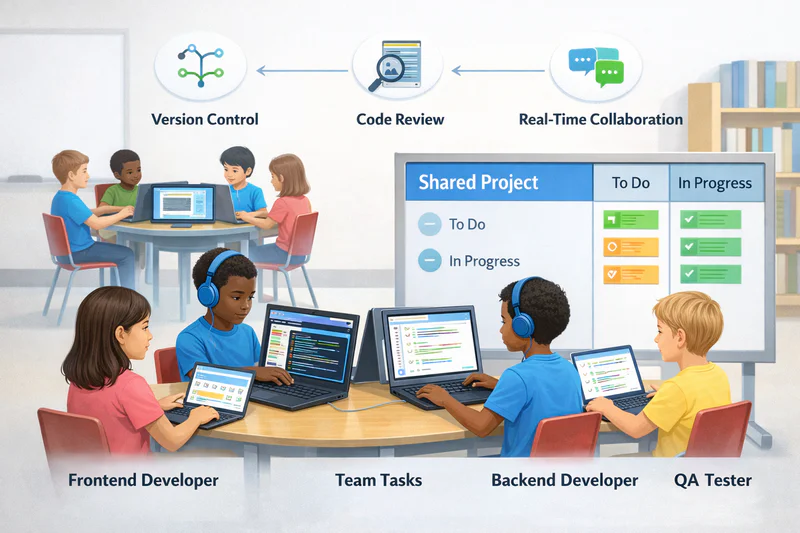
Real-World Examples of Collaborative Programming
To understand why collaborative coding matters, look at how software is built today. Every major platform used across the world is developed by large teams of developers and programmers. These teams include different roles, each responsible for specific tasks. For instance:
A frontend developer designs what users see.
A backend developer manages the logic and data behind the scenes.
A UI designer focuses on user experience.
A QA tester checks for bugs and performs detailed code review.
Engineers use version control systems to track changes and support code sharing among other developers.
Two developers rarely build a complex product alone. Instead, programmers work in coordinated teams. They meet regularly, review progress, and refine features before launch. Even in areas like machine learning and advanced computer science, collaboration is essential. Specialists contribute different knowledge and skills to create a complete solution.
This is why introducing collaborative coding for kids is so powerful. It prepares students for how technology functions in the present world. When children learn to collaborate early, they develop teamwork habits that extend beyond coding. They gain problem solving ability, leadership exposure, and adaptability.
Team-based coding activities mirror how real developers collaborate. Students don’t just write code, they learn how to communicate, review, and improve it together in guided sessions designed for real-world preparation.
Why Teamwork Matters in Programming
Coding is not just about logic. It is about communication, structure, and shared problem solving. In today’s digital world, almost every successful project is built by a team. From simple web development tools to advanced machine learning systems, programmers work together to design, test, and improve solutions for millions of users.
That is why collaborative coding is more than a classroom strategy. It reflects how real developers operate in the present technology landscape. When students participate in group coding projects or structured team coding projects for students, they learn how to:
Divide tasks
Share knowledge
Review each other’s code
Debug code together
Communicate ideas clearly
How Professional Developers Work Together
In the professional world, programmers rarely work alone. They rely on structured systems that improve collaboration and quality. In practice:
Code review ensures that another developer checks the code before it is finalized.
Version control systems track changes and make code sharing safe and organized.
Agile teams divide large projects into smaller tasks.
Daily stand-up meetings keep team members aligned on goals and progress.
Two programmers may write different parts of the same program. Two developers may solve the same challenge in different ways. But through structured feedback and shared control, the final product becomes stronger.
This structured process ensures that developers remain focused, organized, and up to date. For instance, in structured pair programming work, two programmers share one computer. One writes the code. The other reviews logic and suggests improvements. Then they switch. This builds accuracy and deeper understanding.
Educational research in collaborative learning environments shows that students who engage in structured team-based programming show stronger retention of core concepts and improved problem solving ability compared to solo learners.
Soft Skills Kids Gain from Coding in Teams
When students code together, they build essential skills that extend far beyond programming. They develop:
Strong communication skills
Patience during group challenges
Leadership when guiding teammates
Accountability for shared results
Adaptability when ideas change
Like during a shared project, one student may explain a concept while another tests the solution. They exchange feedback, refine ideas, and adjust their approach. This encourages active participation and builds confidence. When two developers or two programmers collaborate, they learn to respect different perspectives. They learn that great ideas often come from discussion.
For children, this is a great chance to prepare for the future. Careers in computer science, software engineering, and even emerging fields like AI demand teamwork. Employers value developers who can communicate clearly, support others, and work through challenges without conflict.
Benefits of Collaborative Coding for Kids
The biggest advantage of collaborative coding for kids is that it strengthens both academic ability and social development at the same time. Coding already teaches logic and structure. But when children collaborate, the learning process becomes deeper and more meaningful. They learn to break large tasks into smaller steps, manage shared responsibility, and improve their thinking through discussion.
In today’s technology-driven world, developers do not work in isolation. They operate within teams, platforms, and global networks. Introducing structured collaboration early gives children a clear understanding of how programming functions in the present world.
Building Communication Skills
When students work on a shared project, they must explain their logic clearly. They describe what the code does. They clarify ideas before typing. They explain why a certain solution works. This simple habit strengthens communication skills.
For instance, when two students debug a program together, one might explain the logic step by step while the other checks for errors. This active participation forces them to think carefully about each line of code. Over time, they learn to:
Use technical vocabulary correctly
Present ideas in structured form
Focus on clarity instead of speed
Learning to Give and Receive Feedback
Professional developers rely on structured code review systems. They share work, receive feedback, and improve through discussion. Children can practice this early.
In classroom coding projects, students review each other’s code and offer constructive criticism. They learn that feedback is not personal. It is part of the process. Such as:
One student may suggest a cleaner way to write a loop.
Another may identify a logic gap in the project.
A team member may point out where users might get confused.
This teaches respectful collaboration and accountability.
Problem-Solving as a Group
Coding always comes with challenges. When errors appear, programs fail, and logic breaks, students must investigate together.
When students debug code together, they approach problems in different ways. One may analyze structure. Another may focus on user experience. A third may check syntax. This shared problem solving builds resilience.
For instance, when a game project does not respond correctly, the team must investigate step by step. They identify where control fails, test new ideas, and track progress until the solution works. This process strengthens creative thinking, shared ownership and persistence during challenges
Research in science and technology education shows that collaborative environments improve long-term problem solving ability because learners are exposed to different ways of thinking.
Pair Programming for Kids: A Beginner-Friendly Approach
Among all models of collaborative coding, pair programming for kids is the simplest to implement and one of the most effective. Instead of managing a large team, two students share one coding task. They sit at one computer, discuss ideas, and build a single project together. This structure keeps the process focused while encouraging collaboration.
Also known as peer programming, this method mirrors how professional developers often work when solving complex problems. It creates balanced teams, promotes active participation, and strengthens real-time communication.
What Is Pair Programming?
At its core, pair programming involves two students and one computer.
Two programmers share a single task
They discuss logic before typing
They debug code together
They solve challenges through continuous discussion
This shared problem solving builds deeper understanding. Instead of silently writing code, students explain their reasoning step by step.
If a program fails to run, one student may explain what the function is supposed to do while the other checks for errors. This helps them catch mistakes faster and build stronger knowledge of programming concepts.
How to Set Up a Pair Programming Session
Setting up pair programming for kids is simple.
Choose a small project.
Assign clear roles.
Set a time limit.
Rotate roles regularly.
Start with manageable project ideas like:
A number guessing game
A simple calculator
A quiz with scoring
A small web development layout
Keep sessions short to maintain focus. Real time collaboration works best in 20–30 minute blocks.
Teachers and parents can also use basic goal tracking methods to measure progress. This keeps students motivated and helps them see improvement over time.
Roles: Driver and Navigator Explained
Pair programming follows a clear structure.
The Driver types the code.
The Navigator reviews, guides, and suggests improvements.
The driver focuses on writing code accurately. The navigator checks logic, anticipates challenges, and ensures the solution aligns with the goal. Switching roles is key.
When students rotate, both gain full access to the learning process. They experience different responsibilities and strengthen different skills.
Best Tools for Collaborative Coding Projects
Even the best ideas need the right tools. Modern coding collaboration tools make it easy for students to share code, edit in real time, and track changes. These platforms include built-in collaboration features that support structured teamwork.
When chosen carefully, the right platform simplifies the process and keeps teams aligned.
Kid-Friendly Platforms for Coding Together
For younger students, visual platforms are ideal. Scratch classroom environments allow children to:
Share projects
Remix ideas
Comment on each other’s work
Learn through community interaction
These platforms encourage collaborative learning while keeping the experience engaging.
Students can create animations, games, and interactive stories. They see how other developers structure logic. They learn from example projects. This exposure builds creativity and confidence.
At Codeyoung, students as young as five have successfully begun their coding journey, though most start around six. With experience teaching over 50,000 students globally, Codeyoung has found that readiness depends less on age and more on curiosity, focus, and willingness to participate in structured activities especially collaborative ones.
Using GitHub for Team Projects
For middle school and older learners, GitHub introduces more advanced collaboration. GitHub allows students to:
Host code
Manage version control
Practice structured code sharing
Track edits across team members
Version control ensures that no work is lost. It also helps students understand how programmers work in professional environments.
Even experienced developers rely on GitHub to manage large projects across global teams.
Real-Time Collaboration Tools (Replit, CodePen, Scratch)
Some platforms allow students to edit code in real time. Tools like Replit and CodePen support:
Live editing
Shared project links
Instant preview
Chat feature for quick discussion
These tools allow teams to collaborate across many devices. Students can join sessions through video calls or video chat when working remotely.
For group coding projects, this flexibility makes coordination easier. It allows students to work from local environments or remote settings without losing connection.
Collaborative Coding Activities for the Classroom
Teachers can introduce structured team coding projects for students without major setup. Simple group coding projects can transform the classroom into a collaborative learning space.
Group Challenges and Hackathons
Timed coding challenges create excitement. Small teams compete to:
Build a mini app
Solve a logic puzzle
Design a basic game
Creative constraints encourage new ideas. Teams must divide tasks quickly and work efficiently. Hackathon-style events teach students how to manage time, communicate clearly, and stay focused under pressure.
Building a Class Project Together
A larger shared project builds long-term collaboration. Consider this:
A classroom game
An interactive quiz
A simple website project
Roles can be divided clearly:
One team handles design
Another writes logic
Another performs code review
Another tests for users
This structure teaches responsibility while exposing students to different roles developers perform in the world.
Peer Code Reviews for Young Learners
Even young students can practice simplified code review. Teachers can use:
Checklist reviews
Code walkthrough sessions
Structured feedback rounds
Students explain their code. Peers ask questions. Suggestions are made respectfully. This builds confidence and reinforces collaboration as a key part of the learning process.
Teaching Teamwork Through Coding at Home
Parents can also introduce collaborative coding for kids without a formal classroom. Children can work with siblings or friends to create small projects. The goal is not perfection. The goal is collaboration.
Sibling and Parent-Child Coding Projects
Simple project ideas at home include:
Build a small game
Create a family website
Design a quiz together
Parents do not need advanced programming knowledge. They can ask questions, encourage explanation, and support problem solving. This strengthens bonds while building technical skills.
Virtual Collaboration with Friends
Students can also collaborate online using safe platforms. Set clear rules:
Schedule sessions
Define tasks
Maintain respectful communication
Use secure platforms
Through virtual teamwork, students gain exposure to how global developers work today.
Overcoming Common Challenges in Group Coding
Like any team activity, collaborative coding comes with challenges. But with structure, these can be managed.
Managing Different Skill Levels
Not all students learn at the same pace. To create balanced teams:
Rotate roles frequently
Pair beginners with intermediate learners
Use scaffolded tasks
Break projects into manageable parts
This ensures everyone remains engaged and builds confidence.
Resolving Conflicts and Encouraging Participation
Clear communication norms are essential. Define responsibilities early. Encourage quieter students to explain ideas. Create safe space for feedback.
Teachers can intervene when needed but should allow students to solve minor disagreements themselves. This builds leadership and adaptability. Collaboration is a skill. It improves with practice.
Preparing Kids for Future Careers with Team Coding Skills
The future of work is collaborative. From software development to AI teams, from game studios to startup environments, developers rarely work alone.
Programming today is about teamwork, structured processes, and shared responsibility. Students who learn pair programming for kids build habits that extend beyond school. They learn to:
Communicate clearly
Support teammates
Manage complex tasks
Solve problems collectively
In a world driven by technology, these skills are not optional. They are essential. When children learn to collaborate while writing code, they prepare for real careers in science, computer innovation, and digital problem solving.
Frequently Asked Questions
What is an example of pair programming?
An example of pair programming is two students building a simple game together on one computer. One types the code while the other reviews logic, suggests improvements, and helps debug errors.
Is pair programming outdated?
No, pair programming is not outdated. Many professional developers still use it to improve code quality, reduce errors, and strengthen collaboration, especially in agile and fast-paced development environments.
How does pair programming work in a classroom?
In a classroom, students work in pairs on one project. They switch between driver and navigator roles, discuss solutions, review code together, and solve problems through structured collaboration.
What is collaborative coding?
Collaborative coding is when two or more people work together to write, review, and improve code. They share tasks, discuss ideas, debug errors, and build a project as a team.
How can two people code together?
Two people can code together through pair programming, where one types while the other reviews and guides. They switch roles, discuss solutions, and solve problems collaboratively on one computer or online platform.