AI and Robotics: How Kids Can Build Their First Smart Machines
Imagine your child building a robot that listens to voice commands, avoids walls, or follows a black line across the floor. Sounds futuristic, right? The truth is, AI and robotics for kids is no longer science fiction. It is affordable, beginner friendly, and fun.
Today, kids robotics is becoming a powerful way for children to explore technology in a hands on way. With the right robot kit, your child can build robot models at home and learn how machines think and move. They do not just play with robots. They create their own robots, program them, and understand how they work.
In this guide, you will discover what AI and robotics are. You will learn how to build robots with step by step instructions. We will cover the best kits to choose and share easy AI robot projects for beginners.
Key Takeaways
Kids can start building robots as young as age 6 using LEGO-based kits with Scratch-style block coding.
AI makes robots "smart" by using sensors for light, distance, and sound. These sensors detect surroundings so the robot can respond through programmed decisions.
Beginners should start with simple projects (line-following, obstacle-avoiding) before advancing to AI-powered robots with machine learning features.
From simple line following machines to robot tank and robotic arm designs, robotics prepares young learners for future careers in science, software development, and engineering.
What Are AI and Robotics?
A robot is a machine that can move, sense its surroundings, and perform tasks. It uses motors, sensors, and electronic components to function. Robotics is about designing and building robots.
Artificial Intelligence, or AI, is the brain behind smart machines. AI allows a robot to make decisions based on data. It can recognize patterns, respond to voice, or adjust its path when it detects an obstacle.
Think of robotics as the body and AI as the brain. When you combine them, you get machines that can move and think. That is what makes AI and robotics for kids so exciting. Children do not just build machines. They create smart machines.
For young learners, these ideas are introduced in simple ways. They connect sensors, write basic code, and watch their robot respond. It feels like magic, but it is actually science and engineering working together.
Many parents choose structured programs to guide this journey. This shows that robotics and coding are not just trends. Instead, they are lasting skills that children can master with good guidance.
Understanding the difference between AI and robotics
Many parents think AI and robotics are the same. They are connected, but not same.
Robotics focuses on hardware. This includes motors, wheels, robotic arm attachments, frames, and all the parts inside a robot kit. It is about building robots that can move or grab objects.
AI focuses on intelligence. It involves software, data, and machine learning. AI helps a robot detect objects, recognize sound, or choose the best path.
For example:
A remote controlled car moves when you press a button. That is robotics without AI.
A robot vacuum that maps your house and avoids furniture uses AI and robotics together.
When kids understand this difference, they gain a deeper understanding of how technology works in the real world.
How AI makes robots "Smart"
A basic robot can move forward and backward. A smart robot can decide when to stop. When a robot stops before hitting a wall, that smart decision comes from AI software processing sensor data.
AI works through sensors and data. Sensors collect information from the environment. For example:
Light sensors detect brightness
Ultrasonic sensors measure distance
Sound sensors detect talking or noise
In an obstacle-avoiding robot, sensors detect distance changes, send that data to the software, and trigger new motor commands.
Machine learning takes this further. The robot learns patterns from repeated input. For beginners, this may look like training a robot to follow a line or recognize simple voice commands.
Children quickly see how input leads to output. They begin to understand logic and control. That is where real learning happens.
Why Kids Should Learn Robotics and AI Together
AI and robotics for kids combine creativity and logic in a powerful way. Robotics gives children hands on building experience. AI teaches thinking and decision making.
When robotics hardware combines with AI software, they create a complete learning path from basic movement to smart decision-making. Children see how hardware and software connect. They learn that coding controls movement. They discover how sensors guide actions.
For beginners, this combination builds strong foundations in science, engineering, and computer skills. This learning approach is active. It is not passive screen time. Kids test ideas, fix mistakes, and try again. That process builds resilience and problem solving skills that last a lifetime.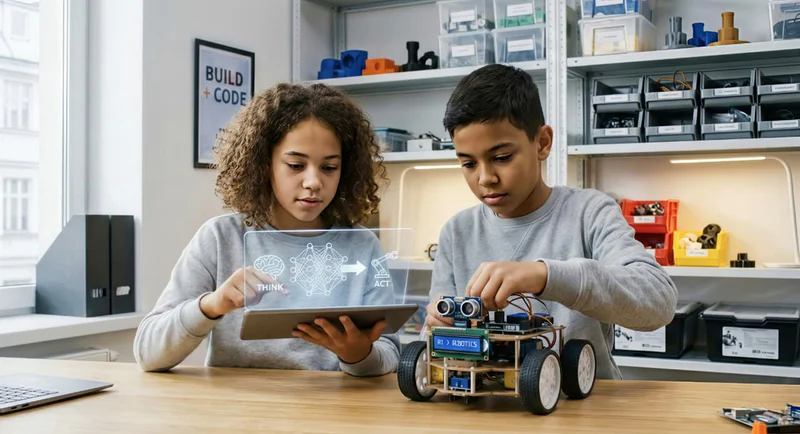
Benefits of hands-on STEM learning
Hands on learning helps children understand concepts faster. Instead of reading about science, they experience it.
Kids robotics improves:
Problem solving skills
Logical thinking
Creativity
Teamwork
Focus
When building robots, children connect wires, attach motors, and program behavior. They see cause and effect in real time. If something does not work, they adjust. That mindset strengthens engineering skills.
Elementary kids especially benefit from this active method. It keeps them engaged and curious. It also makes complex technology feel simple and fun.
Research from MIT Media Lab’s Lifelong Kindergarten group shows that children learn most deeply when they design, build, and program their own robotic creations, rather than just consuming pre-made technology, which strongly supports the value of hands-on robotics for kids.
Skills that carry into the future
Technology shapes the modern world. Learning robotics early gives children a head start.
They gain:
Coding literacy
Basic electronics knowledge
Engineering foundations
Understanding of machine learning
Confidence with technology
These skills support future careers in AI, software development, and engineering. Even if your child chooses another path, the thinking skills remain valuable. Robotics teaches how to analyze challenges and create solutions.
Robotics for Kids: Where to Begin
Parents often ask how to build a robot for kids without feeling overwhelmed. The good news is that beginner friendly robot kit options make it simple.
Choose kits designed for young learners. Look for user friendly instructions and clear diagrams. Most kits include all the parts, motors, sensors, and software needed.
Children do not need advanced tools. They only need curiosity and guidance. Begin with basic projects, then slowly increase difficulty. Building robots step by step builds confidence. If you want to see real examples, explore what students build in their first robotics course with Codeyoung to understand how simple projects gradually turn into smarter robots.
Age-appropriate robotics kits for beginners
Robotics learning progresses through three stages: LEGO kits for ages 6-8, programmable robots for 9-12, and Raspberry Pi with AI for 13+. Each stage builds technical skills while keeping hands-on learning fun and engaging.Choosing the right kit depends on your child's age and experience level.
A Raspberry Pi is a small, low-cost computer. It helps students run programs, connect sensors, and create AI robot projects. It turns simple robotics projects into real-world engineering experiences.
Here's a simple age-based table to guide your choice:
Building your first simple robot
Kids can build a robot in 7 simple steps: assemble the frame, attach motors, connect sensors, install software, write code, upload the program, and test. Most beginner-friendly robotics kits take 1–2 hours to complete.
Here’s the step-by-step process:
Assemble the frame using the box instructions.
Attach motors and wheels.
Connect sensors (light, sound, or distance).
Install the coding app on a computer or tablet.
Drag and drop coding blocks or write basic Python.
Upload the program to the robot.
Test and adjust.
When a robot finds an obstacle, it changes direction. This smart move is guided by AI logic linked to its sensors. Even a simple obstacle-avoiding coding robot shows young learners how software controls hardware.
Building robots teaches how components—motors, sensors, electronics, and software work together. This hands-on learning transforms abstract coding concepts into visible movement.
Why building robots improves problem solving skills
Building robots teaches more than coding. Kids learn how components connect, why a robot detects obstacles, and how software controls motors. When something does not work, they debug the program and adjust sensors. Every robotics project becomes a challenge that builds confidence. That is why kids robotics supports long term academic growth.
Best AI and robotics kits for kids
The best robotics for kids kits are beginner friendly, compatible with Scratch or Python, expandable with sensors, and supported by strong learning communities.
For elementary kids, LEGO robotics kits provide a fun way to start building robots using familiar lego bricks. For intermediate learners, Makeblock offers structured kits with metal components and sensor expansion. For teens and budding engineers, VEX and Raspberry Pi-based kits support machine learning, robotic arm attachments, and even robot tank builds.
Advanced robotics kits for teens (ages 13+) may include AI vision features, camera modules, and machine learning tools using Raspberry Pi boards. These kits connect directly to software development concepts used in the real world.
Choose robotics kits based on:
Age and skill level
Coding language support
Sensor compatibility
Expandability for future projects
Some good options include LEGO robotics sets, Makeblock systems, and VEX kits. Each offers building robots experiences that grow with your child.
Budget-friendly options for beginners
You can start kids robotics without spending much. Many beginner-friendly robot kit options are affordable and safe for young learners. These kits include all the parts, instructions to setup, and easy setup. Most support scratch based coding through a user-friendly app.
Advanced kits for older kids and teens
Advanced kits are for serious learners. They help you gain a deeper understanding of robotics and engineering. Many use raspberry pi or similar mini computer boards and support Python programming.
Advanced robotics kits for teens using Raspberry Pi boards may include AI vision features, camera modules, and machine learning tools. Teens can train models. They can experiment with sensors. They can also control complex robots, like a robotic arm or a smart robot tank. Building robots prepares future engineers for software development and tech jobs.
Once you understand your child’s learning stage, the next step is choosing the right brand and ecosystem.
Comparing popular brands (LEGO, VEX, Makeblock)
Parents often compare LEGO, VEX, and Makeblock when choosing robotics kits. Each brand supports building robots, but they differ in focus.
LEGO
LEGO kits use familiar lego bricks. They are beginner friendly and ideal for elementary kids. Setup feels like play. Coding often starts with scratch style blocks. It is a fun way to introduce robotics without overwhelming beginners.
Makeblock
Makeblock offers structured kits with metal parts and strong expandability. It supports block coding and Python. It is a good option for students ready to explore more serious robotics projects.
VEX
VEX focuses on engineering precision. It suits older students who enjoy detailed building and competition level projects. It supports multiple programming options and strong hardware expansion. When choosing, consider ease of use, coding language support, AI compatibility, and expandability.
To help with your decision, here’s a simple comparison of LEGO, Makeblock, and VEX. This overview highlights ease of use, expandability, coding support, and AI compatibility. This way, you can choose based on your child’s goals.
There is no single best brand. LEGO works well for beginners who want a playful start. Makeblock offers balance between creativity and structure. VEX suits students ready for engineering-level challenges. Choose robotics kits based on your child’s age, coding experience, patience level, and interest in AI robot projects.
Programming Robots: Coding for Kids Made Fun
Kids program their first robot using block-based coding (Scratch), no typing required. As they advance, Python programming unlocks AI features, sensor control, and machine learning projects.
Programming makes a simple machine a coding robot. It can move, respond to sound, follow a line, or avoid obstacles. When a robot senses light or distance, its software processes that information. Then, it sends commands to the motors.
Block-based coding platforms use drag-and-drop commands. This hands-on approach to coding feels like a game while teaching loops, conditions, and logic structures.
As students grow, they transition to Python. Python programming teaches practical software development skills. These skills are valuable in robotics, AI, and automation. Robotics for kids naturally progresses from Scratch blocks to machine learning models, step by step.
Building hardware is only half the journey. Now comes the brain, coding.
Block-based coding for young learners
Block based coding is perfect for beginners. Platforms like scratch use colorful blocks instead of typed code. Kids drag and drop commands to create a sequence.
There is no typing required. That reduces errors and builds confidence. Young learners focus on logic instead of spelling. They understand key concepts like loops, events, and conditions.
When connected to a robot kit, these blocks control motors and sensors. A child can program a robot to follow a line, react to light, or stop when it hears sound.
This hands on approach makes coding feel like a game. It keeps kids engaged while building real understanding.
Transitioning to Python and other languages
As children grow, they become ready for text based programming. Python for robotics is often the first step. It is simple, readable, and widely used in AI projects.
Instead of dragging blocks, students type commands. They write functions, use loops, and define conditions. This enhances their understanding of logic and control.
Some advanced kits also support JavaScript basics. This helps students explore web based control systems or interactive robotics apps. Start with block coding. Move to guided Python lessons. Then explore more complex logic when ready.
Text based programming also connects robotics to real world software development. Students see how their coding skills apply beyond robots.
Smart Robot Projects Kids Can Build at Home
Kids can build AI robot projects such as obstacle-avoiding robots, line-following machines, voice-controlled bots, robot tanks, and even small robotic arm designs.
Beginner robotics projects include:
Line-following robot (1–2 hours)
Obstacle-avoiding robot (2–3 hours)
Voice-controlled coding robot (3–4 hours)
More advanced AI robot projects using Raspberry Pi include:
Object recognition robot
AI-powered pet robot
Mini robot tank with camera module
These robotics projects help young learners understand sensors, machine learning basics, and software control in a fun way. Each project builds problem solving skills and creativity.
Voice-controlled robots
A voice controlled robot listens and responds. Using a simple sound module, kids canwrite commands like move forward, stop, or turn.
The robot detects specific words and matches them to actions. This teaches input and output models. It also introduces early AI concepts without heavy math.
Obstacle-avoiding robots
This robot uses ultrasonic sensors to measure distance from objects. When the robot detects a wall or chair, it changes direction automatically. Children see how sensors connect to software and control movement. It strengthens problem solving and understanding of real world robotics.
Line-following robots
Light sensors help the robot follow a black line drawn on the floor. The program adjusts motor speed to stay on the correct path. This project teaches precision, control, and logical thinking. It is one of the most beginner friendly robotics projects for young learners.
AI-powered pet robots
Kids can build a small robot that reacts to touch, light, or sound. With simple machine learning tools, the robot responds differently based on patterns it learns. It helps children create their own robots that feel interactive and engaging.
Using sensors and data to teach robots
Sensors are what make a robot "smart", they detect light, distance, and sound, then send data to the software so the robot can respond. Without sensors, a robot is just a machine that moves; with sensors, it becomes an AI-powered system.
Common sensors used in robotics for kids include:
Light sensors
Ultrasonic distance sensors
Sound detectors
Camera modules
When a coding robot spots an object with an ultrasonic sensor, the software measures the distance and sends new motor commands. This process detect, process, respond, forms the basis of machine learning and AI.
Even simple robotics projects show how data moves from sensors to software and then to motors. This teaches engineering thinking in a hands-on way.
How to Add AI to Your Robotics Projects
Adding AI does not require advanced math. Many modern kits simplify integration. They provide ready made machine learning tools that children can train through visual dashboards.
Start small. Teach the robot to recognize colors or follow a specific object. Let kids test and adjust results. This trial and improvement process builds understanding naturally.
AI becomes less intimidating when presented as pattern recognition and smart decision making.
Simple machine learning concepts for kids
Machine learning can sound complex, but children can grasp the basics quickly.
Explain it this way:
Input is information given to the robot.
Output is the robot’s response.
Training means showing examples.
Testing means checking if the robot learned correctly.
For example, show the robot five red objects and label them red. Then test with a new red object. If it responds correctly, it has learned a pattern.
This simple model helps young learners understand AI without overwhelming detail.
Educators around the globe are defining what kids should learn about AI at different grades. The AI4K12 initiative, jointly sponsored by the Association for the Advancement of Artificial Intelligence (AAAI) and the Computer Science Teachers Association (CSTA), offers national guidelines and classroom resources. These tools help schools teach AI topics, like perception, learning, and robotics, in a way that's right for each age level.
Robotics Competitions and Clubs for Kids
Challenges motivate students to improve designs and coding skills.
Competitions encourage teamwork. Children share ideas, divide tasks, and solve problems together. They present projects and explain their logic. This strengthens communication skills.
Many local schools host robotics events. National leagues offer structured competitions with clear rules and themes. Participating builds confidence and long term interest.
Local and national competitions to join
One of the most popular options worldwide is FIRST LEGO League, a global STEM program where kids ages 5–16 design, build, and program LEGO robots while solving real‑world themed challenges as a team. This focuses on problem solving, coding, engineering, and core values like teamwork and innovation, making it an excellent goal for kids who already enjoy building robots at home.
Children design solutions, test ideas, and refine programs. They learn resilience when things fail and pride when solutions work.
Search for community STEM events or robotics leagues in your area to get started.
Starting a robotics club at school
Kids robotics becomes even more exciting in competitions. Local and national robotics leagues encourage teamwork and innovation.
Schools can start clubs by:
Choosing a shared robot kit
Setting project goals
Finding a mentor
Hosting mini competitions
Competitions build confidence and communication skills. Students learn to present ideas and work as a team.
Careers in AI and Robotics for Future Innovators
Learning robotics opens doors to real careers. Kids who explore might become robotics engineers, AI developers, automation specialists, or hardware designers.
Robotics helps build strong technical and problem-solving skills. This is true, even if students pick another field. AI and robotics isn't just about toys. It is about preparing for a technology-driven world.
Resources to Keep Learning
Robotics does not stop after one robot kit or a single project. To grow in kids robotics, practice often. Explore new ideas and learn in a structured way. When children build robots regularly, their confidence and technical skills improve faster.
Here are powerful ways to keep learning:
Online robotics tutorials that guide building robots step by step
Beginner AI and machine learning courses designed for young learners
Open source robotics communities where students explore real projects
STEM YouTube channels that explain sensors, electronics, and coding in a fun way
Coding practice apps that strengthen programming logic and problem solving
The more children explore, the stronger their understanding becomes. Curiosity leads to skill. Skill leads to confidence and confidence leads to innovation.
Frequently Asked Questions
What age should kids start kids robotics and AI?
Most kids can start kids robotics around age 6. At this stage, young learners use beginner friendly robot kit tools with Scratch style coding. They focus on hands on learning, simple sensors, and motor control. Early exposure builds problem solving skills and confidence. Starting young helps a child explore technology in a fun way without difficulty.
What are some easy robotics projects for beginners?
Easy robotics projects include a line following robot, obstacle avoiding robot, or simple coding robot. These robots use sensors to detect light or distance and respond through motors. Kids connect hardware and software to see real results. Such projects teach engineering basics. They are a good option for elementary kids starting robotics.
How to make an AI robot at home?
Make an AI robot at home with beginner-friendly kits featuring Raspberry Pi, sensors, and Scratch for machine learning basics. Kids program the robot to detect sound, light, or objects and respond intelligently. Follow step-by-step instructions to connect components like motors and cameras. Hands-on projects build understanding of software development and control.
What are some easy robot projects for beginners?
Easy robotics projects for beginners include building a coding robot that detects obstacles or follows a black line using sensors and motors. Kids create their own robots with LEGO bricks, learning programming and electronics hands-on.
Try voice-controlled bots or simple robot tanks for fun challenges. These projects teach problem-solving and engineering in an engaging way. Perfect for young learners starting their STEM path.
How much do robotics kits cost?
Robotics kits for kids range from $40 beginner LEGO-style kits to $300+ advanced Raspberry Pi AI systems with camera modules and robotic arm attachments. Most families start between $80–$150 for a quality beginner-friendly robot kit.
Can kids learn robotics without a kit?
Yes. Kids can start learning robotics through Scratch coding apps, robotics simulators, and online AI robot project tutorials. However, hands-on robot kits accelerate understanding because children physically connect components and see real-world results.