How to Build an App: Should Kids Start with Apps or Websites?
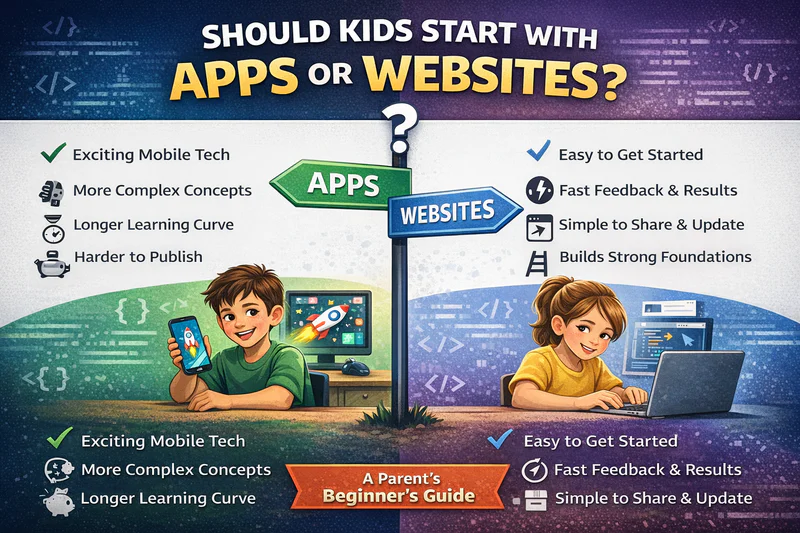
"My child wants to build an app, but should they start with apps or websites?" This question comes up in parent-teacher meetings and family discussions. With technology playing a big role in daily life, parents want to prepare their kids for the digital future. The real question is not whether kids should learn coding, but where they should begin.
Both options are useful, but the starting point matters. It affects confidence, how fast kids learn, and long-term success. While mobile app development sounds exciting, website building for kids is often an easier and smoother way to enter the world of technology creation. This guide helps parents choose the right beginner path based on a child's age, interests, and learning style, not just what is popular right now.
The Gateway to Tech: Website Building for Kids
Websites are one of the easiest ways to enter technology creation. When kids create websites, they don't just learn to code; they also understand how the internet works. Website building for kids gives fast and clear results. Kids can write a few lines of code, refresh the page, and instantly see text appear, colors change, or images show up. This quick feedback turns abstract coding concepts into real outcomes. Unlike mobile app development, which often needs many steps before anything shows on screen, web development lets kids experiment freely and see changes immediately.
Instant Gratification and Easy Sharing
Kids stay motivated when they can see their work come alive instantly in a browser. The feedback loop in web development is simple: write code, save the file, refresh the page, and see changes right away. This quick process helps kids try new ideas and fix mistakes without waiting for long steps or complicated setups.
Editing a website is also very easy. If a child wants to change a background color or add a new section, they just update the code and refresh the page. There are no complex build steps, no app store approvals, and no device testing needed. This simplicity lowers frustration and builds confidence, keeping kids interested and excited throughout their learning process.
Mobile Innovations: App Development for Kids
App development for kids is exciting but more complex than websites. Building apps needs more than basic coding. Kids must understand mobile devices, app stores, permissions, and different screen sizes on iOS and Android devices. This can feel overwhelming early in their technology learning journey.
Mobile app development also needs a different user interface approach. Apps must work with touch, offline use, and different Android devices and iOS phones, making learning harder.
Still, app development is possible when kids are ready. When kids first learn coding concepts through web projects, moving to building apps feels natural. Strong programming concepts, problem-solving skills, and the right tools help kids succeed in mobile applications.
The Best Kids' App Development Tools
Luckily, kids don't need professional app development tools to start learning. Many beginner-friendly platforms are made to teach kids the basics without confusion. Most use drag-and-drop systems that feel like building with digital blocks.
These platforms let kids create apps by joining visual blocks, similar to LEGO pieces. Tools like MIT App Inventor make app building easy, even for beginners. Kids can build working Android apps that respond when users tap buttons or move their mobile devices.
MIT App Inventor
MIT App Inventor is especially helpful for kids learning app development. This free platform allows kids to create apps using block-based programming. The drag-and-drop features simplify complex ideas while producing real apps.
This platform teaches computer science fundamentals through hands-on app creation, making it ideal for even children at an early age who want to explore programming apps.
App Lab and Other Tools
App Lab helps kids master the real coding language. For older kids interested in advanced topics, no-code platform tools like Appy Pie create native apps with guided learning and curiosity.
These kids' app maker platforms enable students to build fully functional apps complete with in-app purchases and push notifications, demonstrating important skills for real-world app creation.
Comparing Learning Curves: Deployment vs. Hosting
Getting projects live shows clear differences between websites and apps. Knowing these differences helps parents choose the right place for kids to start.
Once a child creates a site, they just upload files to a server, configure basic settings, and share the link. Many platforms offer free hosting for learning. In just minutes, the website is live, and anyone with internet access can see it.
Mobile app deployment is much more complex. Building an app is only the first step. Kids must test it on real mobile devices, then package the app with icons and details. After that, the app must be submitted to an app store.
For Android apps on Google Play, reviews take days. The App Store for iOS apps takes even longer and has strict rules, which can slow kids down.
Cross-Platform Skills: React Native and Flutter for Teens
As children grow in their technology journey, they start learning tools that connect websites and mobile apps. Frameworks like React Native and Flutter help developers build building applications for iOS and Android using a single codebase.
React Native uses web skills like JavaScript to create mobile apps in an easier way. Flutter, made by Google, uses the Dart programming language and offers many tools to build apps that work smoothly across different platform options for multiple platforms.
These frameworks are best for teens who already know web basics. Skills like user interface design, handling user input, and managing data are already familiar. Instead of starting from scratch, they can use these skills in a mobile context, making learning simpler and more effective.
Why a "Web-First" Approach Is Usually Better for Beginners
After looking at both paths, the evidence clearly shows that websites are the best starting point for most young learners, not about limiting children or ignoring mobile app development; it is about building joy, confidence, and long-term success.
Lower Barriers to Entry
Websites offer much lower barriers to entry. Kids can start creating with basic text editors and browsers, tools already available on most computers. No special software installs, no device-specific issues, no app store accounts. This easy access allows children to begin their coding journey immediately instead of waiting through setup steps that may discourage beginners.
Skills Transfer Naturally
The skills learned from building websites naturally transfer to apps and almost every other technology area. Learning HTML teaches document structure. CSS builds design sense and focuses on detail. JavaScript introduces programming language fundamentals, problem-solving, and logical thinking. These basics support whatever kids later create, mobile apps, games, desktop software, or any digital platform.
Early Success Builds Confidence
Early success builds long-term interest in technology. When children finish their first website project, they feel real achievement.Website building for kids does not delay learning; it speeds it up. Compare two paths: one child struggles with app development from day one, growing confused and discouraged, while another builds confidence through web projects, then approaches apps with strong problem-solving skills. The second path consistently gives better outcomes.
Parents should choose learning paths that focus on joy and confidence, not pressure. Technology learning should feel creative and playful. When kids create projects they are proud of, whether building their own app or developing their own mobile apps, they develop a lasting love for technology that continues well beyond childhood. Parents can track their child's progress as they move from simple app projects to more complex educational apps.
Conclusion
There is no single "wrong" answer in the website versus app discussion, but there is usually a better place to start.
Apps offer more advanced features and powerful results, but they need more patience and knowledge. For beginners, especially younger kids, a web-first approach gives better long-term results. Children learn basic programming concepts, improve problem-solving skills, and create projects they can easily share, which keeps them motivated.
As kids grow and their coding skills improve, app building becomes a natural next step. They use their web knowledge, design stage experience, and ability to teach kids themselves new ideas. Whether they use tools like App Inventor or start programming apps, they move forward with confidence.
The goal is not early age app development, but building curiosity, important skills, and a lasting interest in technology. Starting with websites gives kids a strong foundation and meaningful hands-on learning. This approach balances productive screen time with skill development, helping children learn at their own pace. Platforms like Scratch Jr offer even younger learners a gentle introduction before they progress to more advanced app creation on multiple platforms.
Frequently Asked Questions
What's the best age for kids to start learning app development?
Most children learn basic app development concepts around age 10-12, particularly using visual tools like MIT App Inventor. However, starting with website building around age 7-9 provides better preparation. Younger children benefit from block-based programming platforms like Scratch Jr that teach logic without mobile complexity. The ideal age depends more on the child's progress and prior coding exposure than on a specific number.
Can kids really create an app that appears in app stores?
Yes, kids can absolutely create apps published on Google Play and the App Store, though they'll need adult assistance. The App Inventor and similar platforms produce fully functional apps that meet store requirements. Parents must create developer accounts and handle submission processes due to age restrictions. Many educational apps in stores were created by young developers, proving that even children can build meaningful mobile applications with features like in-app purchases and push notifications.
Do kids need expensive software or devices for app building?
No, kids can start app building with free tools and basic equipment. MIT App Inventor, App Lab, and other kids' app development tools cost nothing and work on standard computers. For testing own mobile apps, even budget Android devices suffice—expensive iOS phones aren't necessary initially. Web-based platforms with drag and drop interface eliminate installation requirements. The barrier isn't financial; it's understanding which free tools match your child's progress and learning style.