
A five-year-old who cannot yet read can already write a working program. ScratchJr is built for ages 5 to 7, and its developers at Tufts and the MIT Media Lab state that even children who have not learned to read can create projects with it. So the common worry about typing before coding has the order wrong: coding does not wait for typing, and the two skills become urgent at different times for different reasons.
That matters practically. Parents regularly delay a coding class until a child types fluently, and lose a year of logic and problem-solving to a prerequisite that does not exist. Others go the other way, push a nine-year-old straight into Python, and watch them quit over a missing colon.
The useful question is not whether typing matters. It is when typing becomes the thing standing between your child and the work, and what the published standards actually ask for. The answer is narrower than most advice online suggests.
Where does typing actually become necessary?
At exactly one point: the move from a block-based tool to a text language. Everything before that needs almost no keyboard at all.
The Scratch Foundation describes its tool as "a simple, block-based coding interface that they can drag and snap together: no tricky syntax required". A child building a Scratch game types only the text they have chosen themselves, such as a sprite name, a broadcast message or the words in a say block. They never type the structure of the program. The loops, the conditions and the event handlers are all dragged.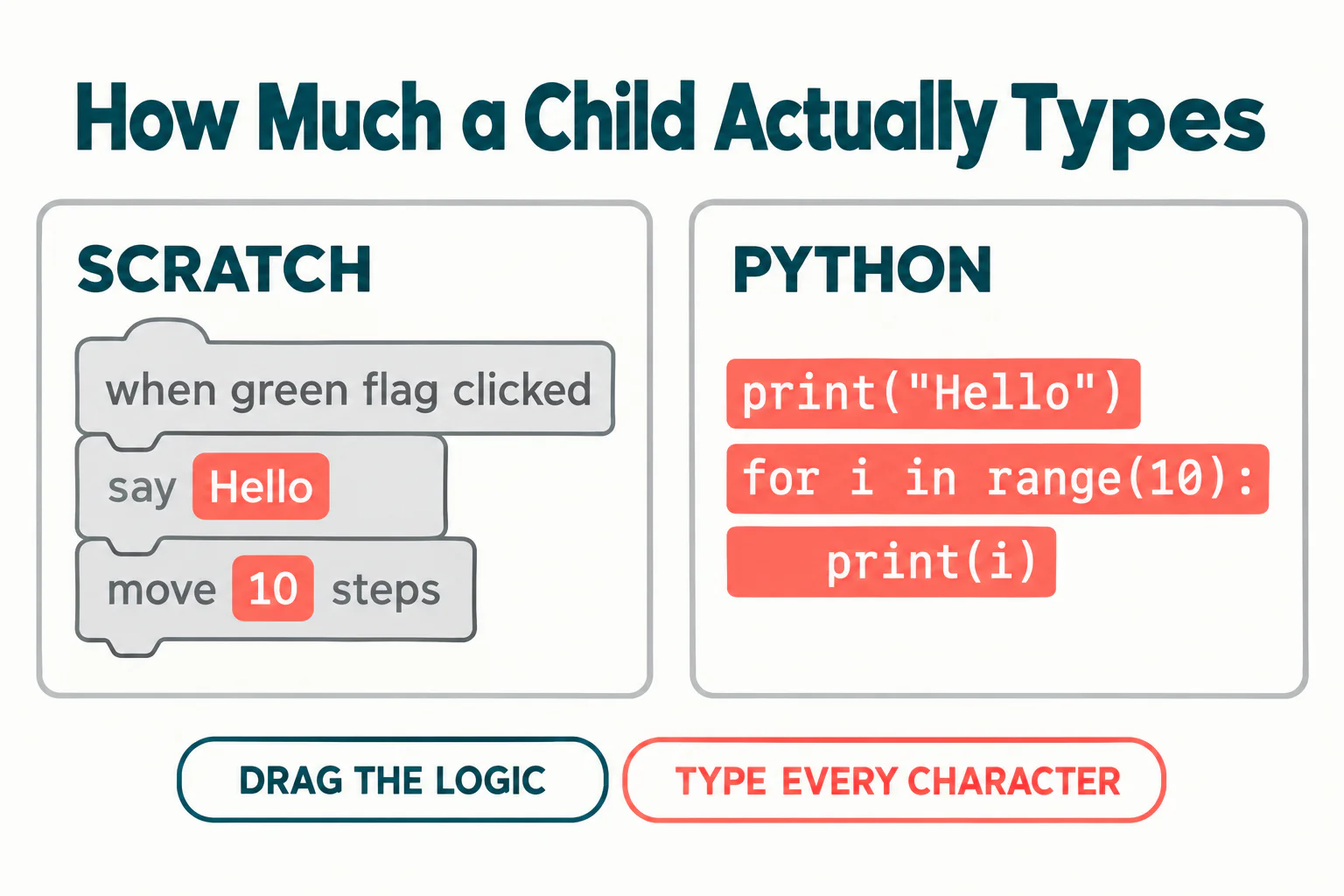
Python is the opposite. Every bracket, colon, quotation mark and indent has to be produced by hand, and each one is a place where a correct idea can produce a broken program. That is a genuine change in the nature of the work, and it is the only moment in a child's coding path where keyboard skill is load-bearing.
What do the keyboarding standards actually ask for?
They ask for pages, not speed. The Common Core writing standards are the most widely adopted US standards that mention keyboarding, and they are specific. Grade 4 expects a student to "demonstrate sufficient command of keyboarding skills to type a minimum of one page in a single sitting". Grade 5 raises that to two pages, and grade 6 to three.
Read what is missing. There is no words-per-minute target anywhere in those standards, at any grade. The entire requirement is expressed as volume produced in one sitting, which is a measure of stamina and comfort rather than speed.
That is worth knowing because almost every typing product sells against a per-minute number, and parents reasonably assume those numbers come from somewhere official. They do not. The figures vary widely between vendors because each one chose its own. If you want a target that is actually grounded in something, use the page measure: can your child produce a page of their own writing in one sitting without the keyboard being the obstacle.
School needs typing earlier than coding does
This is the part that reorders the whole decision. The grade 4 standard lands at roughly age nine. A child moving from Scratch to Python usually does so somewhere between ten and thirteen, depending on how far their block projects have taken them.
So for most children, typing is a writing requirement first and a coding requirement second, by a margin of a year or more. If you are weighing whether to start typing practice, the honest reason is that a school essay is coming, not that a coding class is blocked.
What the keyboard does to a child learning Python
A typing mistake in a text language does not announce itself as a typing mistake. It arrives as an error message about the language, and to a child the two are indistinguishable.
Python's own documentation is unusually honest about this. Describing a missing colon, it explains that the parser "repeats the offending line and displays little arrows pointing at the place where the error was detected", and then warns: "Note that this is not always the place that needs to be fixed." In its example the error is reported at the word print, because the colon is missing just before it.
Look at what a child faces. Leave off a colon and you get a SyntaxError pointing at the wrong word. Leave off a closing quotation mark and you get another SyntaxError. Capitalise print and you get a NameError instead. Three keyboard slips, two error names, and not one of the messages says anything about the keyboard.
A child who cannot yet find the colon key reliably meets this several times an hour. They conclude they are bad at programming, which is the wrong lesson from the right evidence. Teaching a child to read an error message is a separate skill worth teaching directly, and we covered it in teaching kids to read error messages.
A sensible order, by age
These bands are teaching observations from classes rather than research findings, and children vary. Use them as a default to adjust, not a schedule.
| Age | Coding | Keyboard | Why this order |
|---|---|---|---|
| 5 to 7 | ScratchJr | Nothing formal | Reading is not required, so typing certainly is not. Hands are often too small for the home row |
| 8 to 10 | Scratch | Start short, regular practice | Coding needs no typing yet, but the grade 4 writing standard is arriving |
| 10 to 12 | Scratch projects with variables and messages | Build stamina, aim for a page in a sitting | This is the window to get comfortable before the keyboard becomes load-bearing |
| 11 to 13 | First text language, usually Python | Should already be comfortable | Typing while learning syntax means debugging two unfamiliar things at once |
The one rule worth holding to: do not let a child meet a text language and the keyboard in the same month. Either skill alone is manageable. Together they produce the error loop above, and that is where children decide coding is not for them.
Not sure which level your child should start at? A free trial class with a Codeyoung teacher shows you exactly where they are and what they are ready for next, before you commit to anything.
Book a Free Trial →How to practise typing without stopping the coding
Run them in parallel. Pausing coding until typing is fluent removes the reason to type and stalls the logic work for no gain.
- Ten minutes, most days, not an hour on Sunday. Keyboard skill is motor memory, and motor memory responds to frequency rather than duration.
- Cover the hands, not the screen. A tea towel over the keyboard stops a child looking down, which is the single habit that keeps hunt-and-peck alive.
- Practise on their own writing. Typing a story they wrote builds the stamina the standards describe. Typing nonsense drills builds speed on nonsense.
- Drill the punctuation a programmer needs. Colon, semicolon, brackets, square brackets, quotation marks, underscore. Ordinary typing courses barely touch these and they are most of what breaks a Python program.
- Accept a dip when accuracy improves. A child relearning finger positions gets slower for two or three weeks. That is the skill forming, not failing.
What a reasonable target looks like
Ignore speed and watch for one thing: does your child look at the keyboard while they think? A child who can hold an idea in their head while their hands find the keys has arrived, whatever their speed. A child who loses the thought every time they hunt for a bracket is not ready for a text language yet, however fast they eventually get.
When that changes, the move itself is a judgement call with several other signals in it, and when a child is ready to leave Scratch sets them out. For the destination, our complete guide to Python for kids covers what the first months look like.
What this means for choosing a class
A good block-based class should have no typing prerequisite at all, and a provider who asks for one has not thought about it. For a first text-language class, ask the opposite question: what happens in the lesson when a child mistypes. A teacher who treats a missing colon as a keyboard event rather than a comprehension failure will keep the child in the subject.
A full-size keyboard beats a faster laptop
Hardware matters less than parents expect, and we checked the published minimums in what computer a child actually needs for coding. A full-size keyboard is worth more than a faster processor here, because small hands on a cramped laptop keyboard learn awkward finger positions that are expensive to undo.
The short version
Coding does not require typing. A child aged five who cannot read can build a program in ScratchJr, and a child in Scratch types only the words they invent. Typing becomes load-bearing at one specific moment, the move to a text language, and school reaches that need first: the Common Core standards ask for one typed page in a sitting by grade 4, two by grade 5 and three by grade 6, with no speed target anywhere.
So start typing practice for the writing, keep it to ten minutes a day, drill the punctuation a programmer needs, and make sure your child is comfortable at the keyboard before they meet Python rather than at the same time.
Codeyoung runs 1:1 live online classes for children aged 6 to 17, with a teacher who adapts the pace to your child rather than a fixed syllabus. The first class is free, so you can see how they respond before deciding.
Book a Free TrialStandards quoted from the Common Core grade 4 writing standards and the grade 5 and 6 equivalents, and error behaviour from the official Python tutorial on errors, both checked on 21 October 2026. ScratchJr age range and reading note from scratchjr.org and the MIT Media Lab. Our online coding classes for kids start children in blocks and move to text only when they are ready.