
Key Takeaways
- The best Python libraries for chatbot development include NLTK for text processing, spaCy for advanced NLP, ChatterBot for conversational logic, and Rasa for production-grade applications.
- Choosing the right library depends on the project's complexity; NLTK with simple rule-based Python is the most reliable starting point for beginners (ChatterBot, once the popular beginner pick, is now largely unmaintained), while Rasa is built for more advanced, context-aware chatbots.
- For younger learners, starting with rule-based chatbots using standard Python libraries builds a strong foundation before moving to complex AI-driven tools.
- The development process involves setting up the environment, preparing data, training a model with a chosen library, testing responses, and deploying the chatbot.
What are the best libraries for building an AI chatbot in Python?
The best Python libraries for building an AI chatbot are NLTK, spaCy, ChatterBot, and Rasa, each serving different needs from basic text processing to advanced conversational AI. For integrating deeper machine learning capabilities, developers often turn to Scikit-learn, Keras, and TensorFlow. These tools form a powerful ecosystem for creating intelligent and responsive bots.
Python's extensive library support is a primary reason it is a top choice for AI projects. According to official documentation, Python's rich ecosystem and clear syntax provide robust support for various complex functionalities, making it accessible for both beginners and experts. For natural language processing (NLP), which is the core of any chatbot, libraries are essential. Analytics Vidhya's guides on building AI chatbots highlight how tools like NLTK and spaCy are used for fundamental text processing tasks such as tokenization, stemming, and lemmatization, which help the bot understand human language.
For creating the conversational flow, specific frameworks are more efficient. DataCamp's tutorials show that a library like ChatterBot is designed with machine learning capabilities to generate automated responses, learning from conversations over time. It simplifies the process of creating a conversational agent. For students ready to build their first functional bot, a guide from Real Python on ChatterBot demonstrates its relative ease of use, making it an excellent starting point for learning the principles of chatbot programming.
Key libraries and their primary functions include:
- Natural Language Toolkit (NLTK): This is a foundational library for NLP. It's best used for text processing, classification, and tokenization, providing the building blocks for a chatbot to understand user input.
- spaCy: A more modern and faster alternative to NLTK, spaCy excels at production-level NLP tasks like named entity recognition (NER), part-of-speech tagging, and dependency parsing.
- ChatterBot: A long-popular library that generates replies by matching input against a training corpus (it selects the best-fit stored response rather than truly "learning" over time). Note: ChatterBot is now largely unmaintained and often fails to install on modern Python (3.8+), so for new projects in 2026 many educators start with NLTK plus simple rule-based logic instead.
- Rasa: An open-source framework for building production-ready, context-aware AI assistants. It handles dialogue management and allows for more complex, multi-turn conversations.
- Scikit-learn, Keras, TensorFlow: These are general machine learning and deep learning libraries. They are used when a chatbot requires custom models for tasks like sentiment analysis or intent classification, offering maximum flexibility.
When to use each Python chatbot library for your project?
You should choose a Python chatbot library based on your project's specific goals and complexity. For simple educational projects focused on text processing, NLTK is a good starting point. For more advanced natural language understanding, spaCy is superior. ChatterBot is ideal for creating basic conversational bots, while Rasa is the choice for building complex, scalable AI assistants for real-world applications.
Making the right choice prevents a project from becoming overly complicated or lacking necessary features. The decision depends on whether you are building a simple rule-based bot or one that needs to understand intent and context. For instance, DataFlair's tutorials show that a project might combine NLTK and Keras, using NLTK for text preprocessing and Keras to build a neural network for intent classification. This highlights how libraries are often chosen for specific AI tasks. As a student's skills grow, they can take on more complex challenges, and Real Python offers a variety of project ideas that show how different libraries fit different levels of complexity. A step-by-step guide can further help in understanding how to build your first Python AI chatbot by applying these libraries in a structured project.
Here is a breakdown of which library to choose based on project needs:
| Library | Best For... | Use Case Example | Complexity Level |
|---|---|---|---|
| NLTK | Foundational NLP & Education | A student project to analyze text and identify parts of speech. | Beginner |
| spaCy | High-Performance NLP | A bot that needs to quickly extract names, dates, and locations from text. | Intermediate |
| ChatterBot | Simple Conversational Bots | A basic FAQ bot for a website that learns from user interactions. | Beginner |
| Rasa | Production-Grade AI Assistants | A customer service bot that manages multi-step dialogues and integrations. | Advanced |
| TensorFlow/Keras | Custom Machine Learning Models | Building a unique sentiment analysis model to gauge user emotion. | Advanced |
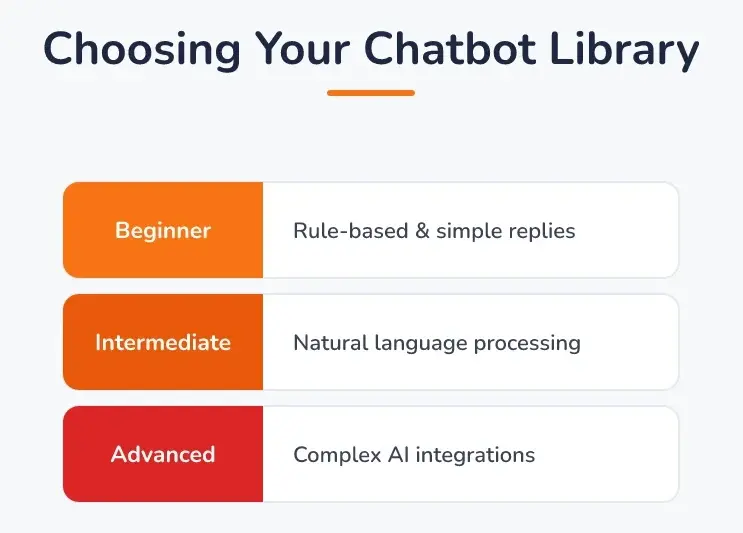 Choosing Your Chatbot Library: Beginner: Rule-based & simple replies, Intermediate: Natural language processing, Advanced: Complex AI integrations.
What is a no-API Python chatbot library option for younger kids?
For younger kids, a great no-API option for chatbot programming is to build a simple rule-based system using only Python's standard libraries. This approach avoids the complexity of external services and focuses on foundational logic, such as if-elif-else statements, to create responses. This method directly teaches core programming concepts and helps a child understand how a machine follows instructions.
This focus on fundamentals is critical. We distinguish between "using AI" (like asking a pre-built tool a question) and "understanding AI" (knowing how to train models and write the logic). At Codeyoung, our AI & Machine Learning with Python course for ages 10-17 begins with basics like print("Hello World") and gradually builds toward creating an 'AI Chatbot GUI' application in its first level. This ensures students grasp the underlying principles first, which aligns with guidance from organizations like Code.org that emphasize the importance of foundational computer science skills.
By focusing on rule-based logic first, children learn the core principles of programming before tackling more abstract AI concepts.
This educational philosophy ensures that students build confidence and a solid base of knowledge. We believe that strengthening fundamentals is the key to mastering complex topics, a principle that explains why kids should learn Python to begin with. A simple, no-API chatbot project is an excellent way to apply these core skills in a fun and interactive way. The project can be as simple as:
- Greeting the user.
- Asking the user's name and using it in responses.
- Responding to specific keywords with pre-programmed answers.
- Having a default response for unrecognized input.
How do you pick the right Python chatbot library for your project?
To pick the right Python chatbot library, parents and educators should evaluate four key factors: the child's current skill level, the project's complexity, the availability of learning resources, and long-term performance needs. For a beginner's first project, a simpler library like ChatterBot is ideal. For a more ambitious project requiring advanced features, a framework like Rasa is a better fit.
Making an informed choice requires a clear understanding of the project's goals. For self-learners, the availability of free courses can be a major factor. For example, MyGreatLearning offers a free course on building chatbots that has over 40,100 enrolled learners, indicating strong community support for independent study. Similarly, Codecademy's learning paths cover different types of chatbots, from rule-based to generative, emphasizing the importance of guided instruction for skill development. Finding engaging Python resources for kids is key to maintaining motivation.
Here is a decision framework for parents and educators:
- If your child is a complete beginner (ages 10-12): Choose ChatterBot or a rule-based bot with standard Python. These options have a lower learning curve and provide immediate, rewarding feedback.
- If the goal is a science fair or school project: Use spaCy for impressive NLP features like named entity recognition. This adds a "wow" factor by allowing the bot to identify specific information in user sentences.
- If your teen is preparing for advanced studies or competitions: Start with Rasa. It teaches industry-standard practices for building scalable AI assistants and managing complex conversational flows.
- If the project requires a custom behavior not found in other libraries: Use TensorFlow or Keras alongside NLTK or spaCy. This path is for advanced learners who want to build and train their own machine learning models from scratch.
At Codeyoung, we know true understanding comes from personalized instruction, which is why we offer 1:1 only, fully live classes where students can ask questions and get immediate help. Our instructors are rigorously vetted, with only about 0.1% of applicants hired after extensive technical and communication checks. This personalized approach, backed by founders recognized by Forbes Asia 30 Under 30 and our STEM.org certification since 2021, ensures kids learn foundational concepts deeply.
How do you go from a Python library to a working chatbot?
Going from a Python library to a working chatbot is an iterative process: set up your environment and install the library, prepare a small dataset of example questions and answers, write the response logic, test it with real inputs, then refine. You start small and expand as the bot improves, which lets young coders see progress quickly and stay motivated.
That build is best followed as a hands-on project with the actual code in front of you. For a complete, beginner-friendly walkthrough, see our step-by-step guide on how to build your first Python AI chatbot. Keeping the build in its own tutorial lets this page stay focused on the question that brought you here: which library to choose.
Frequently Asked Questions
Can a 10-year-old really build a Python chatbot?
Yes, a 10-year-old with foundational Python knowledge can build a simple rule-based chatbot. They can start with basic if-else logic to create predefined responses to specific user inputs before moving on to using beginner-friendly libraries.
How much does it cost to build a Python chatbot?
Building a Python chatbot can be completely free. All the major libraries like NLTK, spaCy, ChatterBot, and Rasa are open-source, and Python itself is free to use, making it an accessible project for any budget.
Do you need advanced math for chatbot programming?
For building a basic chatbot with libraries like ChatterBot, you do not need advanced math. However, to create custom machine learning models from scratch using TensorFlow or Keras, a strong understanding of concepts like linear algebra and calculus becomes important.
What is the difference between a rule-based and an AI chatbot?
A rule-based chatbot follows a set of predefined rules and can only respond to specific commands or keywords it's programmed to recognize. An AI chatbot uses machine learning and natural language processing to understand intent, handle variations in language, and learn from conversations to improve its responses over time.
How long does it take to learn enough Python to build a simple bot?
A motivated learner can grasp the Python fundamentals needed to build a simple, rule-based chatbot in just a few weeks. Building a more complex, AI-driven bot with a library like Rasa would require several months of dedicated learning and practice.
Which Python libraries should beginners start with for AI chatbots?
For beginners eager to create AI chatbots, ChatterBot is an excellent primary library to start with, complemented by NLTK for essential text processing tasks. This duo provides a practical entry point, allowing your learner to develop foundational conversational logic and data handling skills without the immediate complexities of production-grade systems like Rasa. While ChatterBot simplifies the core AI, NLTK offers the tools to understand how computers process human language, preparing them for more advanced natural language processing. For younger minds, even beginning with basic rule-based chatbots using standard Python code can build invaluable problem-solving abilities and a strong coding foundation before moving to these sophisticated AI frameworks. The entire process, from setting up the environment to preparing data and seeing their chatbot respond, is an incredibly empowering and creative adventure.