
Key Takeaways
The best starting languages for beginners with autism and ADHD are often visual, block-based options like Scratch, which leverage strengths in pattern recognition and offer immediate results.
Python serves as an excellent second language due to its clear, readable syntax and logical structure, providing a smooth transition from visual to text-based programming.
An effective learning structure for neurodivergent children includes consistent routines, short and focused sessions with breaks, and personalized 1:1 instruction that adapts to their pace.
Sharing a child's learning style with their tutor early on is highly beneficial, as it allows the instructor to customize their teaching approach for maximum support and engagement.
What are the best programming languages for beginners with autism and ADHD?
The best programming languages for beginners with autism and ADHD are not a single choice, but rather a progression that honors the individual's learning style. Typically, visual, block-based languages like Scratch are ideal starting points for younger learners (ages 6-9), while text-based languages like Python are excellent for older children or those ready for the next step. The key is to match the tool to the child's cognitive strengths and interests.
Many neurodivergent children possess powerful aptitudes for systems thinking, pattern recognition, and logical reasoning. Programming is a field where these strengths are not just helpful, they are foundational. Instead of forcing a curriculum, the goal is to find a language that feels intuitive. For many, this means starting with a visual language where they can manipulate code blocks like digital LEGOs, seeing cause and effect instantly without getting bogged down by typos or complex syntax.
This approach aligns with established educational guidelines. The K-12 Computer Science Frameworks emphasize introducing core computational concepts in an age-appropriate manner, focusing on logic and problem-solving before demanding mastery of syntax. This ensures a solid foundation is built. As a child’s confidence and skills grow, they can transition to text-based languages. You can see a breakdown of many options in this list of kids coding languages. This progression allows them to apply their strong logical skills to more complex and powerful creation tools.
At Codeyoung, learning goes beyond lessons. With 50,000+ students taught across 45+ countries, fully live 1:1 classes, teachers chosen from less than 1% of applicants, and an 85%+ course completion rate, we focus on making concepts easy to understand and enjoyable to learn.
Which coding languages and tools are best for kids with autism and ADHD?
For kids with autism and ADHD, the best beginner coding tools are Scratch for visual learning and Python for a text-based start. Scratch uses drag-and-drop blocks that provide immediate, tangible results, which is excellent for maintaining focus and engagement. Python offers a clean, readable syntax that reduces cognitive load, allowing learners to focus on logic and problem-solving concepts.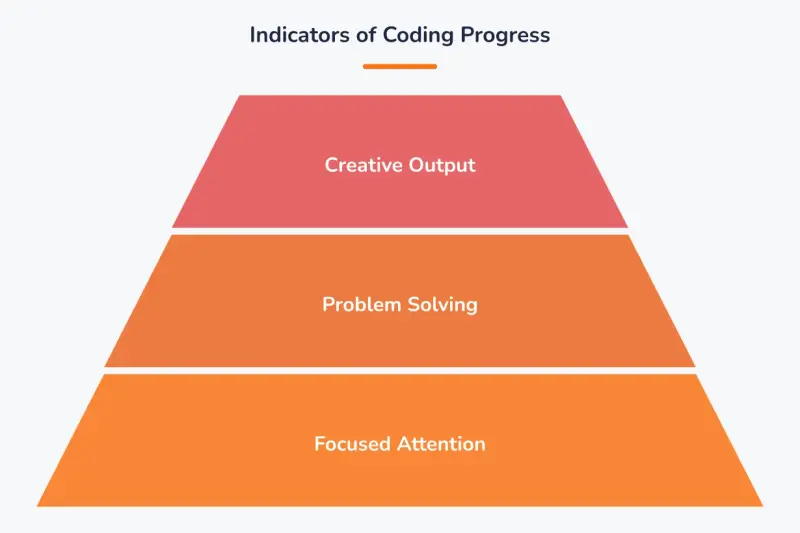
Indicators of Coding Progress
These tools are particularly effective because they leverage common neurodivergent strengths. A 2024 study by Oswald et al. found that programming can foster both computational thinking and social-emotional skills in children with ASD and ADHD. Visual languages like Scratch and Blockly are considered ideal starting points because they make abstract concepts concrete. A child can see how a "repeat" block creates a loop, building an intuitive understanding of programming logic.
The following table compares some of the top choices for neurodivergent beginners.
Moving from a visual language to a text-based one like Python is a natural and powerful step. At Codeyoung, our curriculum for ages 10-16 begins with the fundamentals of Python, starting with print("Hello World"), and progresses systematically toward advanced projects like building a 'Yoga Pose Detection' application using AI. This structured path ensures that students are building on firm foundations, which is a crucial element in coding for kids with autism.
What pacing and structure help neurodivergent kids learn to code?
The most effective learning structure for neurodivergent kids involves short, focused sessions, a predictable routine, and highly adaptable instruction. Short bursts of learning, typically 30-45 minutes, followed by planned breaks, help manage attention and prevent cognitive overload. This approach respects a child's natural energy and focus cycles, making learning a positive and sustainable activity rather than a draining one.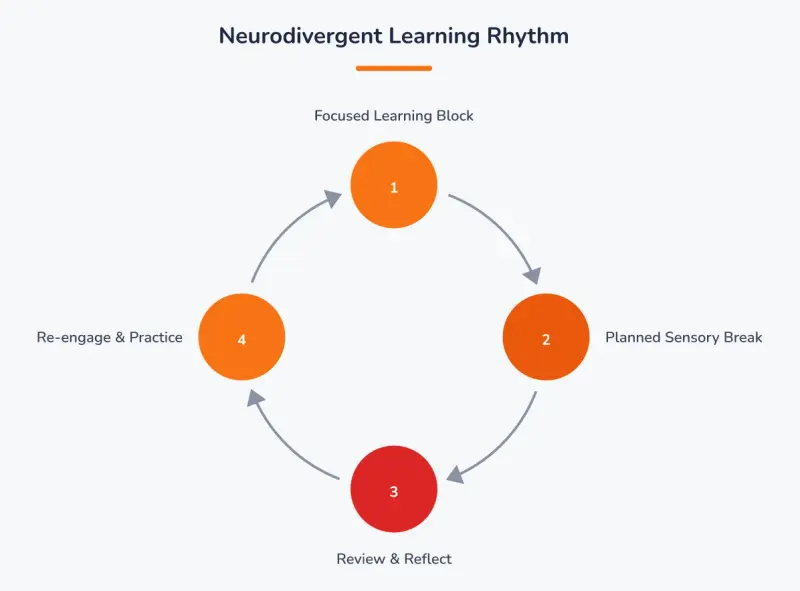
*Neurodivergent Learning Rhythm. *
A consistent routine provides a sense of safety and predictability, which can reduce anxiety and allow a child to engage more fully with the material. Knowing what to expect each session, from the greeting to the wrap-up, helps a learner transition into a focused state. Student-centered and adaptable instructional strategies are key to effective computer science education. This means the structure should serve the student, not the other way around.
One-on-one instruction provides the ultimate adaptive learning environment, allowing the pace and focus to change based on the child's needs that day.
A decision framework can help parents identify the right structure:
If your child is new to formal instruction (ages 5-7): Choose very short (25-30 minute) sessions focused on play and exploration with visual tools. The goal is positive association, not rigid learning. You can read more about the best first steps for coding at this age.
If your child thrives on routine: Schedule coding sessions for the same time on the same days each week. Use a visual timer to signal the start, break times, and end of the session.
If your child has intense, specific interests: Find a program that allows projects to be tailored to those interests, whether it's game design, art, or robotics.
If attention varies day-to-day: A 1:1 format is critical. Research by Benjamin Bloom in 1984 found that 1:1 tutoring is about two standard deviations more effective than conventional group instruction. At Codeyoung, all our classes are 1:1 and live on Zoom. This allows the instructor to adjust the lesson instantly, whether that means going faster, reviewing a concept, or pivoting to a different activity. Every session is also recorded, so families can re-watch explanations as needed.
When should you tell a coding tutor about your child's autism or ADHD?
You should tell a coding tutor about your child's autism or ADHD before the first session, ideally during the initial consultation or enrollment process. Early and open communication is not about labeling a child but about equipping the instructor with the insights needed to create the most effective and supportive learning environment possible from day one.
Why is early disclosure helpful?
Sharing this information allows a skilled tutor to proactively tailor their communication style, lesson pacing, and feedback methods. For example, they might use more direct and literal language, provide instructions in a step-by-step written format, or build in more frequent sensory breaks. It transforms the learning experience from a generic one to a personalized one. A well-qualified instructor sees this information as an opportunity to connect and support, not as a sign of limitation.
What specific information is useful for a tutor to know?
You don't need to share a full diagnostic report. Instead, focus on practical learning preferences and needs. Helpful information includes:
Communication Style: "He responds best to very clear, literal instructions."
Interests: "She is passionate about Minecraft and will be highly motivated by any project related to it."
Sensory Needs: "He may need a 2-minute break away from the screen every 20 minutes to reset."
Strengths: "She has an incredible memory for details and loves finding patterns."
How can you be sure the information will be used constructively?
The quality of the instructor is paramount. It is essential to choose a program with a rigorous vetting process for its teachers. For instance, Codeyoung's instructors are selected from a large pool of applicants, with fewer than 1% hired after passing comprehensive checks for technical skill, communication, and empathy. This ensures that the person working with your child is not only an expert in their subject but also a patient and adaptable educator.
What are the signs that a coding approach is working for your neurodivergent child?
The key signs that a coding approach is working for your neurodivergent child are sustained engagement, growing confidence, and the independent application of learned skills. You will see your child not just attending sessions, but actively participating, asking questions, and even continuing to think about their projects outside of class time. This intrinsic motivation is the clearest indicator of success.
Another strong signal is a visible increase in their confidence when tackling problems. They may start debugging their own code with less frustration or eagerly suggest ideas for new features in their projects. This shows they are internalizing problem-solving skills and feeling a sense of ownership over their work. Progress may not always be linear, but a general upward trend in their ability to handle complexity and ambiguity is a positive sign.
Codeyoung's model supports this through tools like our proprietary Noah AI practice platform, which provides a space for students to experiment and solidify concepts between sessions. This is paired with our CREATOR teaching approach, which emphasizes curiosity and creative application.
You can look for these specific positive indicators:
Voluntary Sharing: Your child is excited to show you their game, animation, or program and explain how it works.
Increased Focus: You notice their attention span during coding sessions is gradually lengthening.
Connecting Concepts: They start making connections between a coding concept and something in the real world, like explaining how a "for loop" is like the chorus in their favorite song.
Reduced Anxiety with Errors: Instead of shutting down when code doesn't work, they start seeing it as a puzzle to be solved.
How can parents create a successful coding environment for a neurodivergent child?
Creating a successful coding environment for a neurodivergent child involves choosing tools that match their strengths, establishing a predictable structure, and working with instructors who can personalize the experience. The focus should be on visual languages like Scratch to start, followed by text-based languages like Python. Success comes from an approach that values the child's unique cognitive profile, using their strengths in logic and pattern recognition as the foundation for learning. With structured support and adaptable teaching, programming can become a field where they excel and build lasting confidence.
Frequently Asked Questions
Is coding just more screen time?
Productive coding is active, creative screen time, not passive consumption. While it uses a screen, learning to code involves problem-solving, logical thinking, and building something new, which engages the brain differently than watching videos or playing most pre-made games.
Does my child need an expensive computer to start coding?
No, a basic laptop or desktop computer is sufficient for most beginner coding languages. Many powerful tools, including Scratch and web-based Python editors, are free and run directly in a standard web browser, requiring no special or high-powered hardware.
What if my child gets frustrated and wants to quit?
Frustration is a natural part of learning to code. A good approach is to work with an instructor who can break down problems into smaller, manageable steps and celebrate small victories. In a 1:1 setting, a tutor can immediately address the point of frustration and help the child work through it, building resilience.
How does coding help with skills outside of the computer?
Coding teaches computational thinking, which is a way of breaking down large, complex problems into smaller, sequential steps. This is a valuable skill for academic planning, project management, and everyday problem-solving, improving executive function skills far beyond the keyboard.
At what age is it best to start text-based coding?
While some children are ready earlier, students aged 8 and up can often start directly with text-based languages like Python. For younger learners, starting with a visual block language first helps build a strong conceptual foundation before adding the complexity of syntax.