
Most parents watching a child stare at broken code assume the missing ingredient is patience. It usually is not. Teaching kids debugging works because debugging is a procedure, and a child with a procedure does not need nearly as much patience as a child without one.
The child who gives up after ninety seconds is not short of grit. They are standing in front of thirty lines of code with no idea where to look first, and no method for deciding. Give them one, and the giving up mostly stops. This guide sets out the method, what to expect at each age, and the one thing parents do that prevents it from ever being learned.
Why debugging gets left out of coding lessons
Because it is invisible in the finished product. A child shows a parent a working game. Nobody shows anybody the forty minutes of it not working, so the part that took the effort is also the part nobody teaches.
Curriculum writers disagree with that emphasis, for what it is worth. England's national curriculum for computing introduces debugging at Key Stage 1 with "create and debug simple programs", and at Key Stage 2 requires pupils to "use logical reasoning to explain how some simple algorithms work and to detect and correct errors in algorithms and programs". The American CSTA standards place the same skill at 1B-AP-15: "Test and debug (identify and fix errors) a program or algorithm to ensure it runs as intended", in the ages 8 to 11 band.
Both frameworks treat finding errors as a named, taught skill rather than something that happens to a child on the way to a working program. Most home learning does the opposite.
What a child actually does when code breaks
Watch closely and the pattern is consistent. They read the whole program from the top, slowly, hoping the mistake will announce itself. It does not. So they read it again. Then they start changing things more or less at random, several at once, and now there are two bugs instead of one.
This is not a character problem. It is the only strategy available to someone who has never been shown another one. An adult debugging something unfamiliar does exactly the same thing, for exactly the same reason.
The three failures inside that pattern are worth naming, because each has a fix:
- No hypothesis. They are looking for "the mistake" rather than testing an idea about where it might be.
- No narrowing. The search area stays the whole program from the first minute to the last.
- Multiple simultaneous changes. When something improves, they cannot tell which change did it.
The halving method
Here is the technique that changes the most, and it takes about four minutes to teach.
Do not look for the bug. Look for the half the bug is in. Disable the second half of the program, run it, and ask one question: is the problem still there? If yes, the fault is in the first half. If no, it is in the second. Either way you have just eliminated half the program without reading any of it.
Then do it again on the half that remains. And again.
| Round | Lines still suspect | What you did |
|---|---|---|
| Start | 16 | Ran it, saw the wrong behaviour |
| 1 | 8 | Switched off the bottom half |
| 2 | 4 | Switched off half of what was left |
| 3 | 2 | Again |
| 4 | 1 | Found it |
Four rounds to go from sixteen lines to one. A child reading top to bottom might get there eventually, but they will not know when they have finished, and they will have read most lines three times on the way.
In Scratch this is physically satisfying, which helps enormously. Drag the bottom half of the script out of the stack and drop it on the workspace. It is still there, it just does not run. Click the green flag. In Python, comment the lines out with a hash. Same idea, less drama.
Not sure which level your child should start at? A free trial class with a Codeyoung teacher shows you exactly where they are and what they are ready for next, before you commit to anything.
Book a Free Trial →The two sentences that do most of the work
Before any halving, a child needs to be able to finish two sentences. Most cannot, and that is the actual blockage.
"It should have..." and "but instead it..."
Try it with a child mid-frustration. A surprising number cannot complete the first one. They know it is wrong, they have not decided what right would look like. "The cat should have stopped at the edge, but instead it went straight off the side." Now there is something to test. Compare that with "it does not work", which gives you nowhere to begin.
This is the habit worth building above all others, and it transfers well beyond coding. A child who can state expected behaviour and observed behaviour separately is doing something close to what a scientist does with a prediction, which we looked at from the other direction in our post on why kids pass science tests without understanding science.
Change one thing
The third rule, and the one children break constantly. One change, then run it, then look. Not three changes and a hope.
The reason matters and is worth explaining to a child rather than simply enforcing: if you change three things and the problem goes away, you have not fixed anything, because you do not know which change mattered and two of them may have introduced new faults that have not shown up yet. Children accept this readily once it is framed as "you will not know what you did", which they recognise as annoying.
What to expect at each age
Debugging capacity develops unevenly, and expecting the wrong thing at the wrong age is a reliable way to produce a child who believes they are bad at coding.
| Age | What is realistic | What is not yet |
|---|---|---|
| 6 to 7 | Noticing the program did something unexpected and saying so | Locating the cause without help |
| 8 to 9 | Finding it by halving, with an adult prompting the procedure | Explaining why the fault produced that behaviour |
| 10 to 12 | Running the whole procedure unprompted, changing one thing at a time | Predicting likely bugs before running the program |
| 13 plus | Forming a hypothesis first, then testing it directly | Consistency under time pressure |
The jump that surprises parents is between eight and ten. An eight-year-old can often find a bug and be completely unable to say why it caused what it caused. That is normal. Explanation arrives a year or two after location, not alongside it, and pushing for the explanation too early makes children hide their working.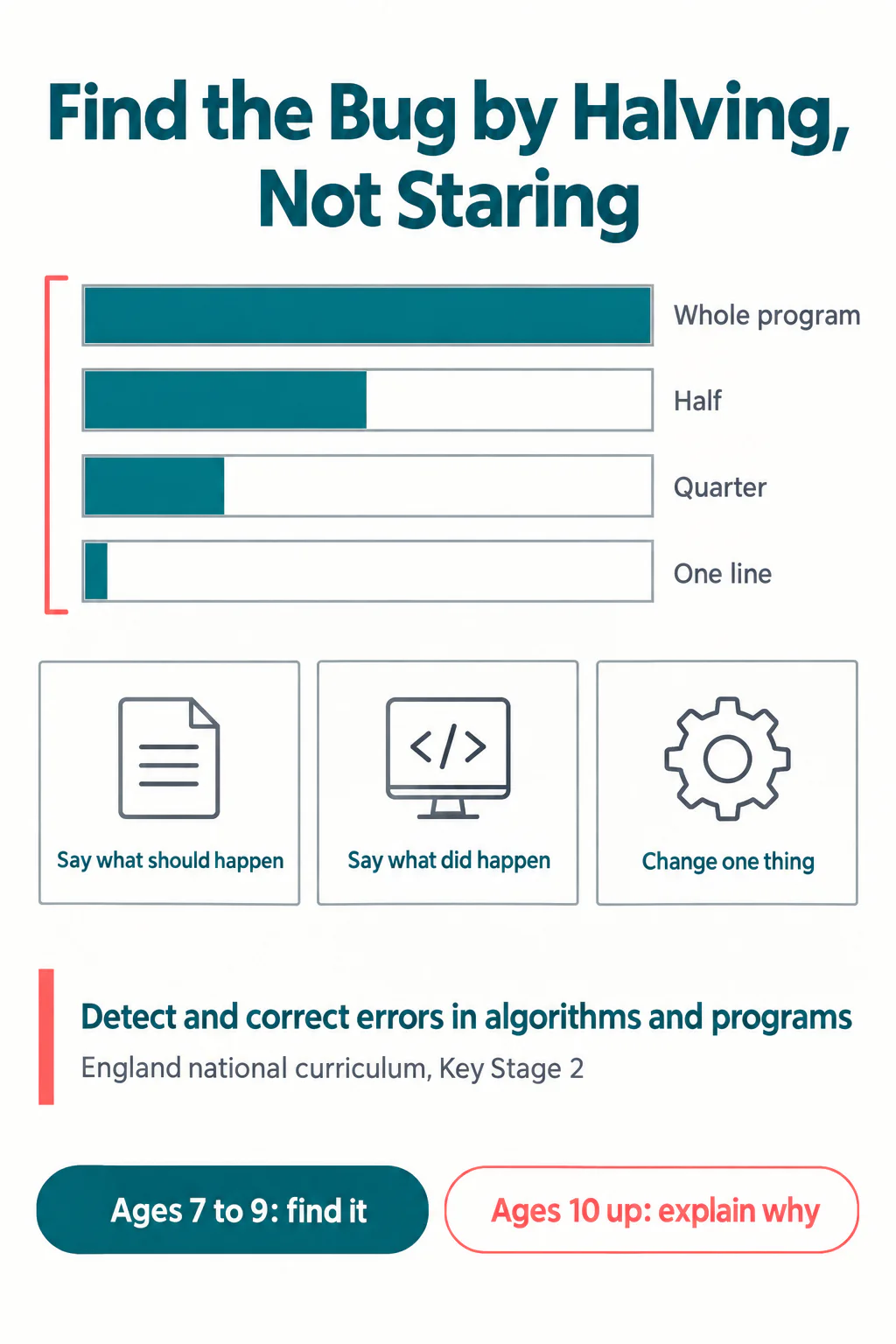
The thing parents do that stops all of this
They point at the line.
It is almost impossible not to. You are standing behind them, you can see the missing bracket or the variable that never got set, and the child is upset. Saying "line six" ends the distress in two seconds and costs nothing visible.
What it costs is the entire lesson. The program now works, and the child has learned that the way to fix broken code is to find an adult. Do that often enough and you produce a child who codes confidently as long as someone is sitting next to them, which is the pattern we see most often in students arriving from unsupervised home learning.
Two questions to use instead, in this order:
- "What should it have done?" Wait for a full answer. Do not accept "work properly".
- "What did it do instead?" Again, specifics. "It went off the edge", not "it broke".
Then, only if needed: "which half do you think it is in?" That is a hint about method, not about the answer, and it leaves the finding to them. The distinction matters more than it looks, and it is the same distinction we draw in helping with maths homework when you hated maths.
Set a timer, not an expectation
How long should a child sit with a broken program before help arrives? Long enough to be genuinely stuck, short enough that stuck does not turn into miserable.
Ten minutes at primary age, fifteen at secondary, on an actual visible timer. The timer does two useful things. It gives the child permission to struggle, because struggling is now the assigned task rather than evidence of failure. And it removes the negotiation, because a rule decided the moment rather than a parent who might be persuaded.
When the timer goes, help with method first. "Talk me through what you have tried" usually surfaces the answer without anyone pointing anywhere. This is also the honest reason a live class works for some children and recorded video does not: a teacher can watch the process and correct the method, which a video cannot. We looked at how to judge that difference in how to tell if your child's classes are actually working, and it is the reason our online coding classes are taught live rather than recorded.
Why this matters more now, not less
An AI assistant will write a working function for a child in four seconds. It will not tell them what to do when the program still behaves wrongly afterwards, because the fault sits between the generated code and the rest of the project, which the assistant never saw.
The child who can narrow a search area and change one thing at a time can work with generated code. The child who cannot is stuck the moment anything deviates, and they are stuck at a level they never earned. That gap is widening, and it is the practical argument in your child used AI to write their code, now what.
Debugging has quietly become the part of programming that a child has to own personally. Everything else has help available.
What to try this week
Next time a program misbehaves, resist the line number. Ask what it should have done, then what it did instead, and make the child answer both in full sentences. Then ask which half they want to switch off first, and let them run it.
Expect it to be slower than pointing. It will be slower for about three weeks, and then it will be faster than pointing ever was, because the child will have stopped calling you. That is the whole return on the investment, and it shows up as a child who keeps going when the program breaks rather than one who fetches an adult.
Codeyoung runs 1:1 live online classes for children aged 6 to 17, with a teacher who adapts the pace to your child rather than a fixed syllabus. The first class is free, so you can see how they respond before deciding.
Book a Free Trial