
A score counter in Scratch is four blocks and about ninety seconds of work. Children build one, it works, and they move on. Then they add clones to spawn falling apples or enemy ships, the score stops counting, and nothing in the script looks wrong, because nothing in the script is wrong. The problem is a single radio button chosen minutes earlier, in a dialog box that most tutorials tell children to click past.
That radio button is the real subject here. The four blocks are worth ten lines; the scope rule behind them is what separates a child who can copy a tutorial from one who can debug their own game. This guide covers both, verified against Scratch 3.32.1, the current release.
If your child has already built a timer, they have done nine tenths of this before. A timer and a score are the same object in Scratch: one variable, changed by one block. Only the trigger differs.
What is a score counter in Scratch?
A score counter is a variable, which the Scratch Wiki defines as "a changeable value recorded in Scratch's memory", plus a block that changes it when something happens in the game. Scratch has no dedicated score feature. You are building a labelled box that holds a number, and then writing the rules for when that number moves.
This is why a score counter is worth more teaching time than its size suggests. It is usually the first time a child stores something, names it, and changes it from somewhere else in the program. That is the idea the rest of programming is built on.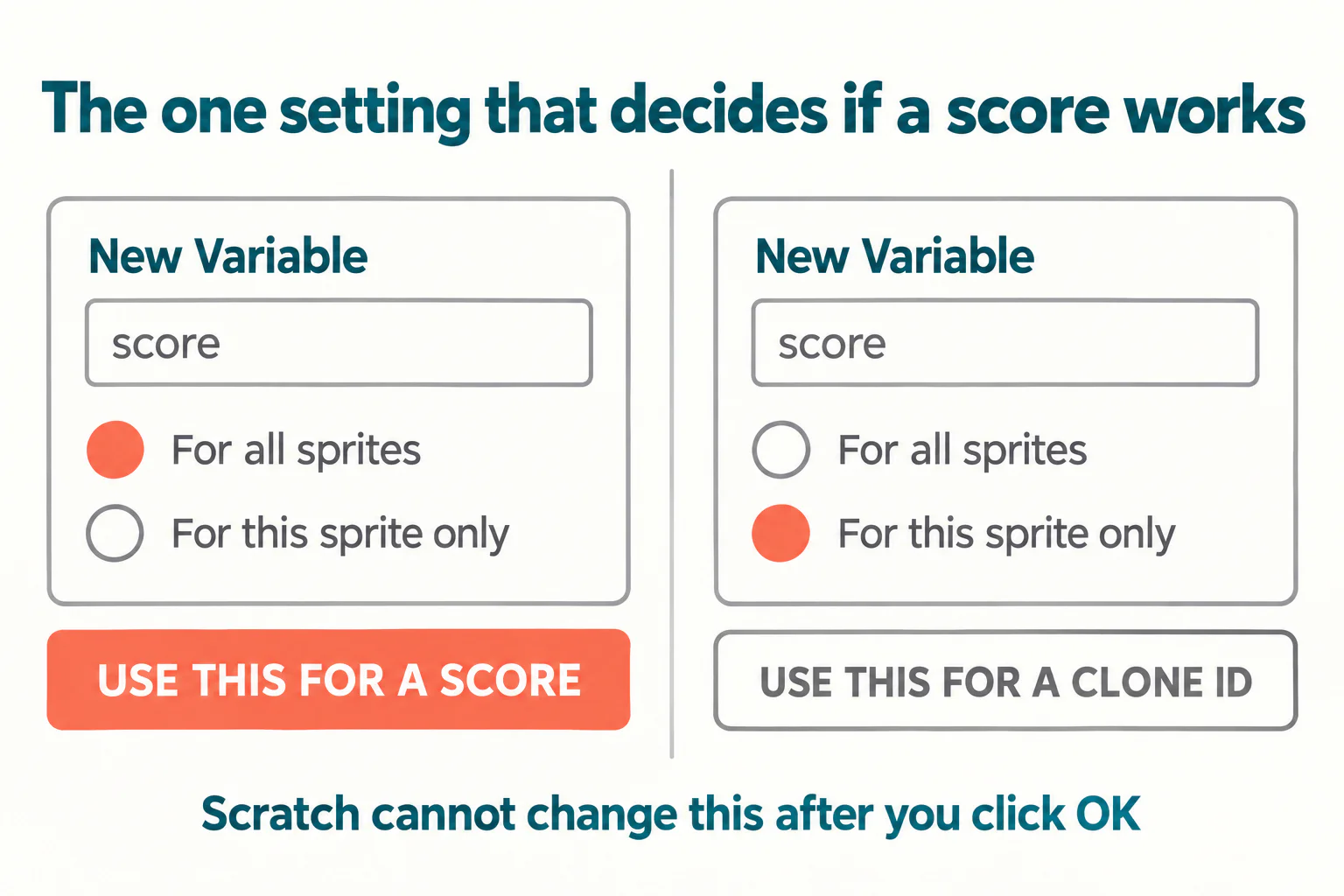
Make the variable, and choose the right scope
Open the Variables category in the block palette and click Make a Variable. Name it score, in lower case, so it reads cleanly inside the blocks. The dialog then offers two options, and this is the decision that matters.
For all sprites, which is what a score needs
Selecting For all sprites creates one shared value. Every sprite, every clone and the stage itself read and write the same number. When the cat sprite adds a point and the scoreboard sprite displays it, both are touching one box. This is the correct choice for a score, a high score, a lives counter, or anything else there is exactly one of in the game.
It is also the default, which is why a simple game built without clones works first time and teaches the child nothing about scope.
For this sprite only, which is what breaks scores
Selecting For this sprite only gives each sprite its own private copy. The Scratch Wiki records the detail that causes the trouble: clones inherit the local variable values of their parent at the moment they are created, and from then on each clone's copy is its own. Change it in one clone and no other clone, and not the original sprite, sees the change.
There are genuine uses for this. A clone ID, a per-enemy health value, or an individual speed all belong here, precisely because each clone should keep its own. A score does not.
The four blocks that make a working score
With the variable created as For all sprites, the whole counter is this:
when green flag clicked, the hat block that starts the game.set score to 0, placed immediately underneath it, before anything else runs.- Your game's trigger, for example
when this sprite clickedorif touching Apple then. change score by 1, inside that trigger.
Then tick the checkbox beside score in the Variables palette to show the readout on the stage. Test it by clicking the green flag twice in a row. The score should return to zero both times, and climb from zero both times. If it does, the counter is correct and the rest is game design.
One small distinction worth drawing for an older child: set writes a specific number, and change adds to whatever is already there. A child who uses set score to 1 inside the scoring trigger builds a game where the score reaches one and stays there forever. It is an instructive mistake, because the fix requires them to say out loud what each block does.
Not sure which level your child should start at? A free trial class with a Codeyoung teacher shows you exactly where they are and what they are ready for next, before you commit to anything.
Book a Free Trial →Why scores stop adding up in clone games
Here is the failure in full, because recognising it is the skill. A child builds a game where apples fall from the top of the screen. Rather than make twenty apple sprites, they do the sensible thing and use create clone of myself. Each clone falls, and when it touches the basket it runs change score by 1 and deletes itself.
If score was made For this sprite only, every clone starts with a copy of whatever the parent's score was when that clone was created, usually zero. Each clone then raises its own private copy from 0 to 1, and deletes itself a moment later, taking its copy with it. The stage readout shows the parent sprite's value, which nothing ever changed. The score sits at zero while apples are visibly being caught.
Nothing errors. No block turns red. The blocks are in the right order and say the right thing. This is why children get stuck here rather than working it out, and it recurs often enough that MIT's own Scratch discussion forums carry repeated threads about scores not updating and clones not counting.
The fix. Scratch does not let you switch a variable's scope after it is created. Delete the variable by right-clicking it in the palette, make a new one with the same name and For all sprites selected, then drag it back into the two or three places the old one appeared. This takes about a minute and is a useful moment to let a child do the dragging, because it shows them that the blocks were never the problem.
The genuinely counter-intuitive part is that a clone-based game usually needs both scopes, pointing in opposite directions. The score must be global, so twenty clones can write to one number. A clone ID must be local, so each of the twenty keeps its own. Children who learn only "use For all sprites" hit the mirror-image bug the first time they need per-clone data. The rule is not which option is better; it is whether the game has one of a thing or many.
Two more failures worth knowing
These two account for most of what remains.
- No reset under the green flag. Scratch variables keep their value between runs, and between sessions, so a project reopened a week later still holds last week's score. Without
set score to 0at the top, the number climbs forever and the child concludes the game is broken. It is the most common scoring bug that is not about scope. - Scoring inside a forever loop with no guard. A block that reads
forever: if touching Apple then change score by 1adds a point on every frame the sprite is in contact, so one catch is worth thirty points. The fix is to delete the apple, move it, or add a shortwaitso the contact ends before the next check.
That second one is a good introduction to the idea that a loop runs far faster than a child imagines. Asking them to guess how many points one catch should be worth, then counting what actually happens, makes the point better than any explanation. Our guide to teaching kids debugging covers how to run that kind of check without simply handing over the answer.
Where a score counter goes next
Once the variable idea lands, several things a child already wants become straightforward, because they are the same pattern with a different trigger.
- A lives counter is
set lives to 3andchange lives by -1, with a check forlives = 0to stop the game. - A high score is a second global variable updated only when
score > high score, and because Scratch keeps values between runs, it persists without any extra work. - A timer is the same shape again. Note that Scratch also has a built-in
timerreporter andreset timerblock in the Sensing category, which is a different object from a variable you control yourself. Our step-by-step Scratch timer tutorial covers when to use each.
For a child ready to put this into a real project, how to make a game on Scratch walks through a complete build, and how to make a maze in Scratch in 7 steps is a good first home for a score. If you are wondering what comes after this stage, the Scratch curriculum progression guide sets out the order these ideas usually land in.
Conclusion
The counter itself is four blocks: a green flag hat, set score to 0, a trigger, and change score by 1. The part worth your child's attention is the dialog box before all of that, where For all sprites and For this sprite only decide whether twenty clones share one number or keep twenty private ones.
Get a child to say which kind of value they are making before they click, and most scoring bugs never happen. When one does happen anyway, the question to ask is not what the blocks say. It is how many copies of this number the game is supposed to have.
Codeyoung runs 1:1 live online classes for children aged 6 to 17, with a teacher who adapts the pace to your child rather than a fixed syllabus. The first class is free, so you can see how they respond before deciding.
Book a Free TrialSources checked 19 October 2026:Scratch Wiki, Variable · Scratch, MIT Media Lab · Codeyoung Scratch coding classes