Scratch is currently one of the most accessible platforms for writing code and learning basic programming concepts in the world. It is quite a good start for a novice coder starting to gain knowledge of the programming language. Scratch, which is kind of a visual programming language, uses its drag-and-drop interface with colorful design to allow children to learn the basics of coding without complicated syntax. When the students can experiment with blocks, characters, and animations, they start developing the logical thinking and problem-solving abilities that they will need for more sophisticated programming in the future.
Many teachers and parents do not know that Scratch is not only a tool that should be used by the beginning learners; it can be a tool to support the entire learning process, which may involve not only college education but also primary education. A correctly designed Scratch coding curriculum provides a ladder, starting with simple sequences and loops in the lower grades and progressing to interactive stories, games, simulations, and algorithmic thinking in the higher grades. Such a gradual development facilitates the fact that one new concept builds up naturally on the previous knowledge.
This blog is aimed to help young people interested in scratch platform to discover best practices in learning Scratch, resources that can be recommended to enhance learning, and examples that are real-world and make the process of coding creative and meaningful.
As a teacher who needs to create a curriculum, as a parent who needs to facilitate learning at home, or as a learner who wants to get acquainted with coding on his/her own, this blog will make you understand the way Scratch scales with learners of any age.
If you're just getting started, our complete guide to scratch programming for kids covers everything a parent needs to know before diving into curriculum planning.
What is Scratch Programming
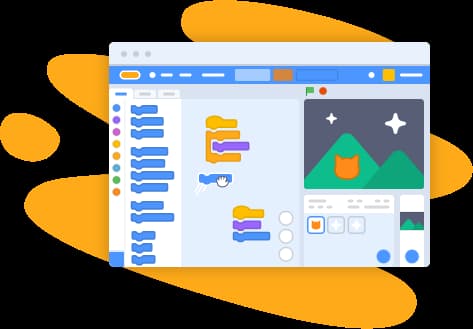
Scratch is an intuitive learning-to-code block-based programming language. It was invented by MIT and eliminates the syntax barrier to allow students to concentrate on other concepts of logic, sequence, and problem-solving, which are the real concepts of programming. It has a colorful interface and user-friendly blocks, which are suitable for learners and first-time coders.
The ability to use the drag-and-drop interface is one of the greatest gifts of Scratch. Coding blocks in the form of puzzle pieces can be attached together, and the result is displayed to the students immediately on the screen. This instant visual feedback assists them in seeing cause-and-effect relationships in code, experimenting, and correcting errors without frustration.
Since Scratch is a creative program by its nature, it promotes the expression of the ideas of students in the form of storytelling, animation, music, simulation, and game creation. This is a creative-based strategy that corresponds to the fundamental philosophy of Scratch: learning must be affordable, fun, and project-based. Using Scratch, students do not just memorize rules but instead come up with something that has meaning in it—coding is a fun and exploratory experience that evolves with them.
Understanding Scratch: A Block-Based Programming Language

Scratch is based upon a small number of simple elements that allow easy coding for beginners. The characters or objects of a project, such as the actors of a play, are called sprites. The setting is the background or scene in which all the action is taking place. Students can direct their sprites through scripting, or a sequence of blocks of code attached together like LEGO blocks. Scratch is also event-driven, i.e., things happen when some event takes place—e.g., when the green flag is clicked or when the sprite is touched.
Students may learn about the main concepts of programming in an approachable manner as they discover Scratch. Loops resemble repeated instructions (e.g., continue doing something until I tell you to stop), and conditions allow sprites to make choices (e.g., if it is raining, then open an umbrella). Scratch uses broadcasting to allow sprites to communicate with each other—the passing of messages in class so that various characters can know when it is their turn to perform an action. These ideas allow children to understand the actual logic of coding without being exposed to complex writing.
Why Scratch? Benefits of Visual Programming

The visual programming of Scratch is created to allow students to learn by playing. Children can develop logical thinking and sequencing skills by dragging blocks and dropping them together, and they are naturally taught that things have to be placed in the appropriate sequence to produce an animation or a game. Lack of typing also makes one more confident; particularly those starting their first steps are scared to make a mistake. When something does not work, you can just rearrange blocks and redo it. More to the point, Scratch encourages creativity.
The students are able to create their own characters, create backgrounds, animate stories, compose music, and create games all without having to learn how to code. In most classrooms, it has been seen that even the shy or hesitant students become very enthusiastic when they find their ideas on the screen.
Foundational Years: Grades 1–3 (Ages 6–8)

Students are exposed to Scratch at a very young age in its most playful and exploratory manner. They play with simple movement, add entertaining sounds, and form simple creative stories through simple drag-and-drop arrangements. It is not to learn complicated programming but rather to be inquisitive, creative, and confident. Young learners start to realize that their ideas can be made alive with the help of code by means of storytelling and experimentation.
Key Concepts at This Level
Causation and incidence learning that occurrences happen in a certain sequence and occur as a result of events.
Basic motion and appearance moves—to move sprites, to make them talk, to give them a different costume, or to make them appear or disappear.
Sound and music blocks—adding character by using recorded audio and music.
Creative stories and greeting cards—the development of simple stories with characters and backgrounds.
Basic animation and clicker games—making sprites jump, dance, or react to clicks of the mouse.
Learners start to conceptualize cause-and-effect logic, the basic principle of something happening when I click. This prepares the foundations of more structured thinking in the subsequent levels of Scratch programming.
Developing Years: Grades 4–6 (Ages 9–11)

The skills of students in Scratch increase as they advance to the developing years through simple story telling to more structured and logic projects. At this point, students start looking at intermediary concepts that drive actual games and simulation-based learning. They begin to learn the interaction of loops, conditions, and variables to produce movement, scoring systems and game behavior. It is also here that they get to learn how to debug, which is an important skill that makes one patient, solve problems and be able to be attentive.
Intermediate Concepts, Game Design Fundamentals & Real-World Applications
Students start using structured thinking to make more complicated and creative Scratch projects. The main ideas that will be presented in Grades 4-6 are:
Loops and conditionals Loops and conditionals are used in automating repetitive actions and responding to choices made by the sprite.
Variables and sensing blocks - construction of score counters, timers, health bars and input-based behavior.
Coordinate system- concept of moving x /y across the stage with great precision.
Maze and catching games - logic, collision detection, and controls of the player.
Quizzes and Pong-style projects - combining variables, events, and game physics to create a realistic gameplay.
Repetition, scoring systems, and dynamics of games allow students to start to be able to think in a structured way of computation. They get to know how to combine logical elements together- to have a solid base on higher grade programming.
Middle School Years: Grades 7–9 (Ages 12–14)

Middle school students start to use more advanced features of Scratch, combining creativity and more advanced computational thinking. They also delve into such features as custom blocks and data structures and elaborate event handling, which can enable them to create more sophisticated projects.
Advanced Features, Game Mechanics & Data Structures
Scratch promotes mathematical thinking, design thinking and advanced problem solving.
Cloning: Allowing modular, reusable code.
Lists and arrays - storing and handling large numbers of data.
Physics, platformer, space-shooters - combining gravity, speed, and sophisticated game-logic.
Students will have a clear grasp of modular programming and will learn to divide tasks into reusable units and create efficient and scalable projects.
High School Years: Grades 10–12 (Ages 15–18)

During the high school, Scratch emerges as a potent stepping stone towards text-based languages — if you're weighing up the options, our guide to Scratch vs Python for kids breaks down exactly when and how to make the switch. Learners use systematic thinking, resolve compound problems, and experiment using advanced capabilities that reflect principles of real-world programming. At this point, scratch projects are more analytical, research-based, and innovation-oriented.
Preparing for Higher-Level Programming and Building First Project
Multi-step logic and recursion - complex algorithms and repetitions.
Data visualization and prototyping - Scratch allows you to map the data and simulate systems and test ideas.
OOP simulation with sprites- simulations of classes, objects and behaviors with sprites.
Physics engines and AI opponents - playing with gravity, movement and simple artificial intelligence.
Students become creators and move on to becoming computational thinkers who will solve open ended problems, and this can lead to advanced programming and STEM career opportunities beyond Scratch.
Building a Complete Scratch Curriculum: Year-by-Year Framework

Scratch curriculum Scratch curriculum is based on considered scaffolding, in which concepts are introduced one by one, with students returning to ideas each year in more substantial, meaningful ways. Educators can create a structure where they develop an annual plan which advances with student capabilities, so that easy sequences in the lower grades are replaced by complicated algorithms and models in the upper classes. The idea of differentiation is important particularly in mixed ability classrooms where there are students who might require additional guidance and those ones who will do well with open ended tasks. Ensuring that there are several entry levels, optional challenges and time-based choices all contribute to the success of every learner.
Evaluation in Scratch is not about looking at whether a project works or not. Rather, educators will be able to test creativity, logical reasoning, problem-solving, and methods of debugging. The ability to think in a computational way and resilience is achieved by encouraging the students to think about their process, not the final product. The educator can add remix challenges and mini hackathons or game design competitions or thematic projects to expand the learning time so students can explore new ideas as they practice the core concepts.
Teaching Scratch Effectively: Best Practices for Educators

Effective teaching of Scratch revolves around project based learning. Allow students to imagine, design, build and repeat - the creative process itself is the learning experience. Pair programming, peer reviews and group projects should be used to encourage collaboration and students sharing ideas, providing feedback and debugging each other. The interactions enhance the process of learning to code, as well as create communication and teamwork.
The management of the classroom, i.e. organised checkpoints, student assistants and facilitated troubleshooting exercises, make the learning process to flow smoothly. Safe sharing and responsible digital citizenship is also a lesson that is important to teach, particularly when students are posting their projects on the Scratch community. The collaborative creative power of one student can be used by many teachers to realize an idea that may be small one such as making a character jump, but once other students join in, it can turn into an extensive interactive game or animation.
Inspiring Projects: Real Examples of Student Creations

Displaying actual projects of students makes the learners know what can be done at various grades. For example:
Grade 3: It is a digital greeting card with events, basic animation and amusing sound effects.
Grade 6: A maze game constructed utilizing loops, sensing blocks, and scoring.
Grade 9: A Gravity, velocity, and custom block physics simulator.
Grade 12: An AI battle bot with superior logic, variables, and strategic decision-making.
For a deeper library of ideas at each level, browse our full list of Scratch projects range.
These projects not only exhibit skill development but also bridge the gap between teachers and students with coding as well as careers in creative design, and STEM fields such as robotics, game development, animation, and data science.
Resources & Tools

In order to facilitate teaching and learning, the following are suggested Scratch tools and communities:
Scratch.mit.edu - the primary site of projects creation and distribution.
Scratch Teacher Accounts and Communities - classroom management and teacher collaboration materials.
Scratch Wiki & Curriculum Guides - documentation, tutorials, and conceptual explanation.
Project Repositories and Extensions - Project extensions such as Pen, Music, Video Sensing and LEGO extensions are used to create a hands-on learning experience.
The resources enable teachers to enhance their curriculum with organized classes, innovative conceptions, and social assistance.
Conclusion: Scratch tutorial and Learn Computer science basics on CodeYoung
A gradual Scratch coding curriculum also allows students to develop compute-year after computer-year creativity, confidence, and computational thinking. Educators and parents can support children to become able problem-solvets that can handle advanced programming by allowing more and more complexity, and by promoting project based exploration.
Join the Scratch community today with the formal Scratch coding tutorials by Codeyoung - where all children would learn to code by creativity.
FAQs - Scratch Coding Tutorial
Is Scratch free to learn coding?
Yes. Scratch is absolutely free to all the students, parents, and teachers. You are able to create, save and share projects without any subscription or unnoticed fees. The site is stored in the internet meaning that you just need to have the internet connection. Free teaching guides, resources and community support are also available in scratch.
What is the best age to start Scratch?
The Scratch age group is 68 years old; most kids start programming Scratch at this age when they are able to comprehend simple sequences and like the idea of storytelling. Younger students may start with ScratchJr, and it is created with 5-7 years in mind. Early beginning is beneficial in gaining confidence, curiosity and logical thinking prior to moving to more structured programming concepts in higher grade levels.
How much time per week is ideal for learning?
A regular 1-2 hours a week is best towards gradual improvement. This gives students an opportunity to study new things, have time to practice in building small projects, and learn about creativity without being in a hurry. Weekly sessions would be valuable to further bolster the computational thinking, debugging capabilities and confidence with the students slowly advancing to more challenging tasks in the Scratch.
What are the hardware requirements?
Scratch is compatible with any laptop, desktop or Chromebook with a modern web browser. The online editor requires an internet connection but there is an offline version. Tablets may be used, but the keyboard and mouse are more pleasant when it comes to moving blocks and creating a project correctly.
How does Scratch prepare students for Python or JavaScript?
Scratch teaches the fundamental principles of programming: sequencing, conditionals, variables, algorithms and debugging. Through these, students learn logic but not by working on the syntax written in a text. It facilitates the migration to such languages as Python or JavaScript, where the concepts are the same and only the style of writing them differs.