
Every Scratch game with more than a handful of moving things is built on clones in Scratch: one sprite that copies itself while the project runs, instead of twenty sprites dragged in by hand. Children pick up the three clone blocks in an afternoon. The rules underneath them take longer, and two of those rules are routinely reported wrong in tutorials and forum answers.
The first is the clone limit. Scratch allows 300 clones at once, and that is one shared allowance for the whole project, not 300 per sprite. The second is that the original sprite answers almost every message its clones answer, so code written "for the clones" quietly runs one extra time. This guide covers both, with a small worked project where the second one causes a real bug you can watch happen.
Key Takeaways
- A clone copies its parent at the moment it is made: position, direction, costume, size, whether it is hidden, graphic effects and local variable values.
- It does not copy running scripts. A clone starts fresh, and only
when I start as a clone(or another event) sets it moving. - The 300-clone cap counts every sprite's clones together. At 300,
create clone ofsilently does nothing. - The original runs every hat block except
when I start as a clone, including broadcasts, key presses and clicks. - "For this sprite only" variables are each clone's private memory, which is how one clone knows it is lantern 3 and not lantern 4.
What is a clone in Scratch?
The Scratch Wiki defines it precisely: each clone "has the same costumes, sounds, scripts, and variables as the original but is otherwise independent." It is a temporary sprite created by a running script, and it behaves like a real sprite in every way that matters during play. It moves, it changes costume, it can be clicked, and it can be detected with touching.
Two things it is not. It is not a duplicate: right-clicking a sprite and choosing duplicate makes a permanent sprite that appears in the sprite pane, while clones never appear there and vanish when the green flag or the stop sign is clicked. And it is not a stamp. The pen extension's stamp block leaves a flat picture on the stage that cannot run code. A clone can.
That is why clones turn up everywhere games get interesting. The Wiki's own list of common uses runs from projectiles and collectible coins to enemies, snow and firework particles, and buttons in a menu. Our shooting game in Scratch is two sprites, one of which clones itself into every target the player ever sees.
The three clone blocks, and what each one really does
All three sit in the orange Control palette. Cloning arrived with Scratch 2.0, and in the 2011 pre-alpha the first block was simply "Create Clone", with no way to choose which sprite to copy.
create clone of (myself)
Makes one new clone of whichever sprite is picked in the dropdown. "Myself" copies the sprite running the block; naming another sprite lets one sprite, or the stage, produce clones of something else. Run inside a clone, "myself" makes a clone of that clone, which is useful for recursion and is also the source of the runaway problem further down.
Two details from Scratch's own source code are worth knowing. The new clone is placed one layer behind the sprite it was copied from, so a fresh clone appears underneath its parent, not on top. And the stage itself can never be cloned.
when I start as a clone
A hat block that runs in the newly made clone, and only there. It is the one hat block the original sprite can never trigger. You may have several of them in one sprite; each new clone runs all of them at the same time.
delete this clone
Removes the clone that runs it and stops all its scripts. The Wiki is explicit that "this block does nothing if the original sprite runs it", and that it is the only way, besides the green flag and the stop sign, to remove a clone. That harmlessness on the original turns out to be very useful.
What a clone copies, and what it does not
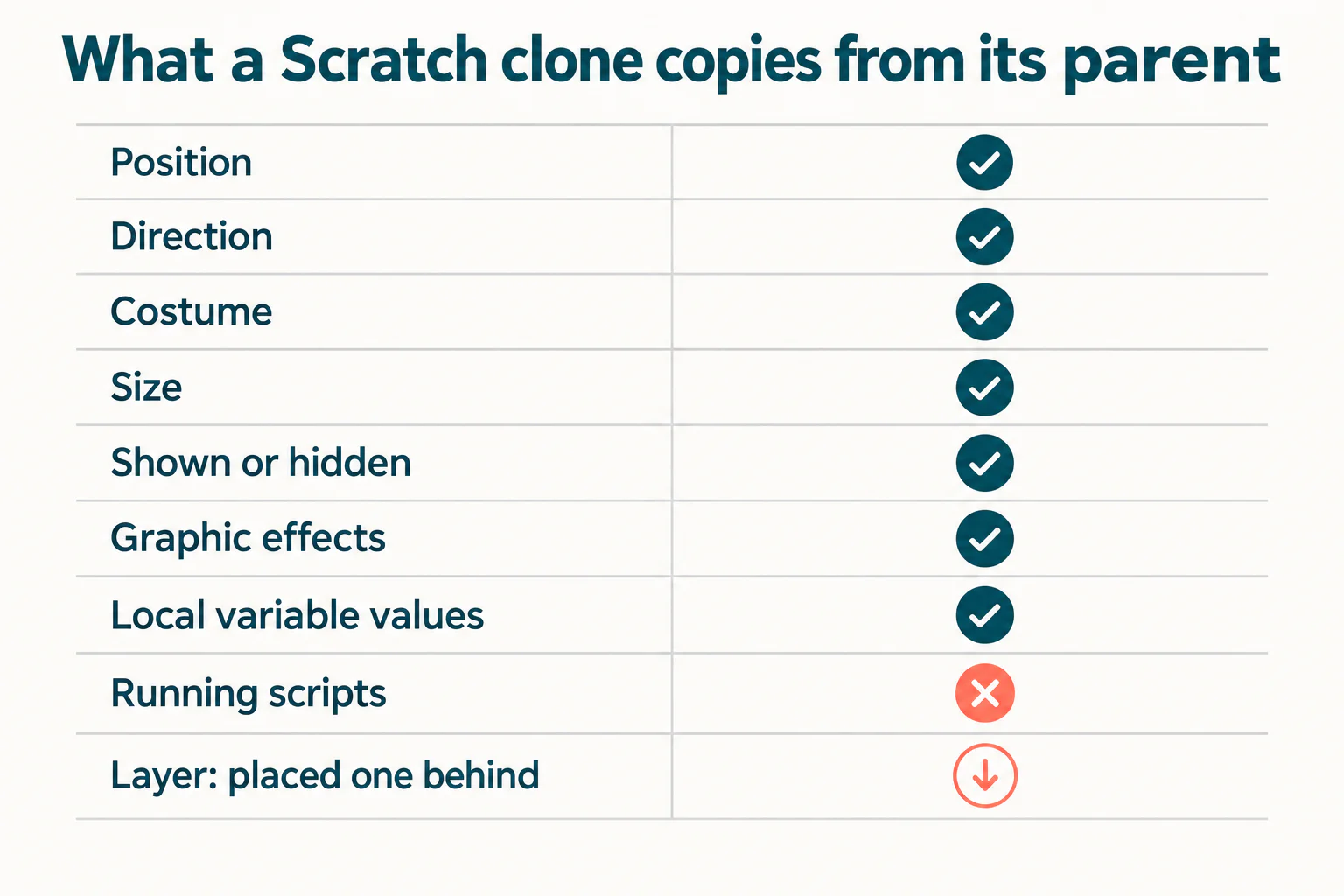
when I start as a clone tells it what to do.The copy is a snapshot taken at the moment of cloning. From then on, parent and clone drift apart. Scratch's source copies these properties across:
| Property | Copied to the clone? | What that means in practice |
|---|---|---|
| Position and direction | Yes | Move the parent to the spawn point first, then clone |
| Current costume and size | Yes | Switch costume before cloning to make a different-looking clone |
| Shown or hidden | Yes | A hidden parent makes hidden clones, so clones need their own show |
| Graphic effects (colour, ghost and so on) | Yes | Effects on the parent carry over to every new clone |
| "For this sprite only" variables and lists | Yes, the values at that moment | Then each clone keeps its own private copy |
| Scripts that are currently running | No | A parent mid-way through a forever loop does not pass that loop on |
| Layer | Not the same layer | The clone goes directly behind its parent |
The "shown or hidden" row catches nearly everyone once. The usual pattern hides the original, because the original is a factory and not a game piece. Every clone it makes is then hidden too, and a child who forgets show under when I start as a clone gets a project that appears to do nothing at all.
Clones are usually the point where a self-taught Scratch learner gets stuck, because nothing on screen says what went wrong. A free trial class with a Codeyoung teacher shows you where your child is and what they are ready for next, before you commit to anything.
Book a Free Trial →A worked Scratch clones project: five lanterns, one sprite
This is a small puzzle that uses every idea in this guide. One sprite makes five lantern clones in a row. Clicking a lantern flips it and its neighbours between on and off. Light all five and you win. It takes about fifteen minutes and needs one sprite with two costumes, named off and on.
Make four variables first. Two are For all sprites, because there is one of each in the game: clicked and lit. Two are For this sprite only, because every lantern needs its own: my number and on.
Script 1: the factory
- when green flag clicked
- hide
- set lit to 0, set on to 0, switch costume to off
- set my number to 0
- repeat 5, containing: change my number by 1, then go to x: ((my number) * 80) - 240 y: 0, then create clone of myself
- After the loop: set my number to 0
Each clone is born holding the parent's current my number, so the five clones carry 1, 2, 3, 4 and 5 and stand at x = -160, -80, 0, 80 and 160. They also inherit on = 0 and the off costume. Nothing in the clone sets any of that; it arrives by copying.
Script 2: wake the clones up
- when I start as a clone
- show
Click the green flag now. Five dark lanterns should appear in a row. If nothing appears, the show is missing.
Script 3: the click
- when this sprite clicked
- set clicked to (my number)
- broadcast toggle and wait
- if lit = 5 then, containing say Solved for 2 seconds
Script 4: every lantern decides for itself
- when I receive toggle
- if < (my number) > 0 > and < (abs of ((my number) - (clicked))) < 2 > then
- Inside it, if on = 1 then: set on to 0, switch costume to off, change lit by -1
- else: set on to 1, switch costume to on, change lit by 1
The broadcast reaches all five clones at once, and each one compares its own number with the one that was clicked. Lantern 3 clicked means lanterns 2, 3 and 4 flip; lantern 1 has only one neighbour. The puzzle has exactly two solutions from all-dark: click lanterns 1 and 4, or lanterns 2 and 5. We checked every one of the 32 possible click combinations to confirm there is no third.
The bug worth breaking on purpose
Now delete the (my number) > 0 half of the condition and play again. Clicking 2 then 5 still wins. Clicking 1 then 4 lights all five lanterns and never says Solved.
The reason is the hidden original. It also runs when I receive toggle, and its my number is 0. When lantern 1 is clicked, the difference is 1, which is under 2, so the invisible original flips itself and adds 1 to lit. After both clicks lit reads 6 instead of 5. That is the whole reason the factory script resets the original's number to 0 at the end, and the reason for the guard. A bug that appears for one solution and not the other is exactly the kind children cannot find alone.
Per-clone data: "For this sprite only" is each clone's memory
A local variable gives every clone a private box. The Scratch Wiki puts it plainly: with "for this sprite only", "each clone of the sprite will have its own value for the variable or list that is separate from the original sprite and all other clones." The value is copied in at birth and is the clone's own from then on.
That is what made the lanterns work. my number is an ID, and on is state. The same pattern gives each enemy its own health, each falling object its own speed, or each menu button its own job. The Wiki's suggested habit is to set the value in the parent just before each create clone of, which is what the repeat loop above does.
The mirror-image mistake is making a score local. Then each clone counts into its own hidden copy and the number on stage never moves, which we take apart step by step in how to make a score counter in Scratch. The short rule: one-per-game values are For all sprites, one-per-clone values are For this sprite only.
One limit surprises children who try to read a clone's data from another sprite. The Sensing block (x position) of (Lantern) reports the original sprite's value, never a clone's. The Wiki is blunt that this "makes it impossible to access information about clones using this block." If another sprite needs to know where clone 3 is, the clone has to write that into a global list itself, item 3 for clone 3.
Clones and broadcasts: the original is always listening
When a sprite has clones, a when I receive script runs for the original sprite and every one of its clones. The Wiki's note on the block says exactly that. It is the cheapest way to talk to forty clones at once, and the cheapest way to clear them: a when I receive game over script ending in delete this clone removes every clone, while the original survives because the block does nothing there.
The same is true of key presses and of when this sprite clicked. The Wiki's page on separating clone and sprite triggers puts the trap in one line: "a trigger specifically designed for a sprite will also be run by a clone when signaled," and the reverse holds too. Its fix is the one the lanterns used: a local variable that tells the original apart, checked with an if.
There is one thing broadcasts will not do for you, which is decide order. Scratch runs a message through sprites and clones from the front layer to the back, and the Wiki says that order should not be relied on. We cover the rest of messaging, including why a message carries no data, in Scratch broadcast blocks explained.
The 300-clone limit is shared by the whole project

create clone of from any sprite does nothing.The Scratch Wiki gives the number: "There may only be 300 clones at once in a project to prevent excessive lagging or crashes." Many forum answers and tutorials go further and describe it as 300 per sprite. Scratch's own code says otherwise. The runtime keeps a single clone counter for the entire project, sets the maximum at 300, and checks that one counter whenever any sprite asks for a clone.
So a game with 180 snowflake clones, 100 coin clones and 20 enemy clones has used everything. The next enemy will not appear, even though the enemy sprite itself has only 20.
And nothing tells you. At the cap, Scratch's clone function simply returns without making anything: no error, no red outline, no message. Existing clones keep working. The symptom is a game that slowly stops spawning things, usually because clones that leave the screen are never deleted. The cure is a delete this clone at the end of every clone's life: when it reaches an edge, when it is caught, when the level ends. Deleting frees the place immediately.
The number also has a small history. The Wiki records that 301 clones could be made in Scratch 2.0; Scratch 3.0 enforces 300 exactly.
The clone that clones itself

Put this in a sprite and press space a few times:
- when space key pressed
- create clone of myself
The first press makes one clone. The second press is heard by the original and that clone, so two more appear, three in total. Then 7, 15, 31, 63, 127 and 255. The ninth press would bring the total to 511, so it stops dead at 300 and the project begins to lag. A Scratch forum thread titled simply "clones clone if i press space" is this exact problem.
The fix is to make only the original create clones. Either create them from a script clones never run, such as the green flag loop in the lantern factory, or guard the key press with a local check such as if my number = 0. A forever loop containing create clone of myself placed under when I start as a clone is the same mistake with no key press needed, and it hits the cap in a fraction of a second.
When is a child ready for clones?
In our teaching, clones work best once a child is comfortable with variables and has built at least one game with a score. The blocks are simple; the idea that one script runs separately inside thirty copies, each holding different values, is the genuinely abstract step. Children around 9 to 11 who have that groundwork usually get it with one worked example like the lanterns. Younger children can happily use clones for snow or bubbles that need no per-clone data, and leave IDs for later.
That ordering is deliberate. Clones are the closest thing in Scratch to the objects and classes of Python or Java, and a child who understands why the hidden original flipped a lantern has already met instance state, without typing a line of syntax. Our Scratch coding classes build up to clones in that order. For a second clone project with a very different shape, the snake game in Scratch builds its whole body from self-deleting clones.
Summary: the four rules of Scratch clones
Clones in Scratch come down to four rules. A clone is a snapshot of its parent, so set position, costume and local variables before cloning, and remember that a hidden parent makes hidden clones. The original runs every hat block except when I start as a clone, so code meant only for clones needs a guard. Local variables are each clone's memory and global ones are the game's. And the 300-clone cap belongs to the whole project, fails silently, and is only ever freed by delete this clone.
Codeyoung runs 1:1 live online classes for children aged 6 to 17, with a teacher who adapts the pace to your child rather than a fixed syllabus. The first class is free, so you can see how they respond before deciding.
Book a Free TrialSources checked 12 November 2026: the Scratch Wiki pages Cloning, Create Clone of (), When I Start as a Clone, Delete This Clone, When I Receive (), Separating Clone and Sprite Triggers, Detecting Clones, () of () (Sensing block), Variable and Broadcast; the Scratch Foundation's open-source scratch-vm runtime (MAX_CLONES and the shared clone counter), rendered-target.js (what makeClone copies) and scratch3_control.js (clone layering and delete behaviour); and the scratch.mit.edu Discuss thread "clones clone if i press space". The lantern solutions were checked by testing all 32 click combinations.