
Python has 35 words it will not let your child use as a name. Those 35 are not the problem. They announce themselves loudly, on the right line, the moment the file runs. The words that genuinely confuse children learning Python are the ones Python does allow, accepts without comment, and then punishes three lines later with a message that mentions neither the name nor the mistake.
This matters most in the first few months after a child leaves block-based coding. In Scratch you choose a variable from a menu, so naming collisions cannot happen. In Python your child types whatever they like, and the language trusts them. Understanding Python keywords and reserved words is really about understanding which of those two failures you are looking at, because one takes ten seconds to fix and the other can end a project.
What this post covers
- The 35 reserved keywords, and why Python refuses to run at all when one is used as a name.
- The riskier group: built-in names like list, print and sum, which Python permits and then breaks.
- Why the error message names a type rather than the name your child chose.
- The four soft keywords that are only reserved some of the time.
- A one-line check your child can run, and the naming habit that makes it unnecessary.
What is a keyword in Python?
A keyword is a word the language has kept for its own grammar. The Python language reference puts it precisely: these "names are used as reserved words, or keywords of the language, and cannot be used as ordinary identifiers. They must be spelled exactly as written here."
There are 35 of them:
| False | None | True | and | as |
| assert | async | await | break | class |
| continue | def | del | elif | else |
| except | finally | for | from | global |
| if | import | in | is | lambda |
| nonlocal | not | or | pass | raise |
| return | try | while | with | yield |
Nobody needs to memorise that grid, and asking a ten-year-old to is a waste of a lesson. Most of these words a child will meet naturally in the first year of Python, and the handful they will never touch, such as nonlocal and await, are not words anybody reaches for as a variable name anyway. The useful fact is that the list is short, fixed and checkable.
What happens if your child uses one as a name?
Python stops. It does not run one line and then fall over. Given a file whose first line is class = 5, Python reports:
File "<string>", line 1
    class = 5
          ^
SyntaxError: invalid syntax
Read what that message gives you. The line number is 1. The offending line is reprinted. A small arrow sits directly under the character that broke it. Nothing ran, so there is no partly-finished output to interpret.
This is the good failure, and it is worth telling your child so. A keyword collision is caught before the program starts, points at itself, and is fixed by renaming one variable. Children who have learned to read the error message rather than panic at it handle this in seconds. The post linked there covers how to read the message; this one is about why the message sometimes points somewhere useless.
The names that cause real trouble are not keywords
Here is the fact that reframes the whole topic. Ask Python whether list is a keyword and it says no:
>>> import keyword
>>> keyword.iskeyword('class')
True
>>> keyword.iskeyword('list')
False
list is a built-in function name, not a reserved word. So Python lets your child use it, says nothing, and carries on. Watch what that produces:
list = [1, 2, 3]
print(len(list))        # prints 3, everything looks fine
list(range(3))          # TypeError: 'list' object is not callable
The first two lines work. The variable is created, the length prints correctly, and a child reasonably concludes the name was fine. The program only breaks when something tries to use list as a function again, which might be twenty lines later, or inside a piece of code the child copied from a tutorial and never looked at.
The same thing happens with the names children reach for most:
| What the child wrote | What breaks | What Python says |
|---|---|---|
print = 'hello' | The next print(...) | TypeError: 'str' object is not callable |
sum = 10 | The next sum([...]) | TypeError: 'int' object is not callable |
list = [1, 2, 3] | The next list(...) | TypeError: 'list' object is not callable |
In every case the error is reported on the second line, the one that used the function, not the first line where the damage was done. The child stares at a line that is completely correct.
Not sure which level your child should start at? A free trial class with a Codeyoung teacher shows you exactly where they are and what they are ready for next, before you commit to anything.
Book a Free Trial →Why is the error message so unhelpful here?
Because it describes what Python found, not what your child intended. Look again at TypeError: 'int' object is not callable. It names the type that ended up in the way, which is an integer. It does not name sum. It does not use the word "variable". It gives no hint that the real event happened earlier and was a naming decision.
For an adult developer that message is enough, because they already know what shadowing is and the word "callable" is familiar. For a child it is a dead end. They have been taught that the error tells you where the problem is, and here the error is telling the truth about the wrong line.
So the teaching point is narrow and genuinely useful: when the broken line looks fine, suspect a name. That single heuristic turns an unfixable error into a search. Ask your child to scroll up and look for the function's name on the left of an equals sign. They will find it, and the moment they find it once they rarely make the mistake again. It is the same instinct behind treating debugging as a taught skill rather than a personality trait.
Soft keywords: reserved only sometimes
There is a middle category, and it exists because Python's designers did not want to break old code. Four names are soft keywords, reserved only in specific contexts: match, case, type, and a single underscore when used as a wildcard inside a case pattern.
The language reference explains that these "syntactically act as keywords in their specific contexts, but this distinction is done at the parser level, not when tokenizing." In plain terms, inside a match statement they behave like keywords, and everywhere else they are ordinary names. So this runs perfectly well:
match = 5
print(match)            # prints 5
match and case arrived as soft keywords in Python 3.10, and type joined them in 3.12. The practical upshot for a learner is modest but worth saying once: a tutorial or a list of keywords written before 2021 is incomplete, and a child who finds two different keyword counts online is not confused, they are reading two different Python versions.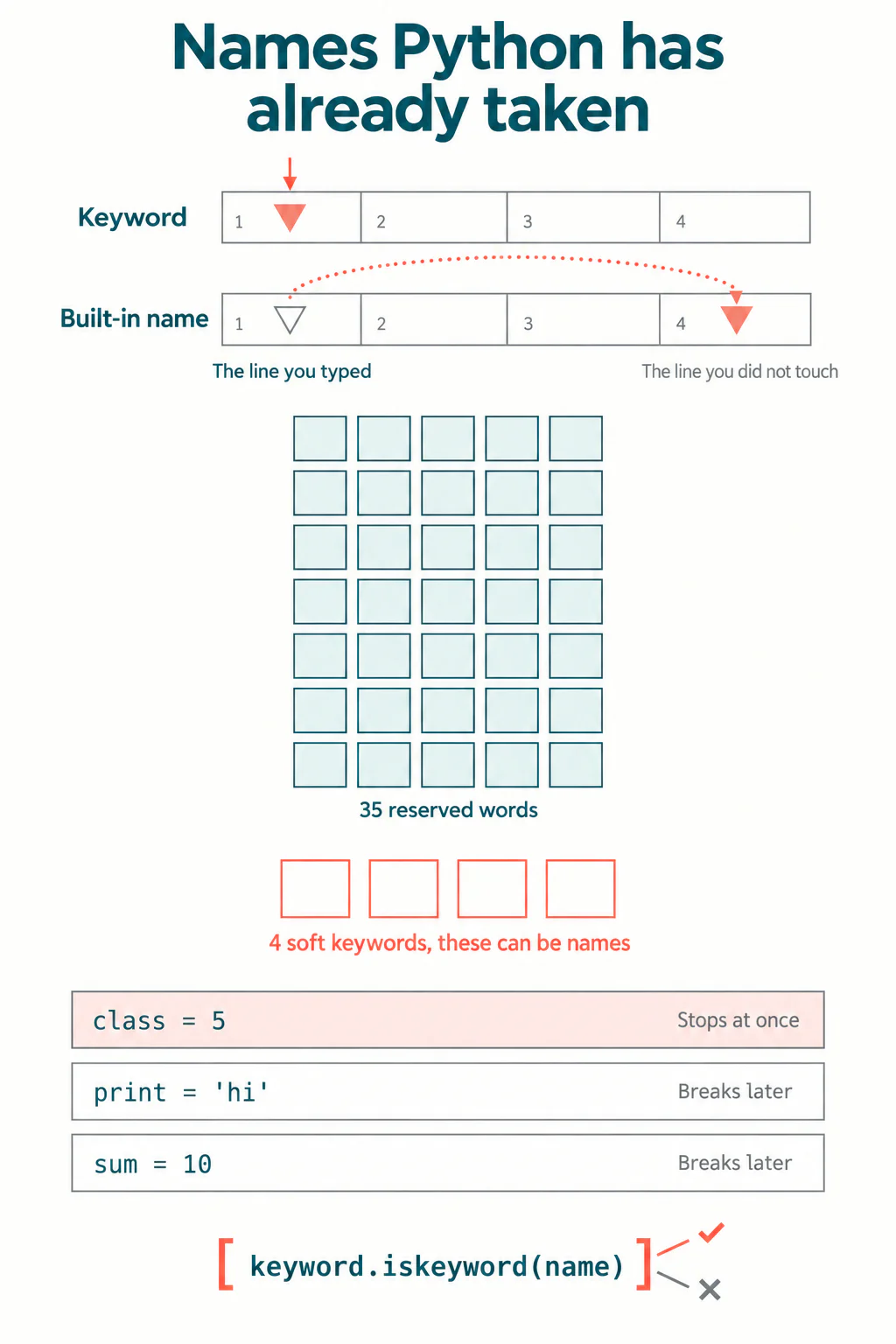
How to teach this at home, without a lecture
Five minutes, once, at the right moment. The right moment is the first time your child hits one of these errors, not before.
- Show them the check. Open Python, type
import keyword, thenkeyword.iskeyword('list'). Let them try their own variable names. Children enjoy this because it answers instantly and they are in charge of it. - Explain its limit honestly. True means stop. False does not mean yes. That gap is the whole lesson, and children handle the nuance better than most adults expect.
- Teach one naming habit instead of a list. Add a word. Not
listbutscore_list. Notsumbuttotal_sum. Notprintbutprint_name. A specific name is both safer and easier to read in a month's time. - Give them the heuristic. If the line in the error message looks correct, look upwards for a name.
- Let them break it on purpose. Have them write the three-line
sum = 10example themselves and read the error. A failure they caused deliberately is not frightening, and they will recognise it when it happens by accident.
Deliberately breaking something is a better teaching move here than any explanation, because the gap between cause and symptom is the thing being taught, and you cannot describe that gap as vividly as a child can experience it in thirty seconds.
When is a child ready for this?
It depends much less on age than on what they are building, and rushing it does real harm. My own view, after years of watching children make the jump from blocks to text, is that naming problems should be taught when they appear rather than taught in advance.
| Stage | Typical age | What to do about names |
|---|---|---|
| Block coding, Scratch | 7 to 10 | Nothing. Blocks make collisions impossible, so there is nothing to warn about |
| First weeks of Python | 10 to 12 | Teach the naming habit only. Add a word to every variable name |
| Writing programs over 20 lines | 11 to 13 | Teach the keyword check and the SyntaxError. This is when collisions start |
| Using libraries and copied code | 12 and up | Teach shadowing properly, with the sum and list examples |
A child who is genuinely ready to leave Scratch can absorb all of this in one session. A child pushed into text syntax early will meet the shadowing error before they have the mental model to interpret it, decide Python is arbitrary and unfair, and quietly lose interest. That is the outcome worth avoiding, and it is why we hold children in blocks until the logic is secure rather than until a birthday.
If your child is still assembling the vocabulary, our guide to 40 common programming terms and the comparison of Scratch and Python are the right place to start instead. You can also check the current list yourself any time in the Python keyword module documentation.
What to take away
Python's 35 reserved keywords are the easy case: they stop the program on the line that caused the problem and the arrow points at it. The hard case is the built-in names, which are not reserved, which Python accepts in silence, and which produce a TypeError on a line that is not at fault. Teach the habit of adding a word to every name and most of this disappears before it starts.
And if your child is staring at an error on a line that looks perfectly fine, they have probably met this exact problem. Scroll up, look for the name, rename it, move on.
Codeyoung runs 1:1 live online classes for children aged 6 to 17, with a teacher who adapts the pace to your child rather than a fixed syllabus. The first class is free, so you can see how they respond before deciding.
Book a Free TrialOur online coding classes for kids move children from blocks to Python at the pace the child sets, which is the only way this particular lesson lands when it should.