Forge Minecraft Mods: Complete Guide to Forge Mod Loader
Minecraft Forge is the most popular mod loader for Minecraft. The Forge system allows players to install and run thousands of Minecraft mods safely inside the game.
Mods expand Minecraft far beyond the default experience. Players can add new tools, mobs, crafting systems, tech machines, or even completely new worlds. Mods can also add items, blocks, and entities to the game, letting you customize and expand Minecraft’s content in countless ways. The Minecraft forge mod loader makes these modifications work together without breaking the game.
Today, most community mods use Minecraft Forge. This platform makes installation easy, manages dependencies, and ensures different mods work well together.
Many young players become curious about how mods work. This guide shows how the Forge mod loader works. It also tells you where to download safe mods and how to install them without errors.
Key Takeaways
Forge is the standard Java-edition mod loader and provides a stable API for many established mods.
Trusted platforms like curse forge Minecraft mods help users download verified mods safely.
Install matching Forge and Minecraft versions, place .jar files in the mods folder, and verify from the launcher.
Use performance libraries first (FerriteCore, Rubidium) and JEI for recipe lookup to reduce trial-and-error.
What is Minecraft Forge?
The Minecraft Forge mod loader is a platform that allows the game to run community-created Minecraft mods safely. The mod loader connects the base Minecraft game with community-made modifications.
Minecraft Forge reads jar files in the mods folder. It loads the needed dependencies and applies those changes when the game starts. Because the mod loader manages these files automatically, players do not need to change the core Minecraft files manually. Because of this system, players do not need to edit game files manually anymore, which reduces errors and improves stability.
One major reason developers prefer Minecraft Forge is its strong development framework. The platform has an intermediary API. It simplifies mod creation. Developers can build mods using Java, the same language that powers Minecraft.
This system also improves compatibility. Many forge mods modify blocks, entities, crafting recipes, and world generation systems. The Forge framework ensures these modifications work together without conflicts.
Because of this stability and developer support, most major modpacks and large mod collections rely on Minecraft Forge.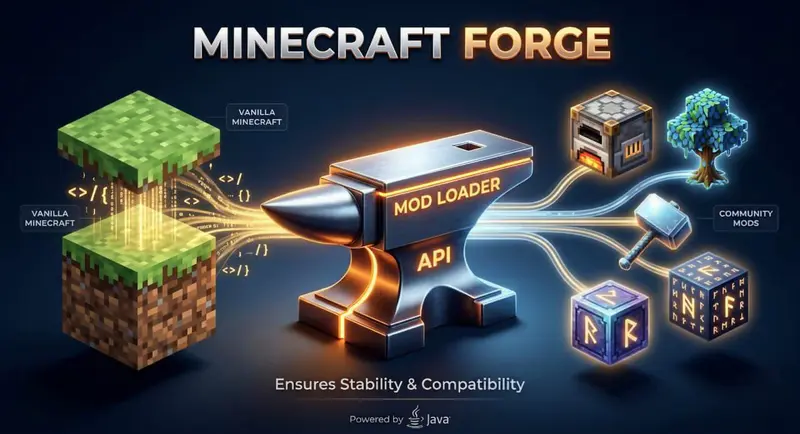
Minecraft Forge vs Fabric Mods
Many players compare Minecraft Forge and Fabric mods when choosing a mod loader. Both systems allow the game to run mods, but they focus on different priorities.
Minecraft Forge is known for compatibility and large modpacks. Most classic forge mods and big mod collections, like All the Mods, use the Forge platform.
Fabric mods, on the other hand, focus on performance and fast updates. Fabric is lightweight and often supports new Minecraft versions faster than Forge.
Most beginners prefer Minecraft Forge because it supports thousands of established mods and large modpacks.
How to Install Forge Minecraft Mod Loader
Installing Minecraft Forge takes a few minutes if you do it right.
First get Minecraft Forge from its website. Always use the site because other sites may have old or unsafe files.
Next pick the Forge version, for your Minecraft game. If you have Minecraft 1.20 you need the Forge version for 1.20. If you don't match the versions you might get loading errors.
After you download the installer file, double click the jar file to open it and start the installation process. Choose Install Client, confirm. After selecting Install Client, wait a few seconds while the installer completes the setup in the background.The installer will put the Forge files in your Minecraft folder.
When the installation is done open the Minecraft Launcher. You will see a profile called Forge. Choose this profile. Start the game once to finish setting up.
When you start the game for the time Minecraft makes a mods folder in the game directory. This is where you put all your mods.
Now your mod loader is ready to run mods.
Finding the Best Forge Minecraft Mods
Players can discover thousands of forge mods across several trusted platforms. These Minecraft mods expand gameplay by adding new blocks, tools, crafting recipes, mobs, and automation systems.
Popular mod categories include:
Tech mods that automate crafting and resource processing.
Exploration mods that generate new biomes and structures.
Map mods that help players navigate large worlds.
Performance mods that reduce memory usage and improve performance.
A well-known example is Xaero's Minimap. It shows a map overlay on the screen. Players can create waypoints to mark important locations, making navigation easier in large worlds. The mod also helps players track nearby world terrain, making exploration easier.
Many players choose to install modpacks. These are collections of mods that work well together. Using modpacks makes sense for beginners because it saves time and avoids compatibility issues between different mods.They help avoid conflicts between different mods.
Favorite Performance Mods for Minecraft Forge
Performance mods improve stability and reduce lag when multiple Minecraft mods are installed. These mods optimize memory usage, improve rendering systems, and fix common issues found in large modpacks.
Popular performance mods include:
OptiFine compatibility mods, which improve graphics settings and frame rates.
FerriteCore, which significantly reduces memory usage.
Rubidium, which improves rendering performance.
BetterFPS, which boosts overall game performance.
Some advanced optimization tools use techniques like async path tracing and better rendering systems. These tools also enhance mode rendering. This helps the game show complex modded environments smoothly, reducing visual glitches. As a result, Minecraft can handle complex modded worlds more efficiently.
Players who feel there are not enough animations in the default game often use visual enhancement mods to improve movement, effects, and overall immersion.
These performance improvements are especially useful when running large modpacks such as All the Mods, where hundreds of mods can otherwise strain the game engine.
CurseForge Minecraft Mods: Top Recommendations
CurseForge is the name you will hear most often in the modding community. Many players prefer curse forge Minecraft mods because the platform makes everything simple.
Why CurseForge stands out:
We verify downloads for safety.
Organizers categorize mods into clear groups.
You can filter by Minecraft version easily.
Each mod page shows ratings and recent updates.
Popular Forge-compatible mods to try first:
Just Enough Items (JEI) shows you every item in the game and how to craft it. Essential for any modded playthrough.
Biomes O' Plenty adds dozens of new biomes to explore. The world feels fresh again.
JourneyMap creates a real-time map of your world. You can see where you have been and mark important locations.
Tinkers' Construct lets you build custom tools and weapons from different materials. Deep and rewarding.
OptiFine improves performance and adds graphics options. Many players consider it required.
When you browse CurseForge Minecraft mods, check the version carefully. Download only what matches your Forge installation.
Curse Forge Minecraft Mods: Where to Download Safely
CurseForge is the largest and most trusted platform for downloading Minecraft mods. The platform hosts thousands of projects and verifies uploads from mod developers.
Players prefer curse forge mods because the platform offers organized categories, version filters, and reliable downloads. This system helps users find mods compatible with their specific Minecraft version.
Popular Forge-compatible mods include:
Installing Minecraft Mods with Forge
Installing Minecraft mods with Minecraft forge is simple once the mod loader is installed.
How to add mods to your game:
Step 1: Download the mod file
Mods usually come as .jar files. Save them somewhere you can find, like your Downloads folder.
Step 2: Locate your mods folder
Open File Explorer (Windows) or Finder (Mac). Type %appdata%/.minecraft in the address bar and press Enter. Look for a folder called mods. If you do not see one, create a new folder and name it mods exactly.
You can also rename the folder carefully if it was created with the wrong name, but make sure it stays exactly “mods” or the mod loader will not detect it.
Step 3: Place mod files in the folder
Copy or move the .jar files into the mods folder. Do not unzip them. Leave them as .jar files.
Step 4: Launch Minecraft with the Forge profile
Open the Minecraft launcher. Select the Forge profile and click on Play. The forge mod loader system automatically detects and loads every mod in the folder.
Step 5: Check that mods loaded
On the main menu, click Mods. You should see a list of all your installed mods. If a mod appears here, it loaded correctly. Forge Minecraft mods work together when you follow these steps.
How Minecraft Forge Uses Config File Settings
Most forge mods create a config file when the game launches. The config file stores customizable settings that control how the mod behaves.
These config files are usually found in the config directory within the Minecraft folder. Players can open them using a simple text editor.
A config file may control settings such as:
mob spawn rates
machine energy usage
crafting difficulty
world generation features
By adjusting the config file, players can balance gameplay or improve performance. Large modpacks usually have many configuration files. These help Minecraft mods work well together.
Creating Custom Mods with Minecraft Forge
Creating your own mods with Minecraft Forge opens up a world of possibilities for both new and experienced developers. The first step is to download and install the Forge mod loader, which acts as the foundation for all modding projects. Minecraft Forge is designed to be compatible with multiple versions, making it easy for developers to create mods that work across different game updates.
When developers install Forge, they get the Mod Development Kit (MDK). They can then use it to create a new project. The MDK package delivers vital resources which enable you to start working on your project through its pre-built templates and sample mod. The toolkit provides a simple method for creating new game elements which include blocks and items and game features.
Developers use Java to create custom mods and implement them within the Minecraft Forge project structure. They implement these mods within the Forge project structure. The mod loader manages all required game elements through its dependency system. It guarantees that the game will correctly load all necessary libraries and mods during startup.
Research from MITs Media Lab shows that engaging in design activities like game modification helps children develop essential computational thinking and creative problem-solving skills. Learning to create mods often becomes a gateway to programming. At Codeyoung, students often shift from playing Minecraft to creating their own projects. They use languages like Java for this. With 85%+ course completion rates and a structured 1:1 learning model, students develop strong problem-solving skills while working on real coding projects inspired by games.
Advanced Modding Techniques
The advanced modding techniques provide gamers with their Minecraft mods as a base and these techniques will enable them to create more customizable and precise modifications. Developers can use Java to create custom classes, interfaces, and methods. The new entities, blocks, and tools let developers create new game elements. They can also use the game logic changes to adjust existing functions and mechanics.
The Minecraft Forge API serves as a strong resource for modders who operate at an expert level. The tool helps developers make new gameplay features. It has two main functions: event registration and configuration management for custom events. The Forge API enables you to create mods which bring in advanced systems that include automation and new mobs and complex crafting processes.
The mod projects which developers create and control require Eclipse and IntelliJ IDEA as their primary development environments. The tools offer three key features: code completion, debugging, and project organization. These features make mod development easier, from testing to refinement. The developers use these tools to work on big projects while maintaining their mod stability and functionality with other game mods.
Advanced modding techniques let you make custom Minecraft mods. These mods can change the game to fit your creative ideas and community needs.
All the Mods Modpack Overview
One of the most famous Forge modpacks is All the Mods. Despite its name, the modpack does not include every mod. Instead, it includes a carefully selected collection of compatible forge mods.
The All the Mods modpack focuses on high quality gameplay systems that work well together. It combines technology mods, exploration content, automation systems, and advanced crafting mechanics.
Players enjoy All the Mods because it transforms Minecraft into a large sandbox simulation. The game isn’t just about survival. Players build factories, explore new worlds, and make powerful tools in this system.
Large modpacks like All the Mods show how flexible Minecraft Forge is. It allows hundreds of mods to function together without conflict.
Minecraft Forge Mods for Multiplayer Servers
Many players wonder if forge mods work in multiplayer environments. The answer depends on the server setup.
If a server runs Minecraft Forge, every player joining the server must install the same Minecraft mods locally. The server and client must use compatible mod versions to avoid connection errors.
Forge modded servers are popular for large modpacks, where players collaborate in shared worlds. These servers allow groups of players to build factories, explore new terrain, and automate crafting systems together.
Server administrators often configure modpacks carefully to reduce bugs, performance issues, and memory usage problems.
Troubleshooting Common Forge Mod Issues
Most Minecraft Forge mod issues occur because of version mismatches, missing dependencies, or conflicts between multiple mods. Identifying the cause quickly helps prevent crashes and loading errors.
A common problem happens when Minecraft crashes during startup. This usually means the installed forge mods do not match the Minecraft or Forge version.
Another frequent issue is mod conflict. Some mods modify the same systems, such as world generation, entities, or rendering features. When two mods attempt to change the same game function, errors can appear. These errors usually appear when conflicting mods are present in the same setup or when dependencies are missing.
Common troubleshooting steps include:
ensuring Minecraft and Forge versions match
removing recently installed mods
checking the error log in the game directory
installing missing dependency mods
Installing mods gradually helps identify problems faster.
Best Forge Mods for Different Minecraft Versions
Minecraft updates often break mods. Developers need time to update their creations. You cannot use a mod made for 1.19 with Forge 1.20.
Minecraft 1.20+ mods
The latest version has fewer mods because developers are still updating. Check CurseForge frequently for new releases.
Minecraft 1.19 mods
This version has many stable mods. Most popular mods updated to 1.19 quickly.
Minecraft 1.18 and 1.16 mods
Older versions have the largest mod collections. Many modpacks still run on 1.16 because so many mods are available.
Mod packs
Some creators bundle mods together into modpacks. These are collections that work well together. All the Mods is a popular pack that includes hundreds of mods balanced for gameplay.
Always check compatibility before downloading forge mods Minecraft. The mod page clearly shows which Minecraft version it supports.
Minecraft Mods Community
The Minecraft mods community is a lively place. Here, people create new ideas by working together and trying out different things. The global community of game developers and players together with content creators establishes a shared space which they use to express their dedication towards expanding game features. The community gets support from many online platforms. These include forums, social media groups, and dedicated websites.
The Minecraft Forge forums are the main place for modders. Here, they can showcase their latest work, seek help, and access the full documentation. Forums are a key tool. They help users solve problems, learn new skills, and stay updated on the latest in modding.
The community centers on CurseForge. This platform gives players and developers access to a wide range of mod libraries. It also offers important development tools and resources. The platform lets users explore different mods. They can download and test them. Users can also find modding resources, like guides and tutorials.
The Minecraft mods community thrives on collaboration. Developers work together on major projects, sharing code and assets. They also provide feedback to help each other improve. By joining this vibrant ecosystem, you can learn from skilled modders while showcasing your work to shape the future of Minecraft modding.
This community offers endless opportunities to enhance your skills. Whether you're a beginner creating your first mod or an experienced developer seeking fresh ideas, there's something for everyone.
Safety Tips for Downloading Forge Minecraft Mods
Downloading mods from trusted sources is essential for protecting your computer and your game files.
Always use platforms like CurseForge when downloading Minecraft mods. The platform moderates uploads and verifies many projects before publishing them.
Follow these safety practices when installing Minecraft mods:
Download from trusted platforms
Read mod reviews and ratings
Avoid unofficial mirror websites
Scan files if unsure
Safe downloads prevent malware and reduce the risk of installing broken mods.
Conclusion
The Minecraft Forge mod loader makes modding accessible for both beginners and experienced players. By installing Forge, players can explore thousands of forge mods that expand Minecraft far beyond its default gameplay.
From new mobs and tools to massive modpacks like All the Mods, Forge allows the community to reshape the game in creative ways. Players only need to install Forge, download compatible mods, and place them inside the mods folder to begin exploring new features.
Minecraft modding also introduces players to deeper technical ideas. According to educational insights from Code.org connecting computer science concepts to creative, student-driven interests like gaming significantly boosts long-term engagement in STEM.
With the right mods installed, Minecraft becomes more than a survival game. It becomes a platform for creativity, experimentation, and learning.
Minecraft Forge Mods - FAQs
What is Forge mod loader for Minecraft?
The Forge mod loader for Minecraft is a platform that allows the game to run community-created Minecraft mods safely. The Minecraft forge mod loader works by reading mod jar files placed inside the mods folder and loading them when the game starts. This system also manages dependencies between different forge mods, which prevents compatibility issues.
How do you install Minecraft Forge mods?
To install Minecraft mods using Minecraft Forge, first install the mod loader from the official Forge website. After installing Forge, download compatible forge mods as jar files from trusted platforms such as curse Minecraft forge mods pages.
Move the downloaded jar file into the mods folder inside the Minecraft directory. When the game launches using the Forge profile, the mod loader automatically detects and loads the installed mods.
Is CurseForge safe for Minecraft mods?
Yes, CurseForge is considered one of the safest platforms for downloading Minecraft mods. The platform hosts thousands of verified projects and organizes them by Minecraft version, popularity, and compatibility with Minecraft Forge.
Each mod page includes version details, user feedback, and installation instructions, which helps players avoid broken or incompatible Minecraft mods. Using trusted platforms like CurseForge significantly reduces the risk of downloading malware or corrupted files.
Can you use Forge mods with vanilla Minecraft?
No, forge mods cannot run in vanilla Minecraft because the base game does not include a mod loader. Mods require the Minecraft forge mod loader to read the mod files and integrate them with the game engine. When players install Minecraft Forge, the launcher creates a Forge profile that loads the mods from the mods folder during startup.
What are the most popular Forge Minecraft mods?
Some of the most popular forge mods include JourneyMap, Just Enough Items (JEI), Biomes O Plenty, and Tinkers Construct. These Minecraft mods improve gameplay by adding crafting helpers, exploration features, and advanced tool creation systems.
Large modpacks such as All the Mods combine many of these mods into a single experience powered by Minecraft Forge. Players often install these mods to expand world exploration, improve crafting systems, and customize gameplay.