
You open your child's laptop and there it is: sixty lines of tidy Python with proper variable names and a comment above every function. Better than anything they have written before, finished in about eleven minutes, and they cannot tell you what line 34 does. Every parent of a coding student is going to have this moment. The useful news is that there is real research on kids using AI to write code, it was done on children exactly this age, and it does not say what the headlines say.
It says something narrower and considerably more useful: the tool is not the problem. One specific habit is.
What the research actually found
In a controlled study presented at the 2023 CHI conference, researchers gave 69 novice learners aged 10 to 17 a set of 45 Python code-authoring tasks. Half had access to an AI code generator. The other half did not.
The group with the AI completed more tasks, at a 1.15 times higher completion rate, and scored 1.8 times higher. That part is unsurprising. The part that matters is what happened next. On tasks where they had to modify code by hand, with no AI available, the AI-trained group did not do worse. A week later, on a post-test, they performed slightly better, though not by enough to be statistically meaningful.
So the straightforward fear, that a child who uses an AI assistant will lose the ability to code without one, was tested directly and did not appear. If you have been carrying that worry, you can put it down. You can read the full paper, Studying the Effect of AI Code Generators on Supporting Novice Learners in Introductory Programming, free on arXiv.
What did appear was something else.
The four ways children actually use these tools
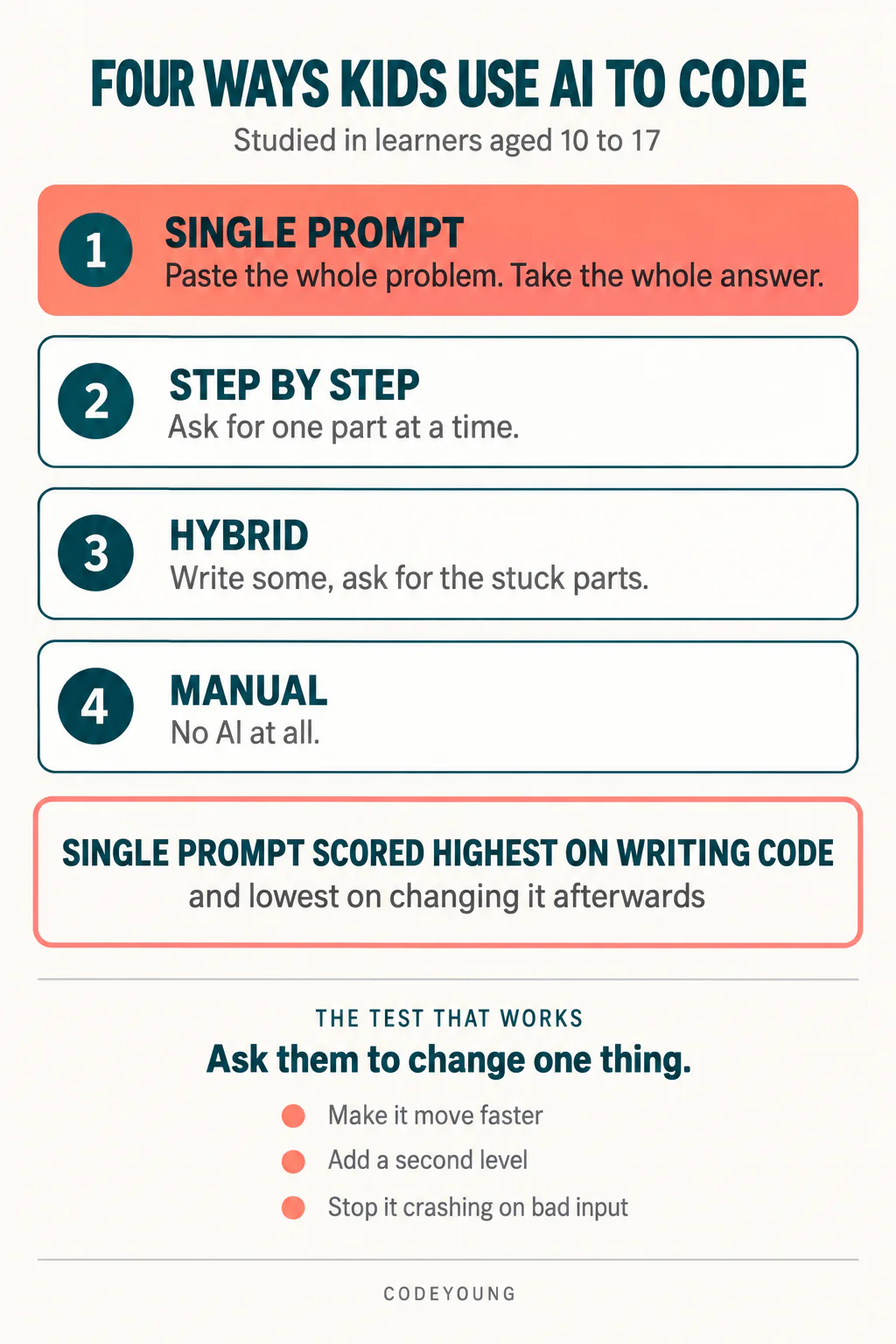
A follow-up study by the same group watched 33 learners, again aged 10 to 17, work through the same 45 tasks and sorted what they did into four patterns.
- AI single prompt. Paste the whole problem in, take the whole solution out.
- AI step by step. Break the problem into parts and ask for each part separately.
- Hybrid. Write some of it yourself, ask for the bits you are stuck on.
- Manual. No AI at all.
Here is the finding worth pinning to the fridge. The single-prompt approach produced the highest correctness scores on writing the code, and the lowest correctness scores when those same learners were later asked to modify code. The researchers described it as showing signs of over-reliance.
Read that twice, because it inverts the normal parental signal. The work that looks best is produced by the habit that teaches least. A parent judging by the output alone gets the answer exactly backwards. The child with messy, half-working code they wrote themselves is, on this evidence, in better shape than the child with sixty immaculate lines.
This is also why "did you write this yourself" is a poor question. It has one socially obvious answer, it puts the child on the defensive, and it does not measure anything.
Not sure whether your child is following their coding classes or copying through them? A free trial class with a Codeyoung teacher shows you exactly where they are and what they are ready for next, before you commit to anything.
Book a Free Trial →The one test that tells you what you need to know
Ask them to change it.
Not to explain it, because a child can narrate code they do not understand by reading the comments aloud. Give them one small, specific modification and watch what happens in the next five minutes:
- Make the character move twice as fast.
- Add a second enemy.
- Make it stop crashing when someone types a letter instead of a number.
- Change the score so it goes up by 5 instead of 1.
A child who wrote the code, or who followed along closely while the AI wrote it, finds the right line and changes it. It takes minutes and they are slightly bored by the request. A child who pasted the problem in scrolls up and down looking for something that seems relevant, then gets quiet.
That silence is not a discipline problem. It is a diagnostic, and it is the same one professional developers use on themselves. If you cannot change it, you do not own it.
What to do at each age
Readiness for these tools tracks how much of the underlying habit is already built. A rough guide, based on where children typically are in the progression from visual blocks to written syntax.
| Age | Where they usually are | Sensible position on AI |
|---|---|---|
| 6–9 | Sequencing blocks, learning that order matters | None. The part the AI removes is the only part being built. |
| 10–12 | Loops and conditionals, first written syntax | Use it to explain an error message. Not to produce code. |
| 13–15 | Functions, debugging, projects of their own design | Step-by-step requests only. One function at a time, then read it. |
| 16–17 | Larger projects, unfamiliar libraries | Close to professional use, with the rule that they must be able to modify anything they keep. |
The pattern across the table is one idea: a generator is safe once the child can read what comes back. Before that point it is not a shortcut, it is a substitute. This is the same reasoning behind not rushing a seven-year-old into Python syntax before they can hold a two-step loop in their head, which we set out in our guide to whether kids should still learn to code.
What to say instead
The conversation goes better if it is about the size of the request rather than about honesty. Three sentences that work:
"Ask it for the next step, not the whole thing." This is the single rule that maps onto the research. It is enforceable, a child can follow it without supervision, and it is how competent adults use these tools.
"Show me where you would change it." Lower stakes than asking them to explain the whole file, and it produces the same information.
"What did you try before you asked it?" This reframes the AI as the second move rather than the first, which is the habit that matters when the problem is one nobody has solved before.
Avoid making it a moral question. A twelve-year-old who has been told AI use is cheating will simply stop telling you, and you lose the visibility that lets you help. Our guide on how kids can use AI for homework covers the same ground across other subjects.
Where AI genuinely helps a learner
Three uses are straightforwardly good, and it is worth naming them so the rule does not read as blanket suspicion.
Explaining error messages. Python's tracebacks are written for people who already know Python. A ten-year-old who can paste an error and get a plain-English explanation gets unstuck without waiting for an adult, and stays in the project instead of abandoning it.
Reviewing code they wrote. Asking what is wrong with my code is a different act from asking for code. It rewards having written something first.
Reading unfamiliar code. A teenager opening someone else's project on GitHub used to face a wall. Now they can work through it a function at a time, which makes a whole category of learning available earlier than it used to be.
What none of these do is remove the need to write bad code and fix it. That remains where the learning lives, and it is why a good class still spends most of its time on debugging rather than on typing. If you are not sure whether your child's class does that, our post on telling whether a class is actually working lists what to look for, and our online coding classes for kids are built around exactly that balance.
What this comes down to
The evidence on kids using AI to write code is more reassuring and more specific than the general anxiety around it. Access to a generator did not damage these learners. One habit did: handing over the entire problem and accepting the entire answer, which produced the best-looking work and the weakest ability to change it.
So do not police the tool. Police the size of the request, and use the modification test when you want to know where your child really is. If they can change it, they understood it, and that is the only evidence worth collecting.
Codeyoung runs 1:1 live online classes for children aged 6 to 17, with a teacher who adapts the pace to your child rather than a fixed syllabus. The first class is free, so you can see how they respond before deciding.
Book a Free Trial