How to Teach Kids About ChatGPT and Generative AI (2025)
Teaching Artificial Intelligence is now an essential part of helping children learn about ai and understanding AI and how modern tools work. This guide explains How to Teach Kids About ChatGPT and Generative AI, what these systems do, how they work, and how families and teachers can introduce them safely. You will find age-appropriate activities, classroom strategies, and clear explanations that help students become confident and responsible users.
What is ChatGPT and Generative AI? (Explained for Kids)
Start with a simple idea. Generative AI is like a smart artificial intelligence helper that learns from examples and uses those patterns to create new stories, answers, or new ideas. Tell children that ChatGPT reads a lot of text, then uses those patterns to make predictions. It does not have feelings or personal opinions. It is simply following learned patterns. This simple introduction fits well with how kids artificial intelligence learn from their own examples.
Use an analogy they understand. When kids learn to draw, they look at pictures, notice shapes and colors, then try again. AI learns in a similar way, just as computers learn from many examples and then try to create something new. It learns from many examples and then tries to create something new.
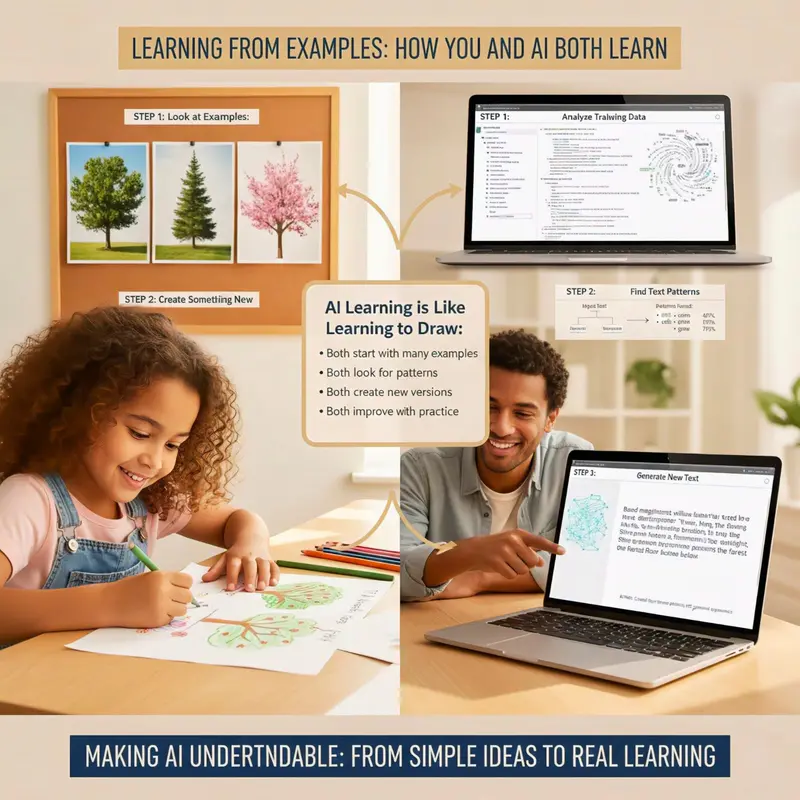
How ChatGPT Works: A Simple Breakdown
ChatGPT learns by reading large amounts of text, including large language models .
It looks for repeated patterns in language.
It predicts the next best word to build sentences that answer questions.
It is a type of machine learning system that recognizes patterns and creates new text. It can also make mistakes, so students should think critically and check facts. These habits help them build AI literacy and a strong foundation for valuable skills.
Generative AI vs Traditional AI: What’s the Difference?
Function | Traditional AI | Generative AI |
|---|---|---|
Function | Analyzes and follows rules | Creates new content |
How it Works | Recognizes patterns | Generates patterns |
Flexibility | Follows fixed rules | Learns and adapts |
Example | A calculator, voice assistants like Siri | ChatGPT writing a story, DALL-E creating an image |
The Building Blocks of AI: Core Concepts Made Simple
Before exploring more advanced ideas, students should understand a few core AI concepts.
Machine learning allows computers to learn from data without explicit programming. It powers most modern AI systems.
Computer vision enables AI to interpret images, such as in self-driving cars or medical image analysis.
Natural language processing (NLP) helps computers understand and generate human language.
Using everyday examples helps students see how AI systems work in daily life and can help personalize learning, building a solid foundation for learning more advanced topics.
Why Teaching Kids About AI Matters in 2025
AI education helps students develop skills for school, work, and everyday life. It boosts critical thinking, creativity, and problem-solving. These skills are important. It also gets them ready for jobs that use AI and digital tools.
By 2030 many jobs will need AI skills, data literacy, and analytical ability. Teaching AI early gives students a significant advantage. AI tools are already in search engines, writing apps, and classrooms, so students need to understand how they work. Learning AI also improves problem solving and data analysis, which helps students learn to solve real world problems.
AI literacy helps keep kids safe. Students who understand privacy, bias, and misinformation can question AI results and spot unfair patterns. This helps them judge where AI is appropriate and where it is not. When kids grasp artificial intelligence AI, they can solve real problems and make smarter choices every day.

Age-Appropriate Ways to Introduce ChatGPT to Children
Different ages understand AI in different ways. Use simple creative tasks for younger kids in ai classes, practical activities for preteens, and discussions about ethics for teens.
Plan lessons by age group to match attention spans and reading levels. For young learners, use short games and simple stories to make learning personal. For middle school students, add hands-on activities and small AI projects. For teens, discuss ethics, share real examples, and connect to computer science and coding.
A good rule is “hands on, minds on.” Kids learn AI best by trying things, gaining hands on experience playing AI games asking questions, and watching systems respond. Keep sessions short with clear goals. Use everyday examples to help students build confidence step by step.

For Ages 6–9: Using AI for Creative Storytelling
For young students, the focus should be on fun and to spark creativity. Use ChatGPT for simple, creative tasks.
Create silly fairy tales: Ask it to write a story about a dragon who loves pizza.
Get character ideas: Brainstorm characters for their own drawings or stories.
Play rhyming games: Generate lists of words that rhyme.
Tip: Co-create with the child. Sit together and build the story as a team. This keeps the learning process active, shared, and fun.
For Ages 10–12: ChatGPT as a Learning Assistant
At this stage, you can introduce ChatGPT to students. It can help them understand concepts, not just find answers. This helps students understand tools like virtual assistants better. They also improve their analytical skills.
Explain complex ideas: Prompt: "Explain how volcanoes work to a 5th grader."
Brainstorm science projects: "Help me brainstorm ideas for a biology fair project."
Create practice quizzes: "Generate five practice questions about ancient Egypt."
This shows them how to use AI for research and problem-solving. It emphasizes that AI is a launchpad for learning, not a shortcut.
For Ages 13+: Advanced AI Concepts & Ethical Use
Teens are ready to explore the bigger picture of Artificial Intelligence. This is the time to discuss responsible AI use.
AI Ethics: Talk about AI bias, data privacy, and plagiarism.
Critical Thinking: Teach them to verify every piece of information from trusted sources.
Prompt Engineering: Show them how crafting better prompts leads to better answers.
This prepares them for real-world applications and the futuristic concept of ethical considerations of technology.
How AI Connects to Computer Science Learning
AI fits naturally into computer science, including topics like neural networks . Teachers can introduce coding concepts that show how computers learn and solve problems. Middle school students can build simple models, write small scripts, or explore classification activities. This builds a strong foundation for future computer science learning.
Hands-On AI Projects and Games to Spark Curiosity
Hands-on activities help students understand AI while building strong problem-solving skills.
AI Detective: Compare an AI-generated paragraph with a human-written one and spot the differences. This sharpens analytical thinking.
Teachable Machine Showcase: Use tools like Google’s Teachable Machine to create a simple model that recognizes patterns, such as rock, paper, and scissors gestures.
Design a Smart System: Create a solution to a real-world problem, such as a system that sorts recycling. This encourages creativity and practical problem-solving.
These projects make complex ideas clear and engaging for middle school students and older learners.

How to Use ChatGPT in the Classroom: Practical Strategies
Teachers can use ChatGPT to support lessons in many ways.
Use it for daily warm up questions.
Use it to build vocabulary lists and practice sentences involving natural language processing.
Ask for science hypothesis ideas.
Use it for debate preparation or research planning.
Use it to rewrite sentences so students can compare and improve their writing.
Each activity gives students practice in critical thinking and prompt clarity.
5 ChatGPT Activities for Student Engagement
Structured digital-tool activities can make lessons fun. They keep students engaged without just using screens all the time. One option is a Debate Prep Bot, where students type a claim and receive points for and against it. They review the ideas, check the facts, and build their own arguments.
A Story Rewriting Challenge works well for writing practice. The tool provides a simple story, and students improve the plot, tone, or details. A Character Personality Creator provides brief character descriptions for students to use in their writing.
A Math Word-Problem Builder lets students create story problems. They can also solve and check these problems. A Fix My Paragraph task provides students with a short passage full of mistakes. They correct grammar errors and enhance clarity.
These activities help students improve their writing, reasoning, and problem-solving skills. They also keep students active and engaged in learning about computer vision.

Creating Effective ChatGPT Prompts with Students
Prompt writing is a key communication skill. Students learn it best when they understand three basics: give context, set a clear task, and choose a tone. For example, instead of asking a broad question, they should specify who the answer is for. They should also clarify what they want and how it should sound.
A simple framework is who, what, how:
Who is the audience.
What you want the system to do.
How it should be written.
Students can practice by adding context, stating a goal, choosing a tone, and giving an example. These steps help them get clear results and reduce confusion. Good prompts boost communication and help organize thoughts. They also teach students to use digital tools with neural networks effectively.
Teaching Responsible AI Use: Safety & Ethics
Teaching AI includes safety, especially in the context of machine learning. Students should know that digital tools collect data, including medical images so they must not share personal details like names, addresses, or school information. They also need to check answers with trusted sources because these tools can be wrong.
Explain when AI should not guide decisions, such as medical choices, grading, or personal issues. Treat it as support, not the final voice.
Before using any tool, teach a few basics:
Keep personal data private.
Check facts with reliable sources.
Do not use AI to complete full assignments.
Use it to explore ideas or understand topics better.
Talk about fairness, bias, and privacy.
These habits help students use AI responsibly and build strong problem solving skills.
How to Spot AI-Generated Misinformation
Teaching AI includes helping students recognize incorrect or confusing results. Kids learn AI more safely when they know how to check claims, compare sources, and question information.
Show students clear examples of answers that look smooth but contain wrong dates, missing citations, or vague details. Ask them to check names, numbers, and facts against textbooks or trusted websites. Encourage them to look for unusual claims or statements that conflict with what they learned in class.
Use a simple cycle: pause, compare, confirm.
Students pause before accepting an answer, compare it with at least one other source, and confirm details with a reliable reference. They can also ask follow-up questions to test consistency.
These habits build critical thinking, improve problem-solving skills, and help kids perform tasks as informed users who understand how AI systems work in school and daily life.

Setting ChatGPT Boundaries at Home and School
Clear rules help kids use learning tools in safe and productive ways. Families and teachers can set limits so students stay focused and avoid misuse.
Use short, supervised sessions for younger kids. Keep tool use in shared spaces and treat it like other screen time. Explain that these tools can help with ideas, planning, or practice, but students must write their own work and check facts with trusted sources.
At home, parents can ask kids to share what they learned after each session. In class, teachers can explain when digital tools are allowed, such as for brainstorming or outlining, and when they are not, such as during tests or graded writing. Simple rules like “use it for support, not final answers” keep expectations clear.
These boundaries build good tech habits, strengthen critical thinking, and support strong learning across subjects.

Addressing Data Privacy and AI Bias with Young Users
As children become informed users of AI, they need to understand key challenges. Data privacy is critical, students should never share private details, and they should know that their inputs may help train AI systems.
Discussing AI bias builds critical thinking. Since AI learns from human-generated data, it can reflect human biases. Encourage students to ask, "Why might the AI be suggesting this?" This helps them develop essential skills for evaluating information online and using AI responsibly.
Common Concerns Parents Have About Kids Using ChatGPT
Parents often worry about overuse, cheating, or unsafe content. The best solution is guidance. With clear rules and supervision, kids use these tools safely and build strong thinking and problem-solving skills.
These tools should support learning, not replace effort. Students should show their steps, reflect on answers, and revise based on feedback. Most platforms include safety filters, but adults should stay involved, talk about what kids see, and use controls when needed.
Balanced use, along with books, hands-on projects, and real conversations, helps students build a solid foundation for school and daily life.

Best AI Tools for Kids Beyond ChatGPT
Many kid-friendly AI tools support teaching AI concepts in simple and practical ways. They help young students learn how kids AI works. They explore machine learning and do hands-on projects. These activities build a strong base for future computer science work.
Good options include:
Google Bard for teens: Useful for fact-checking and helping students compare information.
Scratch with AI extensions: Lets young students teach coding basics and build simple kids AI projects.
Code.org AI Lab: Offers guided activities that show how computers learn and how to recognize patterns.
Teachable Machine: A web tool where students train models to identify images or sounds, supporting early computer vision skills.
Storybird AI and DALL·E Mini: Tools that let students create pictures and short stories to enhance creativity.
Resources for Teaching AI to Kids (Free & Paid)
A wide range of resources helps young students learn AI concepts and gain hands-on experience.
Free Resources:
Code.org’s AI curriculum and lesson plans
Kid-safe YouTube channels with tutorials
Google’s “AI Experiments” and other interactive tools
Paid Resources:
Structured AI classes and summer camps that guide students through AI projects.
Step-by-step modules that cover how AI systems work, data privacy, and simple hands-on projects.
Books and Printables:
Age-appropriate books that explain Artificial Intelligence using everyday examples like voice assistants, self-driving cars, or recommendation systems.
Printable worksheets and simple diagrams to help kids learn AI at their own pace.
Start small: Introduce one module on “How AI works,” then explore responsible AI, Machine Learning, or Computer Vision, followed by a project where students build or test a simple smart system. Using a clear, step-by-step approach makes the learning process engaging and accessible while developing critical thinking and problem-solving skills.

Conclusion: Preparing the Next Generation for an AI-Powered Future
Teaching AI is an exciting journey for young students. It builds confidence, creativity, and responsible habits. Start with simple explanations, add hands on projects, and guide kids through safe use. These lessons give children a deeper understanding and strong foundation in Artificial Intelligence, Machine Learning, and Critical Thinking.
Ready to start?Download our free "AI Literacy Starter Kit" with 5 simple prompts your kids can try today.