
Key Takeaways
- To choose your child's first Scratch game, balance their personal interests with an achievable project goal.
- Focus on topics your child loves, such as space or animals, to keep them engaged in the coding process.
- Select a project with only one or two core game mechanics, like a chase game or a clicker, for simplicity and successful completion.
- A well-chosen first project helps your child successfully finish the game and build valuable coding confidence.
How do I choose a Scratch game project to build?
For parents guiding their child, the best first Scratch game project balances the child's personal interests with a simple, achievable goal. Focus on their favorite topics, like space or animals, and select a project with one or two core mechanics, such as a chase game or a clicker, to ensure they can complete it and build initial confidence.
With millions of projects uploaded monthly, the official platform from the MIT Media Lab, Scratch, offers a vast community and numerous examples for inspiration. This massive library can be overwhelming. The key is to start with a clear, simple objective. Rather than aiming for a complex multi-level adventure, a great starting point is a game where one character (a sprite) chases another, or where clicking on a character makes a score go up. This approach aligns with guidance from organizations like Code.org, which advocate for foundational computer science principles that are reinforced by starting small and building incrementally. A detailed guide to Scratch programming for kids can help establish these core concepts before starting the first project.
At Codeyoung, our curriculum, developed by a team including an IIT Delhi alum and recognized by Forbes Asia 30 Under 30, prioritizes these fundamentals. Our STEM.org-certified approach, honed by teaching over 50,000 children, emphasizes building a solid coding foundation first. This ensures that when students later encounter more complex tools, they use them effectively. The goal is to make a first project that is not just fun, but also a solid stepping stone.
When you're browsing community galleries for inspiration, you might notice that some creators have developed intricate projects with dozens of sprites and custom sound effects. While these are impressive, they typically represent months of iterative work. For a first project, simplicity is the path to success. Some parents worry that choosing a simple project might bore their child, but the opposite is usually true. A game that can be completed provides far more satisfaction than an abandoned, overly complex project. The sense of having built something that works, even if it's simple, is what motivates children to continue learning.
- Pong Game: This classic paddle-and-ball game is excellent for learning about coordinates, motion, and
if...thenconditional statements (e.g., if the ball touches the paddle, then bounce). - Chase Game: A simple game where the player controls a sprite to catch another sprite teaches keyboard input handling (
when space key pressed), variables (for a score), and simple loops. - Virtual Pet: This project allows a child to program a pet to react to clicks with sounds or animations. It introduces event-based programming (
when this sprite clicked) and managing different sprite "costumes" for animation. - Story-Based Animation: Instead of a game with rules, a child can create an interactive story where clicking different characters reveals parts of a narrative. This is perfect for learning about sequencing and coordinating multiple sprites.
How to match a first Scratch project to your skill level?
The most effective way to start is by honestly assessing a child's current comfort with logic and computers, then selecting a project that offers a slight challenge without causing frustration. Many children struggle not from a lack of ability, but because foundational concepts were not taught clearly. A great first project acts as a clear, successful lesson. Codeyoung uses a placement diagnostic during our free trial class to personalize a learning plan, ensuring the first project is perfectly matched to the student's entry point.
For young creators, understanding the difference between project types is crucial. A "Catch the Falling Objects" game is simpler than a multi-level platformer. Beginner-friendly Scratch game ideas often include clicker games or basic maze navigation. These projects focus on one or two core concepts, making them ideal for a first experience. The table below breaks down project ideas by beginner skill level, helping you choose a suitable starting point. You can also explore a variety of Scratch projects for different age groups to see how complexity can scale.
Consider the typical learning trajectory. A child who has never programmed before should begin with a project that uses three to five different block types at most. For example, a "Cat and Mouse Chase" game might only require when green flag clicked, when arrow key pressed, move 10 steps, and if touching, then say. This limited palette makes it easier to understand what each block does. In contrast, a game that requires understanding variables, broadcasts, cloning, and costume switching simultaneously will create cognitive overload for a beginner.
| Skill Level | Core Concept Focus | Example Project Idea | Why It Works |
|---|---|---|---|
| Absolute Beginner (Ages 6-8) | Event Blocks & Motion | "Cat and Mouse Chase": Player moves a mouse sprite with the arrow keys to run from a cat sprite that moves automatically. | Teaches the direct relationship between a key press and on-screen movement. It uses basic when key pressed and move steps blocks. |
| Curious Explorer (Ages 8-10) | Variables & Conditionals | "Apple Catching Game": Apples fall from the top of the screen. The player moves a bowl to catch them, and a score variable increases. | Introduces the concept of a score using a variable and the if...then block to detect if an apple is touching the bowl. |
| Confident Beginner (Ages 10-12) | Loops & Broadcasts | "Simple Maze Game": The player navigates a sprite through a maze using arrow keys. Touching a wall sends the sprite back to the start. | This project requires using forever loops to constantly check for wall collisions and can introduce the broadcast block to signal a win or loss. |
| Aspiring Designer (Ages 12+) | Clones & Custom Blocks | "Asteroid Dodger": The player controls a spaceship that must avoid asteroids. New asteroids are created continuously as clones. | This moves beyond single sprites to teach cloning, which creates copies of a sprite, introducing more dynamic and unpredictable gameplay. |
Choosing the right project based on this progression builds momentum. A student who successfully makes a chase game is more likely to feel prepared to tackle a game with scoring. This incremental success is the foundation of a positive and sustained learning experience. Age is a useful proxy for skill, but the real indicator is what the child already knows. A 12-year-old who has never seen a computer should start with an "Absolute Beginner" project, not an "Aspiring Designer" one. Conversely, a very tech-savvy 8-year-old might breeze through a chase game and be ready for variables much sooner than the table suggests.
How much time should a beginner Scratch game take?
A beginner's first Scratch game should be scoped to take between one to four hours to complete. This timeframe is short enough to maintain focus and provides a quick, rewarding sense of accomplishment. A basic game can typically be built and understood in a single session. Setting a realistic expectation prevents the discouragement that comes from an overly ambitious project that drags on for weeks.
The primary goal of a first project is not to build a masterpiece, but to build confidence. A game that is finished, even if it's simple, is infinitely more valuable than a complex game that is abandoned. Completing a project provides the positive feedback loop necessary to encourage a child to start their next, more challenging one. This philosophy is a key reason for the high course completion rate of over 80% among the 50,000+ students Codeyoung has taught across more than 15 countries. Projects are designed to be completable within a reasonable number of sessions.
For example, a simple "Pong" game might take a focused beginner two hours. The first hour could be spent creating the paddles and getting them to respond to keyboard input. The second hour could be dedicated to programming the ball's movement, its bouncing logic when it hits a paddle or a wall, and adding a simple scoring system. This structured, two-part process makes the project feel manageable and leads to a tangible, playable result by the end of the session.
Breaking the work into discrete sessions also helps. If your child is working for 30 minutes per day, a two-hour project spans four days. On day one, they might just get the sprite moving. Day two could be collision detection. Day three adds scoring, and day four is polish and testing. This rhythm prevents burnout. Each session ends with visible progress, which is motivating. The child goes to bed having accomplished something concrete, like "Today I made the ball bounce off the wall," which builds anticipation for the next session rather than dread.
How to choose a project based on what you want to learn?
To make a first project truly educational, select a game based on the specific programming concept you want the child to learn. Instead of just picking a game that looks fun, identify a core skill and find a project that teaches it. This goal-oriented approach transforms playtime into a deliberate learning exercise. The official Scratch platform's 'Ideas' section exemplifies this by linking starter projects to specific skills, such as using the 'Animate a Name' project to learn sequencing or 'Make Music' to understand event-based programming. To make this pairing easy to scan, the map below matches four foundational concepts to a simple game that teaches each one.
 To learn X, build Y: match each coding concept to a simple game that teaches it.
This method aligns with Codeyoung's CREATOR teaching approach, which encourages exploration with clear learning goals. For instance, our 'AI & Machine Learning with Python' course guides students from a simple print("Hello World") all the way to a complex 'Yoga Pose Detection' capstone project. Each project is a vehicle for a new set of skills, demonstrating a clear and intentional learning path. The same principle applies to a first Scratch game: the game is the fun part, but the real prize is the underlying concept it teaches.
When you select a project with a learning objective in mind, you give your child a mental framework. They are not just "making a game," they are "learning how conditionals work by making a maze game." This framing makes the educational value explicit. It also makes it easier to explain why certain parts of the project are important. When a child asks, "Why do I need this if block?", you can respond, "Because that's the conditional logic that makes your game check whether the player hit the wall. This is the main thing we're learning today." This clarity of purpose helps maintain focus and makes debugging feel less random.
By connecting game mechanics to programming fundamentals, a child learns not just how to build one game, but how to think like a programmer. For example, if a child's goal is to understand how games track progress, building a clicker game teaches them that a variable is essentially a container that holds a number. Once they see how change Score by 1 increases that number each time they click, they can apply that same logic to tracking lives, time, or collected items in future games. The concept becomes portable.
- To learn Variables: Build a Clicker Game. In this game, clicking a character increases a score. This directly demonstrates how a variable is created (
Score), initialized (set Score to 0), and changed (change Score by 1) in response to an event. - To learn Conditionals (
If...Then): Create a Maze Game. The core logic of a maze is conditional. If the player's sprite is touching the color of the wall, then send it back to the start. This provides a clear, visual lesson on cause and effect in code. - To learn Loops: Design a Falling Objects Game. To make apples or basketballs continuously fall from the sky, you need a
foreverloop. Inside the loop, you program the object to go to a random position at the top and then glide down, repeating the action indefinitely. - To learn Event Handling: Make an Interactive Birthday Card. This project uses various event blocks.
When this sprite clicked, a character might say "Happy Birthday!"When space key pressed, music might start playing. This teaches how scripts can be triggered by different user actions.
How to scope your Scratch game so you actually finish it?
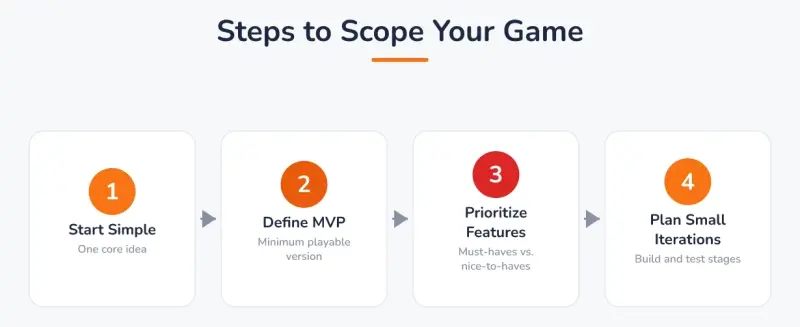
To ensure a first Scratch game gets finished, you must define its "Minimum Viable Product" (MVP) and build only that. An MVP is the simplest possible version of the game that is still playable. For a maze game, the MVP is just a sprite that can be moved with arrow keys and stops when it hits a wall. It doesn't need enemies, timers, or multiple levels in its first version. This focus on core mechanics is essential for completion, as demonstrated by the many simple but complete maze game projects beginners share online.
Once the MVP is working, you can add one new feature at a time. After the basic maze movement is complete, the next step might be to add a "You Win!" screen when the sprite reaches the end. After that, you could add a single moving obstacle. This incremental approach prevents the feeling of being overwhelmed. Many tutorials, such as those detailing how to make a maze game, implicitly teach this by focusing on core mechanics first before suggesting optional additions. The goal is to always have a working game, which is far more motivating than having a complex, broken project.
This strategy of building a strong foundation aligns with our core belief at Codeyoung: build coding fundamentals first. Before adding complexity, ensure the basics work perfectly. Our proprietary Noah AI practice platform reinforces this by providing students with targeted exercises to master individual concepts before they combine them into larger projects. Breaking a big idea into small, testable parts is the most reliable path to a finished game. To see this in action, you can explore some of the best Scratch games for beginners to play and remake, as they often start from a very simple core idea.
A practical way to define your MVP is to write down the absolute minimum feature set on a piece of paper before you start building. For a "Catch the Falling Apples" game, your MVP list might look like this: (1) Apples appear at the top and fall down. (2) Player can move a basket left and right. (3) Score increases when basket catches an apple. That's it. No lives system, no increasing difficulty, no power-ups, no sound effects. Those are all "version two" features. By writing this list down, you create a clear finish line. When all three items work, you are done with version one, and you can celebrate that achievement before considering any additions.
Another scoping technique is time-boxing. Set a timer for your total project time, say three hours, and commit to finishing whatever you can in that window. This forces prioritization. If you've spent two hours getting the movement and collision working, you have one hour left for scoring and polish. You may not have time to add that elaborate animation you imagined, and that's okay. The project is still complete and playable. Time-boxing creates a healthy constraint that prevents endless tinkering and scope expansion, both of which are completion killers.
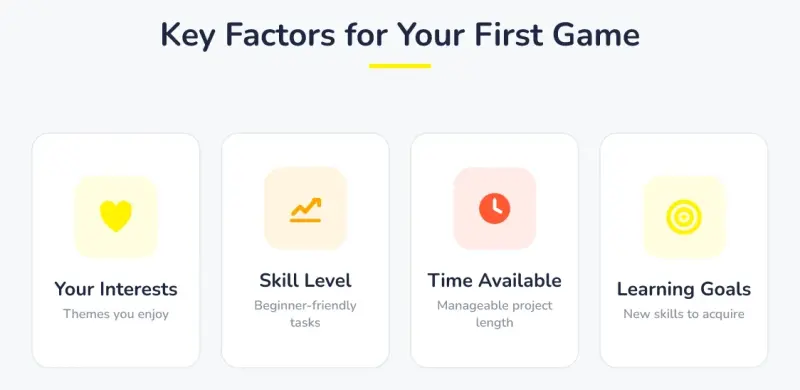 Key Factors for Your First Game: Your Interests (Themes you enjoy), Skill Level (Beginner-friendly tasks), Time Available (Manageable project length), Learning Goals (New skills to acquire).
What mistakes leave a first Scratch game unfinished?
The most common mistake that leaves a first Scratch game unfinished is over-ambition. A beginner who tries to build a complex, multi-level game with advanced physics for their first project is almost certain to get stuck and abandon it. As noted in guides to advanced Scratch development, features like creating sprite clones with list variables or programming movement with a sine wave function can easily overwhelm new users if attempted too soon. This leads to frustration and the incorrect conclusion that coding is "too hard."
Another major pitfall is a lack of structured support. When a young coder encounters a bug or a logical problem they cannot solve, it becomes a hard stop. Without a knowledgeable guide to help them debug the issue, the project stalls indefinitely. This is why having access to expert help is critical. Codeyoung addresses this directly with a strict 1:1, fully live tutoring model. Every session is conducted on Zoom and recorded, so students and parents can re-watch explanations. This ensures that a child is never left stuck on a problem for long.
The quality of this support is paramount. We hire only about 0.1% of teacher applicants, choosing from over 1,000 candidates after rigorous background, technical, empathy, and communication checks. Common beginner mistakes are easily avoided with the right guidance. For example, a child might try to build a racing game as their first project because they love cars. However, a racing game requires managing multiple lanes, speed variables, opponent AI, lap counting, and collision detection. This is a recipe for an unfinished project. A better first project for a car enthusiast would be a simple "Avoid the Obstacles" game where a car sprite moves left and right to dodge falling objects. This captures the theme they love but dramatically reduces complexity.
A related mistake is not testing frequently. Some beginners write large chunks of code and then press the green flag to see if it all works. When it doesn't, they have no idea which part is broken. Professional programmers test constantly, often after adding just one or two lines of code. Teach your child to add a small piece of functionality, then run the program immediately. If it works, great, move to the next piece. If it doesn't, they know exactly where the problem is. This habit of incremental testing is one of the most valuable skills a young coder can develop.
- Feature Creep: This happens when you keep adding new ideas ("Let's add a boss fight! And a multiplayer mode!") before the core game is even finished. Solution: Stick to the original, simple plan for version one. Write down extra ideas for a "version two" to tackle after the first one is complete.
- Choosing a Vague Theme: A project titled "Adventure Game" is too broad. A project named "Help the Knight Find the Key in the Castle" is specific and provides a clear goal. Solution: Define a clear, simple objective for the game before writing a single line of code.
- Ignoring the Debugging Process: Many beginners get frustrated when their code doesn't work and give up. They don't realize that debugging (finding and fixing errors) is a normal part of programming. Solution: Teach them to test their code in small pieces. After adding a new block, run the program to see if it works as expected.
- Not Asking for Help: Trying to solve every problem alone can be demoralizing. Solution: Encourage children to ask for help from a parent, teacher, or online community when they have been stuck on the same problem for more than 15 minutes.
What are the frequently asked questions about starting Scratch games?
Is it better to copy an existing game or invent a new one?
For a very first project, it is often better to re-create a simple, existing game like Pong or a basic maze runner. This approach removes the pressure of inventing game mechanics and a storyline, allowing the child to focus entirely on learning the programming concepts needed to make the game work. Once they have successfully built 1-2 games following a tutorial, they will have the confidence and skills to start designing their own original ideas. There are many online collections of Scratch game ideas that can serve as inspiration for these guided first projects. Some parents worry that copying stifles creativity, but in programming, imitation is often the first step toward innovation. By recreating a known game, children learn the fundamental patterns, which they later remix into their own creations.
What if my child gets bored with their game idea halfway through?
Boredom often stems from a project being either too difficult or not challenging enough. If the project is too hard, simplify it by removing a feature. For example, if adding enemies to a platformer is causing frustration, focus just on making the jumping mechanic work perfectly. If it's too easy, add a small, new challenge, like a timer or a second level. The key is to adjust the scope to maintain engagement. Sometimes boredom signals that the child has learned what that project had to teach them. In that case, it might be fine to declare the current project "good enough," celebrate what was built, and move on to a new project that teaches a different concept. Completion is important, but forced completion of a project that no longer serves a learning purpose can be counterproductive.
How can I help my child if I don't know how to code?
Your role is not to be a coding expert, but a project manager and a source of encouragement. Help them break their big idea into smaller steps. Ask questions like, "What is the one thing you want to make happen next?" or "Let's try to make the cat move just one step to the right." This helps them focus on manageable tasks. For technical problems, structured learning environments are invaluable. You can also explore coding platforms for kids to find tools and communities that offer built-in support and tutorials.
Should my child's first game have sound and music?
Yes, but add them at the end. Sound effects and music are highly motivating for kids and can make a simple project feel much more polished and exciting. However, they should be treated as finishing touches. Focus first on making the core game mechanics functional. Once the game is playable, then add a "pop" sound when a point is scored or background music that loops. This provides a fun final step that rewards the hard work of building the logic. Scratch has a built-in library of sounds and music loops that are very easy to add, making this a low-effort, high-reward final addition that gives the project a professional feel.
Choosing your child's first Scratch game is a balance of passion and practicality. By matching the project to their skill level, setting realistic timeframes, focusing on specific learning goals, and managing scope, you equip them for a rewarding coding experience. The goal is not just to build a game, but to build confidence and foundational programming skills that last.