
If you went looking for the Hour of Code this year, you will have landed somewhere else. The address hourofcode.com now redirects to hourofai.org, and on that site the old catalogue is filed under the heading "Legacy Hour of Code Activities". The organisation behind it changed name too: Code.org became CodeAI on 2 June 2026. The hour your child's school has run every December since primary one is still happening, under a different title and with a different subject at the centre of it.
This guide covers what actually changed, when Computer Science Education Week falls in 2026, how to run an Hour of AI with your own child in an evening, which activity to pick at which age, and one honest limit worth knowing before you build expectations around a single hour.
What happened to the Hour of Code?
It was renamed rather than retired. The Hour of AI site describes itself as "building on over a decade of success with the Hour of Code", and says the new initiative is "designed to help students and educators everywhere take their first step into understanding and creating with AI". The organisers report that more than 33 million learners have taken part in an Hour of AI since June 2025.
Three renamings happened at once, which is why a search for last year's event now goes in circles.
- The organisation: Code.org became CodeAI.
- The event: Hour of Code became Hour of AI.
- The web address: hourofcode.com redirects through to hourofai.org.
The computer science material has not disappeared. CodeAI still publishes its free curriculum, and the previous Hour of Code activities remain reachable as a labelled legacy section. If your child wants to make a game rather than train a classifier, that path is still open and still free.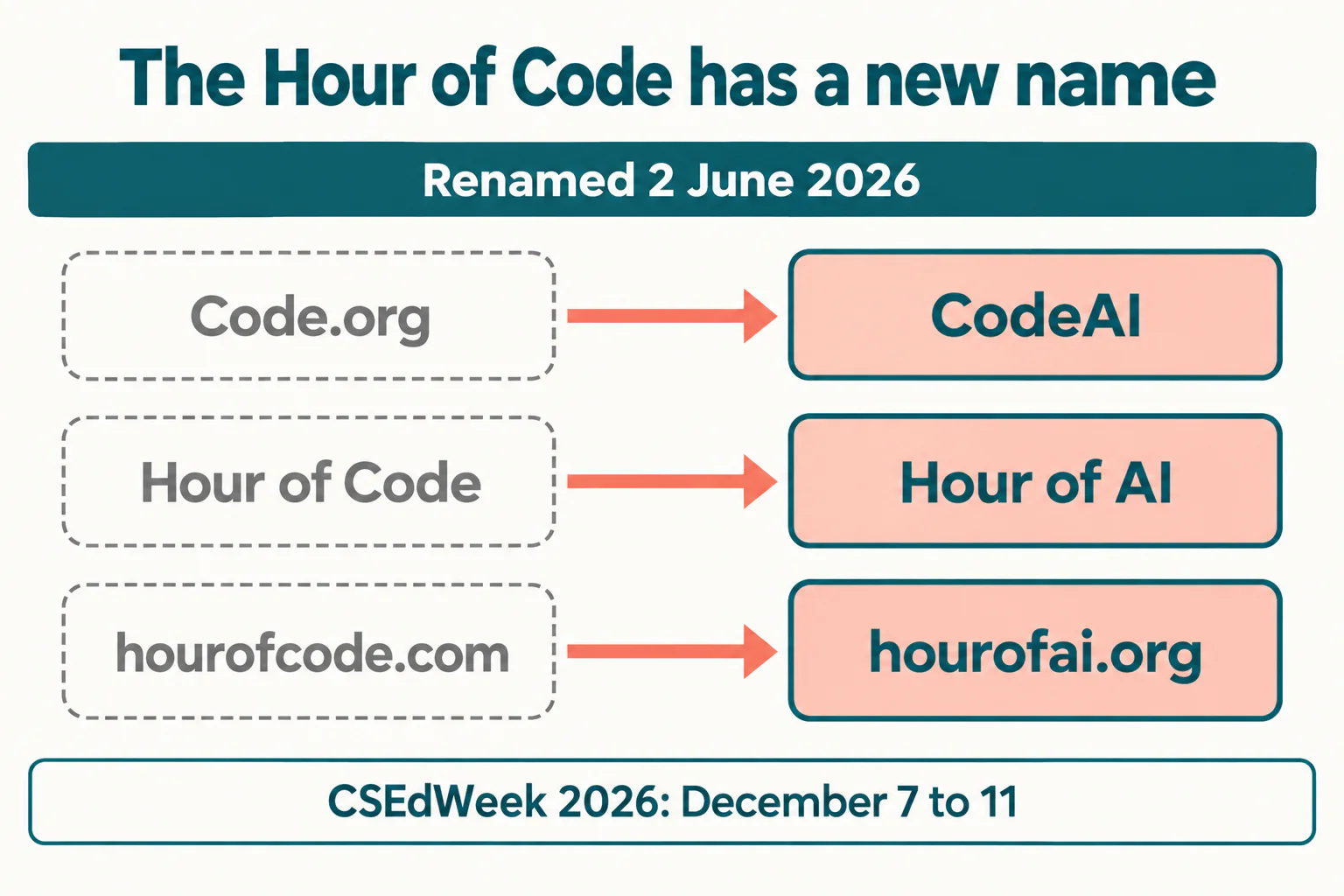
When is the Hour of AI in 2026?
Computer Science Education Week 2026 runs from 7 to 11 December. The week has always sat here for a reason: the organisers hold it in recognition of the birthday of Grace Hopper, the computing pioneer born on 9 December 1906.
You do not have to wait for it. The planning guide states plainly that "an Hour of AI works any time of year", and signing up is optional. One person can register and then share the guide across a whole school or district, which is how most primary schools handle it.
For a family, the useful consequence is that December is the busiest and worst week to try this. Doing it in late October or November means the websites are quiet, the activity catalogue is not under load, and you are not competing with a school assembly for your child's attention.
The gap this rename is built on, and how to read it honestly
CodeAI justified the shift with survey numbers, and they are worth looking at directly rather than through a headline. 84% of US students report using AI. Only 16% of high school leaders say all their students are learning about AI in school. Alongside that, 75% of high school students say the importance of AI fluency will increase, and 63% say AI knowledge is valuable for life beyond school.
Now the small print, because it changes what the numbers mean. The survey was conducted by YouGov Plc among a nationally representative sample of 666 US high school students, between September 2025 and February 2026. Two things follow. It describes teenagers, not seven-year-olds, so it says nothing directly about primary-age children. And the 16% figure is leaders saying all of their students are learning about AI, which is a much harder bar to clear than "some of our students are". A school teaching AI to half its year groups counts in the 84% of leaders who did not say yes.
Read carefully, the gap is still real and still worth acting on. Children are using these tools well before anybody teaches them what the tools are doing, which is the same sequence that made internet safety an awkward retrofit twenty years ago. An hour spent explaining how a model guesses is an hour spent ahead of that curve rather than behind it.
Not sure which level your child should start at? A free trial class with a Codeyoung teacher shows you exactly where they are and what they are ready for next, before you commit to anything.
Book a Free Trial →How to run an Hour of AI at home, in five steps
The official guide sets out five steps, and they take about fifteen minutes of preparation for an hour of activity.
- Sign up, or do not. Registration gets you reminders and new activity announcements. It is explicitly optional, so skip it if you simply want to run one on Saturday morning.
- Pick an activity from the catalogue, which covers games, music, dance and art alongside the more obviously technical options. Pick before the day, not on it.
- Plan and prepare. Choose a time and collect whatever the activity needs. This is the step families skip and then abandon the hour twenty minutes in because a login did not work.
- Host it. The guide suggests opening with a short video and then letting children work. Resist narrating over them.
- Keep going. The guide's own final step is to continue with activities and courses that build on what the child discovered. That step is the one that decides whether the hour mattered.
Two practical notes from running these with children. Sit beside a child under about eight and read the instructions aloud rather than letting them guess at the text. And give the hour a destination: "by the end of this we will have made something that guesses what I drew" works far better than "we are going to learn about AI".
Which activity should your child do?
The catalogue is described as running from kindergarten upward, with individual activities marked for ages such as 6 to 18, and the providers include Minecraft, LEGO Education, Adobe and Scratch. That range is wide enough that choosing badly is the main way the hour goes wrong. What follows is how I would match an activity to a child, based on what children can actually hold in their heads at each stage.
| Age | What works | What to avoid | Adult involvement |
|---|---|---|---|
| 6 to 8 | Unplugged sorting and guessing games, drawing recognition | Anything that needs typing or reading long instructions | Sit alongside, read every instruction aloud |
| 9 to 11 | Block-based activities where the child trains something and then tests it | Text-based prompting tasks with no visible result | Nearby, step in only when they ask |
| 12 to 14 | Building a simple classifier, or an AI feature inside a Scratch project | Passive video explainers | Check in twice, otherwise leave them to it |
| 15 to 18 | Activities touching real model behaviour, bias and failure cases | Anything pitched at primary school, which they will dismiss | None, but ask afterwards what surprised them |
One constraint many schools welcome: the organisers state there are "no tech requirements" and that activities are available "for any devices, or none at all". An unplugged activity with cards teaches the same underlying idea about sorting and prediction, and a class with four tablets between thirty children can still run the hour properly.
If your child is somewhere before this and you are judging readiness rather than activity, our guide on whether your child is ready to learn coding is the better starting point. For children who come out of the hour wanting to build rather than watch, block coding is the natural next step and our Scratch guide covers the first few projects.
What one hour can and cannot do
An hour is enough to change a child's posture toward these tools. Before it, AI is something that happens to them. After it, it is something people build, get wrong, and fix. For a nine-year-old that shift is worth more than any particular technical content, and it is why the format has survived a decade.
What an hour cannot do is teach how a model works, and nobody should pretend otherwise. There is also a specific risk with AI activities that the old coding activities did not carry: a child can finish an hour having typed instructions to a tool and concluded that building with AI means asking for things. That is the opposite of the lesson. Our piece on children using AI to write code covers where that habit leads, and it is the single most useful thing to read before the hour rather than after it.
So treat the hour as a recruiting device, which is exactly what its own fifth step says. The question that matters is not how the hour goes. It is what you do in the fortnight afterwards, and whether anything your child made that day ever gets opened again. If it does, a weekly 1:1 coding class is the format that keeps it open.
One hour in December, and the fortnight after it
The practical version of all this is short. The Hour of Code is now the Hour of AI, the site you want is hourofai.org, and Computer Science Education Week 2026 falls on 7 to 11 December. You can run one any week you like, you do not need a device, and choosing the activity to match your child's age matters more than choosing the most impressive one.
The gap the rename points at is genuine, even after reading the survey's small print carefully. Children are already using these tools. An hour spent on what the tools are doing is time well spent, provided something follows it.
Codeyoung runs 1:1 live online classes for children aged 6 to 17, with a teacher who adapts the pace to your child rather than a fixed syllabus. The first class is free, so you can see how they respond before deciding.
Book a Free TrialSources, all checked 12 October 2026: Hour of AI, including the planning guide and CSEdWeek dates; CodeAI on the rebrand and the YouGov survey. The redirect from hourofcode.com to hourofai.org was verified directly.