
Most coding quiz questions for kids on the internet ask the same thing in different costumes: which of these is not a programming language. It is a vocabulary question. A child can answer it correctly and still be unable to predict what a three-block script does, which is the thing you were actually trying to find out. This set is built the other way round. All 50 questions ask a child to work out what the code does, what a variable holds, or what breaks when the order changes.
Answers are given for every one. They are grouped into five age bands, from six-year-olds who have never typed a line to teenagers comparing search methods. Nothing here needs a computer.
What should a coding quiz actually measure?
Whether a child can follow instructions that a machine would follow. That is the whole subject, and it is not the same as knowing the words.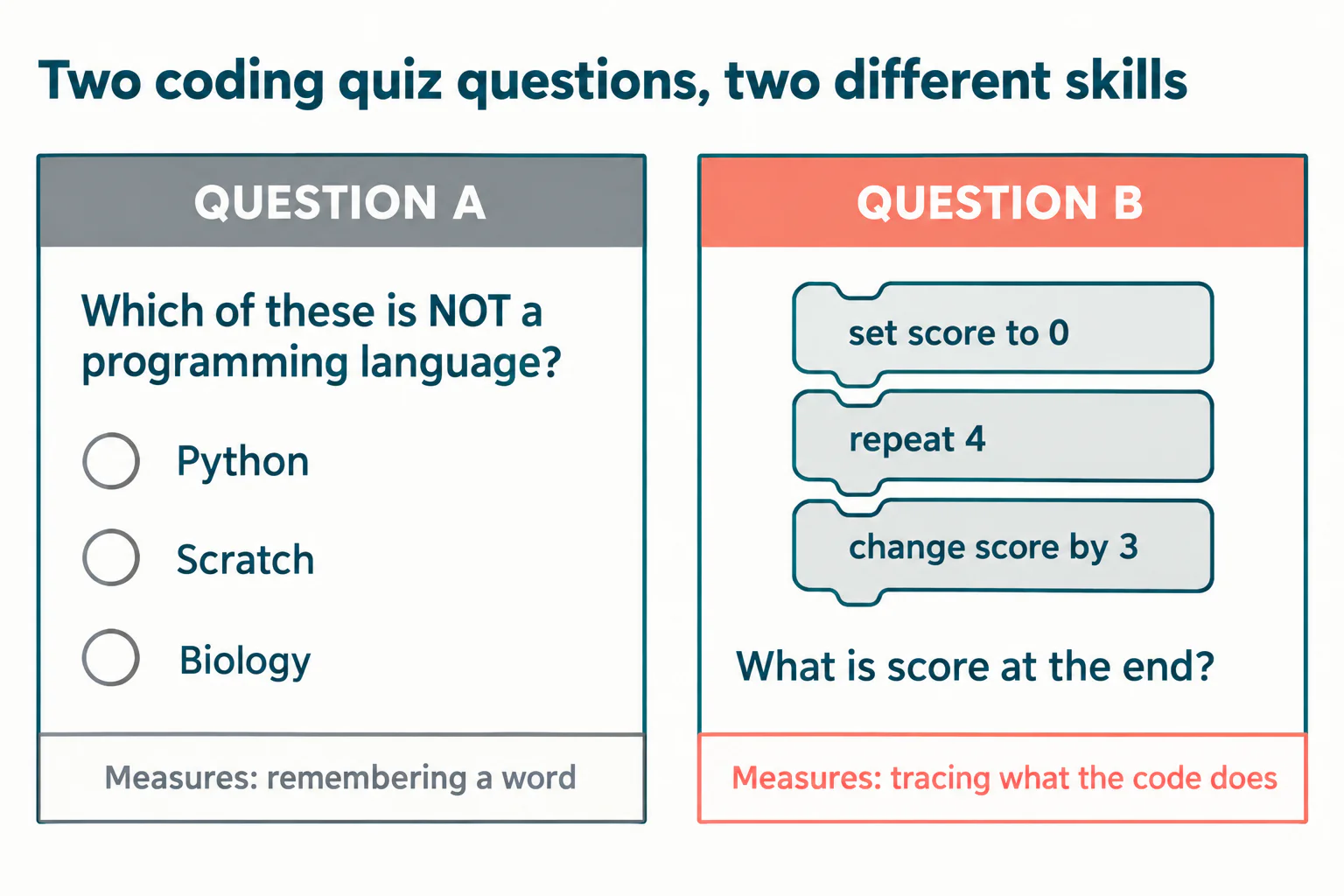
There is research behind this preference, and it is older than most of the quizzes online. An international working group published in the ACM SIGCSE Bulletin in 2004 tested novice programmers on reading and tracing code rather than writing it, and found many of them weak at both, including at the narrower task of choosing the correct completion of a short piece of near-finished code. The authors concluded that such students have a fragile grasp of skills that are a prerequisite for problem solving. The study looked at university students, not children, and the lesson travels: if reading code is the precursor skill, a quiz that never asks a child to read any code is measuring the wrong thing.
The CSTA PK to 12 Computer Science Standards were revised in 2026 and now organise the subject into five concepts: Algorithms and Design, Programming, Data and Analysis, Systems and Security, and Computing and Society, alongside twelve practices in four categories. Most quiz pages still map to the older 2017 arrangement. If you are choosing questions for a classroom, that reorganisation is worth knowing about, because Algorithms and Design now sits ahead of Programming rather than inside it.
How to trace a script, the skill most quizzes skip
Tracing means writing down what each variable holds after every line. Three minutes of instruction and most children can do it, and it changes what a quiz can tell you.
Work the example in the image with your child once. Set stars to 1. Enter the repeat. Add 2, so stars is 3. Add 2 again, 5. Add 2 again, 7. Leave the loop and say 7. The common wrong answer is 3, because three is the number printed on the loop, and a child who has only ever run scripts rather than read them reaches for the visible number. That single misread is worth more diagnostic information than a page of right answers about terminology. Our guide to how block coding works covers the block shapes these questions assume.
50 coding quiz questions for kids, by age
Each band holds ten questions with the answer in bold. Read them aloud to younger children. Ages are a starting point, not a rule: the bands map to what a child has met, not to how clever they are.
Ages 6 to 8: order and repetition
- A robot faces right. It does: move 1, turn left, move 1. Which way is it facing now? Up.
- The instructions are: put on socks, put on shoes. What goes wrong if you swap them? The shoes are already on, so the socks cannot go on. Order matters.
- A sprite does "move 10 steps" four times. How far has it travelled? 40 steps.
- The script is: say hello, wait 2 seconds, say bye. Roughly how long does it take? About 2 seconds.
- "repeat 3: jump". How many jumps? Three.
- Which one is a loop: doing something once, or doing the same thing again and again? Again and again.
- A robot must reach a flower three squares to its right and only has a "move one square right" button. How many presses? Three.
- The script is "when green flag clicked: say hi". What has to happen before the sprite says hi? Somebody clicks the green flag.
- Two sprites each have "when green flag clicked: move 10 steps". Do they move one after the other, or together? Together, because both scripts start on the same event.
- A sprite faces right and runs "repeat 2: move 10 steps, turn right 90 degrees". Which way does it face at the end? Left, because two right turns of 90 degrees add up to 180.
Ages 8 to 10: loops, conditions and events
- "set score to 0" then "repeat 4: change score by 3". Final score? 12.
- x starts at 1. "repeat 5: change x by 2". Final x? 11.
- "if touching edge then turn 180 degrees". The sprite is in the middle of the stage. What happens? Nothing. The condition is false, so the block inside is skipped.
- A forever loop contains "move 1 step". When does it stop on its own? It does not. Only the stop sign or the project ending stops it.
- "if score greater than 10 then say win". The score is exactly 10. Does it say win? No. Ten is not greater than ten.
- Which runs the inner block more times: "repeat 10" inside "repeat 3", or "repeat 3" inside "repeat 10"? Neither. Both run it 30 times.
- A project has two separate "when green flag clicked" scripts. How many of them run? Both.
- "wait until score = 5" sits before "say done", and the score never reaches 5. What does the sprite say? Nothing. It waits there.
- score starts at 0. "repeat 3: change score by 1", then "say score" after the loop. What is said? 3, once.
- Same script, but "say score" is inside the loop. What is said? 1, then 2, then 3.
Not sure which level your child should start at? A free trial class with a Codeyoung teacher shows you exactly where they are and what they are ready for next, before you commit to anything.
Book a Free Trial →Ages 10 to 12: variables, coordinates and debugging
- "set lives to 3" then "repeat 3: change lives by -1". Final lives? 0.
- A sprite sits at x = 0 and runs "change x by -50". New x? -50.
- A game resets the score at the end of the loop instead of before it. What goes wrong? The score reads 0 every round, because the reset happens after the points are added.
- A project has two variables named score, one "for all sprites" and one "for this sprite only". Why might the scoreboard be wrong? The sprite is changing its own copy while the scoreboard shows the shared one.
- "if up arrow pressed then change y by 10" works while playing only in one of these places: inside a forever loop, or on its own. Which? Inside the forever loop, because the key has to be checked over and over.
- timer starts at 10. "repeat until timer = 0: change timer by -1". How many repeats? 10.
- Same start and step, but "repeat until timer less than 0". How many repeats now? 11, because it carries on through zero.
- A sprite's position changes but it never appears. Name two things to check. Whether it is hidden, and whether x or y has put it off the stage.
- "change score by 1" has been pasted twice into the same loop by accident. What does the score do? It climbs twice as fast as it should.
- Why does "go to x: 0 y: 0" usually belong at the start of a game script? It resets the sprite to a known position so every play starts the same way.
Ages 12 to 14: functions, lists and logic
- A custom block "draw square" holds "repeat 4: move 50 steps, turn right 90 degrees". Calling it twice in a row draws what? The same square twice in the same place, unless the sprite moves in between.
- "add apple to list" then "add pear to list". What is item 1? apple.
- A list has two items. You do "delete 1 of list" then "add kiwi to list". How long is the list? Two items.
- "if a greater than 5 and a less than 10". Which of 5, 7 and 10 passes? Only 7.
- "if a greater than 5 or a less than 10", with a = 3. True or false? True, because 3 is less than 10 and "or" needs only one side.
- "not (a = 4)", with a = 4. True or false? False.
- Why build a custom block instead of copying the same ten blocks into three places? One change fixes all three uses, instead of three edits and a missed one.
- A function takes a number and returns double it. What does it return for 0? 0.
- A list has 4 items and the script asks for "item 5 of list". What comes back? Nothing. There is no item 5, so the result is empty.
- A list holds scores and you want the highest. Do you need a single if, or a loop that compares? A loop that compares each item against the best so far.
Ages 14 to 17: algorithms and cost
- You search a sorted list of 1,000 names one at a time. Worst case, how many names do you look at? 1,000.
- Same list, using binary search. Worst case? 10, because 2 to the power 10 is 1,024.
- Faster to find one item: a sorted list with binary search, or an unsorted list checked one by one? Binary search on the sorted list, and the gap widens as the list grows.
- A loop inside a loop over n items does roughly how many steps? About n times n.
- Why does doubling the input hurt a nested loop more than a single loop? The single loop does twice the work. The nested loop does four times.
- A program gives correct answers for 10 items and times out at 10,000. Logic bug or efficiency problem? Efficiency, since the answers were right at the smaller size.
- Name a way to sort five numbers by hand and one weakness of it. Repeatedly pick the smallest and move it, which is selection sort. Its weakness is that it rechecks the whole remaining list on every pass.
- What is a base case in recursion, and what happens without one? The condition that stops the function calling itself. Without it, the calls never stop.
- Two programs give the same answer. One uses 3 variables, the other 30. Which is easier to debug? The one with 3, because there are fewer states to hold in your head at once.
- You are asked to explain your own code and cannot. What does that tell you? That it may be working by accident, and that you have not traced it.
If your child wants to write code rather than read it after this, the companion set of coding problems for beginners asks for programs instead of answers, and the brain teaser riddles with answers cover pure logic puzzles with no code in them at all.
The November challenge that contains no code
The largest computing contest for school-age children asks no programming questions whatsoever, which is the strongest argument available against the vocabulary quiz.
The Bebras Computing Challenge runs in more than 60 countries each November, and the 2026 window is 9 to 20 November. In Canada it is administered by the University of Waterloo's Centre for Education in Mathematics and Computing as the Beaver Computing Challenge, with the same dates for North and South America. Grade 5 and 6 students answer 12 questions out of 60 points; the Grade 7 and 8 and Grade 9 and 10 divisions answer 15 out of 90. Everyone gets 45 minutes, and Waterloo states that the contest requires only familiarity with concepts from the mathematics curriculum.
No code. The questions are about logic, patterns, algorithms and data. A child who has memorised that a loop repeats things will find them hard. A child who has traced a script will find them familiar. That is the gap this question set is designed to close, and the timing is useful: there are a little over three weeks until the window opens.
What does a wrong answer actually tell you?
More than a right one. Each of the common wrong answers in this set points at a specific misunderstanding, and the fix is different in each case.
- Answering with the loop count instead of the value (question 11 answered as 4, question 19 answered as 1) means the child is reading the numbers on the blocks rather than following the value. Trace two scripts together on paper.
- Getting the boundary wrong (question 15 answered yes, question 27 answered 10) is an off-by-one habit, and it is the single most common bug in children's games. Ask them to say the comparison out loud as words.
- Expecting a condition to keep checking itself (question 25) means events and loops have blurred together. Show them an if outside a loop failing in a real project.
- Treating two same-named variables as one (question 24) is a scope misunderstanding, and it arrives early with Scratch's "for this sprite only" option.
- Guessing confidently and correctly on the multiple-choice items while failing the typed ones tells you the quiz format was doing the work, not the child.
Record which of those five appears, not the score out of 50. The score tells you almost nothing you can act on.
How to run these questions at home or in class
- Pick ten, not fifty. One band, one sitting, fifteen minutes. The Waterloo divisions use 12 to 15 questions in 45 minutes, which is a reasonable upper bound for this age group.
- Ask for the value, not the option. Above about age ten, drop any multiple choice. A typed answer cannot be reverse-engineered from the choices.
- Let them write the trace. Paper and pencil beside the question. The trace is the evidence; the answer is just the last line of it.
- Then run the script. Build question 11 in Scratch and watch the variable change. Prediction followed by confirmation is what makes the idea stick.
- Re-ask the ones they missed a week later. Not the whole set. Only the misses, and only after the explanation.
Teachers running this with a whole class may find it easier to load one band into a game format, and our step-by-step guide to building a Kahoot game covers the setup. For a sense of which concepts come next after a child clears a band, the Scratch curriculum progression guide lays out the order.
Coding quiz questions for kids, in short
A quiz that asks which option is not a programming language can be passed by a child who has never written a script. A quiz that asks what a variable holds after three passes of a loop cannot. All 50 questions above are the second kind, banded by age, with answers, and none of them needs a screen. The international contest that 60-plus countries run every November, open from 9 to 20 November 2026, contains no code at all, which tells you where the subject thinks the skill lives.
Use ten at a time, ask for values rather than options, and record which of the five misunderstandings shows up instead of the score. That is a diagnostic you can teach from. Our age-by-age guide to choosing a coding course covers what to do once you know the gap, and the 1:1 coding classes start from wherever the trace broke down.
Codeyoung runs 1:1 live online classes for children aged 6 to 17, with a teacher who adapts the pace to your child rather than a fixed syllabus. The first class is free, so you can see how they respond before deciding.
Book a Free TrialSources, all checked 15 October 2026: University of Waterloo CEMC, Beaver Computing Challenge for the 2026 dates, divisions, question counts and time limit; UK Bebras for the 9 to 20 November 2026 challenge window; CSTA PK to 12 Computer Science Standards for the 2026 concepts and practices; and Lister and others, "A Multi-National Study of Reading and Tracing Skills in Novice Programmers", ACM SIGCSE Bulletin 36(4), 2004, pages 119 to 150, for the reading and tracing findings.