Search for coding for kids with dyslexia and you will soon be told that dyslexic children are natural programmers. The most careful study on the question does not say that. In 2019, Ian McChesney and Raymond Bond at Ulster University put 14 programmers with dyslexia and 14 without in front of an eye tracker, asked them to read and explain three short programs, and found no significant difference in how well the two groups understood the code. Not worse. Not better either.
For a parent, that is the useful finding. Dyslexia does not stop a child understanding a program. What it does is make specific, predictable parts of programming harder: the parts that depend on spelling a word exactly, and the parts that depend on reading a lot of text quickly. Those parts can be identified, and most of them can be reduced with settings that take ten minutes to change. This guide sorts the two, then covers the tools, a sensible order from blocks to typed code, and what the research can and cannot tell you.
Key Takeaways
- Logic is not the problem. In the best controlled comparison, programmers with dyslexia understood code as well as those without.
- Exact spelling is. Python treats
score,Scoreandsocreas three different names, and a slip stops the program. - Block coding removes almost all the spelling but not the reading, because Scratch blocks are still labelled with words.
- Special dyslexia fonts do not help on average. A 2026 meta-analysis of 15 studies found no reliable effect. Size and spacing matter more.
- Autocomplete and Python's "Did you mean" suggestions turn spelling from recall into recognition, which is the single biggest change you can make.
Which parts of coding load on reading and spelling?
The ones where a word has to be produced exactly, character for character, and the ones where a child has to read a block of prose before doing anything. Everything else in programming is closer to puzzle solving than to reading.
Start with what dyslexia is. The International Dyslexia Association adopted a revised definition on 22 October 2025, describing "difficulties in word reading and/or spelling that involve accuracy, speed, or both". Hold that against the list of things a beginner programmer does and the pressure points sort themselves out.
| Part of programming | Load on reading or spelling | Why |
|---|---|---|
| Typing names of variables and functions | High | Every use must match the first spelling exactly. Python's own reference says of names: "Case is significant." |
| Keywords and punctuation | High | while, elif, colons, brackets and quotation marks all have one correct form |
| Reading error messages | High | Dense text, unfamiliar words, often read under frustration |
| Reading tutorials and instructions | High | Long prose, usually before the child has written a line |
| Reading code someone else wrote | Medium | Short lines and indentation help, but names may be long or unfamiliar |
| Planning what the program should do | Low | Can be drawn, spoken or acted out |
| Ordering steps and spotting a logic bug | Low | Reasoning about cause and effect, not about words |
| Testing by running and watching | Low | The feedback is the sprite moving, not a sentence |
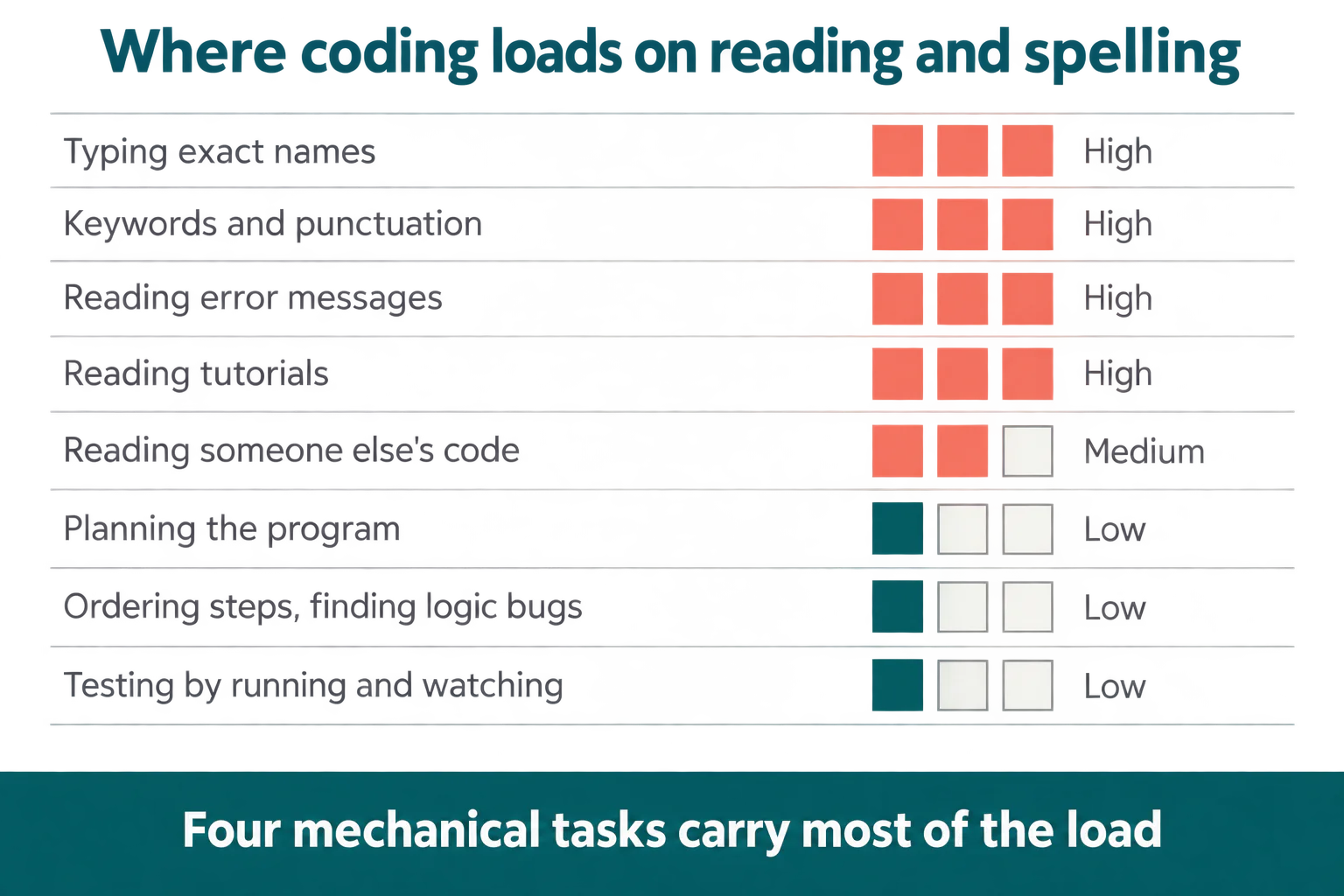
Read the table from the bottom up and the encouraging part is obvious. The thinking a teacher actually wants a child to learn, planning, sequencing and debugging logic, sits in the low rows. The heavy rows are mechanical. That does not make them trivial, a mechanical barrier still stops a child cold, but mechanical barriers have mechanical fixes.
The worst of them is the identifier, because the failure is silent until it is not. A child who names a variable score and later types socre has made no reasoning mistake at all. In Python the program stops with a NameError. In a language without that check, the program may simply run wrongly. Either way the child concludes they are bad at coding, which is the wrong lesson.
Why block coding removes the spelling load, but not the reading
In Scratch, a child names a variable once, when they create it, and from then on it is a block to drag or an option to pick from a drop-down. They never retype it, so they can never misspell it. The same goes for broadcast messages, costumes and sounds. Blocks only snap together where the combination is valid, which means syntax errors cannot happen. Every failure is a logic failure, and logic failures are the ones a dyslexic child is as well equipped to solve as anyone.
The honest caveat is that Scratch is not a reading-free environment. Its blocks are labelled in words: "move 10 steps", "when this sprite clicked", "repeat until". The demand changes from producing a word to recognising one, which is a much easier task, but a child with significant reading difficulty can still find a crowded palette of text blocks slow going.
That is where ScratchJr is different. It is built for ages 5 to 7, and when it launched in 2014, MIT News reported that "even children who have not yet learned to read can create projects with ScratchJr", because its blocks are pictures rather than labelled commands. For a younger child, or an older one whose reading is a long way behind their reasoning, it removes both loads at once.
We covered the wider case for blocks in coding for kids with ADHD, where the argument is about working memory rather than spelling, and in the best coding approach for neurodivergent beginners. The conclusion is the same for different reasons: start where the mechanics cannot get in the way of the thinking.
Not sure whether your child is ready for typed code or should stay with blocks a little longer? A free trial class with a Codeyoung teacher shows you where they are, and the teacher can set up the editor for them in the same session.
Book a Free Trial →What the research on dyslexia and programming actually shows
Less than the internet suggests, and almost none of it is about children. Here is the evidence base, study by study.
McChesney and Bond, 2019. Published in Empirical Software Engineering, this is the controlled comparison quoted at the top. The 28 participants were all students on the same level of computing degree, half with dyslexia. The two groups did not differ significantly in comprehension or in their confidence about it. Their eye movements did differ in places, and not in the way the reading research on ordinary text predicted. The authors' own conclusion is careful: programmers with dyslexia "should not necessarily assume that any deficiencies they experience when reading natural text will impair their ability to program". They raise the possibility of an advantage as a question for further work, not as a finding. You can read the full open-access paper.
McChesney and Bond, 2021. A follow-up tested whether cramped code, with little white space between logical groups, hurts dyslexic readers more. Thirty programmers, 14 with dyslexia, read crowded and spaced versions of three Java programs. The results "do not suggest any significant effect whereby programmers with dyslexia are disproportionately affected by crowding", with the authors noting the small sample.
Powell and colleagues, 2004. This is the paper behind most "dyslexic strengths in programming" claims. It proposed that visualisation and creativity help at the design stage while spelling and short-term memory hurt at the coding stage. McChesney and Bond describe its support as "qualitative and anecdotal evidence from conversations with programmers with dyslexia", and a 2024 systematic review by Weir and English at the University of Strathclyde puts the number interviewed at seven.
Cruz, Verma and Liebel, 2025. A preprint, not yet peer reviewed, drawing on 10 interviews, 3 blog posts and 153 Reddit posts from dyslexic software engineers. Its clearest finding is that they "especially struggle at the programming learning stage" and that code completion and linters "mitigate many of the experienced difficulties". On strengths, the authors are frank: those claims came mostly from the three blogs, which they say are "more likely to sensationalize findings".
So the strict reading is this. There is decent evidence that dyslexia does not reduce understanding of code, in adults, in small samples. There is consistent self-report that learning to program is the hardest phase and that tooling helps a great deal. There is no controlled evidence that dyslexic children are better programmers, and no study we could find that tested children at all. Anyone selling a "dyslexic superpower" is going beyond the data. Anyone telling you dyslexia rules a child out is going against it.
Accommodations that work at the keyboard
These are ordered by how much difference they make, most first. All of them are free.
1. Turn on autocomplete and keep it on
Autocomplete changes the task from spelling a name to choosing it from a list, which is recognition rather than recall. In Python's built-in editor, IDLE, pressing Tab after the first few letters of a name either opens a list of matches or, if only one name fits, fills it in immediately. Ctrl+Space opens the list on demand. Cruz and colleagues report that dyslexic engineers describe code completion as one of the tools that matters most, and one contributor's summary is hard to improve on: "If you use a ide that auto-populates for you it's even better."
2. Use Python 3.10 or later, for the spelling suggestions
Since Python 3.10, a misspelled name gets a suggestion. Type print(socre) after creating score and the error now ends NameError: name 'socre' is not defined. Did you mean: 'score'?. We checked the same behaviour for a capitalisation slip and for pritn, which suggests print. For a dyslexic child that one line converts the most demoralising error in Python into a correction they can make on their own. The Python documentation notes the suggestion depends on the standard error display, and some tools replace it, so check your child's editor actually shows it.
3. Change size and spacing, not the typeface
Dyslexia fonts such as OpenDyslexic and Dyslexie are the most popular accommodation and the least supported. A 2026 meta-analysis in Annals of Dyslexia by Azzarello and colleagues pooled 15 studies and 688 readers and found no consistent or reliable effect on reading speed or accuracy; the overall effect size was g = -0.04, effectively zero. Dyslexia Scotland's own guidance agrees that specialist dyslexia fonts "aren't necessarily better than standard ones" and that you should use them "only if an individual finds them helpful".
What the same guidance does recommend is larger text (at least 12pt, with many readers benefiting from more), 1.5 line spacing, extra letter spacing, and dark text on a cream or tinted background rather than black on white. It also notes that monospaced fonts like Courier "can also be effective", which is convenient, because almost every code editor already uses one. In IDLE, the Font tab of Configure IDLE sets the size and face. In Visual Studio Code, the settings editor.fontSize, editor.lineHeight and editor.letterSpacing cover the rest. In Scratch, the zoom buttons at the bottom right of the code area enlarge the blocks.
4. Leave syntax highlighting on, and pick a calm theme
Colour does some of the reading work: keywords, text in quotation marks and comments each look different, so a missing closing quotation mark shows up as half a line suddenly turning the wrong colour. Posts gathered in the Cruz study put it in plain terms, "Auto formatting and syntax highlighting are your friends". IDLE's Highlights tab offers built-in themes, and most editors have a low-contrast option that suits readers who find stark white tiring.
5. Use text-to-speech for instructions, not for code
The heaviest reading in a beginner's week is usually the tutorial, not the program. Your computer's built-in read-aloud or screen reader can take that load. Be clear on one point: Scratch's Text to Speech extension is a block for making projects talk, in 23 languages and five voices. It does not read the editor aloud. It is still worth using, because a child who makes a sprite speak their own story is practising sequencing with no spelling at all.
6. Agree a naming rule and keep names short
Because case is significant, decide one convention, for example all lowercase with underscores, and never mix it. Prefer lives to remaining_lives_count. One dyslexic engineer in the Cruz study described doing exactly this, keeping names "not too long and words that are not hard to remember to spell". It is good practice for everyone, and essential here.
Error messages need their own routine, which we set out in teaching kids to read error messages. For a dyslexic child, read the last line aloud together rather than asking them to read it alone. Keyboard fluency matters too, and typing before coding covers when it starts to matter and how to practise without stopping the coding.
A progression from blocks to typed code
These stages are teaching observations from classes, not research findings, and children move through them at different speeds. The principle is to add one kind of load at a time.
- ScratchJr, around ages 5 to 7. Picture blocks. No reading, no spelling. The child learns sequence, repetition and events.
- Scratch. Reading appears, because blocks carry words, but spelling does not. Read new blocks aloud the first time they appear, and expect the logic to run well ahead of the reading.
- Python in an assisted editor. Spelling arrives, but with autocomplete, highlighting and "Did you mean" suggestions all switched on. Keep programs short, under a screen, so nothing needs to be held in memory across a scroll.
- Python in any editor. Only once the child habitually reaches for Tab before typing a whole name, and reads the last line of an error before asking for help.

The readiness signal for stage 3 is the same one that applies to every child: blocks start to feel slow, and the child wants to express something faster than dragging allows. Dyslexia does not change that signal. It changes how the move should be made. Our comparison of Scratch and Python for beginners covers the general decision.
One finding from the Cruz study is worth passing on without overclaiming. Several engineers found Python's indentation rules awkward, and some preferred languages that catch mistakes earlier. That is self-report from adults, not a reason to avoid Python. It is a reason to make sure the editor shows indentation clearly.
What to tell your child's coding teacher
Tell them before the first lesson, and tell them practical things rather than a diagnosis. A useful list:
- Which editor settings to switch on: autocomplete, larger font, wider line spacing, a tinted background.
- That instructions should be given aloud as well as in writing, and that new block names or keywords should be read out the first time.
- That copying code from a screen or worksheet is the hardest task for your child and teaches the least, so it should be kept to a minimum.
- That a spelling slip in a name is a typing event, not a misunderstanding, and should be treated as one.
A teacher who adapts to that list in the first session is a good sign. One who insists on timed copying exercises or marks down spelling in variable names is not. If your child also has attention or social differences, which can occur alongside dyslexia, our guide to coding for kids with autism covers a different set of adjustments.
The short version
Dyslexia makes the mechanical parts of programming harder: exact spelling of names and keywords, and the reading around the code. It does not, on the best evidence available, make understanding code harder. Block coding removes nearly all the spelling and ScratchJr removes the reading too. In typed code, autocomplete, Python's "Did you mean" suggestions, larger and more widely spaced text and syntax highlighting carry most of the rest. Specialist fonts do not, on average, help. Treat any claim that dyslexic children are born programmers with the same caution as a claim that they cannot code: the research supports neither.
Coding for kids with dyslexia works best when the setup removes the spelling and the teaching protects the thinking.
Codeyoung runs 1:1 live online classes for children aged 6 to 17, with a teacher who adapts the pace and the setup to your child rather than a fixed syllabus. The first class is free, so you can see how they respond before deciding. Explore our online coding classes for kids.
Book a Free TrialSources checked 23 November 2026: International Dyslexia Association, Definition of Dyslexia (adopted 22 October 2025); McChesney and Bond, "Eye tracking analysis of computer program comprehension in programmers with dyslexia", Empirical Software Engineering 24 (2019), 1109–1154; McChesney and Bond, "The effect of crowding on the reading of program code for programmers with dyslexia", ICPC 2021; Weir and English, "Supporting students with dyslexia in learning to program", ICERI 2024; Cruz, Verma and Liebel, "An Empirical Investigation of the Experiences of Dyslexic Software Engineers", arXiv:2511.00706 (preprint); Azzarello et al., "Does font improve reading in dyslexic children?", Annals of Dyslexia (2026); Dyslexia Scotland, Dyslexia-friendly typed formats (12 September 2025); Python documentation (What's New in Python 3.10, IDLE, Lexical analysis); Visual Studio Code editor options; Scratch Wiki, Text to Speech Extension; MIT News on ScratchJr (2014). Python error output verified by running it in Python 3.12.