
About 7 million children in the United States, 11.7 percent of those aged 3 to 17, have a current ADHD diagnosis, according to 2024 data from the National Survey of Children's Health. Plenty of them end up in a coding class, usually because a parent noticed the one activity their child will sit still for involves a screen and a goal.
The common advice is that coding suits ADHD because the feedback is instant. That is half right, and the missing half is the part that decides whether a child is still coding in six months. Instant feedback cuts both ways: the same loop that rewards a working program punishes a broken one, immediately and repeatedly. What separates the children who stick with it from the ones who quietly stop is not interest. It is whether the work was broken into pieces that fit.
What ADHD actually changes about learning to code
The National Institute of Mental Health describes inattention as "difficulty paying attention, keeping on task, or staying organized", and notes that for some people inattention dominates while others have most difficulty with hyperactivity and impulsivity. Programming leans hard on exactly those three.
Writing even a simple game means holding a goal in mind, breaking it into steps, keeping track of which step you are on, and noticing when the result does not match the intention. A child who loses the thread at step four does not get a slightly worse program. They get one that does not run, with no obvious way back.
Two more facts from the CDC are worth a parent holding. Nearly 78 percent of children with ADHD have at least one other co-occurring condition, and about 4 in 10 have anxiety. A child who has repeatedly failed at school tasks does not arrive at a coding screen neutral. They arrive braced for it to go the same way, and the first fifteen minutes decide a lot.
Why block coding is the right starting point
In a text language, a missing colon produces an error message about something that is not the problem, in vocabulary the child does not have. The child has made no reasoning mistake at all and is still stuck. That is the single most demoralising failure mode in beginner programming, and it is entirely avoidable.
Block based environments make syntax errors impossible. Blocks only connect where a connection is valid, so every failure a child meets is a logic failure: the loop ran one time too many, the condition was checked in the wrong order, the sprite moved before the variable updated. Those are diagnosable by a nine year old. A missing colon is not.
This is not just an argument from comfort. A study by Weintrop and Wilensky comparing block based and text based programming in high school computer science classrooms found that students in text based environments hit more syntactical errors and spent longer between debugging attempts, while students working in blocks spent more time changing code and made more debugging attempts. More attempts, less waiting. For a child whose attention is the scarce resource, that difference is the whole ballgame.
When to move to text, and how to tell
The signal is not age and it is not a number of completed projects. It is when the child starts finding blocks slow: dragging for thirty seconds to express something they could have typed in five. That irritation is the readiness marker. Moving before it arrives adds syntax load to a child who has not yet automated the logic, and the usual result is that both get worse at once. Our comparison of Scratch and Python goes through the transition in more detail.
Not sure which level your child should start at? A free trial class with a Codeyoung teacher shows you exactly where they are and what they are ready for next, before you commit to anything.
Book a Free Trial →What actually works, in order of how much it matters
These are teaching decisions rather than curriculum choices, and they apply whether a child is in a class, a club or at the kitchen table.
- Make every step end in something visible. Not "write the movement script" but "make the cat move one step when you press the right arrow, then check it". A child who sees four results in half an hour has four reasons to continue. A child who sees one at the end has thirty minutes of faith to hold.
- Keep the gap between change and result under a few seconds. Running a project after every single edit sounds inefficient and is exactly right here. The feedback loop is the thing doing the work.
- Externalise the plan. Write the three steps on paper beside the screen and tick them off. This removes the task from working memory, which is the resource under pressure. It is the same reason a recipe sits open on the counter.
- Debug by halving, never by staring. Teach the child to disable half the script and run it. Still broken? The problem is in the half that remains. This turns an open ended hunt into a short sequence of yes or no questions, and it is the single most transferable skill in this list.
- Let the project be theirs. A child who chose to build a football game will tolerate a bug in it for far longer than one assigned a worksheet about loops. Choice buys patience, and patience is what debugging costs.
What backfires, including things that sound helpful
Some standard good practice is actively unhelpful here, which is why well meaning classes still lose these children.
- Long projects with a distant payoff. A six week build is a reasonable school unit and a poor fit for a child who needs the loop to close. Split it, and let each week's version run on its own.
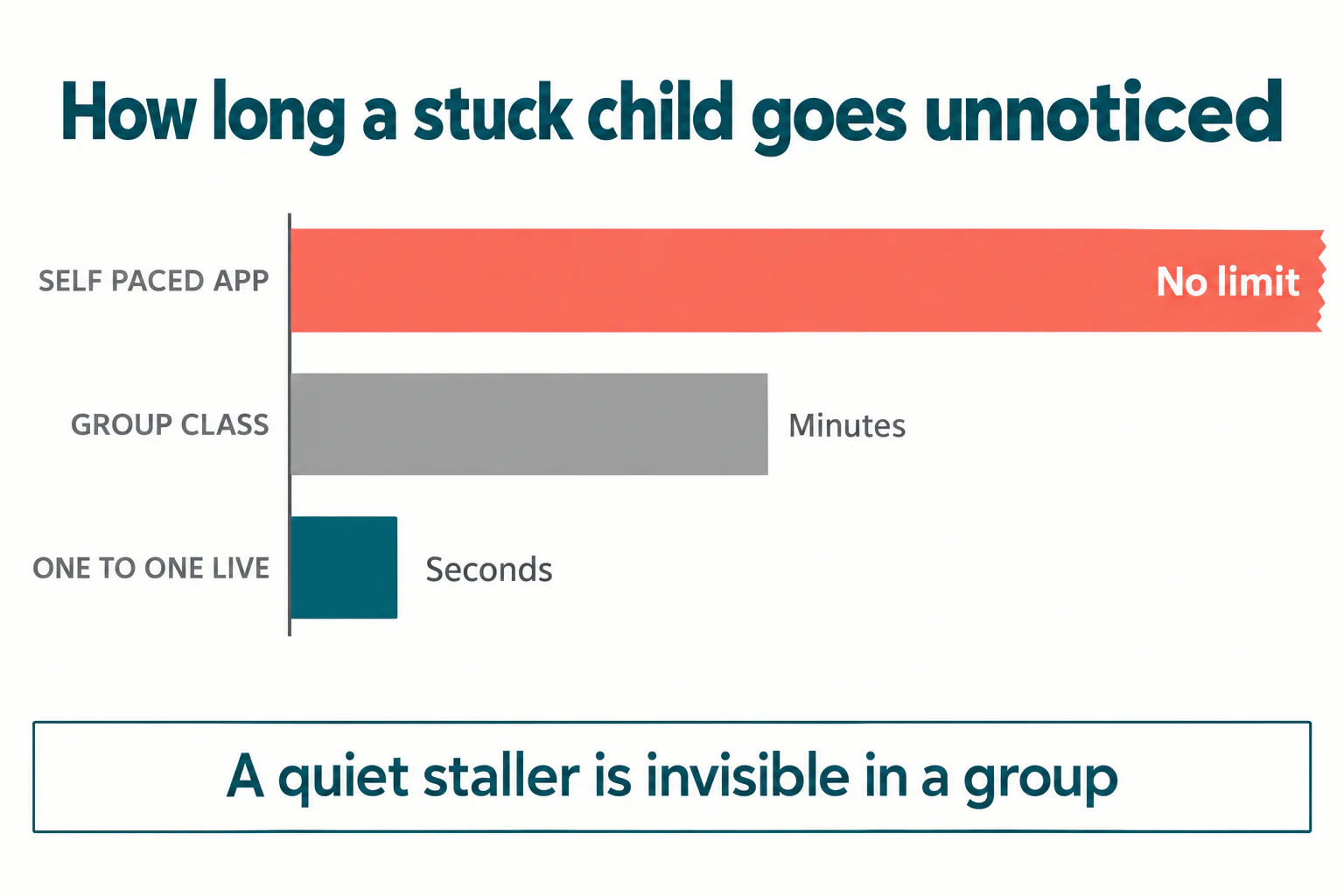
- Silent independent work time. A child with ADHD who stalls quietly can lose twenty minutes without anyone noticing, and will often not raise a hand because asking is itself a task. Stalls need to be seen within a minute, not at the end.
- Treating hyperfocus as the plan. A child who codes for three hours straight is not demonstrating a cure. Hyperfocus is unreliable, hard to start on demand, and often followed by complete avoidance of the thing it was spent on. Build around the normal day, not the exceptional one.
- Typing tutorials and copy exercises. Copying code from a video teaches transcription. For a child with working memory pressure it also consumes the entire budget on the least valuable part of the task.
- Selling coding as a treatment. It is not one, and claiming otherwise sets up a disappointment that lands on the child. The honest claim is narrower: coding gives regular practice at planning, sequencing and checking work in a setting the child wants to be in.
Group class, one-to-one, or an app at home?
All three teach the same material. They differ in how quickly a stall is noticed, which is the variable that matters most here.
| Format | Time a stall goes unseen | Best suited to |
|---|---|---|
| Self paced app | Indefinite | A child who already debugs independently and is building for fun |
| Group class | Minutes to a whole session | A child who asks for help readily and enjoys working alongside others |
| One-to-one live | Seconds | A child who stalls quietly, or who has met enough failure to stop asking |
That is not an argument that every child needs one-to-one teaching. It is an argument that the quiet staller is the specific case where group formats fail invisibly, and parents usually find out months later when the child says they do not want to go any more. If your child is the one who says "I'm fine" while nothing on the screen has changed for ten minutes, the format is the problem rather than the subject.
Our age by age guide to choosing a coding course covers the general decision, and the companion piece on coding for children with autism addresses a different set of needs that are often confused with these ones.
A first month that is actually achievable
If you are starting from nothing, this sequence respects the constraints above and needs no prior experience from the parent.
- Week 1. One sprite, one key press, one visible movement. Nothing else. End the session while it is still working.
- Week 2. Add a second thing that happens: a sound, a costume change, a score variable that counts up. Run the project after every change.
- Week 3. Introduce the halving method deliberately by breaking something on purpose and finding it together. Make this a game rather than a correction.
- Week 4. Let the child pick what the project becomes. Your job is to split their idea into steps small enough that each one ends with something on screen.
If you want a structured starting point, our guide to Scratch programming for children and our explainer on how block coding works both cover the groundwork, and 1:1 Scratch classes give a child a teacher who can see a stall as it happens.
The thing to measure
Do not measure progress in projects finished or concepts covered. Measure it in how long your child can stay with a bug before they leave the room. That number is low at the start and it moves, and when it moves the finished projects follow on their own.
Coding will not change a child's ADHD. What a well structured coding session does is give a child who is used to being told they did not try hard enough a repeated, visible experience of working something out. That is worth having for its own sake, whatever they go on to build.
Codeyoung runs 1:1 live online classes for children aged 6 to 17, with a teacher who adapts the pace to your child rather than a fixed syllabus. The first class is free, so you can see how they respond before deciding.
Book a Free TrialSources checked 13 October 2026: CDC ADHD data and statistics; NIMH ADHD overview; Weintrop and Wilensky, Comparing Block-Based and Text-Based Programming in High School Computer Science Classrooms, ACM TOCE.