
We are one of the three platforms in this comparison, so read it with that in mind. What follows is accurate about all three, taken from each company's own pages, and it includes the cases where one of the others is the better buy. A comparison that concluded we win on every line would not be worth your time.
The useful finding is that these are not three versions of the same product. One is a self-paced video library with optional tutoring. One is live coding classes with a cheaper group option. One is live one-to-one across four subjects. Price differences between them are mostly not differences in value, they are differences in what you are buying, and choosing on monthly cost alone is how parents end up with the wrong one.
The short version
- CodaKid is a self-paced library of 85+ courses with 1:1 available separately. Much the cheapest, and it needs a self-starting child.
- Codingal is live coding in 1:1 or small groups, ages 5 to 17, with STEM.org accredited certificates.
- Codeyoung is live 1:1 only, ages 6 to 17, and the only one of the three that also teaches maths, English and science.
- All three offer a free first class or trial period, so the real decision can be made after watching rather than before.
- If your child has never finished an online course without being asked, self-paced will not work however good the content is.
How the three actually differ
| Codeyoung | Codingal | CodaKid | |
|---|---|---|---|
| Format | Live 1:1 | Live 1:1 and small group | Self-paced library, plus private 1:1 separately |
| Ages | 6 to 17 | 5 to 17, some tracks 13+ | 6+, advanced tracks from 12 |
| Subjects | Coding, maths, English and public speaking, science | Coding and computing | Coding and game development |
| Breadth of coding | Scratch through Python | 16+ courses including AP Computer Science A | 85+ courses, Scratch through Unity and Unreal |
| Certification | Not a headline feature | Certificates accredited by STEM.org | Not a headline feature |
| Try before you buy | Free trial class | Free trial class with level recommendation | First 14 days free self-paced, first 1:1 session free |
Everything in that table comes from each provider's own published pages, checked on 1 October 2026. Platforms change their offerings, so confirm anything that will decide your choice.
When CodaKid is the right answer
Let me do this one first, because it is the case our own sales page will never make.
CodaKid's self-paced courses are listed from 29 US dollars a month for unlimited access to a library of more than 85 courses, with unlimited help desk support. Its range is genuinely wide: Python, Java, JavaScript, Lua, HTML and CSS, Scratch, and project work in Minecraft, Roblox, Unreal Engine and Unity. Private 1:1 lessons are listed separately from 249 dollars a month.
For a specific child, that 29-dollar library is better value than anything live, including ours. That child is roughly thirteen or older, has already built something on their own initiative, reaches for a search engine when they hit an error rather than closing the laptop, and has a particular thing they want to make. Give them Unreal Engine and a library and get out of the way.
The honest test is one question: has your child ever finished an online course nobody reminded them about? If yes, self-paced is the efficient choice and live teaching is partly paying for motivation they already have. If no, a video library becomes an unwatched video library, and the cheap option turns out to cost 29 dollars a month for nothing.
CodaKid's own structure acknowledges this, which is to its credit: the 1:1 option exists precisely because some children need somebody expecting them.
When Codingal is the right answer
Codingal runs live online classes in both 1:1 and small group formats for ages 5 to 17, with sixteen or more named courses running from Scratch and Roblox through Python, app and web development, AI and data science, and up to AP Computer Science A.
Two things stand out as genuine reasons to choose it.
The small group option matters more than it sounds. Some children work better with peers present, and group classes are generally cheaper than one-to-one. If your child is sociable, competitive in a friendly way, and would find an hour of undivided adult attention uncomfortable rather than helpful, a small group is a feature and not a compromise. We teach 1:1 only, so if that is what your child needs, we are not the right fit.
The other is AP Computer Science A. If you have a US high-schooler aiming at that exam, a provider with a named course for it is doing something specific that a general coding pathway is not.
Codingal also markets certificates "accredited by STEM.org". Treat accreditation claims calmly, whoever makes them: a certificate is useful if your child is motivated by a visible finish line, and it is not evidence about teaching quality either way.
Not sure which level your child should start at? A free trial class with a Codeyoung teacher shows you exactly where they are and what they are ready for next, before you commit to anything.
Book a Free Trial →When Codeyoung is the right answer
Two situations, and I would rather be specific than broad.
The child needs the pace set by them rather than by a syllabus. This is the whole reason we teach 1:1 only. A great deal of children's coding rushes a child into typing real syntax before they are ready, and when they bounce off it they conclude they are bad at coding rather than that the sequencing was wrong. Staying in visual blocks for an extra two months is not falling behind. It is the thing that makes the move to Python work later. A live teacher watching one child can make that call. A curriculum cannot, and a video certainly cannot.
You want more than coding from the same place. We are the only one of the three teaching maths, English and public speaking, and science alongside coding, for ages 6 to 17. If your real problem is that your child is behind in maths and interested in coding, a coding specialist solves half of it.
Where we are not the answer: if your child is a self-starting teenager who wants a library to work through, or if you want small groups, or if your budget realistically supports 29 dollars a month rather than live teaching. Those are real constraints and the honest answer is one of the other two.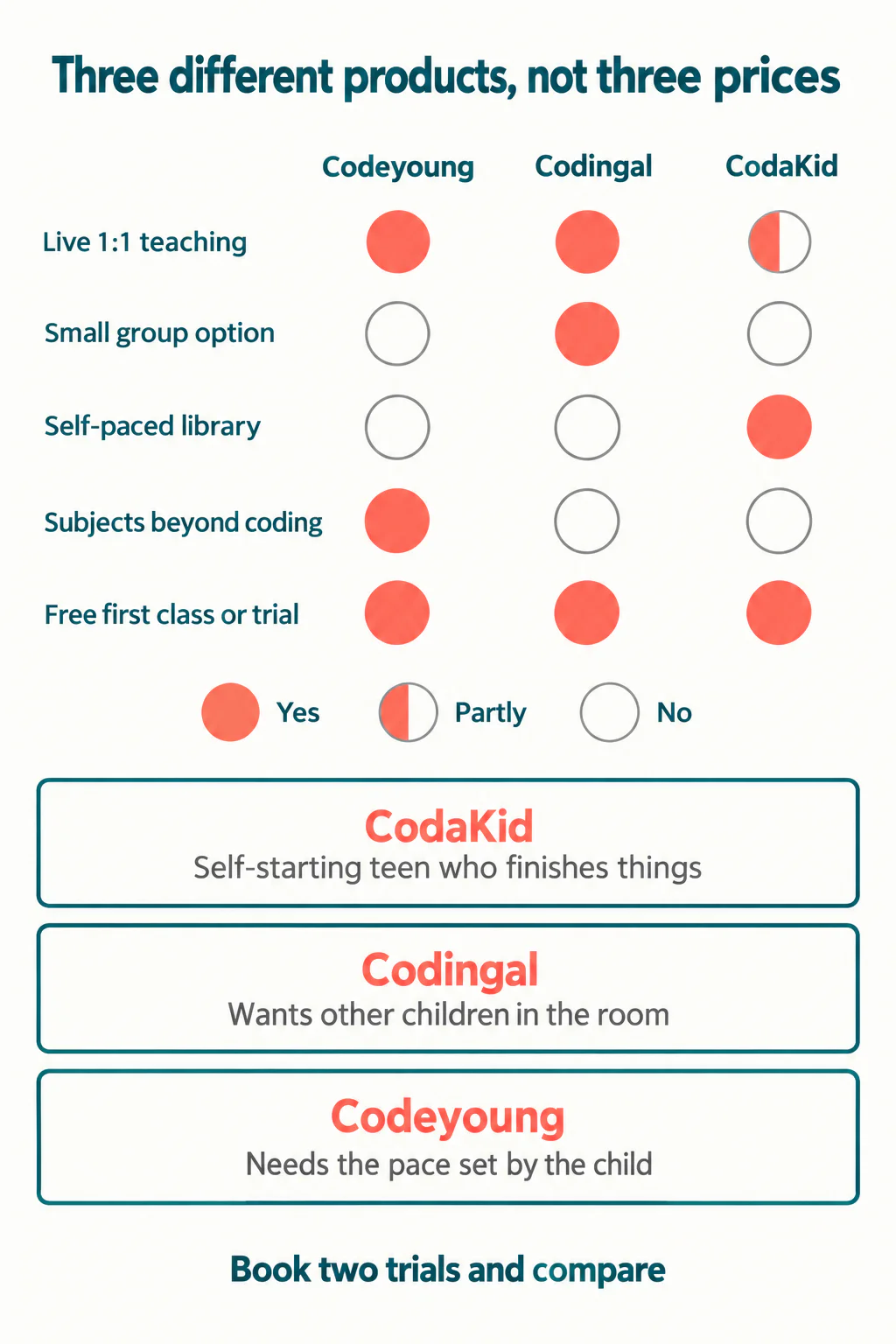
What price differences actually represent
The spread between a self-paced subscription and live one-to-one teaching is large, and it is not a quality gradient. It is a labour cost.
Self-paced means nobody is scheduled. The content was made once and serves everybody, so the price can be low and stay low. Live small-group teaching divides one teacher's hour between several children. Live one-to-one buys a whole hour of one adult's attention, and that is why it costs what it costs everywhere, not just here.
So the question is not which is better value in the abstract. It is how much of that hour your child would actually use. A child who works independently and asks one good question per session is being under-served by one-to-one. A child who stops dead at a red error message and waits is getting very little from a video.
Our breakdown of what online coding classes cost goes into the per-minute arithmetic of group versus individual attention, and our comparison of one-to-one against group classes covers which children do better in each.
How to use the free trials properly
All three let you try before committing, and most parents waste the opportunity by watching whether their child enjoyed it. Enjoyment in a first class is close to guaranteed and predicts very little.
Watch these instead:
- What happens when your child is wrong. Does the teacher correct and move on, or ask what the child expected to happen? The second one is teaching.
- Who does the typing. If the teacher drives and the child watches, your child will have a finished project and no new skill.
- Whether your child explains anything. A child who can say why their code works has understood it. A child who only reports that it works has copied it.
- What you are told afterwards. A specific starting point with a reason attached is useful. A recommendation for the longest available package is a sales output.
- Whether the level is honest. A provider willing to tell you your child should start lower than you hoped is more trustworthy than one that agrees with you.
Take two trials, not one. Comparing is the entire point, and nothing stops you.
A sequencing point that applies whichever you choose
Whatever you pick, the thing most likely to go wrong is moving from blocks to text too early. It is the single most common reason a child who liked coding stops liking it.
The signals that a child is genuinely ready are behavioural rather than chronological: they plan before building, they debug their own projects without being prompted, they have started finding block code restrictive rather than comfortable. Our guide to whether a child is ready to leave Scratch sets out what to look for, and it applies equally to a self-paced library and to a live class.
If you want the broader checklist before committing to any provider, our parent guide to online coding classes covers the questions worth asking any of us.
Deciding
Answer three questions honestly and the choice usually makes itself.
Does your child finish things without being chased? If yes, CodaKid's library is efficient and cheap. Does your child want other children in the room? If yes, Codingal's small groups. Do you need the pace set by your child, or do you want maths or English from the same teacher relationship? That is us.
Book two trials, watch for teaching rather than entertainment, and pick on what you saw. All three of us will survive you choosing carefully.
Codeyoung runs 1:1 live online classes for children aged 6 to 17, with a teacher who adapts the pace to your child rather than a fixed syllabus. The first class is free, so you can see how they respond before deciding.
Book a Free TrialDetails about the other two providers come from their own published pages, checked 1 October 2026: Codingal and CodaKid. Our own classes are described on the online coding classes page.