
The best Christmas coding activities for kids are the ones matched to what a child can actually hold in their head, and a five-year-old and a thirteen-year-old need completely different December projects. Below are seven, banded by age, each with the time it really takes, what you need and the one concept it teaches. They run from paper and stickers for the youngest, through Scratch projects with exact block recipes, to a Python Christmas tree and a puzzle event for teenagers.
Two of the most-copied holiday projects online have a problem worth knowing before you start. The usual Scratch falling-snow recipe contains a condition that Scratch will not let come true, so the snow stops after about half a minute. And the advice that Advent of Code runs to Christmas Day is two years out of date. Both are covered below, with the fix.
Key Takeaways
- Ages 5 to 7: unplugged games teach sequencing, loops and debugging with no screen, in 15 to 30 minutes each.
- Ages 8 to 11: falling snow with clones and a 24-door advent calendar are the two Scratch projects that teach the most for the time.
- The snow bug: check for
y position < -170, not< -180. Scratch stops a small sprite at the stage edge. - Ages 11 and up: a Python turtle tree takes under an hour; Advent of Code now has 12 puzzles, from 1 December.
- Hour of AI (the renamed Hour of Code) lists 7 to 11 December for Computer Science Education Week 2026.
Which Christmas coding activity suits which age?
Start from the concept, not the theme. The decorations are the same at every age; what changes is how many steps a child can track before the idea falls apart. In our classes, most six-year-olds can follow a sequence of five or six instructions but lose the thread when a loop is nested inside another loop. Most nine-year-olds can manage a variable. Real typed syntax usually lands better from about eleven, once block logic is comfortable.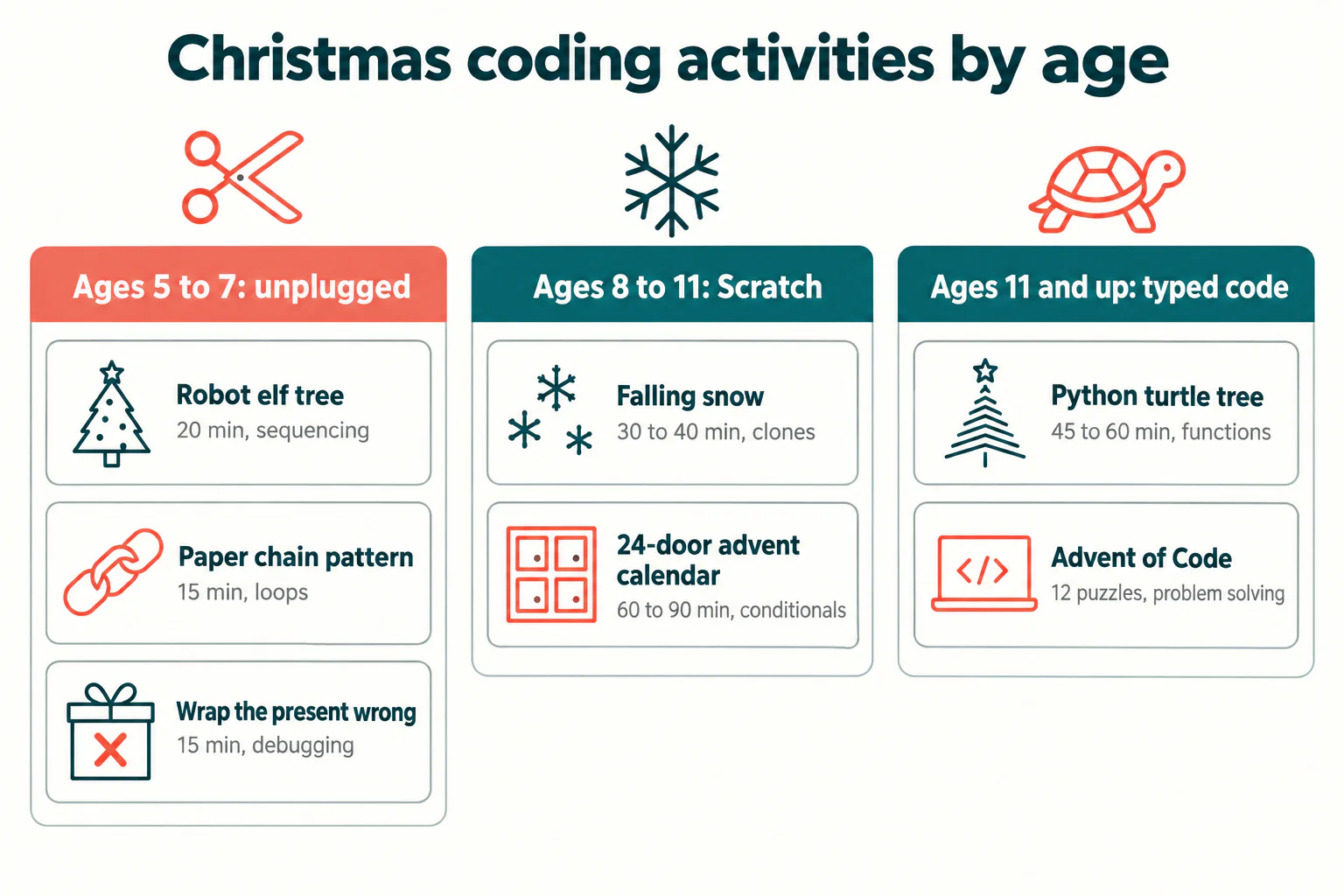
| Activity | Ages | Time | You need | Concept |
|---|---|---|---|---|
| Robot elf tree | 5 to 7 | 20 min | Squared paper, stickers, arrow cards | Sequencing |
| Paper chain pattern | 5 to 7 | 15 min | Coloured paper strips, glue | Loops |
| Wrap the present wrong | 6 to 7 | 15 min | A box, paper, tape | Debugging |
| Falling snow | 8 to 11 | 30 to 40 min | Scratch, free account optional | Clones, random numbers |
| Advent calendar | 9 to 11 | 60 to 90 min | Scratch | Conditionals, lists, dates |
| Python turtle tree | 11 and up | 45 to 60 min | Python from python.org | Functions, loops, coordinates |
| Advent of Code | 13 and up | 30 to 90 min a day | Any language, an account | Problem decomposition |
Unplugged Christmas coding games for ages 5 to 7
No screen is the right answer at this age, and not as a compromise. A child who has to find keys and read menus spends the session on the interface. Paper puts the whole hour on the idea.
1. The robot elf tree (sequencing, 20 minutes)
Draw a simple tree on squared paper, roughly six squares wide at the bottom, and put a small cross on four of the squares. Those are where the baubles go. You are the robot elf, holding one sticker on a start square. Your child lays out arrow cards (up, down, left, right, and a "stick" card) and you follow them exactly, even when they are obviously wrong.
That last part is the lesson. The first time the elf marches off the edge of the paper because the card said "right" five times instead of four, your child learns the single most important fact about computers: they do what the instructions say, not what you meant. Let them fix the cards and run it again. Four baubles is about right for a first go; six is the stretch.
2. The paper chain pattern (loops, 15 minutes)
Cut strips in three colours. Instead of telling your child to "make a chain", write the instruction as a loop: repeat 5 times: red, green, white. Ask how many links that makes before they start. Then change one number (repeat 8 times) and ask again. Five-year-olds usually count; seven-year-olds start to multiply, which is the moment the loop has done its job.
3. Wrap the present wrong (debugging, 15 minutes)
Write five instructions for wrapping a box, with one deliberate bug: put "fold the ends" before "wrap the paper round". Follow them literally while your child watches the parcel go wrong, then ask them to find the broken line. Children enjoy catching an adult's mistake, and finding the faulty step rather than starting again is exactly the habit that matters later in Scratch.
If your child prefers hands-on experiments to games, our winter science experiments for kids work on the same afternoons with the same kitchen-table materials.
Not sure whether your child is ready for Scratch or still better off unplugged? A free trial class with a Codeyoung teacher shows you exactly where they are and what they are ready for next, before you commit to anything.
Book a Free Trial →Scratch Christmas projects for ages 8 to 11
Scratch is free at scratch.mit.edu and runs in a browser; an account is only needed to save online and share. These two projects suit children who have already made a sprite move and used a forever loop. Our Scratch classes for kids cover that groundwork if they have not.
4. Falling snow with clones (30 to 40 minutes)
Paint a new sprite: a small white circle, about 10 pixels across, is enough. Change the backdrop to a dark blue so the snow shows. Then build two scripts on the snowflake.
Script 1, the snow factory:
when green flag clickedhideforever:create clone of (myself), thenwait (0.1) seconds
Script 2, each flake:
when I start as a clonego to x: (pick random -240 to 240) y: (175)set size to (pick random 50 to 100) %showrepeat until <(y position) < (-170)>:change y by (-3), thenchange x by (pick random -1 to 1)delete this clone
Click the green flag and it should snow steadily for as long as the project runs. The original sprite stays hidden because it is a factory, not a flake; every clone shows itself. Our full guide to clones in Scratch explains why that hide-then-show pattern matters.
Now the bug that most snow tutorials contain. The common version of this script says repeat until <(y position) < (-180)>, which looks right because the stage runs from y = 180 at the top to y = -180 at the bottom. It does not work reliably. Scratch's renderer has a rule, called fencing, that keeps every sprite partly on stage: in Scratch's own source code, getFencedPositionOfDrawable stops a sprite once only a strip of up to 15 pixels remains visible, and for a small flake that strip is the whole flake. So a small, roughly round snowflake's centre bottoms out at about y = -180 and sits there. The condition "less than -180" never comes true, the clone is never deleted, and it waits at the bottom forever.
Then a second rule finishes the job. Scratch allows 300 clones at once across the whole project, and when the cap is reached create clone of silently does nothing. At one new flake every 0.1 seconds, stuck flakes fill all 300 places in roughly 30 seconds, and the snow stops. Nothing turns red and no error appears, which is why children assume they broke something else. Checking for -170 gives a 10-pixel margin that a fenced flake always reaches, so every clone deletes itself and the count stays in the dozens.
Stretch goals, in order of difficulty: make bigger flakes fall faster (change y by a number linked to size), add a turn block for spin, then add a sprite your child steers to catch flakes for points.
5. A 24-door advent calendar (60 to 90 minutes)
This one teaches more than any other project here, because it needs a clone ID, a list and a real-world condition. It suits a confident nine to eleven-year-old.
- Costumes. Paint one door, a coral rectangle about 60 by 70 pixels. Use the Text tool to write "1" on it. Duplicate the costume 23 times and change the number on each, so costume 7 shows a 7. Add a 25th costume: the same door, opened.
- Treats list. Make a list called
Treatsand type 24 items into it: jokes, facts, small challenges ("do ten star jumps"). - Make the grid. Create a variable
doorwith "For this sprite only" selected, so each clone keeps its own number. Underwhen green flag clicked:hide,set door to 0, thenrepeat 24:change door by 1,go to x: (((door - 1) mod 6) * 70 - 175) y: (120 - ((floor of ((door - 1) / 6)) * 80)),switch costume to (door),create clone of (myself). - Show the clones.
when I start as a clone,show. - The rule.
when this sprite clicked:if <<(current month) = 12> and <(current date) > (door - 1)>>thenswitch costume to (25)andsay (item (door) of Treats) for 3 seconds, elsesay (Not yet) for 1 second.
The grid formula gives six columns at x = -175, -105, -35, 35, 105 and 175, and four rows at y = 120, 40, -40 and -120, which fits the 480 by 360 stage with a small margin. Scratch has no "greater than or equal" block, so date > door - 1 does the same job.
The date check is where the real conversation happens. The Scratch Wiki notes that the current block reads the device's own clock, so a child who changes the date on the computer can open door 24 on the first of December. Ask them how a real app would stop that. They have just discovered, unprompted, why websites check the time on a server rather than trusting yours.
The month check matters too. Without it, on 5 January the calendar would see date 5 and open five doors. Leave it out on purpose, ask your child what will happen in January, and let them find it.
A Python Christmas tree with turtle, for ages 11 and up
Turtle is Python's built-in drawing module, an implementation of the drawing tools introduced in Logo in 1967. It is the gentlest route into typed code because every line produces something visible. One setup note before you start: the Python documentation states that turtle graphics requires the tkinter module. The python.org installers for Windows and macOS include it, so a normal desktop install works. Some browser editors and some Linux setups do not, and the program fails on its first line with an error mentioning _tkinter.
We ran this program on Python 3.12 before publishing. It draws a trunk, three overlapping layers, twelve baubles and a star.
import turtle
import random

screen = turtle.Screen()
screen.bgcolor("midnightblue")
t = turtle.Turtle()
t.speed(0)
t.hideturtle()

# 1. The trunk: a filled rectangle
t.penup()
t.goto(-20, -200)
t.pendown()
t.color("saddlebrown")
t.begin_fill()
for side in [40, 50, 40, 50]:
    t.forward(side)
    t.left(90)
t.end_fill()

# 2. Three layers, each one narrower and higher
def layer(width, base_y):
    t.penup()
    t.goto(-width / 2, base_y)
    t.pendown()
    t.color("forestgreen")
    t.begin_fill()
    t.goto(width / 2, base_y)
    t.goto(0, base_y + width * 0.6)
    t.goto(-width / 2, base_y)
    t.end_fill()

for width, base_y in [(300, -150), (230, -60), (160, 20)]:
    layer(width, base_y)

# 3. Baubles in random places, random colours
for i in range(12):
    t.penup()
    t.goto(random.randint(-80, 80), random.randint(-130, 60))
    t.dot(14, random.choice(["red", "gold", "white"]))

# 4. A five-point star on top
t.goto(-18, 110)
t.setheading(0)
t.pendown()
t.color("gold")
t.begin_fill()
for i in range(5):
    t.forward(36)
    t.right(144)
t.end_fill()

turtle.done()
speed(0) is worth explaining. The documentation is specific that 0 means no animation at all, so the tree appears almost instantly; change it to 3 and your child can watch the turtle draw each layer, which is far better for understanding what the code does.
Run it a few times and two things go wrong, deliberately. Both are better lessons than the tree itself.
- A bauble floats in the sky.
randint(-80, 80)picks from a rectangle, and the tree is a triangle. The fix ties the width to the height: replace thegotoline withy = random.randint(-140, 60),half = (110 - y) / 2.5andt.goto(random.uniform(-half, half), y). We checked that formula against 200,000 random placements and none landed off the tree. Working out why it works is a proper piece of coordinate geometry for a twelve-year-old. - The star may have a hole in the middle. A five-point star drawn this way crosses its own lines, and the Python documentation warns that when a shape crosses itself, whether the overlapping parts are filled depends on the operating system. On our Windows test the centre stayed empty. Drawing the star as ten outside edges instead fixes it everywhere.
If your child enjoys this, our longer guide to Python turtle programming for kids takes the same tools further.
Free holiday coding events in December 2026
Three things are actually running this December. One commonly recommended option is not.
Advent of Code: 12 puzzles, not 25
Advent of Code is a free calendar of programming puzzles that any language can solve. Its about page says that "just a little programming knowledge and some problem solving skills will get you pretty far", and that every problem has a solution that completes in at most 15 seconds on ten-year-old hardware. For a teenager who has written a few Python programs, it is the best December challenge there is.
Here is what many guides still get wrong. From 2025 the event changed: the creator wrote that after ten years he "needed a change", the global leaderboard was removed, and puzzles now run "ending mid-December". The 2025 calendar had 12 puzzles; day 12 exists on the site and day 13 does not. For 2026, the site confirms the first puzzles appear on 1 December at midnight EST (UTC-5), which is 5am in the UK. Puzzles stay up after release, so nobody needs to stay up for them.
Two practical notes. Sign-in goes through GitHub, Google, Twitter or Reddit, with no separate Advent of Code password, so a parent should handle that for a younger teen. And the site asks players not to use AI to solve puzzles, since they are "designed to be interesting for humans to solve". Its own advice when stuck is to test your code against the worked examples in the puzzle first.
The Hour of AI, formerly the Hour of Code
Code.org is now CodeAI, and the Hour of Code is now the Hour of AI at hourofai.org. Its site lists Computer Science Education Week as 7 to 11 December; the Computer Science Teachers Association's csedweek.org lists the week as 7 to 13 December. The 2026 activities are already live, they are free, and the organisers state they work on "any devices, or none at all". Our guide to the Hour of AI for kids covers how to pick an activity by age and run one at home.
The Scratch holiday studio that no longer takes projects
Scratch's help pages still carry a nine-step Holiday Card Tutorial, a good one-hour project for a seven to nine-year-old. Its final step tells children to add their card to an Interactive Holiday Cards studio. That studio was created in November 2013 for the Hour of Code, was last modified in January 2015, and is not open for new projects to be added. We could not find an official Scratch Team holiday studio announced for December 2026 as of today. Build the card, share it as a normal project, and send the link to family instead. Some user-run studios exist, but they are not run by the Scratch Team.
For gifts that keep the coding going after the 25th, see our tech gifts for kids gift guide.
Making the Christmas coding stick past December
Holiday projects work because they have a deadline and an audience: the calendar has to work by the first, and Grandma is going to see the card. Those are the two things a regular week usually lacks. The useful question in January is which of these projects your child kept fiddling with after it was finished, because that tells you more about their next step than their age does.
A child who kept adding things to the snow wants more Scratch, probably games. A child who changed the computer's clock to beat the advent calendar is thinking about rules and systems, and is closer to typed code than you might expect. A teenager who finished all 12 Advent of Code puzzles has outgrown beginner material and needs harder problems, not another introduction.
Codeyoung runs 1:1 live online classes for children aged 6 to 17, with a teacher who adapts the pace to your child rather than a fixed syllabus. The first class is free, so you can see how they respond before deciding.
Book a Free TrialSources checked 28 November 2026: Advent of Code about pages for 2025 and 2026 and the 2025 puzzle calendar (adventofcode.com); hourofai.org and code.org (CodeAI) for the Hour of AI and CSEdWeek dates; csedweek.org (CSTA); the Scratch Wiki page for the Current () block (en.scratch-wiki.info); the Scratch Foundation's scratch-render source (getFencedPositionOfDrawable, FENCE_WIDTH = 15) and scratch-vm source (setXY, MAX_CLONES); Scratch's Holiday Card Tutorial help pages and the Scratch API record for studio 279432; and the Python documentation for the turtle module (docs.python.org). The turtle program was run on Python 3.12.