
A nine-year-old is stuck on 384 divided by 8 and the calculator is right there on the table. Most parents make this call by instinct, usually on how tired everyone is, and then quietly wonder whether they got it wrong. The honest answer about a calculator for maths homework is that "allowed" and "not allowed" are both the wrong frame. What matters is what that specific page of homework was set to build, and the same child can correctly need two different answers in the same week.
Here is how to tell which page you are looking at, what the curriculum actually says, and the one habit that matters more than the rule itself.
What the curriculum actually says
England's national curriculum is unusually direct about this, and the wording is worth reading closely because it is more nuanced than the summary people repeat.
The mathematics programmes of study state that calculators "should not be used as a substitute for good written and mental arithmetic" and "should therefore only be introduced near the end of key stage 2 to support pupils' conceptual understanding and exploration of more complex number problems, if written and mental arithmetic are secure."
Three things sit inside that sentence. The objection is to substitution, not to the device. The timing given is near the end of primary, around age 11. And the permission is conditional: only where arithmetic is already secure. It is a statement about sequence, not a prohibition. Calculators are also not permitted in the key stage 2 maths tests taken at age 11, which tells you what the primary years are assessing.
If your child is younger than about 10, that resolves most of the question. Below that age, the arithmetic is the subject.
The real question: what is this page for?
Above that age, the rule stops being about the child and starts being about the task. Most maths homework is doing one of two jobs, and a calculator is destructive on one and useful on the other.
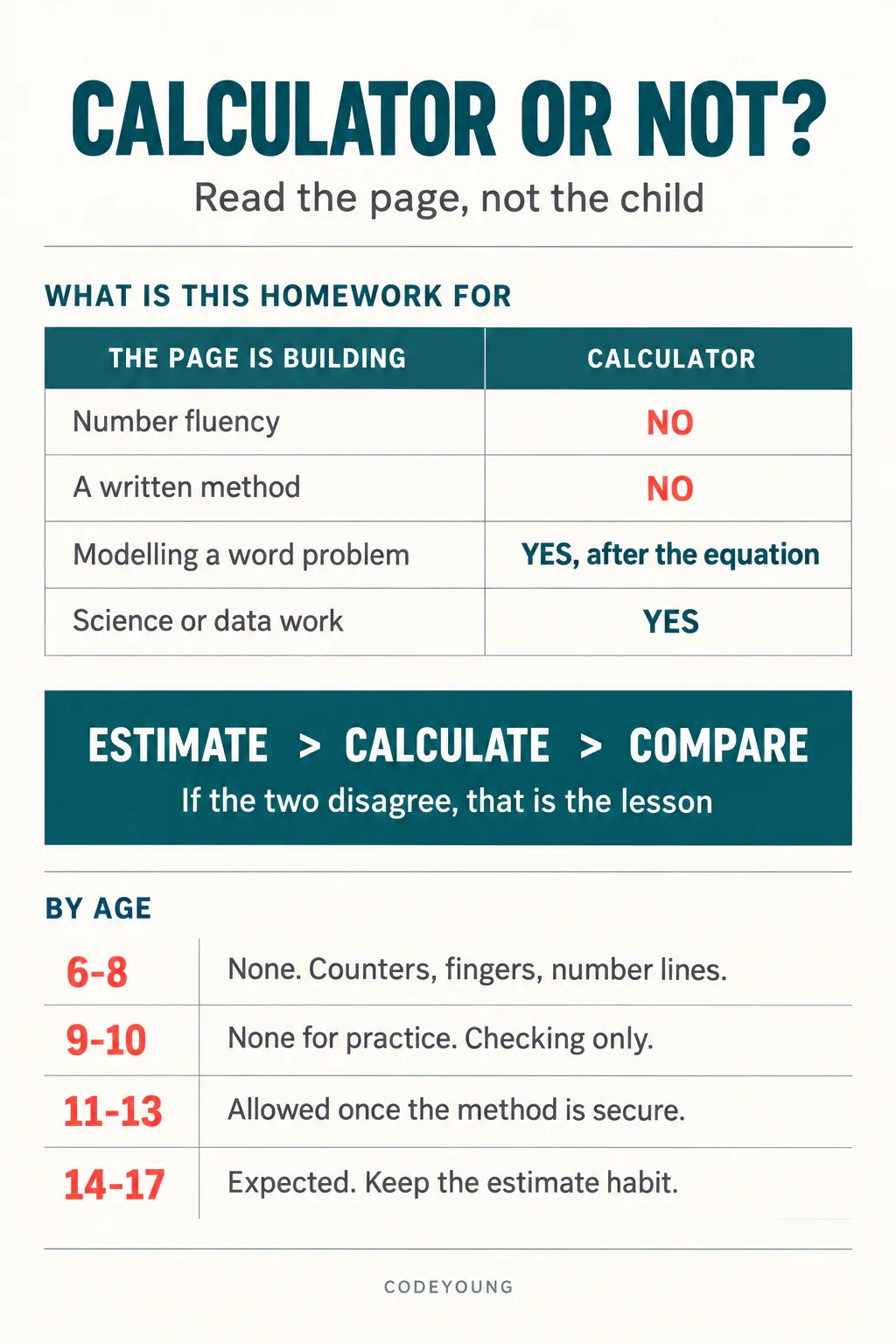
| What the homework is doing | Looks like | Calculator |
|---|---|---|
| Building number fluency | Rows of similar sums, times tables, column methods, fraction arithmetic | No. The computing is the point. |
| Building method | Long division, equivalent fractions, order of operations | No, until the method is secure. Then use it to check. |
| Building modelling | Word problems, real-life contexts, multi-step reasoning | Often yes, once the equation is written down. |
| Serving another subject | Science results, data handling, geography statistics | Yes. The arithmetic is not what is being taught here. |
That third row carries the most useful distinction of the lot. In a word problem, there are two separate skills: turning a sentence into a number sentence, and then computing the answer. A child who can do the first but stalls on the second is failing at arithmetic, not at problem solving, and letting them compute the second part with a calculator lets you see whether the modelling skill is actually there. Make them write the equation down first. Then the calculator is fine.
The reverse case is the one that does the damage: reaching for the calculator before the equation exists, which converts a reasoning task into a guessing task.
Not sure whether your child's arithmetic is secure enough to move on? A free trial class with a Codeyoung teacher shows you exactly where they are and what they are ready for next, before you commit to anything.
Book a Free Trial →The habit that matters more than the rule
Ask for an estimate before the buttons are pressed.
This is the single highest-value intervention available to a parent on this topic, and almost nobody does it. A child types 384 divided by 8, mistypes it as 3084, gets 385.5 and writes it down. Nothing in them objects, because they had no expectation to violate.
A child who has been asked "roughly, what do you think it will be?" says something like "well, 8 times 40 is 320 and 8 times 50 is 400, so somewhere around 45 or 50." When 385.5 appears, it is obviously wrong. They check. They find the typo.
That is the actual skill the calculator threatens, and it is not arithmetic. It is having a sense of the size of numbers, which is what lets an adult notice that a quoted price or a reported statistic cannot be right. Protect that and the calculator becomes close to harmless. Our guides on number sense and mental maths techniques go into how to build it deliberately.
The rule in one line: estimate, calculate, compare. If the two disagree, one of them is wrong and finding out which is the lesson.
A rough guide by age
| Age | What is being built | Position on the calculator |
|---|---|---|
| 6–8 | Number bonds, place value, early times tables | None. Use fingers, counters, a number line, anything physical. |
| 9–10 | Written methods, fractions, multi-step arithmetic | None for practice. Occasionally to check completed work. |
| 11–13 | Algebra, percentages, real contexts | Allowed once the method is secure, after an estimate. |
| 14–17 | Modelling, functions, statistics, exam technique | Expected, with the estimate habit intact. |
The column that changes is not really the calculator column. It is the middle one. As the subject shifts from computing accurately to reasoning about relationships, the arithmetic stops being the thing under assessment, and the tool stops being a threat to it.
The exam your child will sit at seventeen
Worth knowing, because it looks like a contradiction and is not.
The digital SAT, which a great many of these children will eventually take, allows a calculator on every question in the maths section. It goes further: its testing app has a Desmos graphing calculator built in, which students can switch between scientific and graphing modes at any point, and they may also bring their own approved handheld. You can read College Board's calculator policy in full.
So at 11 the calculator is forbidden and at 17 it is handed over with a graphing engine attached. That is not the system contradicting itself. It is the system changing what it is measuring. The primary test wants to know whether a child can compute. The senior test assumes they can, and wants to know whether they can decide what to compute.
Which gives parents a clean way to think about it: every year your child's arithmetic stays weak is a year of borrowed time, because the tools get more generous precisely as the reasoning demands get harder. A fifteen-year-old with shaky times tables does not struggle with times tables. They struggle with algebra, because factorising requires seeing that 56 is 7 times 8 without stopping to work it out. Closing that gap is most of what our online maths classes for kids spend their time on.
Where a calculator is doing real work
Four cases where handing it over is the right call and worth saying out loud, so the household rule does not read as blanket suspicion.
- Checking finished work. Marking their own answers builds the estimate habit rather than replacing it.
- Exploring patterns. What happens to a fraction as the denominator grows? That is twenty calculations a child should not do by hand, and the pattern is the lesson.
- Ugly numbers in a real context. A recipe scaled for seven people, a currency conversion, a science result. The messiness is what makes it real.
- A child who has hit a wall. Forty minutes of failed long division teaches nothing but that maths is miserable. Sometimes the right move is to finish the page, then come back to the method another day. Our post on helping with maths homework when you hated maths yourself covers how to call that moment.
That last one deserves emphasis, because the alternative to a calculator is not always practice. Sometimes it is a child deciding they are bad at maths, which is far more expensive than one skipped division. If that phrase has already been said in your house, our guide on what to do when a child says they are bad at maths is the more useful place to start.
What this comes down to
A calculator for maths homework is neither a crutch nor a right. It is a tool with one specific failure mode: it substitutes for arithmetic that has not been built yet, and it hides the mistakes it causes. Look at what the page is asking your child to practise. If the computing is the point, the calculator removes the lesson. If the reasoning is the point, it removes a distraction.
And whatever you decide, make the estimate first. A child who knows roughly what the answer should be is safe with any tool you give them.
Codeyoung runs 1:1 live online classes for children aged 6 to 17, with a teacher who adapts the pace to your child rather than a fixed syllabus. The first class is free, so you can see how they respond before deciding.
Book a Free Trial