
Twelve is a good age for robotics and an awkward one to shop for. Most of the best robotics kits for 12 year olds are built either for younger children, where the assembly is the whole activity, or for sixth-formers, where the electronics assume knowledge your child does not have yet. The gap in the middle is where families overspend.
There is also a change this year that most buying guides have not caught up with, and it affects the single most recommended kit on the market. Worth knowing before you order anything.
Check the support lifespan before the spec sheet
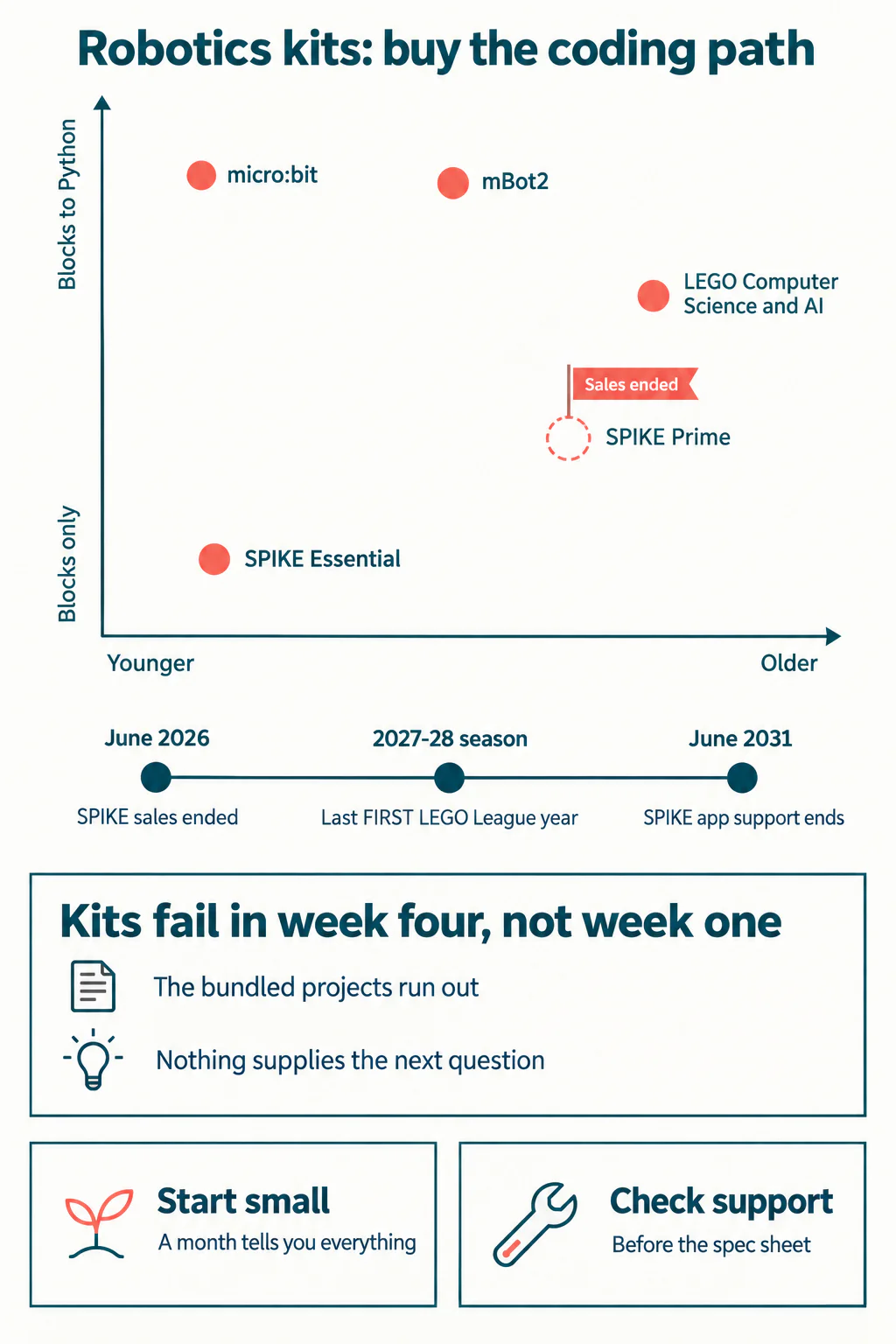
LEGO Education ended sales of the SPIKE portfolio on 30 June 2026. That includes SPIKE Prime, the set that appears near the top of almost every robotics list written in the last five years.
This does not make a SPIKE Prime set worthless, and I want to be fair about it. LEGO has committed to supporting the SPIKE App with bug fixes and operating-system updates until 30 June 2031, and Consumer Service holds hardware spare parts for two years after the last sale. A set bought second-hand today will work for years.
But it changes the calculation in two concrete ways. New features stopped in June 2026, so the software will not gain anything further. And for competition families it matters more: SPIKE sets can be used in FIRST LEGO League through the 2027-2028 season, after which legacy LEGO Education solutions are no longer eligible. LEGO's own replacement, the Computer Science and AI line, became eligible from the 2026-2027 season.
So the honest summary: buy SPIKE Prime if you find one cheaply and your child wants to build now. Do not buy it as the platform they will grow into over the next four years.
Five kits worth considering
| Kit | Ages | Coding path | Notes |
|---|---|---|---|
| BBC micro:bit | 8 and up | MakeCode blocks from 8, Python from 11. Also works with Scratch | Senses light, temperature, sound, movement and magnetism. The cheapest honest entry point and the one with the longest runway |
| Makeblock mBot2 | Around 8 to 14 | mBlock blocks, then Python in the same platform | CyberPi controller with internet connectivity. Can be trained for image, pose and video recognition through machine learning |
| LEGO Education Computer Science and AI | Grades K-2, 3-5 and 6-8 | LEGO's current teaching platform | The successor to SPIKE. Eligible for FIRST LEGO League from the 2026-2027 season |
| LEGO Education SPIKE Essential | Grades 1-5 | Block coding | Aimed below twelve. Only worth it if a younger sibling will share it |
| LEGO Education SPIKE Prime | Grades 6-8 | Blocks and Python | Sales ended June 2026. App supported to 2031. Excellent hardware, finite future |
Prices move constantly and vary by country, so check the manufacturer's own page rather than trusting a figure in any article, including this one. What does not move is the coding path, which is the thing actually worth comparing.
Not sure which level your child should start at? A free trial class with a Codeyoung teacher shows you exactly where they are and what they are ready for next, before you commit to anything.
Book a Free Trial →What actually decides whether a kit gets used?
After enough of these arrive in enough houses, a pattern is hard to miss. Kits do not fail in week one. They fail in week four.
Week one is the unboxing and the first build, and the instructions carry the child completely. Week two and three are the remaining bundled projects. Then the instructions run out, and the child is holding a box of parts with no idea what to make. That is the moment the kit either becomes a hobby or goes under the bed.
Two things predict which way it goes, and neither is on the packaging.
- Does the kit connect to something the child already cares about? A data logger is dull in the abstract and interesting if it is measuring whether their bedroom is colder than their sister's. The project has to answer a question they already had.
- Is there a next thing after the manual? An online community, a competition, a course, or a person who says "now try this". Kits sold as self-contained almost always are, in the wrong sense.
If your child finishes instructions happily but never starts anything unprompted, that is not a lack of interest. It is a lack of a next question, and it is the gap a teacher fills. Our post on what students build in a first robotics course shows what that scaffolding looks like in practice.
Blocks or text? Match the kit to the child
Twelve sits exactly on the hinge between block coding and typed code, which is why this age is hard to buy for. Getting the timing right matters more than getting the brand right.
A child who is still building confidence with logic should stay in blocks a while longer. Dragging a loop into place and seeing a robot turn is the same computational idea as typing one, without spelling and punctuation competing for attention at the same time. Pushing a child into Python before the logic is comfortable is the most reliable way to make them decide they are bad at coding.
A child who is already impatient with blocks, who says the palette is slow or wants to do something the blocks cannot express, is ready. For them the deciding feature is whether the kit offers a text language at all. The micro:bit and the mBot2 both do, in the same environment the child already knows, which makes the transition a change of view rather than a change of platform.
Our complete guide to robotics for kids covers that progression in more detail, and AI and robotics for beginners covers what the machine-learning features on kits like the mBot2 are genuinely capable of.
What about competitions?
Competitions solve the week-four problem better than anything else, because a deadline and a challenge supply the next question automatically.
If FIRST LEGO League is the goal, the eligibility timeline is the thing to plan around rather than the kit specification. SPIKE remains usable through the 2027-2028 season, and LEGO Education Computer Science and AI is eligible from the 2026-2027 season. A twelve year old starting now will still be competing when the older sets drop out, which points fairly clearly at the newer line.
For families not aiming at a formal competition, a self-imposed one works surprisingly well: a build to show grandparents at Christmas, or a challenge set against a sibling. The mechanism that matters is the deadline and the audience, not the trophy.
A sensible way to decide
- Start with the coding path, not the part count. Ask whether the kit runs from blocks into a text language. If it stops at blocks, budget for it lasting about a year.
- Check what happens after the bundled projects. Community, courses, competitions. If there is nothing, plan to be that something yourself.
- Check the support lifespan, which this year is not a theoretical concern.
- Buy smaller than you think. A micro:bit and a few components will tell you within a month whether your child wants this, at a fraction of the cost of finding out with a large set.
That last point is the one I would press hardest. The most common expensive mistake is buying the comprehensive kit first, on the theory that it will last longer. It lasts longer only if the interest survives, and the cheapest way to find that out is a small kit and four weeks.
Wrapping up
The best robotics kits for 12 year olds are the ones with somewhere to go: a coding path that runs past blocks, a supported platform, and a supply of next questions once the manual is finished. Check the support timeline before you buy this year, because the most recommended set on the market stopped being sold in June 2026 and most lists still have it at number one. Start small, expect week four to be the test, and treat the parts as the cheap half of the purchase.
If you would rather not guess, a 1:1 coding class will tell you within one session whether your child is ready for text-based code, which is the question that decides the kit.
Codeyoung runs 1:1 live online classes for children aged 6 to 17, with a teacher who adapts the pace to your child rather than a fixed syllabus. The first class is free, so you can see how they respond before deciding.
Book a Free TrialSources: LEGO Education's SPIKE portfolio retirement notice and the micro:bit Educational Foundation.