
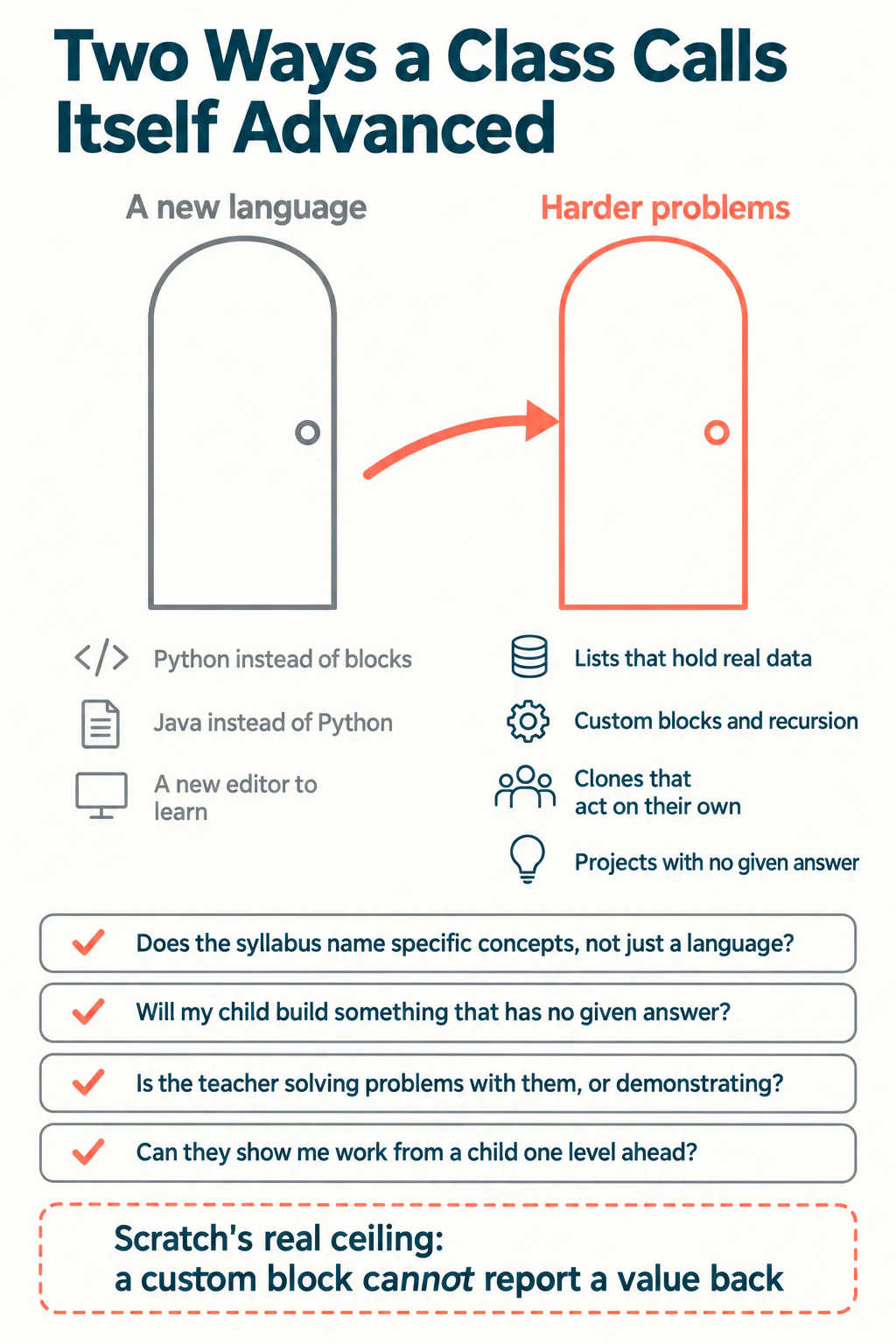
There are two ways a coding class can call itself advanced. It can give your child harder problems, or it can give them a new language. The second is far easier to sell and far easier to teach, and it is what most courses mean.
That matters because the children who need coding classes for advanced learners are the ones most likely to be mis-sold. A child who has finished a beginner course and is asking for more is an obvious candidate for "now we do Python", and a term later they are rebuilding the same projects they already built, in text instead of blocks, learning typing rather than computer science.
This guide is about the buying decision: how to read a syllabus, what a genuinely advanced curriculum contains, and the four questions worth asking any provider before you pay. Whether your child is ready to leave block coding at all is a separate question, and we cover it in is your child ready to leave Scratch.
What does advanced actually mean in a coding class?
Advanced means the problems get harder and the support gets thinner. It does not mean the keywords get newer.
A child who writes a working game in Scratch and a child who writes the same game in Python have demonstrated almost the same thing. What separates a beginner from an advanced young programmer is not which tool they hold, it is whether they can hold a problem in their head that does not fit on one screen, decide how to break it up, and keep going when the first attempt fails.
So when you read a course outline, sort every line into one of two piles. One pile is tools: Python, Java, a new editor, a new platform. The other pile is ideas: data structures, functions, recursion, state, debugging strategy, designing something nobody has specified for you. A syllabus that is all tools and no ideas is a beginner course with a different label.
The four things a genuinely advanced syllabus names
These are the markers worth looking for, and they are deliberately specific enough to check. Take Scratch as the example, because it is where most children are when this question comes up and because parents can verify every one of these themselves.
- Lists that hold real data. A beginner project uses a handful of variables. An advanced one keeps a list of scores, a list of enemies, a queue of questions, and has to decide how to get things in and out of it in the right order.
- Custom blocks and recursion. In Scratch these live under My Blocks. The Scratch Wiki notes that a custom block can be run from inside its own definition, which is recursion, and that disabling screen refresh lets a block finish its work without the child watching every intermediate step. Both are real computer science concepts.
- Clones that behave independently. Scratch allows up to 300 clones at once. When a clone is created, the values of its local variables are copied from its parent, so a child meets the difference between something every clone shares and something each clone owns. That idea is the foundation of objects, met years early and without syntax.
- Projects with no given answer. The hardest and most diagnostic marker. If every task in the syllabus has a target screenshot, nobody is being stretched, because the thinking has already been done by whoever wrote the worksheet.
If a class describes itself as advanced and its outline mentions none of these, it is a safe assumption that the advance is in the branding. Our Scratch curriculum progression guide sets out what the levels look like in sequence.
Why depth usually beats acceleration
The instinct when a child is ahead is to move them up. Teaching experience points the other way more often than parents expect, and the reason is specific rather than sentimental.
A child who races into a text language before they can decompose a problem spends their whole cognitive budget on syntax. They are not thinking about the structure of the program, they are thinking about where the colon goes. The concepts they were ready to meet get pushed back a year, and the subject gets harder and less interesting at exactly the moment it should be getting more interesting.
The same child kept in blocks for another two terms, but given genuinely harder problems, meets lists, functions, recursion and independent actors while the mechanics stay free. Then the move to text is a notation change rather than a new subject, and it takes weeks instead of terms.
There is a real limit, and it is worth knowing so that staying put does not become dogma. Scratch's custom blocks cannot report a value back the way a function in Python returns one. The usual approach is to store the result in a variable and read it afterwards, which works but is clumsy once a child is building anything with several layers. When a child starts being annoyed by that specific limitation, they have genuinely outgrown the tool, and that is a much better signal than finishing a course.
Not sure which level your child should start at? A free trial class with a Codeyoung teacher shows you exactly where they are and what they are ready for next, before you commit to anything.
Book a Free Trial →How to tell if your child is actually ahead
Being quick is not the same as being advanced, and the difference changes what you should buy. Four signals are worth more than speed.
| Signal | What it looks like | What it suggests |
|---|---|---|
| Finishes early, then extends | Adds a level, a score, a second enemy without being asked | Genuinely ahead and under-stretched |
| Finishes early, then stops | Waits, chats, asks what is next | Fast, not necessarily advanced |
| Explains why, not just what | Can say why the loop repeats, not only that it does | Ready for harder concepts |
| Builds more at home than in class | Projects nobody set, often half finished | The class is the bottleneck |
The second row is the one that catches families out. A child who finishes fast and then waits is often bored rather than advanced, and moving them up a level makes the gap worse rather than better. We separate those two cases in detail in is your child bored or struggling.
Four questions to ask any provider
These work on any school, platform or tutor, including us. The answers are more revealing than the brochure.
- Does the syllabus name specific concepts, not just a language? Ask for the outline in writing. "Term two: Python" is not an answer. "Term two: lists, dictionaries, functions with return values, file handling" is.
- What will my child build that has no given answer? If the honest answer is nothing, the course is a guided tour.
- Is the teacher solving problems with them, or demonstrating? Advanced learners need somebody who will get stuck alongside them and show how an experienced person recovers. Demonstration teaches the answer and hides the method.
- Can I see work from a child one level ahead? A provider with a real progression can show you this in a minute. A provider without one will describe it instead.
Which format suits an advanced child?
Group size matters less than who sets the problem. An advanced child in a group of five still receives the group's problem, which is pitched at the middle of the group by necessity. The constraint is not attention, it is the level of the work.
| Format | Suits an advanced child when | Falls short when |
|---|---|---|
| Self-paced platform | They are highly self-directed and already finish things | They need somebody to raise the bar, which software rarely does |
| Group class | The curriculum is genuinely tiered, not one track | Everyone receives the same worksheet |
| 1:1 teaching | The problem can be rebuilt around them each week | The tutor follows a fixed syllabus anyway |
| Competitions and clubs | They want peers at their own level | Used as the only provision, with no teaching behind it |
Competitions deserve a mention of their own here, because for a genuinely advanced child they supply the one thing a class cannot: other children working at the same level. Our guide on how to enter maths competitions covers the equivalent route on the maths side, and the reasoning transfers. Pair a competition with teaching rather than using it instead of teaching.
If you want to see what the next level looks like before committing to it, Codeyoung's online coding classes run 1:1, so the problem can be set at the child rather than at the room.
What to do this term
An advanced learner needs harder problems, a teacher who will work alongside them rather than demonstrate at them, and permission to stay in a tool long enough to reach its real limits. A new language is sometimes the right answer, but it is almost never the first answer, and a syllabus that offers nothing else is offering a change of scenery.
Ask for the outline. Look for lists, custom blocks, clones and open-ended projects. Ask what your child will build that nobody has specified. If the provider can show you a child one level up and what they made, you are probably in the right place.
Codeyoung runs 1:1 live online classes for children aged 6 to 17, with a teacher who adapts the pace to your child rather than a fixed syllabus. The first class is free, so you can see how they respond before deciding.
Book a Free Trial